


 視頻轉換大師
 屏幕錄影大師
 影片修復
影片修復
 安全下載
安全下載3 種免費轉換 FLV 以便在 Xbox 上播放的方法
FLV 被廣泛用於新聞與影片分享網站。當你從 YouTube、Hulu 或 Facebook 下載線上影片時,很有可能會取得 FLV 檔案。FLV 格式可被許多播放器、裝置、平台與瀏覽器支援,但它無法在 Xbox 上播放。
Xbox 不只是遊戲主機,它也允許你透過 USB 隨身碟或外接硬碟來播放影片與音樂。Xbox 相容許多常見的多媒體檔案格式,但如上所述,你無法直接在 Xbox 上播放 FLV。當你想在 Xbox 上觀看 FLV 檔案時,就必須先將 FLV 轉換為 Xbox 支援的格式。

本文分享 3 種免費方法,教你如何將 FLV 轉換為 Xbox。當你想在 Xbox One、Xbox 360、全新的 Xbox Series X 或 Xbox Series S 主機上觀看 FLV 檔案時,都可以利用這些方法將 FLV 轉成 Xbox 支援的檔案格式。
第 1 部分。如何免費將 FLV 轉換為 Xbox 在線
許多視頻轉換器可以幫助您將 FLV 轉換為 Xbox 支持的格式,如 AVI 或 MP4。如果您正在處理一些小的 FLV 視頻剪輯,您應該首先嘗試使用免費的在線 FLV 到 Xbox 轉換器。
Free Online Video Converter 是一款易於使用的線上影片轉檔工具,可將 FLV 轉成 MP4、AVI、WMV、MOV 或其他 Xbox 主機支援的格式。與其他線上轉檔工具相比,它不需要註冊或登入帳號,而且對 FLV 檔案的轉檔大小沒有任何限制。以下指南會示範如何使用它。
步驟 1. 這款線上 FLV 轉 Xbox 轉檔器相容任何網頁瀏覽器,如 Chrome、Safari、IE 與 Firefox。你可以開啟瀏覽器並前往 線上 FLV 轉 Xbox 轉檔器 網站。
步驟 2. 進入網站後,點擊 Add Files to Convert(新增檔案以轉換),再點擊 Download(下載)按鈕,以安裝用於 FLV 轉檔的啟動器。啟動器準備完成後,會跳出視窗讓你新增 FLV 檔案。

步驟 3. 在載入 FLV 檔案後,你會看到多種常見的影片格式列在下方,包括 MP4、AVI、MOV、FLV、WMV、MKV 等。你可以選擇一種 Xbox 支援的格式,例如 MP4 或 AVI。
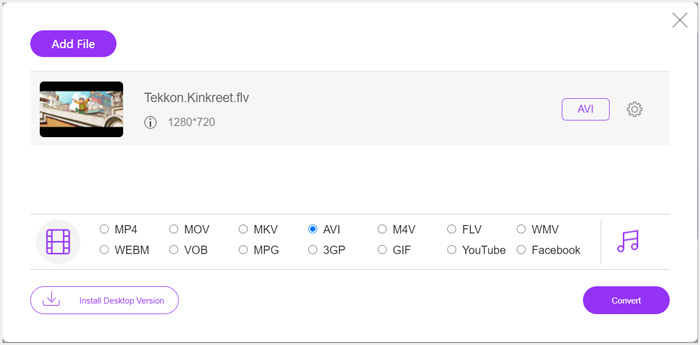
步驟 4. 若要自訂更多輸出影片與音訊設定,可以點擊輸出格式旁的 Settings(設定)圖示。之後點選 Convert(轉換)按鈕,開始將 FLV 轉換為 Xbox 支援格式。轉檔完成後,輸出影片會自動儲存到你的電腦中。
第 2 部分。 如何使用 FreeConvert 將 FLV 轉換為 Xbox Online
FreeConvert 是另一款頗受歡迎的影音轉檔工具,可幫助你將 FLV 轉成 Xbox 支援的 MP4、AVI 或 WMV。它提供專門的 FLV to Xbox Video Converter,讓你可以直接把 FLV 檔案轉換為 Xbox 格式。
步驟 1. 打開瀏覽器,前往此 FLV to Xbox Video Converter 頁面。
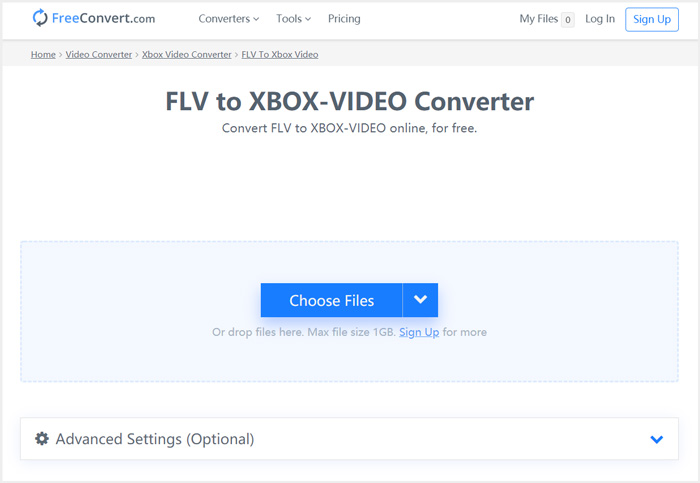
步驟 2. 點擊 Choose Files(選擇檔案)按鈕,瀏覽並上傳你的 FLV 檔案。你也可以透過網址(URL)、Google Drive 或 Dropbox 新增檔案。
步驟 3. 你可以點擊 Add More Files(新增更多檔案)以上傳其他想轉檔的 FLV 檔案。目標格式會預設為 XBOX。只要點擊 Convert to Xbox Video(轉換為 Xbox 影片)按鈕,即可開始進行 FLV 到 Xbox 的轉檔。
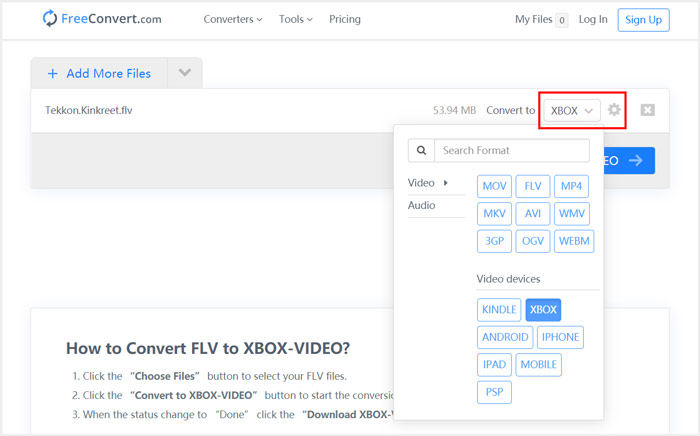
依照類似的步驟操作,將音樂轉成 Xbox 相容格式之後,你也可以在 Xbox 上播放任何音樂。
這個 FLV to Xbox Video Converter 會開始上傳並轉換你的影片。轉檔完成後,你可以點擊 Download(下載)按鈕,將檔案儲存到 Mac 或 Windows 電腦上,或選擇存到 Google Drive 與 Dropbox。在使用這款免費 FLV 轉 Xbox 轉檔工具時,你會看到一些廣告。
第 3 部分。 在 Mac 和 Windows PC 上將 FLV 自由轉換為 Xbox 的更好方法
除了線上 FLV 轉檔工具之外,你也可以依靠其他免費影片轉檔軟體,將 FLV 檔案轉換後在 Xbox 遊戲主機上播放。這裡為你介紹功能強大的 Free FLV Converter,它是專門用來進行各種 FLV 轉檔的工具。

- 將任何 FLV 轉換為 Xbox 支持的格式,如 MP4、AVI、WMV、MOV 等。
- 提供一系列主題來編輯和自定義 FLV 文件。
- 先進的多核 CPU 和 GPU 加速可快速將 FLV 轉換為 Xbox。
- 將一個或多個 FLV 文件轉換為 Xbox,不會有任何圖像或聲音質量損失。
步驟 1. 首先,你可以連按兩下下載按鈕,將它免費安裝到電腦上。開啟程式後,點擊 Add Files(新增檔案)匯入你的 FLV 檔案。

步驟 2. 在 Output format(輸出格式)下拉清單中選擇 MP4 或 AVI 作為目標格式。若要進一步設定,可以點擊輸出格式旁的 Settings(設定)圖示,進入 Profile Settings(設定檔設定)視窗。
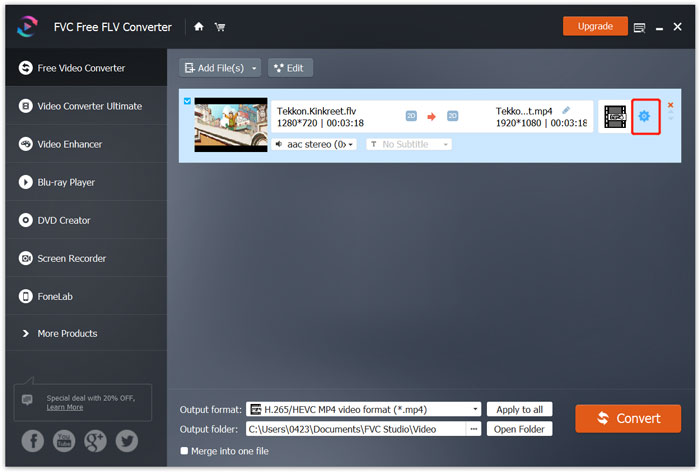
在輸出格式中,它也列出專門的 Xbox 分類,讓你可以直接將 FLV 轉換為 Xbox One 或 Xbox 360 支援的檔案。但此功能需要升級為付費版本才能使用。
步驟 3. 點擊 Convert(轉換)按鈕,開始將影片從 FLV 轉成 MP4,或轉換為其他 Xbox 支援的影片格式。
第 4 部分。 在 Xbox 上播放 FLV 的常見問題
問題 1. Xbox One 可以支持哪些格式?
作為最受歡迎的遊戲機之一,XBox 兼容多種常用的視頻和音頻格式,包括 MP4、AVI、M4V、MOV、WMV、MKV、H.264 AVCHD、WAV、WMA、3GP 視頻、3GP 音頻、AAC 、MP3 等。
問題 2. 如何在 Xbox 上播放視頻?
如果您的 Xbox One 或 Xbox 360 上有電影和電視應用程序,當您將視頻投射到 Xbox 或將外部驅動器連接到 Xbox 時,您可以使用它輕鬆觀看視頻。
問題 3. 什麼播放器可以播放 FLV 文件?
當您想在 Mac、Windows PC 或便攜式 iOS/Android 設備上播放 FLV 文件時,VLC 媒體播放器始終是一個不錯的選擇。它提供桌面和移動應用程序供您在計算機或手機上播放 FLV 文件。
結論
無法在您的 Xbox 遊戲機上播放 FLV 文件?為此,您應該首先將 FLV 轉換為 Xbox 支持的文件。您可以從這篇文章中找到 3 種在 Xbox 上轉換和播放 FLV 的免費方法。
-
 2021年適用於Windows,Mac,iOS和Android的十大FLV播放器
 FLV播放器可幫助您輕鬆地在Windows,Mac,Android,iOS設備上訪問FLV文件。查看可以立即下載的最佳FLV文件播放器。
-
 高質量壓縮GIF和減小文件大小的教程
 這裡有 2 種簡單的方法可以在您的計算機或手機上壓縮 GIF。您可以使用 FVC 免費在線視頻壓縮器和 Photoshop 在不同方面減小 GIF 文件大小。
-
 在桌面和在線上將FLV視頻轉換為MP4的4種免費方法
 本指南共有四種免費方法,可將您的FLV視頻文件在Windows 10/8/7 / XP和Mac OS X上轉換為MP4格式,因此您可以在任何設備上欣賞視頻。
