


 視頻轉換大師
 屏幕錄影大師
 影片修復
影片修復
 安全下載
安全下載如何將任何 FLV 視頻文件轉換和上傳到 YouTube
“「我剛上傳了一個副檔名為 .flv 的影片檔,但收到格式無效的警告訊息,請問要怎麼把 FLV 上傳到 YouTube?」FLV 不只是檔案副檔名,還是一種影片容器格式。這代表一個 FLV 影片檔裡可以封裝各種不同的視訊與音訊編碼,而其中有些編碼 YouTube 並不支援。本文將告訴你,關於如何順利將 FLV 上傳到 YouTube,你需要知道的一切。

第 1 部分:YouTube 支持哪些視頻和音頻編解碼器
據谷歌稱,YouTube 更喜歡廣播格式以及帶有 .mpg 擴展名的 DVD 兼容 MPEG-2 流。 YouTube 支持的編解碼器包括:
- MPEG-2
- 音頻編解碼器: MPEG Layer II 或杜比 AC-3
- 音頻比特率: 128 kbps 或更高
- MPEG-4
- 視頻編解碼器: H.264
- 音頻編解碼器: AAC
- 音頻比特率: 128 kbps 或更高
此外,YouTube 僅支持帶有 MP3 或 PCM 音頻的 WAV 容器、帶有 AAC 音頻和 FLAC 音頻的 MOV。 YouTube 通過正確的編解碼器支持 WMV、AVI、MOV、MP4 和 FLV。
談到 FLV,YouTube 可以訪問使用 Adobe-FLV1 視頻編解碼器以及 MP3 和 AAC 音頻編碼的視頻。如果您的 FLV 視頻包含未壓縮的音頻或 ADPCM 音頻,YouTube 將不接受。
此外,上傳FLV到YouTube還有更多規則:
- 推薦幀率: 24 至 60
- 推薦分辨率: 1080p
- 最短持續時間: 33 秒
第 2 部分:將 FLV 轉換為 YouTube 的最簡單方法
方式 1:在桌面上將 FLV 轉換為 YouTube
如果你在把 FLV 上傳到 YouTube 時遇到錯誤,第一件事就是尋找一個 FLV 轉檔工具,例如 FVC Free FLV Converter。它能讓你調整視訊與音訊編碼器以及其他參數,讓 FLV 檔案符合 YouTube 的規範。此外,它還利用硬體加速與多執行緒來提升轉檔效能。
YouTube 最佳 FLV 轉換器的主要功能
- 1.輕鬆調整FLV的視頻和音頻編解碼器。
- 2.一次批量處理無限的FLV視頻。
- 3.轉換時自動保護視頻質量。
如何在桌面上為 YouTube 轉換 FLV
步驟 1:加入 FLV 檔案
將最好的 FLV 轉換器安裝到計算機上後,啟動它。單擊左上角的添加文件菜單,然後添加要上傳到 YouTube 的 FLV 文件。

步驟 2:變更編碼器
點擊底部 輸出格式(Output format) 旁邊的下拉選單,開啟格式設定視窗。在 搜尋格式(Search Profile) 欄輸入 FLV,然後按下鍵盤上的 Enter 鍵。接著選擇一個採用適當視訊與音訊編碼器的 FLV 格式。
如果你的 FLV 影片太長,建議先將它分割成多個片段,再上傳到 YouTube。你可以點擊 編輯(Edit) 選單開啟影片編輯視窗。

步驟 3:將 FLV 轉檔為適合 YouTube 的格式
接下來移到畫面底部,點擊 開啟資料夾(Open Folder) 按鈕,選擇一個資料夾儲存輸出影片。最後按一下 轉檔(Convert) 按鈕,立刻開始將 FLV 轉檔為適合 YouTube 的格式。

方式 2:將 FLV 轉換為在線 YouTube
如果你不想在硬碟安裝任何影片轉檔軟體,FVC Free Online Video Converter 是一個很好的替代方案。它完全免費,沒有浮水印等限制,而且對檔案大小也沒有約束。以下是具體步驟:
步驟 1: 在瀏覽器中前往 https://www.free-videoconverter.net/free-online-video-converter/,並點擊「Add Files to Convert」按鈕下載啟動器。

步驟 2: 點擊 Add File 按鈕上傳多個 FLV 檔案。接著按下 齒輪(Gear) 圖示開啟格式設定視窗,在這裡你可以調整 視訊編碼器(Video Encoder) 和 音訊編碼器(Audio Encoder)。點擊 OK 確認設定。

步驟 3:在底部選擇一種 YouTube 支援的格式,然後按下 Convert 按鈕開始將 FLV 轉成適用 YouTube 的影片。完成後下載轉檔好的檔案。
別錯過:
第 3 部分:如何將 FLV 上傳到 YouTube
轉換後,您現在可以將您的 FLV 文件上傳到您計算機上的 YouTube。我們在這里分享步驟,以免您迷路。
步驟 1:前往 YouTube 首頁並登入你的帳戶。
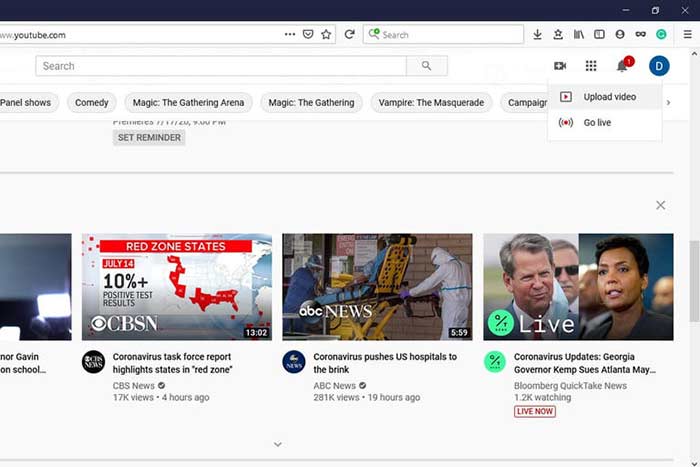
步驟 2:點擊 攝影機(Camcorder) 圖示並選擇「Upload video」進入上傳頁面。
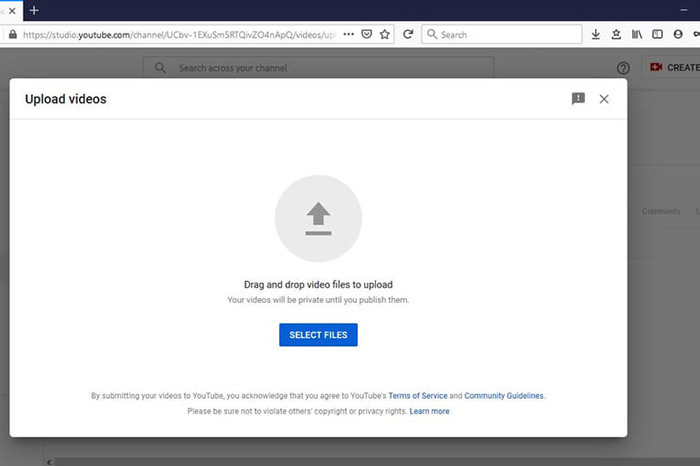
步驟 3: 在頁面上點擊大型的 Select Files 按鈕,然後選取已轉檔、可供 YouTube 使用的 FLV 檔案。或是直接將 FLV 檔案拖放到頁面中進行上傳。
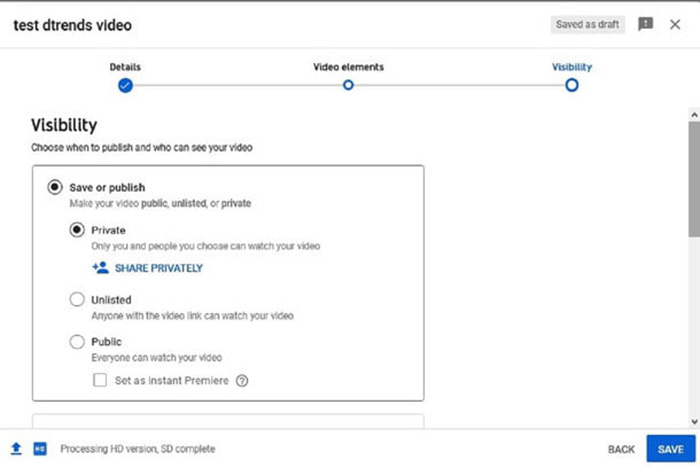
步驟 4:接著設定隱私權等級。預設為公開(Public),但你也可以改成私人(Private)、排程發布(Schedule)或不公開(Unlisted)。
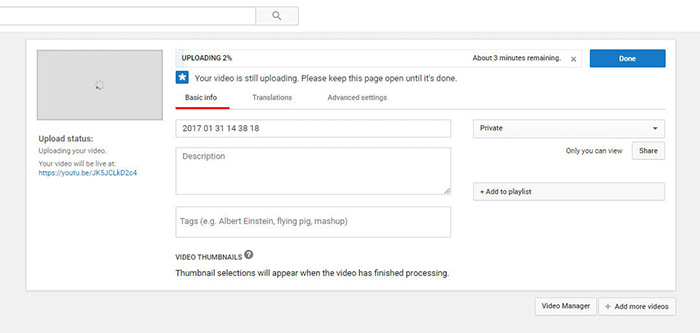
步驟 5:完成設定後,點擊 Save 或 Publish 按鈕。之後你會被導向 控制台(Dashboard) 頁面,在這裡可以看到已經上傳到你 YouTube 帳戶的 FLV 影片。
第 4 部分:關於 FLV 到 YouTube 的常見問題解答
您可以將 FLV 上傳到 YouTube 嗎?
是和否。 YouTube 支持 FLV 視頻格式,但作為視頻容器,您只能上傳支持視頻和音頻編解碼器的 FLV 文件;否則,將失敗。
我可以下載 FLV 格式的 YouTube 視頻嗎?
如果 YouTube 視頻提供下載按鈕,您可以單擊它並選擇 FLV 作為輸出格式。
哪種視頻格式最適合 YouTube?
MP4 是 YouTube 的最佳視頻格式。 Google 確實建議使用帶有 H.256 視頻編解碼器和 AAC 音頻編解碼器的 MP4。那是因為它以較小的文件大小產生高質量。此外,YouTube 還支持 MOV、WMV、AVI、FLV 和 3GPP。
結論
本指南告訴您 YouTube 接受哪些視頻格式以及如何將 FLV 上傳到 YouTube 而不失敗。 FVC Free FLV Converter 可以幫助您為 YouTube 轉換 FLV,並使您能夠輕鬆調整視頻和音頻編解碼器。它甚至不需要任何技術技能,因此初學者可以快速掌握。如果您在上傳視頻到 YouTube 時遇到其他問題,請在此帖子下方留言。
-
 如何在不支付一分錢的情況下將FLV視頻文件轉換為MP4
 本指南共有四種免費方法,可將您的FLV視頻文件在Windows 10/8/7 / XP和Mac OS X上轉換為MP4格式,因此您可以在任何設備上欣賞視頻。
-
 如何在台式機和在線平台上將FLV視頻轉換為MP3音頻文件
 如何將FLV轉換為MP3文件?您需要做的就是仔細閱讀本文,找到您喜歡的方法,並按照我們的分步指南獲得所需的內容。
-
 將 FLV 轉換為 WAV 的 3 種免費方法
 如何轉換 FLV 文件? VLC 可以將 YouTube FLV 轉換為 WAV 嗎?這篇文章講述了 3 種將 FLV 轉換為 WAV 且不會損失質量的免費方法。
