


 視頻轉換大師
 屏幕錄影大師
 影片修復
影片修復
 安全下載
安全下載如何在 Windows 和 Mac 上將 RMVB 視頻文件轉換為 FLV
根據我們的研究,目前市面上有超過上百種的影片格式,它們是為了不同目的而開發的。以 RMVB 為例,因為檔案體積小但畫質優異,非常適合在網路上發佈電影。許多動畫與亞洲電影製作公司都偏好使用這種格式來發行影片。然而,它並未被多數影音播放器或行動裝置廣泛支援。因此,本文將為你分享最好的RMVB 轉 FLV 轉檔工具。

第 1 部分:適用於 PC 的最佳 RMVB 到 FLV 轉換器
FVC Free FLV Converter 是 Windows 電腦上最好的 RMVB 轉 FLV 轉檔工具之一。它能讓你將 RMVB 電影轉成 FLV 格式而不會降低畫質。更重要的是,這款轉檔工具完全免費,沒有任何使用限制。
最佳 RMVB 轉 FLV 轉檔工具的主要功能
- 1.批量快速將RMVB轉換為FLV。
- 2.轉換後製作高質量的視頻。
- 3. 無支付、註冊、水印或其他限制。
如何在 PC 上將 RMVB 轉換為 FLV
第 1 步:打開 RMVB 文件
在你的電腦上安裝完成後,啟動這款最佳 RMVB 轉 FLV 轉檔工具。點擊主介面中的 Add File(s) 按鈕加入 RMVB 檔案。接著,你可以使用內建的媒體播放器預覽影片。

第 2 步:將 FLV 設置為輸出格式
點擊並展開底部的 Output format 選項,從 General Video 清單中選擇 FLV。若要變更解析度及其他參數,請點擊 Gear 圖示。

第 3 步:將 RMVB 轉換為 FLV
接著,按下 Open Folder 按鈕,選擇輸出檔案要儲存的資料夾。最後,點擊 Convert 按鈕,即可立即開始將 RMVB 轉為 FLV。

第 2 部分:前 3 個 RMVB 到 FLV 轉換器在線
頂部1:FVC免費在線視頻轉換器
FVC Free Online Video Converter 是最好的線上 RMVB 轉 FLV 轉檔工具之一。它免費使用,且沒有檔案大小限制。此外,如果你有大量的 RMVB 電影要處理,批次轉檔功能會非常方便。
最佳線上 RMVB 轉 FLV 轉檔工具的主要功能
- 1. 免費在線將 RMVB 轉換為 FLV。
- 2. 使用方便。
- 3.支持批量轉換。
如何在線上將 RMVB 轉為 FLV
步驟 1: 在瀏覽器中開啟 https://www.free-videoconverter.net/free-online-video-converter/。點擊 Add Files to Convert 以下載啟動程式。
下載桌面版以批次轉換檔案。
步驟 2: 按下 Add File 按鈕,上傳你打算轉檔的 RMVB 檔案。接著,在下方選擇 FLV。

步驟 3: 點擊 Convert 按鈕並等待程序完成。然後下載轉好的 FLV 檔案。
前 2 名:CloudConvert
CloudConvert 是一個基於雲的文件轉換器應用程序。它允許您免費處理每次轉換最多 1GB 的 RMVB 文件。此外,您可以從各種來源(例如 Google 雲端硬盤)上傳視頻。
CloudConvert RMVB 轉 FLV 轉檔工具的主要功能
- 1.從計算機或在線轉換RMVB。
- 2. 提供基本的自定義選項。
- 3. 轉換時修剪視頻。
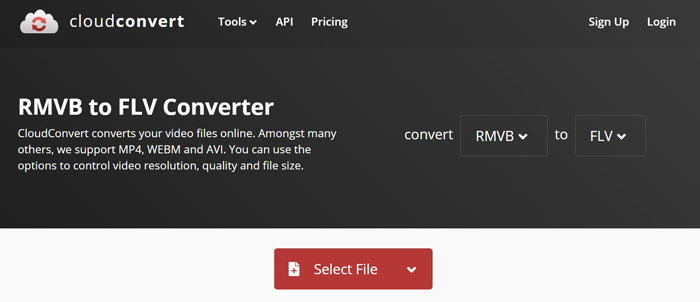
如何在線上將 RMVB 轉為 FLV
步驟 1: 在瀏覽器中開啟 https://cloudconvert.com/rmvb-to-flv。點擊 Select File 按鈕上傳 RMVB 檔案。
步驟 2: 影片上傳完成後,按下 Convert 按鈕。
步驟 3: 完成後,下載 FLV 檔案。
前 3 名:FreeConvert
FreeConvert 類似於 CloudConvert。它也是一個網頁 RMVB 到 FLV 轉換器。默認情況下,最大文件大小為 1GB,但您可以使用個人電子郵件註冊或支付計劃以獲得更多容量。
FreeConvert RMVB 轉 FLV 轉檔工具的主要功能
- 1.在線將RMVB轉換為FLV。
- 2. 提供高級設置。
- 3. 轉換後刪除視頻。
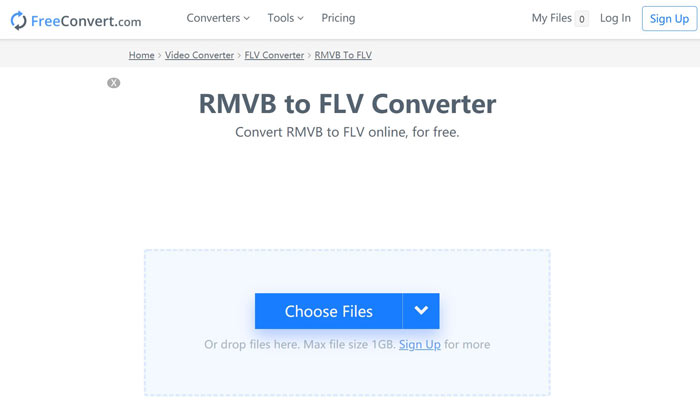
如何使用 FreeConvert 將 RMVB 轉為 FLV
步驟 1: 開啟瀏覽器並前往 https://www.freeconvert.com/rmvb-to-flv。
步驟 2: 點擊 Choose Files 按鈕,從電腦上傳 RMVB 檔案。
步驟 3: 出現提示時,點擊 Convert To FLV 按鈕。轉檔完成後下載 FLV 檔案。
RMVB 與 FLV
第 3 部分:有關 RMVB 到 FLV 轉換器的常見問題解答
什麼是 RMVB 文件格式?
RMVB 是由可變比特率壓縮的 Real Media Video。它針對視頻內容進行了優化。 RMVB 是標準 Real Media 文件格式的更新版本。
Windows Media Player 可以打開 RMVB 文件嗎?
儘管最新版的 WMP 已經內建了許多解碼器,但仍無法在 Windows Media Player 中開啟 RMVB。你必須先將 RMVB 轉成 MP4 或其他常見影片格式。或者,你也可以使用專門的 RMVB 播放器 來開啟 RMVB 檔案。
VLC 可以轉換 RMVB 文件嗎?
是的,VLC 能夠打開和轉換 RMVB 文件,但需要很長時間才能完成這項工作。此外,輸出質量較差。
結論
現在,您應該至少了解適用於 Windows 和 Mac 的前四個 RMVB 到 FLV 轉換器。網絡視頻轉換器應用程序是無需安裝即可將 RMVB 文件轉換為 FLV 格式的便捷方式。但是,FVC Free FLV 轉換器更穩定,輸出質量更好。更多問題?請隨時在下面留言。
-
 MP4到FLV |前3個免費轉換器(在線/ Mac / Windows)
 這篇文章是MP4到FLV轉換的詳細指南。您可以輕鬆地在Windows或Mac計算機上使用排名前3位的免費轉換器將MP4在線轉換為FLV。
-
 什麼是 VOB 文件以及如何將 VOB 文件免費轉換為 GIF
 您想了解更多關於 VOB 文件以及被翻錄後如何分享的信息嗎?或者為什麼需要將 VOB 轉換為 GIF?然後仔細閱讀這篇文章。
-
 2 種簡單的方法來壓縮 FLV 視頻以實現快速上傳
 如果您無法上傳 FLV 視頻,或者共享文件需要一些時間,您可以從文章中了解有關壓縮 FLV 視頻的 2 種簡單方法的更多詳細信息。

