


 視頻轉換大師
 屏幕錄影大師
 影片修復
影片修復
 安全下載
安全下載如何在 Instagram Newsfeed 和 Reels 上評論 GIF
GIF 或圖像交換格式(Graphic Interchange Format)是動態及組合圖片,或經壓縮的影片,你可以用來為社群媒體上的互動增添趣味與娛樂效果。有些人甚至會將這種圖片格式當作迷因(meme),或用來以搞笑的方式表達對貼文的反應。不過,你可知道,在 2012 年爆紅之前,GIF 幾乎要在網際網路世界消失了嗎?所幸,隨著社群媒體使用者持續成長,許多人用這些動態圖片來增添虛擬溝通的趣味,GIF 因而免於絕跡。它已經席捲各大社群媒體 App,包括 Instagram 的收件匣與留言區。因此,在本篇文章中,你將學到如何在 Instagram 上用 GIF 留言。

第 1 部分:Instagram 支援 GIF 嗎?
Instagram 是流行的社交媒體應用程式之一,人們可以在其中分享和展示帶有簡短標題的精美照片。這個照片共享平台不斷發展以增強用戶體驗。其中一項增強功能是 GIF 的使用,允許使用者在互動中添加額外的創造力和表達力。最初,該應用程式的目的只是使用有趣的 GIF 或製作可愛的 IG 故事來發送訊息。但現在,您已經可以在捲軸和新聞源帖子上評論 GIF。
Instagram什麼時候推出這個功能的?
Instagram 評論部分的 GIF 是由該公司負責人 Adam Mosseri 與 Meta 執行長 Mark Zuckerberg 於 2023 年 5 月推出的。據稱,推出這項最新功能是 Instagram 創始人和共同所有者的里程碑之一。他們甚至解決瞭如何等待它出現在 IG 上,因為多年來評論 GIF 在 Facebook 評論部分已經很常見了。這項成就預計將鼓勵 IG 用戶更多參與,因為他們可以使用 GIF 對新聞提要貼文和捲軸進行評論。
支援有區域限制嗎?
IG 的 GIF 評論功能在測試期間僅限於阿根廷、愛爾蘭、義大利、日本、墨西哥和美國。儘管Meta沒有透露這項功能何時向所有人開放,但他們承諾,如果這項新功能在平台上獲得了大量參與,他們將慢慢向全球用戶推出這項功能。因此,也沒有任何數據顯示其區域限制。
第 2 部分. 如何在 Instagram 上評論 GIF
如果您是第一次發現此新功能,可以按照以下步驟了解如何在 Instagram 貼文上評論 GIF(前提是您已經更新了 Instagram 帳戶):
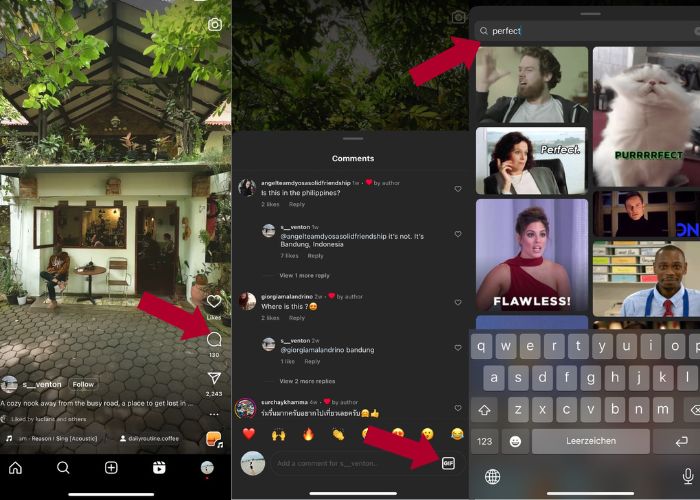
如何在 Instagram Reels 上評論 GIF:
步驟 1。 先前往你想互動的 Reels,然後點擊留言。
步驟 2。 接著,點選GIF 方框來以 GIF 留言。
步驟 3。 然後從 GIF 收藏中挑選你想留言的 GIF。你可以仔細瀏覽,或輸入關鍵字尋找想加入的動態畫面。
步驟 4。 選好之後,點一下該 GIF,就會立即送出。
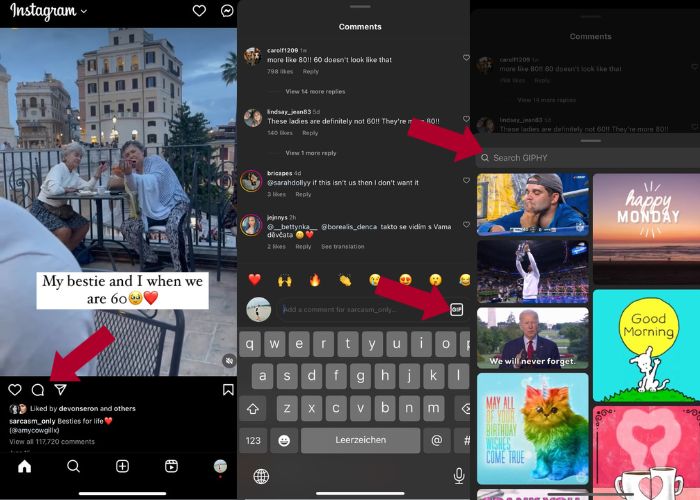
如何在 Instagram 上發布 GIF 評論:
步驟 1。 前往你朋友或其他 IG 使用者的動態消息,點擊想加入 GIF 的照片,然後點選留言圖示。
步驟 2。 接著,點擊留言框中的GIF 圖示。
步驟 3。 搜尋一個 GIF 或向下捲動查看更多 GIF,選擇 GIF 後,回到留言區,查看是否已成功加入。
第 3 部分:為什麼我無法在 Instagram 上評論 GIF
如果您無法使用 GIF 在 Instagram 上新增評論,您可以嘗試更新您的應用程式。如果您碰巧仍然找不到 GIF 按鈕,則您所在的國家/地區可能屬於 Meta 尚未發布此新功能的地區之一。所以你必須等到它到達你的國家。
第 4 部分:如何使用 Best GIF Maker 為 Instagram 製作 GIF
若要客製化你的 GIF,就必須先把 MP4 格式的影片轉成 GIF。你也需要將多張圖片製作成動畫來生成 GIF 檔案。為此,就讓 Video Converter Ultimate 幫你一把。這款軟體是功能完整的影片編輯工具,能讓你輕鬆編輯與轉檔影片。它內建 GIF 製作工具(GIF Maker),使用者可以立刻為自己的 Instagram 建立 GIF。搭配循環動畫(Loop Animation)功能,你會驚訝這款應用程式如何把靜態圖片轉換成 GIF。
此外,該工具還附帶了必要的編輯工具來增強您的 GIF ——編輯其對比度、飽和度、亮度和色調。您也可以使用其過濾器來設定 GIF 的基調。如果您有較長的視頻,也可以使用此 GIF 製作工具對其進行修剪。此外,該軟體還可讓您修改 GIF 的輸出格式和幀速率。最好的部分是這個應用程式為初學者提供了直覺的介面。
如果您覺得這個影片轉換器令人生畏,讓我們向您展示 Video Converter Ultimate 如何如此易於使用。只需按照以下步驟操作:
步驟 1。 安裝並啟動 Video Converter Ultimate
要開始轉檔流程,先點擊下方的免費下載按鈕下載軟體並完成安裝。安裝完成後,在電腦上啟動程式,等待設定程序,接著點擊立即開始即可啟用。
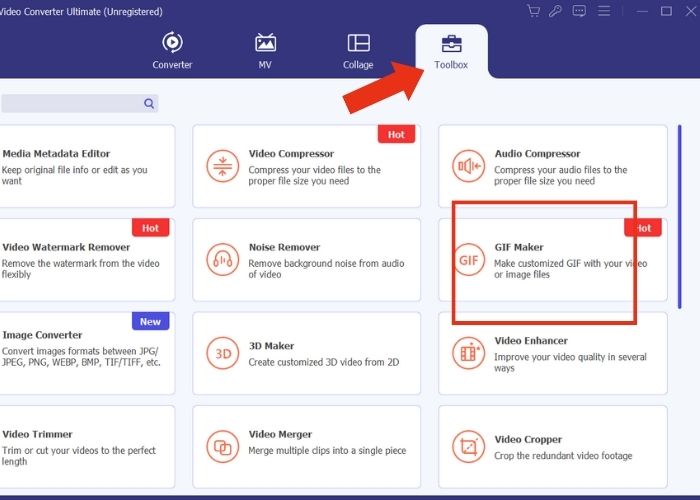
步驟 2。 上傳媒體檔案
在程式介面中,切換到工具箱分頁,於工具集中仔細瀏覽並找到GIF 製作工具。接著,如果想把影片轉成 GIF,就點選影片轉 GIF;若要將多張圖片轉成 GIF,則選擇照片轉 GIF。
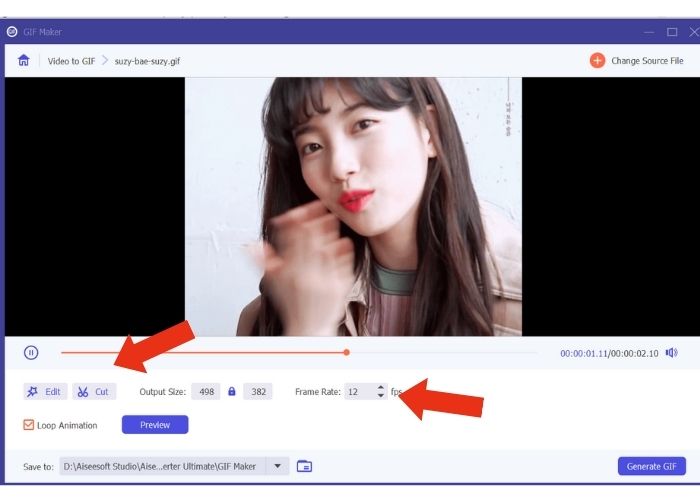
步驟 3。 修改檔案設定
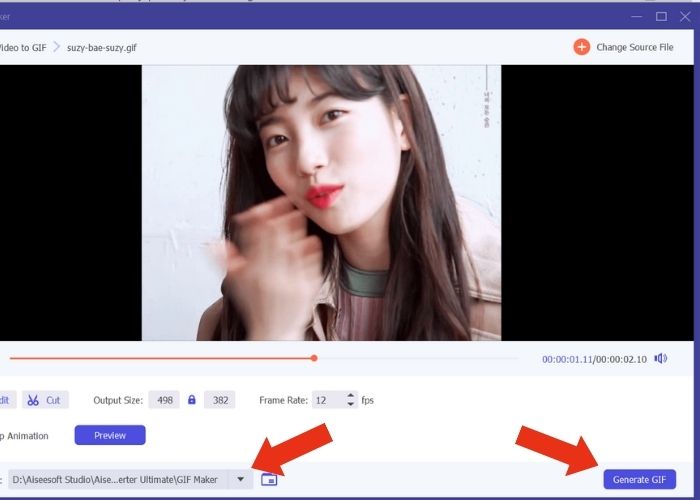
加入檔案後,先透過調整輸出尺寸(Output Size)與幀率(Frame Rate)來設定 GIF 的屬性。然後點擊編輯,以調整影片的色彩強度,或套用濾鏡來增強效果。接著,按一下剪輯來裁切原始檔案的長度,因為多數 GIF 的時長通常不宜超過 6 秒。
步驟 4。 匯出並儲存輸出檔
在匯出媒體之前,先選擇要儲存輸出檔案的位置或資料夾。然後點擊產生 GIF按鈕來匯出 GIF。稍候片刻,工具會處理你的 GIF。完成後,會跳出新視窗,你可以在其中預覽最終成品。
第 5 部分. 如何將 GIF 上傳到 Instagram 評論
現在您已經有了自己的 GIF,這部分將向您展示如何在 GIPHY 網站上上傳。以下是您必須執行的步驟:
步驟 1。 建立一個 GIPHY 帳號。
步驟 2。 匯入你事先製作好的 GIF。
步驟 3。 新增標籤,然後點擊上傳到 GIPHY按鈕。
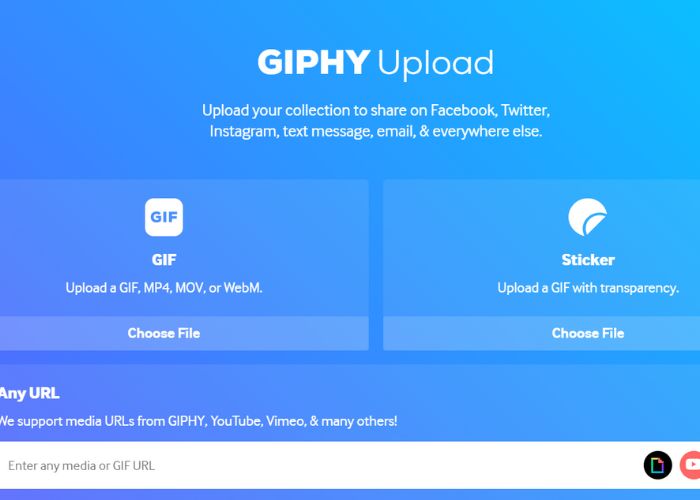
等待幾天,您的 GIF 就會上傳到 Instagram 的 GIPHY 庫。這是一個試錯活動,但此方法可能不適用於您所在的國家。
延伸閱讀:
在桌機、iPhone 或 Android 上調整 Instagram 照片尺寸
在 Windows 與 Mac 上使用最佳動畫 GIF 循環工具讓 GIF 無限循環
第 6 部分:有關如何在 Instagram 評論上發布 GIF 的常見問題解答
您可以使用 GIF 作為 Instagram 個人資料圖片嗎?
目前,Instagram 上的 GIF 僅限於故事、訊息、Reels 上的評論框和動態消息貼文。
Instagram 訊息中會顯示 GIF 嗎?
是的。 GIF 也適用於 Instagram 訊息。
你能在 Instagram 回覆圖片嗎?
對於訊息傳遞來說,是的,可以。然而,尚未允許回應 Reels 和 Newsfeed 上的故事和評論框。
如何將相機膠卷中的 GIF 放入 Instagram 故事中?
以下是如何在 Instagram 限時動態發佈 GIF:
先使用 Video Converter Ultimate 將影片轉換成 GIF,並將輸出儲存到你的相機膠卷。接著,把它上傳到 GIPHY 網站,並等待數日,直到它出現在資料庫中。之後,在搜尋時使用你先前輸入的標籤,就能找到自己預先製作好的 GIF。
為什麼我無法回覆 Instagram 上的評論?
目前,Instagram 僅支援在動態消息和捲軸上評論 GIF。不幸的是,它不允許用戶使用 GIF 回覆評論。
結論
現在你已經知道如何在 Instagram 貼文中用 GIF 留言,就能在好友的動態與 Reels 底下,以有趣的 GIF 留言來增加互動。你也可以使用最佳影片轉檔工具 — Video Ultimate Converter 來自行製作 GIF。但請記得適度使用 GIF 留言,否則有可能會被判定為垃圾訊息。
-
 關於如何在 iPhone 上將 GIF 保存為視頻的 5 個最佳網站
 無法將 GIF 儲存到我的 iPhone'?繼續閱讀這篇文章,我們將為您提供將 GIF 保存到 iPhone 的可能解決方案。
-
 [免費和付費] GIF 變速器:2023 年熱門精選
 您是否對在線製作的 GIF 不滿意,因為它既乏味又緩慢?這將是您的幸運日,因為我們提供了一篇關於 GIF 速度轉換器的文章以及幫助您使用和掌握它的詳細信息。
-
 如何在發布圖像和視頻之前添加和製作 Instagram 過濾器
 Instagram 上的過濾器是什麼?如何應用它?如何製作一個?這些問題將在這篇文章中得到直截了當的答案,所以請閱讀它們。
