


 視頻轉換大師
 屏幕錄影大師
 影片修復
影片修復
 安全下載
安全下載如何快速將 SVG 轉換為 JPG [超級簡單的方法]
你可能有多種理由想要將 SVG 圖片轉換成 JPG。其一是讓後續編輯更簡單。編輯 SVG 需要向量圖形編輯器,但點陣圖編輯器在一般使用者之間更為常見,例如 Microsoft Paint 與 Adobe Lightroom。若先將 SVG 轉成 JPG,就有機會能用 Lightroom 來編輯。線上分享則是另一個將 SVG 轉成 JPG 的理由。幾乎所有允許上傳圖片的網站與 App 都接受 JPG,但很少會接受 SVG。舉例來說,Instagram 接受 JPG,卻不接受 SVG。本文將提供實用方法,教你如何將 SVG 轉 JPG。同時,你也會了解有哪些最佳的線上與離線圖片轉檔工具可供使用。

第 1 部分。比較 SVG 和 JPG
| 文件格式 | SVG | JPG |
| 文件擴展名 | .svg | .jng |
| 由開發 | 萬維網聯盟 | JPEG委員會 |
| 由開發 | SVG 是一種基於 XML 的二維圖形矢量圖像文件格式。支持動畫和交互。在 XML 文本文件中,定義了 SVG 圖片及其行為。由於 SVG 文件只是 XML 文件,因此可以使用任何文本編輯器對其進行編輯。 | JPG 用於網站和電子郵件,因為它們減小了文件大小。但由於JPG是有損的,壓縮後會影響圖像質量。生成的“有損”文件表示質量下降。數碼相機的存儲卡使用 JPG 格式。 |
| 技術細節 | SVG 是一種用於為 Web 定義基於 XML 的基於矢量的圖形的格式。即使放大或調整大小時,此文件也不會損失圖像質量。 SVG 文件的元素和屬性都可以是動畫的。 | JPG 是一種用於編輯靜態照片的圖像文件格式。它提供了一種處理器密集型的對稱壓縮技術。壓縮和解壓都比較耗時。 JPEG 是國際電信聯盟的通用標準。它還包括國際標準化組織。 |
| 相關項目 | Adobe Photoshop Adobe 預覽 Corel Paint Shop Pro Corel SVG 查看器 | Microsoft Windows 照片庫查看器 Adobe Photoshop Adobe 預覽 Corel Paint Shop Pro |
第 2 部分。在線將 SVG 轉換為 JPG 的最佳方式
你能使用的最佳工具是 FVC Free Image Converter。它可以輕鬆將 SVG 轉換為 JPG。此外,它也能同時將多個 SVG 檔案轉成 JPG。它提供了容易上手的介面與操作指引,非常適合一般使用者。此圖片轉換器具備批次轉檔功能,你也可以一鍵下載多個已轉換完成的檔案。這個工具的一大優點是沒有惱人的廣告,你可以專心進行檔案轉換,不會遇到任何廣告干擾。另外,它也支援多種輸入格式,例如 PNG、BMP、TIFF、GIF 等等。而且無需安裝此轉換器,直接透過瀏覽器即可操作。此外,轉換後的圖片品質與原檔相同,能確保你的圖片依然有出色的呈現效果。同時,你在此網站上的資訊也是安全的,當你完成圖片的轉換與下載後,網站會自動刪除你的所有資料。
步驟 1: 前往 FVC Free Image Converter 官方網站。在加入 SVG 圖片檔之前,先選擇你想要的輸出格式,於格式選項中點選 JPG。
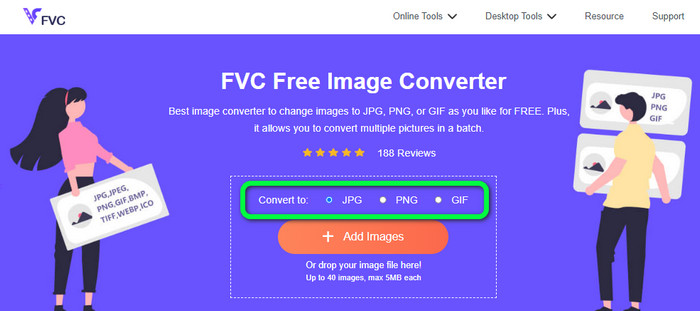
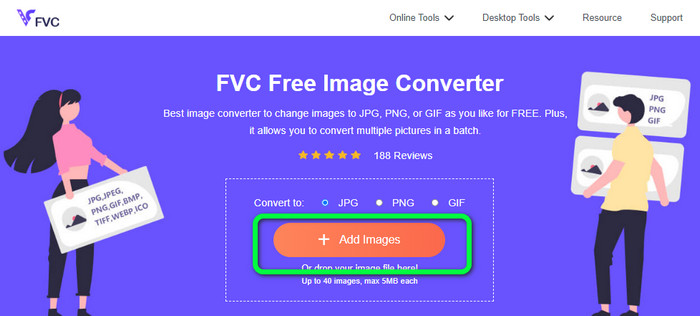
步驟 2: 點擊介面中央的 Add Images 按鈕。接著,電腦中的資料夾視窗會跳出在螢幕上,選擇你想要轉換的 SVG 圖片並開啟。你也可以將 SVG 檔案直接拖放到框中。若要進行批次轉換,再次點擊 Add Images 按鈕即可。
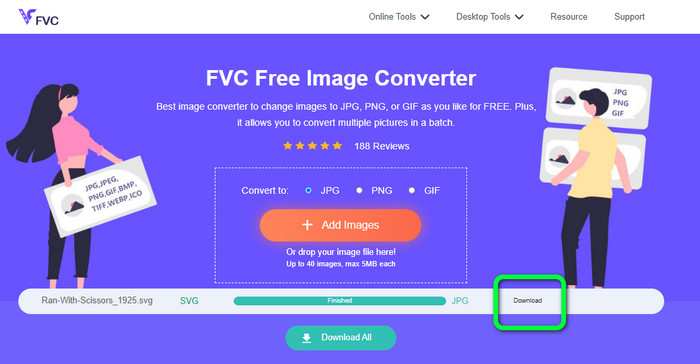
步驟 3: 在上傳檔案時,系統會自動開始轉換圖片。最後一步,在介面右側點擊 Download 按鈕。完成儲存後,在電腦中開啟已轉換的圖片。
第 3 部分。在 Windows 上將 SVG 轉換為 JPG 的簡單方法
本節將介紹在 Windows 電腦上離線將 SVG 轉 JPG 的最佳方法之一。使用 HitPaw Video Converter 是一個有效率的做法。HitPaw Video Converter 的 Image Convert(圖片轉換)功能,能讓批次圖片轉檔變得簡單。你可以匯入各種格式的照片與圖形,並轉換成你想要的格式,無論是大量或個別的圖片格式調整,都是很好的選擇。它也支援目前廣泛使用的照片格式,包括 PNG、JPG、HEIC、RAW、BMP 等等。因此,你也能用這個工具來將 BMP 轉成 JPG 或 PNG。另外,這款可下載程式除了轉檔之外還提供其他功能,你可以利用此軟體下載音樂與影片,也能透過旋轉、裁切與套用濾鏡來編輯影片。不過,HitPaw Video Converter 的操作並不直覺,對初學者尤其不友善,介面偏複雜、不易理解,而且安裝過程也相當耗時。
步驟 1: 在 Windows 上安裝 HitPaw Video Converter。安裝完成後,啟動此應用程式。
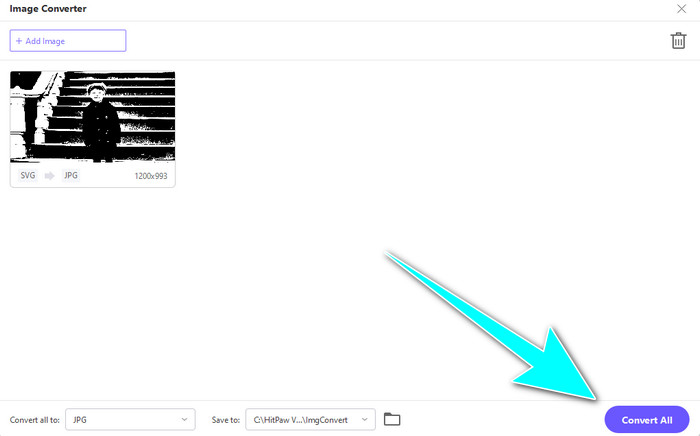
步驟 2: 前往 Toolbox(工具箱)面板,選擇 Image Converter(圖片轉換器)工具。從電腦資料夾中選取你要轉換的 SVG 圖片檔。
步驟 3: 在介面左下角點選 Convert All to(全部轉換為)選項,然後選擇 JPG 作為輸出格式。
步驟 4: 最後,在介面右下角點擊 Convert All(全部轉換)按鈕。耐心等候轉換完成,之後就可以開啟你的圖片(輸出為 PNG 檔案格式)。
第 4 部分。如何在 Mac 上將 SVG 轉換為 JPG
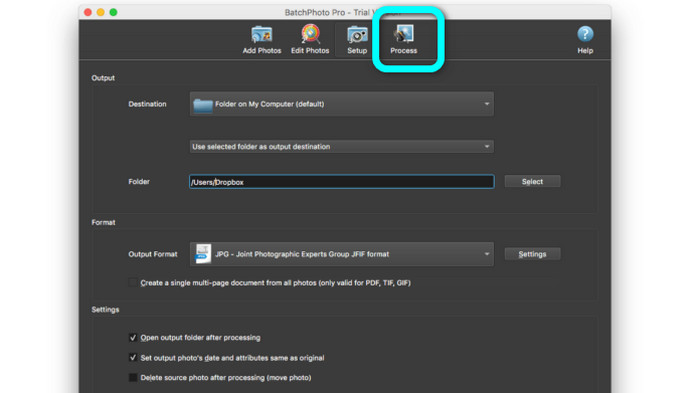
若你想在 Mac 上將 SVG 轉成 JPG,可以使用 BatchPhoto Pro。它支援多種圖片格式,包括 JPG、PNG、ICO、SVG、EPS,以及 170 多種其他格式,甚至可以將圖片儲存為 PDF。它同樣提供批次轉換功能,讓你能同時轉換多個檔案。此外,除了轉檔之外,它也具備圖片編輯功能,例如調整尺寸、旋轉與修改顏色設定。不過,如果你想長期使用該程式,就必須付費購買,因為它只提供幾天的試用版。轉檔流程本身也不太直觀,對於非專業使用者來說,操作起來會覺得相當複雜。
步驟 1: 下載並安裝 BatchPhoto Pro,可以先使用免費試用版。安裝完成後啟動程式。
步驟 2: 在介面上方選擇 Add Photos 選項。點擊後,加入你想轉換成 JPG 格式的 SVG 圖片,你可以一次加入多個檔案。
步驟 3: 前往介面上方的 Set Up 選項。在 Output Format 輸出格式中選擇 JPG。
步驟 4: 點擊 Process 選項以開始轉換流程。完成後,前往輸出資料夾查看已轉換好的圖片。
第 5 部分。有關將 SVG 轉換為 JPG 的常見問題解答
1. 為什麼要將 SVG 轉換為 JPG?
與 SVG 相比,JPG 更適合社交媒體和其他設備。它是您現在可以使用的流行圖像格式之一。在 SVG 中,您只能在網絡瀏覽器上打開此文件。因此,為了更多的兼容性使用,將 SVG 轉換為 JPG 是必要的。
2. SVG文件的優點和缺點是什麼?
您可以將 SVG 文件擴展或縮小到任意大小而不會降低質量。 SVG 不關心顯示類型或圖像大小。他們看起來的方式是不變的。 SVG 還為設計人員和開發人員提供了對其外觀的大量控制。這比在文本編輯器中編輯它們要好。甚至其他視覺元素(如陰影和顏色漸變)也是可調整的。但是,對於細節豐富的高質量照片,有比 SVG 更好的格式。用戶使用點和路徑而不是像素來構建矢量圖形。代碼也是必須的。
3. 如何打開 SVG 文件?
開啟 SVG 檔案的最佳方式是透過瀏覽器。先在鍵盤上按下 ctrl+o,然後選擇你想檢視的 SVG 檔案並點擊 Open(開啟)。
結論
以上就是全部內容!前文介紹了在 Windows、Mac 以及線上將 SVG 轉 JPG 的多種方法。不過,下載並安裝圖片轉換程式多少有些麻煩。如果你想要更簡單的圖片轉換方式,建議使用 FVC Free Image Converter。這款線上圖片轉換工具讓你能直接在瀏覽器中完成圖片轉檔。
-
 關於如何輕鬆將 TIFF 轉換為 JPG/PNG 的有用方法
 不要錯過這些將 TIF 轉換為 JPG/PNG 格式的絕妙方法。這篇文章將提供您需要了解的必要信息。它包括它們的差異。
-
 高效地將 JPEG 轉換為 JPG [列出的五種方法]
 快來獲取關於將 JPEG 轉換為 JPG 圖像文件格式的最簡單教程。單擊此指南並開始學習您喜歡的方法
-
 將 PNG 快速轉換為 JPG 的 5 大領先教程
 如果您需要將 PNG 文件轉換為 JPG 格式,您可以在此處了解最佳方法。您還將了解 PNG 和 JPG 文件格式之間的區別
