


 視頻轉換大師
 屏幕錄影大師
 影片修復
影片修復
 安全下載
安全下載在幾秒鐘內快速將 HEIC 轉換為 PNG 的 7 種簡單方法
想讓你的 HEIC 檔在更多裝置上通用嗎?我們正好有你需要的!這篇文章將向你展示將 HEIC 檔轉成 PNG 的最佳方法,而且一點也不麻煩。那就準備好,一起來了解如何毫不費力地將HEIC 轉 PNG的最佳途徑吧。

第 1 部分。 為什麼將 HEIC 轉換為 PNG 格式
HEIC 文件格式是 Apple 創建的圖像格式。它是 Apple 設備常用的一種圖像格式。儘管它具有高質量的分辨率,但它不會在您的設備上佔用太多空間。但是,HEIC 文件與非 Apple 設備不兼容。相比之下,代表可移植圖形格式的 PNG 是一種用於替代 GIF 格式的圖像文件格式。
它是最常用的未壓縮圖像格式,這意味著它具有巨大的文件大小。儘管如此,幾乎所有設備都支持這種圖像文件格式。因此,如果您想在 Apple 以外的其他設備上打開您的 HEIC 圖像,最好將其轉換為 PNG 文件格式。
第 2 部分。在線將 HEIC 文件轉換為 PNG 文件的 5 種簡單方法
尋找如何將 HEIC 轉換為 PNG 的最佳方法非常困難。但是,我們為您搜索了將 HEIC 更改為 PNG 文件格式的最佳和最簡單的方法。
使用 FVC 免費 HEIC 到 PNG 轉換器
將 HEIC 轉成 PNG 最理想的方式是使用轉檔工具。而我們在網路上找到的最佳工具就是 FVC Free HEIC to PNG Converter。這款轉檔器是線上工具,可以輕鬆地將你的 HEIC 檔轉成 PNG 格式。此外,如果你想批次將多個 HEIC 檔轉成 PNG,它也提供這項功能。
它也可以在幾乎所有常見的瀏覽器中訪問,使其成為無瀏覽器限制工具。此外,它具有簡單的軟件界面並且沒有文件大小限制,因此您可以轉換 HEIC 文件而無需考慮文件大小。因此,如果您有興趣使用此在線 HEIC 到 PNG 轉換器,請遵循以下簡單指南。
步驟 1. 在瀏覽器中搜尋 FVC Free HEIC to PNG Converter。你也可以直接點擊這個連結前往其網頁。以下是初始介面的樣子:

步驟 2. 接著點擊 Add HEIC/HEIF File(s) 按鈕。電腦資料夾會跳出,然後選取你的 HEIC 檔。
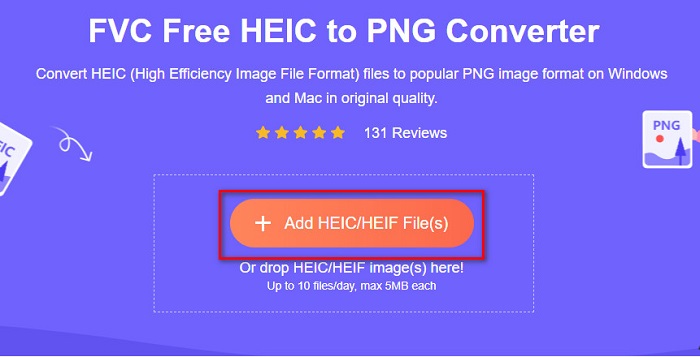
步驟 3. 然後電腦資料夾會出現,從中選擇你的 HEIC 檔,按下 Open。之後就會開始將 HEIC 轉成 PNG。

步驟 4. 最後,在軟體介面上點擊 Download 按鈕,下載你的 PNG 檔。

很簡單,不是嗎?您可以按照以下簡單步驟將 HEIC 文件轉換為 PNG 文件。
使用 Xconvert.com
Xconvert 是一款免費的線上 HEIC 轉 PNG 轉檔器,可以輕鬆將 HEIC 檔轉成 PNG 檔。此線上轉檔器擁有簡單易懂的介面,非常適合新手使用者。此外,使用這個線上轉檔工具時,你還可以變更圖片的解析度。不過,因為它必須連網使用,如果網路速度較慢,你可能會遇到轉檔變慢的情況,而且頁面也會有廣告,可能會讓你感到干擾。
步驟 1. 在瀏覽器中搜尋 Xconvert.com。進入網站後,點擊 Add Files 按鈕,電腦檔案視窗會跳出,然後選取你的 HEIC 檔。

步驟 2. 你的圖片會被上傳到軟體介面。上傳完成後,點擊介面右下角的 Convert 按鈕。接著等檔案準備好可供下載後,再進入下一步。
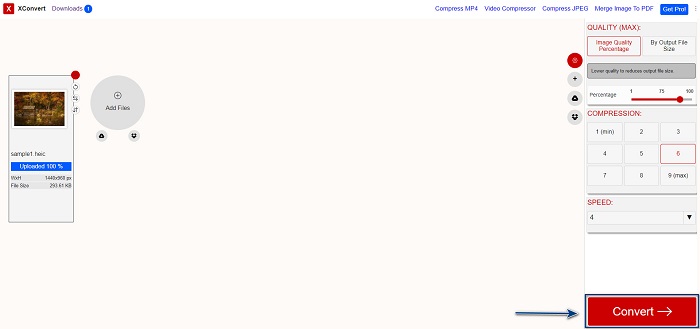
步驟 3. 當檔案準備完成時,點擊 Download 按鈕下載你的 PNG 檔;在下載按鈕上方,你也可以看到輸出檔案大小以及轉檔耗費的時間。

使用 Zamzar
另一個線上將 HEIC 轉成 PNG 的方法是使用 Zamzar 線上轉檔器。你在搜尋 HEIC 轉 PNG 轉檔工具時,很可能已看過這個網站。此轉檔器幾乎在所有常見瀏覽器上都能使用,而且介面簡潔、操作直覺,相當容易上手。不過,如果在轉檔過程中網路突然中斷,可能會導致檔案損毀。儘管如此,仍有許多使用者利用這個工具把 HEIC 轉成 PNG 檔。
步驟 1. 在你使用的瀏覽器上搜尋 Zamzar。進入網站後,點擊 Add Files 按鈕。電腦檔案視窗會跳出,接著上傳你的 HEIC 圖片。

步驟 2. 上傳 HEIC 檔後,點擊下拉選單按鈕,然後選擇 PNG 做為輸出檔案格式。

步驟 3. 最後,點擊 Convert Now 按鈕,將 HEIC 檔轉成 PNG 格式。接著下載你的 PNG 檔。只要等待幾秒鐘,就完成了!

使用轉換工具.io
Conversion Tool 是一款線上 HEIC 轉 PNG 轉檔器,介面簡單易懂。它能高速將你的 HEIC 檔轉成 PNG。此外,相較於其他線上轉檔工具,它的廣告並不多。不過缺點是:它每天最多只能轉換 10 個檔案,而且有單檔大小限制。但如果你只是要轉換小型檔案,那這個工具會蠻適合你。
步驟 1. 在瀏覽器中搜尋 Conversion Tools.io。接著在軟體主介面點擊 Browse 按鈕,或是將 HEIC 檔拖曳並放開(drag and drop)到 Browse 按鈕上。

步驟 2. 之後,點擊 Run Conversion 按鈕,開始將 HEIC 檔轉成 PNG 檔。接著等圖片載入完成後,再進入下一步。

步驟 3. 最後,點擊 Download 按鈕下載你的 PNG 檔。

使用 CDKM
我們要介紹的最後一個工具是 CDKM。這款工具能讓你只需幾下點擊,就把 HEIC 檔轉成 PNG。不過,使用此線上轉檔器時,實際轉檔所需時間會依你的網路速度而定,可能要花上幾秒鐘。它同樣也含有廣告,可能會讓你感到困擾。不過,它沒有檔案大小限制,因此仍然非常值得一試。
步驟 1. 在瀏覽器中搜尋 CDKM online converter。進入該軟體的主介面後,點擊 Choose Files 按鈕。電腦資料夾會跳出,然後選取要上傳的 HEIC 檔。

步驟 2. 接著,點擊 Start Conversion 按鈕,開始轉檔流程。

步驟 3. 最後,向下捲動一點,你會看到 Download 按鈕。點擊 Download 按鈕下載你的 PNG 檔。

第 3 部分。 在 Mac 上將 HEIC 轉換為 PNG
Apple 設備支持 HEIC 文件格式,使用 Mac 可以原生打開 HEIC 文件。但是,如果您想將 HEIC 文件轉換為 PNG,您可以使用 Mac 中的照片應用程序進行更改。因此,如果您是 Mac 用戶,最好閱讀此部分。
步驟 1. 首先,將 HEIC 檔拖曳並放開(drag and drop)到「照片」App 中。然後預覽你的 HEIC 照片,接著點擊「檔案」>「匯出」>「匯出 1 張照片」。

步驟 2. 接著,在 相片類型(Photo Kind)選項中,選擇你想要的輸出格式,並選取 PNG 檔案格式。

步驟 3. 然後點擊 匯出(Export) 按鈕,並選擇輸出檔案要儲存的位置。你就會看到原本的 HEIC 檔已經變成 PNG 格式。

第 4 部分。 在 iPhone 上將 HEIC 文件轉換為 PNG
如果您使用的是 iPhone,則可以在設備上打開 HEIC 文件。但是,如果您想使用 iPhone 設備將 HEIC 文件轉換為 PNG,那麼我們為您提供了一種方法。按照下面這些簡單易行的步驟,您可以毫不費力地將 HEIC 轉換為 PNG。
步驟 1. 在 iPhone 上開啟「照片」App,點擊螢幕上方的「選取」,然後選擇你的 HEIC 檔,再點擊分享圖示。
步驟 2. 往上滑動螢幕,你會看到「複製相片」選項,點擊它。
步驟 3. 接著打開 檔案 App,點選瀏覽按鈕並選擇你想儲存的輸出位置(點選 iCloud 雲碟或「在我的 iPhone 上」)。然後把剛剛複製的 HEIC 檔貼上到那個位置。

粘貼文件後,您會看到文件將自動轉換為 PNG 文件。
第 5 部分。 關於 HEIC 文件和 PNG 文件的擴展知識
如果您仍然不確定是否要將 HEIC 文件轉換為 PNG,我們為您提供了一個比較圖表,以幫助您區分這兩個文件之間的差異。此外,它還為您提供了 HEIC 和 PNG 特徵的清晰概述。仔細閱讀以了解 HEIC 文件和 PNG 文件之間的區別。
| HEIC | PNG | |
| 兼容性 | 只有 Apple 設備支持這種文件格式。 | 幾乎所有設備都支持此文件,包括 Apple 設備。 |
| 文件大小 | 小文件大小。 | 可以達到巨大的文件大小。 |
| 畫面質量 | 高畫質。 | 質量不錯,但不比 HEIC 文件好。 |
| 壓縮/未壓縮 | 壓縮 | 未壓縮 |
| 編輯中 | 編輯時保持圖像質量。 | 編輯時質量可能會下降。 |
第 6 部分。關於將 HEIC 轉換為 PNG 的常見問題解答
將 HEIC 轉換為 PNG 會影響文件大小嗎?
是的。當您將 HEIC 轉換為 PNG 時,它會增加文件大小,儘管它不會很大。
您可以在 Adobe Photoshop 上打開 PNG 文件嗎?
當然。您可以在 Adobe Photoshop 上打開 PNG 文件,因為 Adobe Photoshop 支持 PNG 文件格式。
您可以在 Apple 設備上原生打開 PNG 文件格式嗎?
是的。當您從 iPhone 截取屏幕截圖時,它們會自動以 PNG 文件的形式保存在您的相機膠卷中。
結論
總算!我們的探索即將告一段落。這篇文章為你提供了多種將 HEIC 檔轉成 PNG 格式的最佳解決方案。上述所有線上 HEIC 轉 PNG 轉檔工具,都能輕鬆有效地幫你完成轉檔。而且,若你是 Mac 或 iPhone 使用者,文中也介紹了其他可行的方式。如果你正在尋找具備優異功能、真正好用的最佳 HEIC 轉 PNG 轉檔器,那麼 FVC Free HEIC to PNG 轉檔器絕對是你的不二之選。
-
 如何在 Windows、Mac 和在線上打開 HEIC 文件
 您是否正在尋找一種如何打開 HEIC 文件的方法?本文為您提供在 Windows、Mac 和 Online 上打開 HEIC 文件的最佳解決方案。
-
 JPG VS GIF:3 種輕鬆將 JPG 轉換為 GIF 的方法
 您想知道 JPG 和 GIF 之間的區別嗎?或者您想將 JPG 切換為 GIF 動畫格式?然後閱讀這篇文章有一個想法。
-
 將圖像更改為動畫 GIF 的 5 種最佳方法 [2022 年更新]
 需要將圖像轉換為 GIF 嗎?本文將提供我們可以在市場上找到的五種最佳轉換器。因此,讓我們通過閱讀本文找出這些工具。
