


 視頻轉換大師
 屏幕錄影大師
 影片修復
影片修復
 安全下載
安全下載在線和離線將 JPG 轉換為 HEIC 的簡單和最佳方法
PG 格式是一種標準的圖像文件格式,很多人都使用它。眾所周知,它是互聯網上共享最多的圖像格式。此外,JPG 文件具有出色的質量,並且可以在 Windows 和 Mac 等所有媒體平台上查看。但是,JPG 文件具有巨大的文件大小,如果您在 Mac 設備上編譯過多的 JPG 文件,它可能會佔用您設備中的存儲空間。
因此,對你而言最好的選擇,就是將 JPG 轉換成 Apple 裝置原生支援的 HEIC 格式。此外,HEIC 檔案在保持高畫質的同時,檔案大小更小。接下來請放輕鬆,你將會知道幾款最佳的 JPG 轉 HEIC 轉檔工具,輕鬆將JPG 轉換為 HEIC。

第 1 部分。如何使用最佳在線轉換器將 JPG 轉換為 HEIC
只有少數工具可以將 JPG 轉換為 HEIC;因此,尋找最好的 JPG 到 HEIC 轉換器非常困難。因此,您將了解最好的在線 JPG 到 HEIC 轉換器以及如何在這一部分中使用它們。
轉換
網路上最知名的 JPG 轉 HEIC 轉檔工具之一就是 Convertio。Convertio 是一款線上的 JPG 轉 HEIC 轉檔器,因為介面簡潔,操作起來十分容易。此外,它可以即時將你的 JPG 檔案轉成 HEIC。若你也在尋找影片轉檔工具,這個工具同樣具備相關功能。不過,由於它是網頁版應用程式,有時候轉檔速度可能會偏慢。儘管如此,仍有許多人使用這個工具來將 JPG 轉成 HEIC。
步驟一。 先在瀏覽器上搜尋 Convertio。在軟體主介面上,點擊 Choose Files 按鈕。此時會開啟電腦中的檔案,選取你的 JPG 檔案。接著,你的 JPG 檔案就會上傳到軟體的主介面。

步驟二。 上傳 JPG 檔案後,點擊下拉按鈕,然後選擇 HEIC 作為輸出的檔案格式。
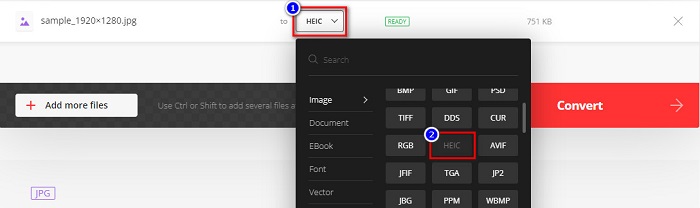
步驟三。 最後,點擊 Convert 按鈕,將 JPG 檔案轉換成 HEIC 格式。等待轉檔完成後,再下載已準備好的 HEIC 檔案。

優點
- 它有一個快速的轉換過程。
- 它安全且免費使用。
- 它有一個易於使用的軟件界面。
- 它支持各種圖像文件格式,包括 JPG、HEIC、PNG、JPEG、GIF 等。
缺點
- 當您的互聯網連接不穩定時,您可能會遇到轉換過程緩慢的情況。
Aconvert
Aconvert 是一款線上的 JPG 轉 HEIC 轉檔工具,可以輕鬆將你的 JPG 檔案轉成 HEIC。這個線上轉換器因為介面簡單,是一款相當容易上手的工具。此外,你還可以透過此工具調整影像尺寸。再者,你也能調整輸出影像的品質。不過,它含有惱人的廣告,可能會讓你感到困擾。
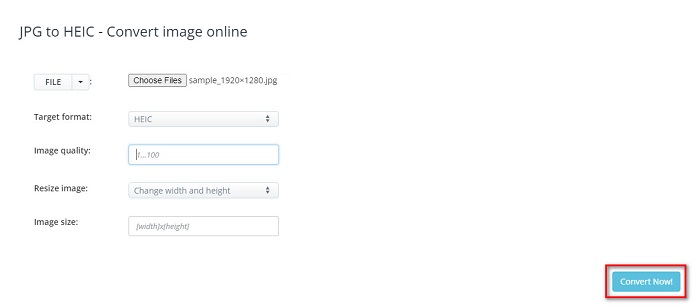
步驟一。 在瀏覽器中搜尋 Aconvert 線上轉換器。點擊 Choose Files 按鈕,將你的 JPG 圖片上傳到主介面。
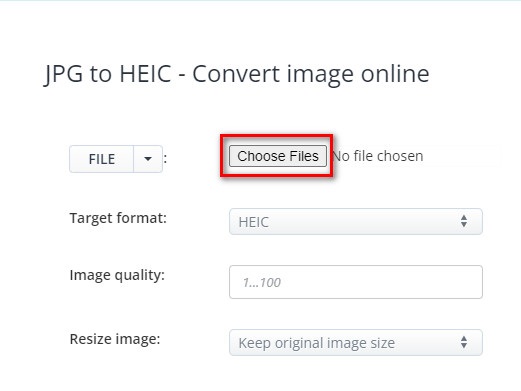
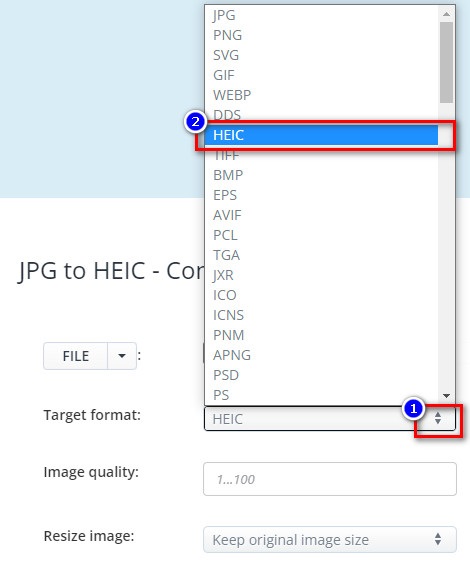
步驟二。 接著,點擊上下按鈕,選擇你想要的輸出格式,並選取 HEIC 檔案格式。
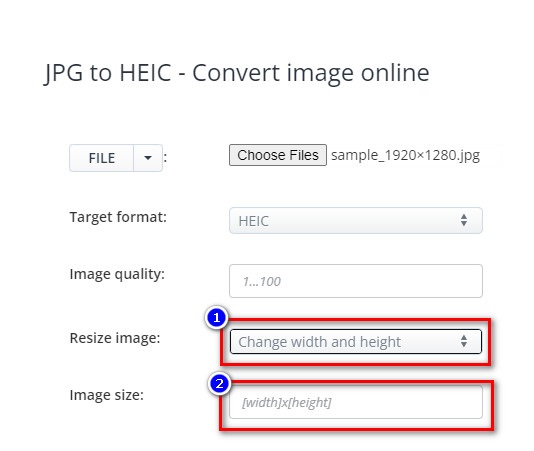
如果你想調整 JPG 檔案的尺寸,請點擊 Resize Image 選項旁的上下按鈕。你可以透過點選相應的選項來設定檔案的寬度和高度,然後輸入想要的寬度或高度數值。若你不想變更影像大小,就直接進行下一步。
步驟三。 最後,點擊 Convert Now 按鈕,將 JPG 檔案轉成 HEIC 檔。稍候幾秒鐘,就可以下載你的 HEIC 檔案了。
優點
- 它具有易於操作的用戶界面。
- 它安全且使用安全。
- 它具有調整圖像質量的功能。
缺點
- 它包含廣告。
任意轉換
我們要討論的最後一個轉換器是 AnyConv 轉換器。這個在線 JPG 到 HEIC 轉換器是免費且安全的。如果您想將您的 JPG 文件批量轉換為 HEIC,此轉換器為您提供了該功能。此外,它具有易於使用的軟件界面,使其成為初學者友好的轉換器。儘管它包含許多令人不安的廣告,但它以尋找 JPG 到 HEIC 轉換器的用戶而聞名。
步驟一。 在你使用的瀏覽器中,在搜尋框輸入 AnyConv。在搜尋結果頁面中點擊 AnyConv 轉檔工具。接著,在軟體主介面上點擊 Choose File 按鈕。
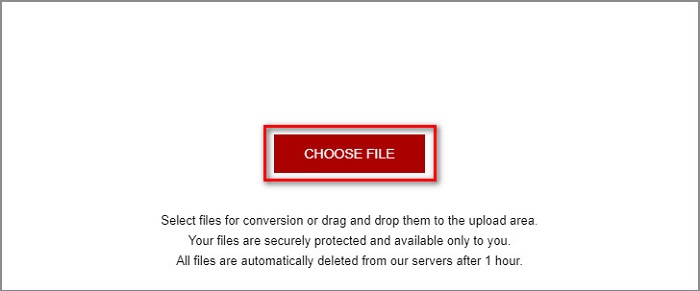
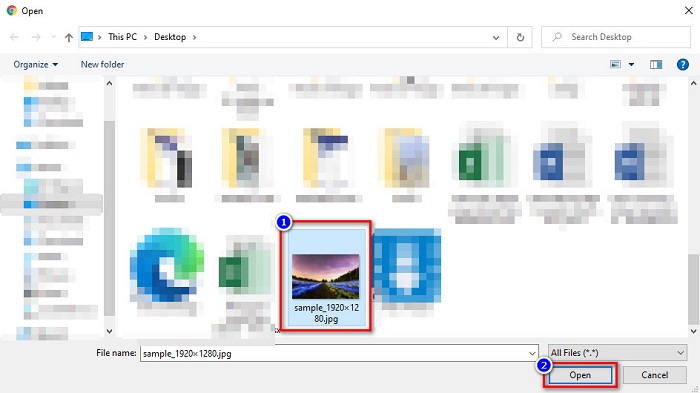
步驟二。 點擊 Choose File 按鈕後,電腦的資料夾會跳出。選取你的 JPG 檔案,然後點擊 Open。
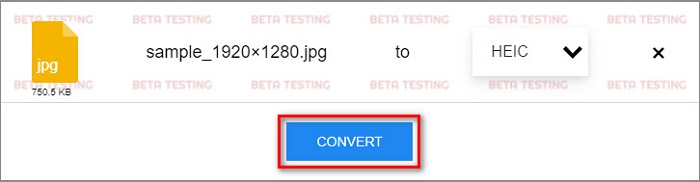
步驟三。 然後,在最後一步點擊 Convert 按鈕。接著等待檔案轉換完成,再將 HEIC 檔案下載到你的裝置。
優點
- 它有一個簡單的用戶界面。
- 它允許您將 JPG 文件批量轉換為 HEIC 文件。
- 可在幾乎所有網絡瀏覽器上訪問,包括 Google、Firefox 和 Safari。
缺點
- 它有時加載過程很慢。
第 2 部分。推薦:轉換 HEIC 文件的最佳 HEIC 轉換器
使用上面提到的 JPG 到 HEIC 轉換器將 JPG 轉換為 HEIC 文件聽起來很容易。但是,如果您是尋找將 HEIC 文件轉換為其他文件格式以與其他媒體平台兼容的方法的人之一,請考慮使用此工具。 Aiseesoft HEIC Converter 是一款離線轉換器,可將 HEIC 文件轉換為 JPG 和 PNG 格式。
儘管它可以產生類似專業的輸出,但它是一個易於使用的工具。此外,您可以調整輸出文件的質量並保留文件的 EXIF 數據。此外,它還可以將您的 HEIC 文件批量轉換為 PNG 或 JPG 格式。很神奇,不是嗎?因此,如果您正在尋找具有最佳功能且免費 100% 的 HEIC 轉換器,那麼此工具是最適合您的轉換器。
Aiseesoft HEIC Converter 的功能特色:
- 它有一個易於使用的圖形用戶界面。
- 它可以將 HEIC 檔轉換成 PNG 和 JPG 檔案格式。
- 它保留您文件的 EXIF 數據。
- 它可以將您的 HEIC 文件批量轉換為 JPG 或 PNG 格式。
- 適用於所有跨媒體平台,包括 Windows 和 Mac。
部分 3. 關於如何將 JPG 轉換為 HEIC 的常見問題解答
將 JPG 轉換為 HEIC 會影響文件的文件大小嗎?
是的,因為 HEIC 是一種壓縮文件格式,所以當您將 JPG 轉換為 HEIC 時,您的 JPG 文件的文件大小會更小。
JPG 和 HEIC 哪個更好?
在圖像的質量和文件大小方面,HEIC 更好。但是,JPG 文件格式比 HEIC 圖像更兼容其他平台。
您可以在 Windows 上查看 HEIC 文件嗎?
很可惜,你無法在 Windows 上直接開啟 HEIC 檔,因為 Windows 系統並不支援 HEIC 圖片。但如果你想在 Windows 上開啟 HEIC,可以先將 HEIC 轉成 Windows 支援的 JPG 或 PNG 檔案格式。
結論
綜上所述,有很多方法可以將 JPG 轉換為 HEIC 格式。但是,並非所有轉換器都具有相同的功能。但是上面所說的在線 JPG 到 HEIC 轉換器是互聯網上最流行和最常用的轉換器。即便如此,如果您正在尋找 HEIC 轉換器,請下載 Aiseesoft HEIC 轉換器,它是 HEIC 轉換的最佳工具。
-
 適用於 PC 和 Mac 的最佳 9 HEIC 到 PNG 轉換器 [在線和離線]
 在這裡找到最好的在線和離線轉換器。我們向您展示適用於 Windows 和 Mac 的頂級免費 HEIC 到 PNG 轉換器。
-
 CopyTrans HEIC 評論、功能和替代方案
 如果您想知道 CopyTrans HEIC 可以做什麼,我們為您提供該工具的功能、優勢和替代方案。
-
 最佳在線和離線 HEIC 查看器 [免費]
 如果您正在尋找最好的 HEIC 查看器,那麼我們可以滿足您的需求。使用這些工具免費查看您的 HEIC 圖像。
