


 視頻轉換大師
 屏幕錄影大師
 影片修復
影片修復
 安全下載
安全下載將影像轉換為黑白的完整指南
彩色圖片的出現似乎讓黑白變得一文不值。但真的是這樣嗎?顯然,黑白色調並沒有完全從我們的生活中消失。人們在看到黑白照片時,往往會更專注於人物最基本的線條,以及物體的質感。藝術家常用黑白來凸顯歷史紀錄片的復古效果。一些設計師也會先將圖片轉換為黑白,再加入另一種鮮豔色彩,以突出圖像中特定的部分。若你也想讓自己的照片看起來像穿越時空或更具戲劇張力,可以嘗試本文推薦的方法將圖片變成黑白。我們會同時提供桌面版與線上工具,方便不同平台的使用者操作。

第一部分:如何在 Photoshop 中將影像變成黑白色
當我們需要對影像進行一些修改時,首先想到的工具是 Adobe Photoshop,這個程式已經變得非常流行,已經成為攝影行業的標準。該程式已經成為圖形行業的標準,它可以幫助我們使圖像看起來像任何顏色,當然包括黑白顏色。您的計算機上有什麼系統並不重要。您可以在電腦上安裝 Photoshop 並開始使用它。除了改變色調,我們還可以使用它為圖片添加更多效果,例如裁剪、選擇、增強品質、去除雜質等等。
這裡我們將介紹如何在 Photoshop 中將影像轉換為黑白。請依照以下步驟操作。
步驟 1: 在電腦上安裝 Adobe Photoshop。請注意,如果你是新用戶,可以先享有 7 天免費試用。不過,Photoshop 是付費軟體,若想持續使用其功能,就需要升級帳號。
步驟 2: 啟動程式後,點選 File(檔案)> Open(開啟),選擇你想要轉換的彩色圖片。
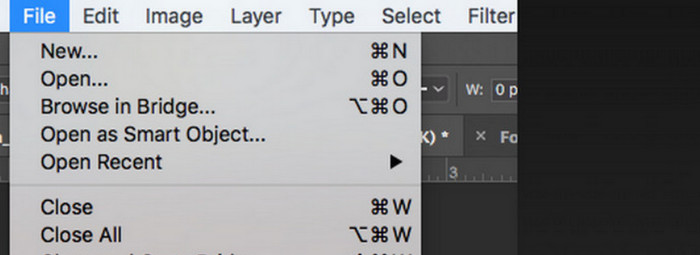
步驟 3: 圖片載入後,前往 Window(視窗),再點擊 Adjustments(調整)。在這裡你會看到一個黑白圖示,按下它。
步驟 4: 接著會開啟 Properties(內容) 面板。選擇 Color Slider(顏色滑桿),然後拖動滑桿以調整圖片的灰階色調。慢慢微調,直到你對照片的黑白效果感到滿意為止。
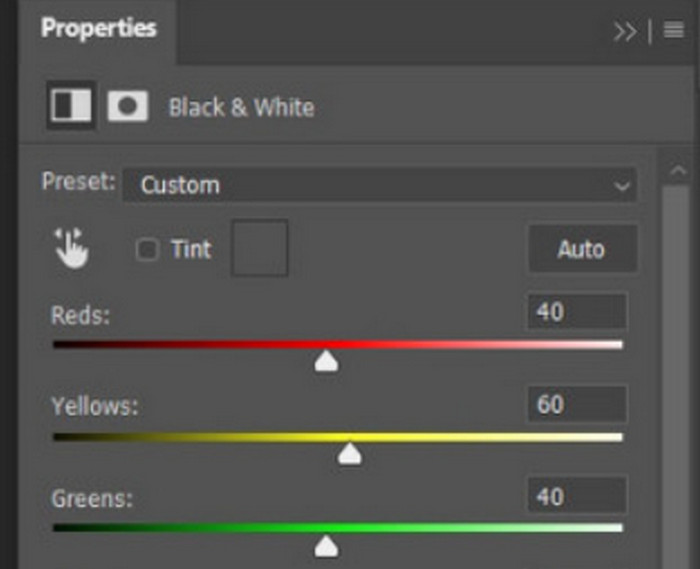
步驟 5: 接下來點選左上角的 File(檔案),在下拉選單中選擇 Save As(另存新檔),然後為轉換後的圖片選擇儲存路徑。
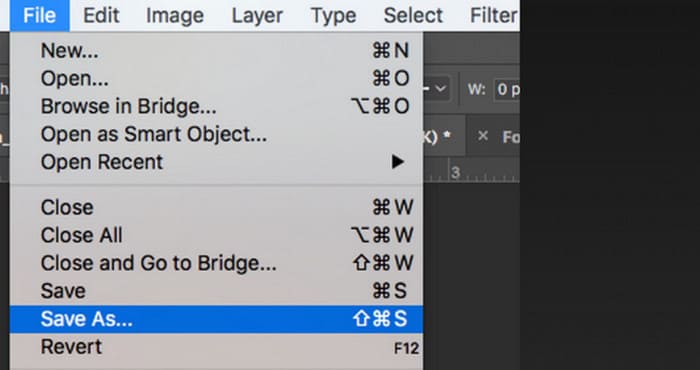
完成以上步驟後,我們就成功將影像變成了黑白色。但在操作過程中,使用者可能會發現Photoshop的介面確實比較複雜,有些按鈕不容易找到。儘管功能齊全,新手幾乎不會使用Photoshop;我們往往需要很長時間去學習和練習才能慢慢熟悉軟體的運作方式。如果您不想繞圈子,而想直接進入主題並立即開始將圖像變成黑白色,請繼續閱讀以找到更直接的解決方案。
二、線上將影像轉換為黑白
與有些麻煩的 Adobe Photoshop 相比,一些線上工具絕對是將彩色圖片轉換為黑白的更好選擇。它們不需要我們執行安裝和下載步驟,可以直接在瀏覽器中使用。這裡推薦大家試試Pixelied Photo Editor,它可以將色調調整為黑白,目前支援上傳JPG、PNG、SVG等格式的圖片。這個線上助手還有一些很好的圖像裁剪和編輯部分,可以幫助我們使我們的作品更加漂亮。
以下是使用 Pixelied Photo Editor 將照片變成黑白色的方法。
步驟 1: 前往 Pixelied Image to Black and White Converter 的官方網站。點擊 Upload Your Image(上傳圖片),加入你想轉換的檔案。
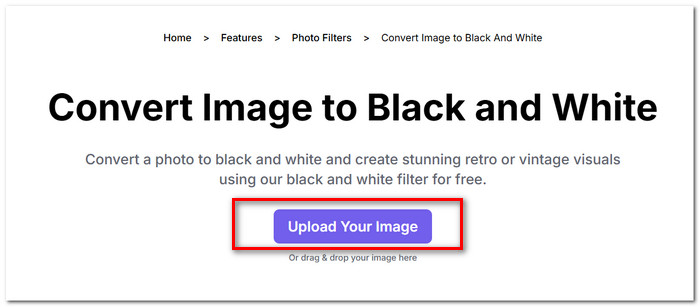
步驟 2: 圖片上傳並載入後,前往 Edit(編輯)中的 Image > Filters(濾鏡)。找到 Black and White(黑白) 濾鏡並套用到你的圖片上。
步驟 3: 完成轉換後,點擊 Download(下載),將圖片儲存到電腦中。
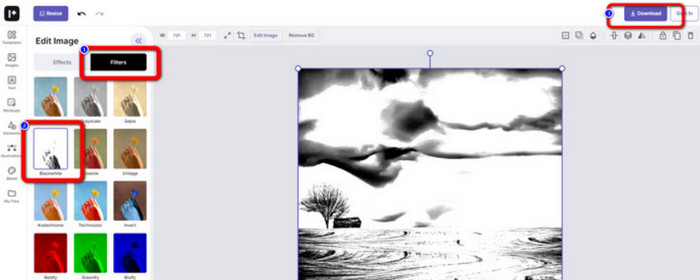
使用 Pixelied 將圖片轉換為黑白幾乎是即時完成,而且這個平台的介面比 Adobe Photoshop 簡潔得多。不過,若要完整套用黑白濾鏡,使用者必須付費升級帳號。這款照片色彩增強工具的免費版本僅提供 2GB 儲存空間。以上都是我們在使用時需要留意的地方。
第 3 部分。額外提示 - 將黑白影像恢復為彩色
Picwand 圖像著色器
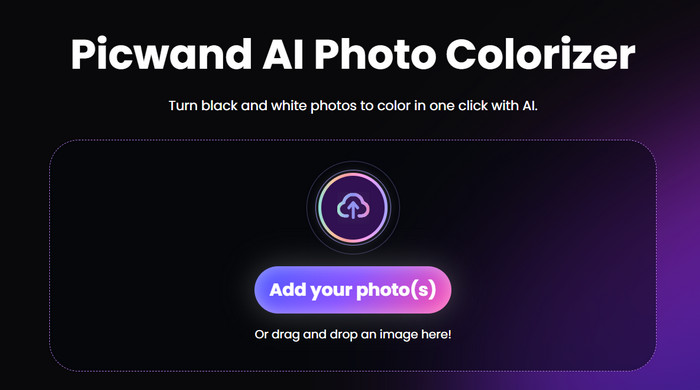
現在,我們已經清楚知道如何把圖片變成黑白。那麼,反過來說,有沒有工具可以修復原本是黑白的照片,讓照片中的人物重新恢復色彩呢?這就要提到一款線上照片編輯工具——Picwand Image Colorizer。在最新 AI 技術的加持下,它能利用先進演算法為老照片上色。我們不需要進行繁瑣又細膩的操作,只要一鍵,Picwand Image Colorizer 就能讓黑白照片重新變得色彩繽紛。
第 4 部分。將影像轉換為黑白的常見問題
影像可以直接從彩色轉換為黑白嗎?
當然。我們可以使用一些不需要手動調整顏色的智慧工具。這些工具將在原始影像上疊加黑白濾鏡。
哪些照片變成黑白效果最好?
具有清晰線條、形狀和邊框的影像轉換為黑白時效果最佳。黑白濾鏡可以讓人忽略影像中的雜質,只專注於最原始的線條。
黑白照片的最佳格式是什麼?
當然,最佳選擇是 JPG,因為它的相容性最高,且在檔案大小與畫質之間取得良好平衡,既不會讓檔案過大,又不會損失太多畫質。如果你的圖片屬於其他格式,也可以先使用工具將其轉換成JPG 檔案,再進行後續的編輯與處理。
結論
本文介紹了兩種將圖片變成黑白的方法,包括使用最經典的照片編輯軟體 Photoshop,以及嘗試線上編輯器。Adobe Photoshop 能以最細緻的方式完成這項工作,但訂閱費用高、介面和操作也較複雜。缺乏經驗的使用者則可以選擇 Pixelied,因為它的介面對新手更加友善。
-
 如何在 Photoshop 中更改顏色 | 2025 綜合指南
 想要透過學習如何在 Photoshop 中更改背景顏色來將您的創造力提升到一個新的水平嗎?本文包含您需要了解的所有內容。現在就讀吧!
-
 如何使用 GIMP 從影像中刪除背景
 開始使用 GIMP 以及從影像中刪除背景的逐步過程。立即探索使用 GIMP 創建透明圖像的有效方法!
-
 如何從圖像中刪除背景:輕鬆的工具
 發現六種工具可以輕鬆地從任何圖像中刪除背景。今天就告別複雜的編輯並輕鬆刪除圖像背景!
