


 視頻轉換大師
 屏幕錄影大師
 影片修復
影片修復
 安全下載
安全下載輕鬆壓縮電子郵件照片的 3 種方法 [指南]
電子郵件是發送帶有照片附件和其他所需文件的訊息的絕佳平台。然而,一些用戶在發送大文件照片時遇到困難,因為它們會導致上傳時間緩慢、傳送失敗或超出電子郵件提供者規定的附件大小限制。為了避免這些問題,在發送照片之前調整照片大小至關重要。
在這篇文章中,我們將透過 3 種方法一步步教你如何壓縮照片用於電子郵件,確保你的照片附件在不犧牲畫質的情況下,也能輕鬆傳送與接收。

第 1 部分:壓縮照片以發送電子郵件的好處
一般來說,壓縮照片有許多好處,包括電子郵件的使用。以下是調整電子郵件照片大小時您可以享受的好處:
• 由於圖片壓縮意味著將照片調整為較小尺寸,你就能比未壓縮的照片更輕鬆地在一封電子郵件中附上多張照片。
• 電子郵件服務提供者往往會對可傳送的附件大小設限。透過為電子郵件壓縮照片,你可以維持在這些限制之內,確保郵件能順利送達、不中斷。當你需要同時寄給多位收件人,或是除了照片還要附上其他類型檔案時,這尤其實用。
• 當照片被壓縮後,只代表它佔用的空間更小,讓你能更有效運用電子郵件的儲存額度。
• 龐大的電子郵件附件有時會被郵件伺服器標記,導致投遞失敗,或是郵件被歸類為垃圾信。將照片壓縮後再寄出,有助於避免這些問題,確保你的附件能順利送達收件人。
• 在某些情境下,使用者會用手機收信。已壓縮的照片相較於未壓縮的,更容易在行動裝置上下載與瀏覽。
第 2 部分:透過轉換影像格式來壓縮電子郵件照片
如果您想壓縮電子郵件中的照片,可以嘗試的第一種方法是使用影像轉換器工具。這樣,它會將您的影像轉換為您想要的格式,轉換過程也會將您的照片最佳化為理想且更易於管理的尺寸。
FVC Free Image Converter 是一款免費的圖片轉檔工具,可讓使用者將照片轉換成多種圖片檔案格式,如 JPG、PNG 和 GIF。因此,如果你要在電子郵件中傳送的圖片格式本身包含較多資料、導致檔案較大,就可以善用這個工具。此外,它非常適合在你想傳送多個大檔時使用,因為它一次可批次轉換多達 40 張圖片。以下是如何使用這個工具來壓縮照片以用於電子郵件:
步驟 1:首先,在瀏覽器中搜尋 FVC Free Image Converter,以便進入此線上工具。
步驟 2:接著,在 Convert to(轉換為)選項中,選擇你偏好的輸出檔案格式。之後,點擊 Add Images(新增圖片)按鈕,匯入你想要轉換的圖片。
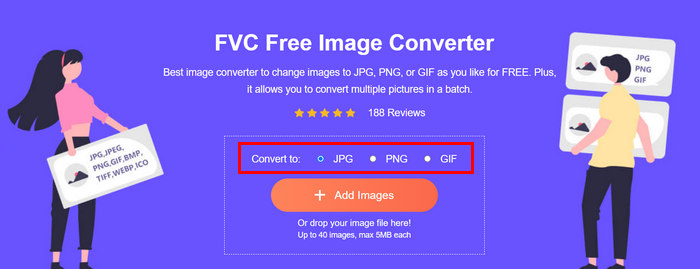
步驟 3:完成後,點擊 Download All(全部下載)按鈕。
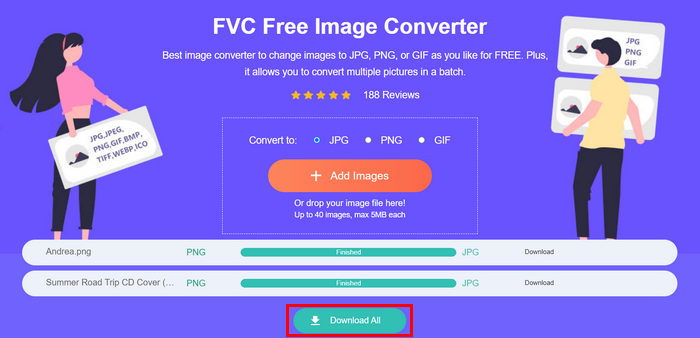 使用 FVC 免費影像轉換器工具,可以確保您轉換後的照片現在已被壓縮並縮小了尺寸,非常適合電子郵件使用。
 第 3 部分。
FVC Free Image Compressor 是一款免費的線上壓縮工具,可讓壓縮照片以用於電子郵件的流程更加簡化。使用者只需上傳或匯入圖片檔案,就能讓工具自動替你壓縮。如果你擔心畫質流失,這個工具運用了最佳化與進階壓縮演算法,確保在為電子郵件壓縮圖片時,依然能維持良好的影像品質。
此外,如果您必須批量壓縮圖像,此工具允許您一次同時壓縮 40 個圖像。最後,它支援各種流行的圖像格式,如 JPEG、PNG、SVG 和動畫 GIF。
步驟 1:在瀏覽器中開啟其官方網站。
步驟 2:之後,點擊 Upload Images(上傳圖片)以匯入你想為網頁壓縮的圖片。請注意,一旦你選好照片並點擊「開啟」,此工具就會自動開始壓縮你的照片。
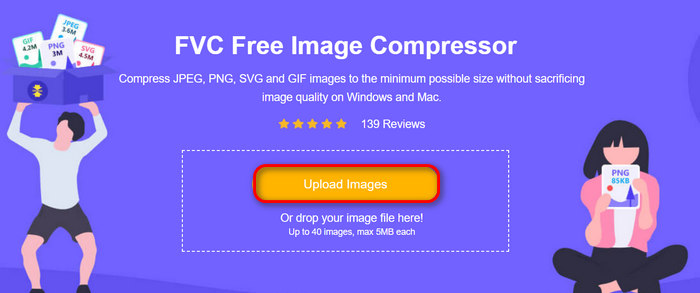
步驟 3:圖片壓縮完成後,你可以透過檢視壓縮後的新檔案大小來預覽結果。最後,點擊 Download All(全部下載)來儲存圖片。
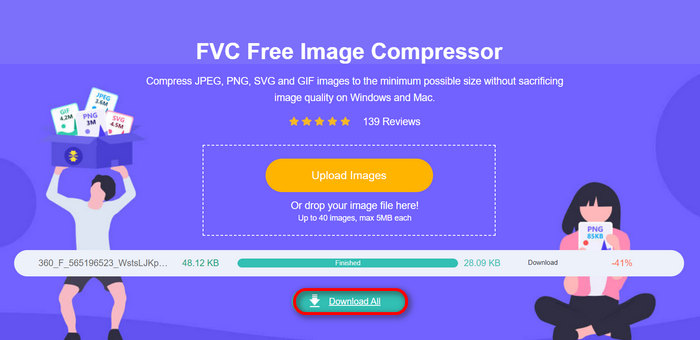
這種方法確實可以幫助您壓縮電子郵件中的照片,而無需忍受複雜的步驟和訂閱費用。此外,其用戶友好且直觀的介面使其成為任何級別用戶的理想工具。因此,如果您想優化照片以供電子郵件使用,請立即嘗試此方法。
第 4 部分:將電子郵件照片大小調整為指定尺寸
如果您想將電子郵件中的照片調整為指定大小,那麼您可以嘗試 IMGonline 工具。此圖像壓縮工具可讓您將圖像大小調整為您選擇的大小。操作方法如下:
步驟 1:在其網站上,點擊 Choose File(選擇檔案)按鈕,加入你想壓縮的照片。

步驟 2:接著,設定 JPEG 檔案壓縮的相關參數。依照你的需求,以 KB 或 MB 為單位輸入想要的檔案大小。

步驟 3:在 Size Reducing in Megapixel(以百萬畫素降低尺寸)選單中,選擇你希望壓縮照片的程度,或設定你想限制的壓縮範圍。
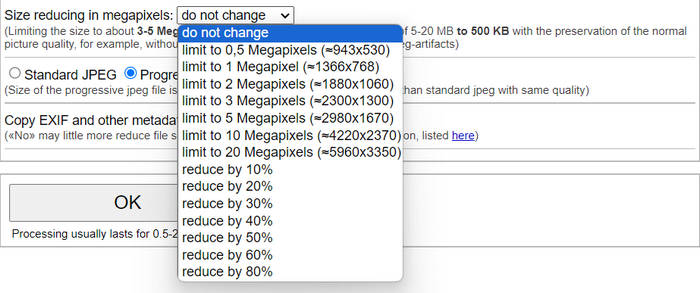
步驟 4:之後,在 Standard JPG(標準 JPG)或 Progressive JPG(漸進式 JPG)之間做出選擇。

步驟 5:完成後,點擊 OK(確定)按鈕即可。
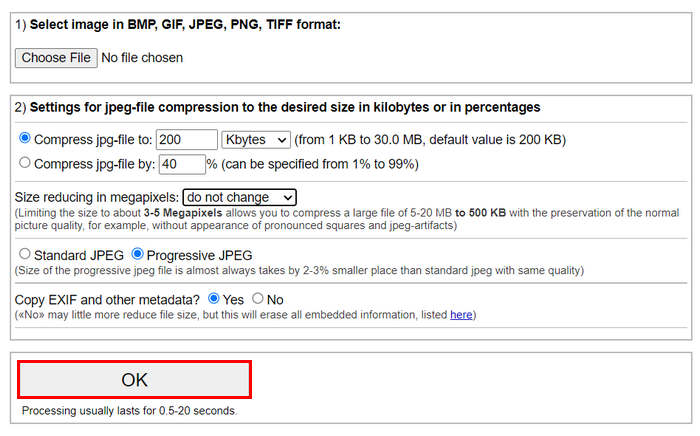
在選擇標準 JPG 和漸進式 JPG 時,請記住,漸進式 jpeg 檔案的大小始終比相同品質的標準 jpeg 小 2-3%。
第 5 部分:有關壓縮照片以發送電子郵件的常見問題解答
我應該將照片大小調整為多少以發送電子郵件?
當談到透過電子郵件發送照片的理想尺寸時,雖然沒有限制,但通常建議將照片尺寸調整為最大 1024x768 像素。此外,將影像大小保持在 1MB 以下有助於避免附件限制問題,並使收件者更輕鬆地下載和檢視影像。
如何壓縮 Gmail 的圖片?
壓縮用於 Gmail 的圖片可以透過多種方法完成。其中最簡單的方法之一,就是使用像 FVC 免費圖片壓縮工具這類的線上壓縮工具。你只需上傳圖片檔,它就會自動幫你壓縮。
什麼圖像類型最適合電子郵件?
最適合用於電子郵件的圖片格式是 JPEG 和 PNG。JPEG 因具備良好的壓縮率以及在檔案大小與畫質間取得不錯的平衡,而被廣泛使用,非常適合色彩豐富的照片及影像。PNG 則適用於需要透明背景,或包含文字、標誌、邊緣銳利的圖形等圖片,因為它能為這些元素維持較高的品質,不過檔案大小通常會比 JPEG 更大。
結論
了解如何為電子郵件壓縮照片非常重要,可以避免上傳時間過長、寄件失敗以及附件大小超出限制。透過遵循本文完整說明的這些方法,你就能確保照片附件更易於管理,並能快速傳送與接收。
還在等什麼?立即開始使用這 3 種簡單方法來最佳化您的電子郵件附件。
-
 過度壓縮的照片:以下是如何輕鬆修復它們
 想知道當影像過度壓縮時該怎麼辦?閱讀本文,了解為什麼會出現此圖像問題,並了解解決這些問題的兩種方法。
-
 將影像大小調整為 100KB:高效壓縮的 3 種最佳方法
 正在尋找一個工具來幫助您將圖像大小調整為 100KB?閱讀本文並了解 3 種如何將圖像縮小到所需檔案大小的方法。
-
 如何在 Word 中壓縮圖片 [Windows 和 Mac]
 想知道如何利用 Word 進行圖片壓縮?本指南將教您如何在 Word 中壓縮圖片以實現無縫壓縮。
