


 視頻轉換大師
 屏幕錄影大師
 影片修復
影片修復
 安全下載
安全下載使用這些快速簡便的方法提高圖像質量
你的圖片是否模糊或品質較差?你必須採取的最佳解決方案,就是提升圖片的品質。幸運的是,有許多工具可以幫助你改善圖片品質。然而,並非所有電腦上的應用程式或工具都具備最佳功能。因此,我們尋找了線上、離線以及 iPhone 上最受歡迎的照片增強工具。想了解如何提升圖片品質,請閱讀本篇文章。

第 1 部分。如何在線提高圖像質量
使用在線圖像增強器比在計算機上下載軟件應用程序更方便。使用在線工具的好處是您可以在您的網絡上自由訪問它。這部分將向您展示如何使用最令人驚嘆的在線照片增強器來提高圖像質量。
FVC Free Image Upscaler 是一款線上免費使用的圖片增強工具,深受許多人喜愛。這個線上應用程式可以將放大倍率設定為 2 倍、4 倍、6 倍和 8 倍。除此之外,它支援最常見的圖片格式,包括 PNG、JPG、JPEG 和 BMP。你也可以在各大網頁瀏覽器上使用它,包括 Google、Firefox 和 Safari。此外,你不必擔心資料安全問題,因為這款工具使用起來相當安全。
此外,它具有強大的人工智能技術,可以自動識別圖像的模糊部分。此外,FVC Free Image Upscaler 可以修復丟失的像素、顏色紋理和更多細節。如果您想使用這款出色的圖像升頻器,請按照下面的簡單指南進行操作。
如何使用 FVC Free Image Upscaler 在線提高圖像質量:
步驟 1: 開啟你的瀏覽器,在搜尋框輸入 FVC Free Image Upscaler。你也可以直接點擊提供的連結前往其主頁。
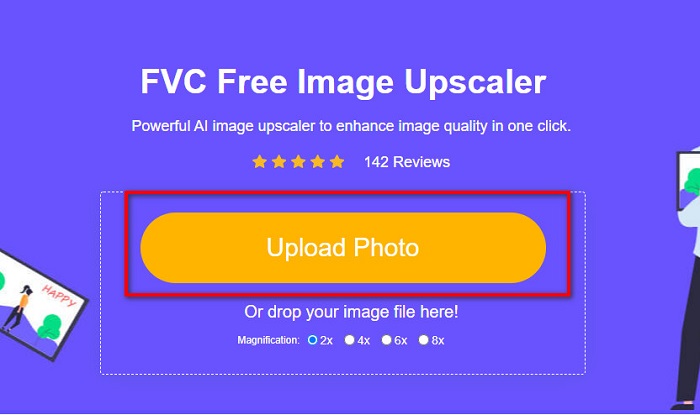
步驟 2: 接著,在主介面上按一下 Upload Photo(上傳照片)按鈕,上傳你想放大的圖片。等待圖片上傳完成後,再進行下一步。
步驟 3: 然後,選擇你想要的圖片放大倍率(Magnification)。你可以從 2x、4x、6x 和 8x 中進行選擇。
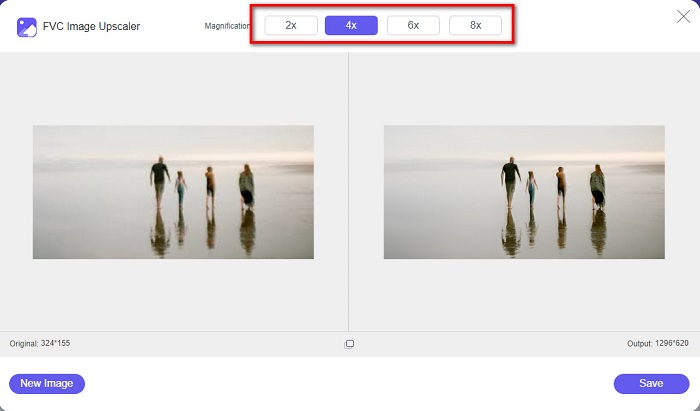
步驟 4: 你可以預覽處理後的圖片,如果滿意效果,請按一下 Save(儲存)按鈕,將放大後的圖片儲存到你的裝置中。
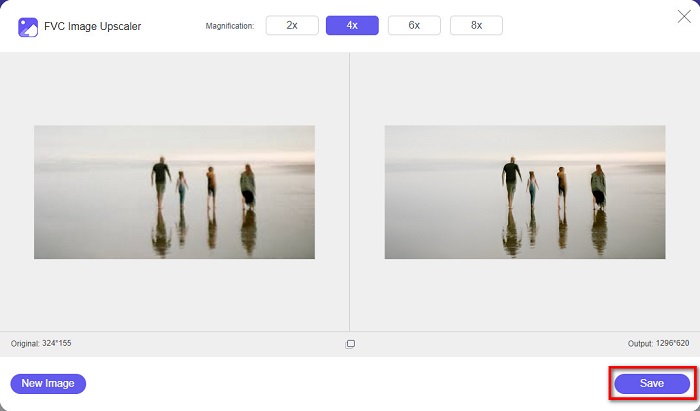
就是這樣!您現在可以在計算機上以高質量視圖查看您的圖像。
第 2 部分。 如何提高 Photoshop 中的圖像質量
如果您想使用專業工具來提高圖像質量,我們可以滿足您的需求。本部分將教您如何使用 Adobe Photoshop 提高照片質量。
Adobe Photoshop 是一款專業的編輯應用程式,你可以用來提升圖片的品質。Adobe Photoshop 具備許多圖片編輯工具供你使用。此外,許多專業人士也使用這款工具,因為它功能強大。而且,這款應用程式能產出高品質的成品,方便你分享到各大社群平台或網站。此外,Adobe Photoshop 是 Adobe 公司最出色的作品之一,你幾乎可以在所有主流平台上下載使用。透過這款編輯應用程式,你可以設計商標、橫幅、宣傳摺頁等更多作品。但許多使用者不知道,它其實也能用來增強圖片。不過,也有不少人覺得這款工具不易上手,因為它的操作介面較為複雜,而且下載與使用成本偏高。
如何在 Photoshop 中提高圖像質量的步驟:
步驟 1: 先在電腦上下載 Adobe Photoshop。依照安裝流程完成安裝,然後開啟程式。
步驟 2: 在主介面上前往 File > Open(檔案 > 開啟),選擇你想要改善的圖片。
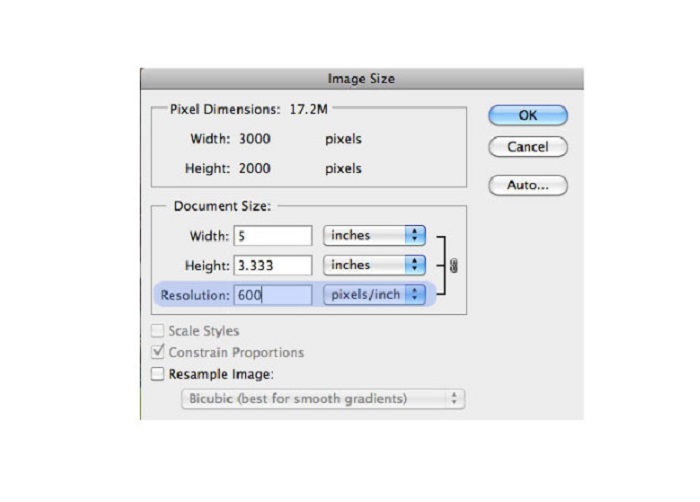
步驟 3: 接著前往 Image > Image Size(影像 > 影像大小)。隨後會跳出一個對話框,在其中取消勾選 Resample Image(重設影像像素)選項,這樣就只會變更圖片解析度。在解析度欄位中輸入你想要的解析度。
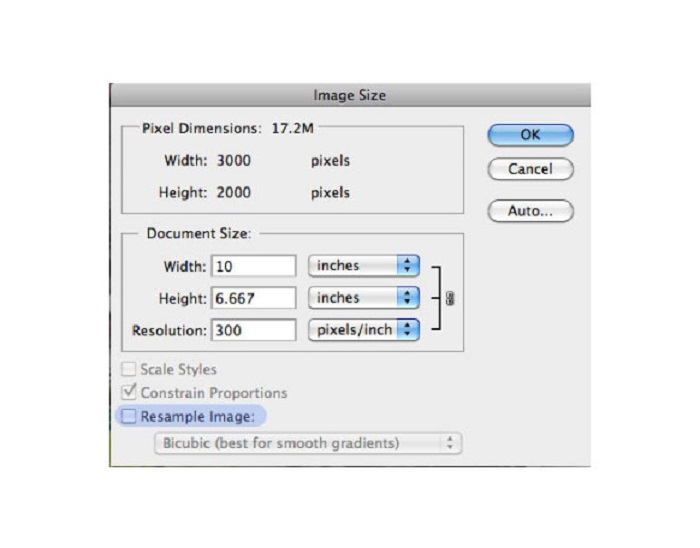
步驟 4: 當你變更解析度(Resolution)後,圖片的寬度與高度(Width and Height)也會隨之改變。然後按一下 OK 按鈕,儲存你對圖片所做的變更。透過此方法,你可以將低解析度圖片轉換為高解析度。
第 3 部分。 如何提高 iPhone 上照片的質量
如果您是 iPhone 用戶,某些應用程序可以增強您的低質量圖像。儘管 AppStore 上提供了許多照片增強器應用程序,但我們選擇了其中最著名的應用程序。閱讀本部分以了解如何提高 iPhone 上照片的質量。
Remini 是提升低畫質圖片的最佳應用程式之一。這款出色的應用程式介面簡潔,是一款相當友善的新手工具。此外,它還運用 AI 技術,能自動偵測圖片中模糊的部分。它同時也是一款安全性良好的應用程式,因此在使用時檔案是受到保護的。其缺點是,你必須觀看廣告才能預覽和下載結果;或者你也可以購買完整版,便能在無需觀看廣告的情況下下載結果。
如何使用 Remini 應用程序提高 iPhone 上的圖片質量:
步驟 1: 在 App Store 下載 Remini 應用程式。下載完成後,在手機上開啟該應用程式。
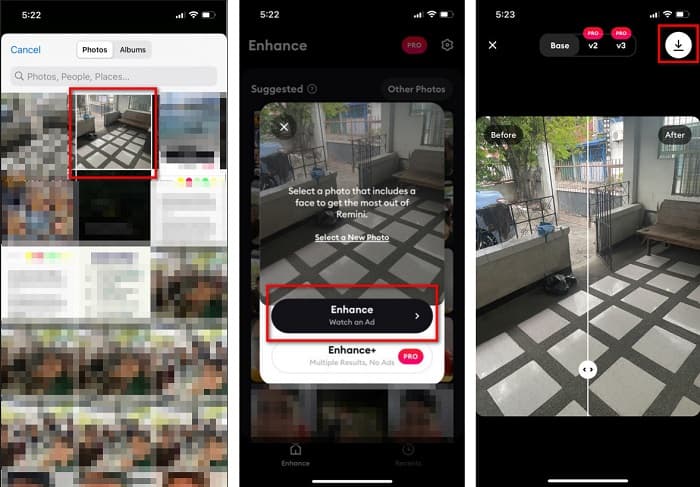
步驟 2: 然後,在主介面中選擇你想放大的圖片。
步驟 3: 接著,點選 Enhance(增強)按鈕,以提升圖片的品質。如果你已購買專業版,就不需要觀看廣告;若尚未購買,則會要求你先觀看廣告才能預覽與儲存結果。
步驟 4: 現在,你可以查看已改善的圖片。然後,點選畫面右上角的下載圖示(Download icon)。完成!透過這幾個簡單步驟,你就能提升圖片品質。
第 4 部分。有關如何提高照片質量的常見問題解答
有沒有可以提高安卓圖像質量的應用程序?
增強照片質量工具是提高圖像質量的最佳圖像質量增強器應用程序之一。使用圖片美化效果將使您的圖像具有專業的外觀。
如何提高 Lightroom 中的照片質量?
Adobe Lightroom 是另一款 Adobe 產品,你也可以用來提升圖片解析度。請閱讀下方的簡易步驟,學習如何在 Lightroom 中提升照片品質。1. 在電腦上下載 Adobe Lightroom。2. 然後在 Lightroom 中開啟你的圖片。3. 點選 Choose Photo > Enhance(選取照片 > 增強)。4. 接著勾選 Super Resolution(超高解析度),然後按下 Enhance(增強)。5. 之後你會看到 Lightroom 提升了圖片的解析度,並將其儲存為 DNG 檔。
如果您放大圖像,它會影響文件大小嗎?
更改打印分辨率不會改變圖像的像素數,也不會影響圖像的大小。
結論
現在要提升圖片品質其實很簡單,尤其是你已經有了這份操作指南。此外,電腦或 iPhone 上也有許多應用程式可以幫助你放大圖片。不過,如果你想使用能自動放大模糊圖片的免費圖片放大工具,現在就試試 FVC Free Image Upscaler 吧。
-
 使用最佳工具去除 B612 水印的 5 種方法
 想知道如何去除照片中的 B612 水印嗎?您可以使用這些出色的工具輕鬆地從圖像中刪除 B612 水印。
-
 如何刪除 WOW 滑塊水印的簡單步驟 [已解決]
 WOW Slider 是一款用於創建精彩幻燈片的應用程序。但是,它會在其輸出中嵌入水印。閱讀以下內容以了解如何刪除 WOW Slider 水印。
-
 如何去除防拍水印的簡單方法
 按照這些簡單的方法刪除防拍水印。使用這些神奇的水印去除劑輕鬆從圖像中去除防拍水印。
