


 視頻轉換大師
 屏幕錄影大師
 影片修復
影片修復Pixlr 如何去除照片浮水印的快速指南
在某些情況下,移除浮水印是必要且適當的。例如,如果水印位置不當、過大或過於分散注意力,或影響了專案的最終質量,則可能需要移除浮水印。尊重版權法至關重要,請務必僅移除您擁有所有權或已獲得編輯授權的內容上的浮水印。
如果你發現自己建立的浮水印顯示不正確,或是干擾了匯出的圖片,本篇文章將會引導你如何輕鬆地在 Pixlr 中移除浮水印。此外,千萬別錯過瞭解其最佳替代工具的機會,幫助你從照片中去除浮水印。我們就不再多說,馬上開始吧!

第一部分:什麼是 Pixlr?
Pixlr 是一款功能強大的線上影像編輯工具,於 2008 年推出。最初,它被設計成一個基於網路的用於基本照片編輯的平台,但由於其易於使用的介面和便捷的功能,使用戶能夠編輯照片,因此迅速流行起來。
主要特點:
• 使用 Pixlr 編輯器中的仿製圖章和修復畫筆去除浮水印。
• 大量編輯並移除多張圖片中的浮水印。
• 使用修圖工具移除浮水印後進行平滑編輯。
• 支援 JPG、PNG、WEBP 和 PDF 輸出格式。
• 可在 Windows 和 macOS 上無縫運作。
可以使用Pixlr去除浮水印嗎?
是的,你可以使用 Pixlr 來移除浮水印。這個平台提供多種工具,例如仿製圖章(Clone Stamp)、修復筆刷(Healing Brush)等,可以有效地擦除或移除圖片上的浮水印。而且這些功能操作簡單,因此 Pixlr 確實是去除照片浮水印的理想工具。
第二部分:如何在 Pixlr 中移除浮水印?
現在您已經了解了 Pixlr 是什麼以及它的功能,接下來我們將學習如何使用它來去除照片浮水印。這款工具非常容易使用,事實上,即使是新手也能輕鬆上手。以下是在 Pixlr 中移除浮水印的詳細步驟:
步驟 1:首先,在你的搜尋引擎上搜尋 Pixlr。
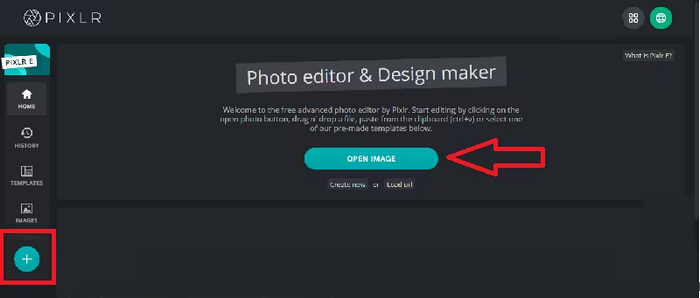
步驟 2:找到該工具後,點擊進入。接著,點選Open Image按鈕,上傳含有你需要移除之浮水印的照片。或者,你也可以直接點擊螢幕左側面板上的+按鈕來上傳照片。
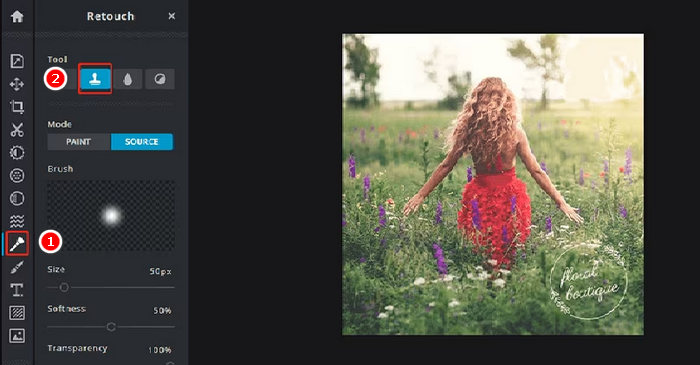
步驟 3:照片載入後,在螢幕左側點選Retouch按鈕,畫面會跳出一個面板。之後,在工具選單中選擇Clone Stamp。
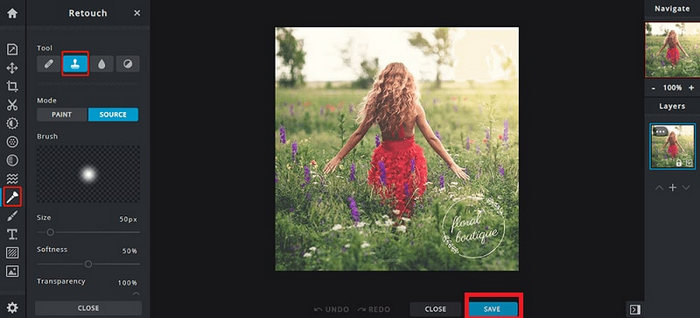
步驟 4:現在,按住滑鼠並將游標移到你想去除的浮水印上。完成在 Pixlr 中移除浮水印後,點選Save按鈕。
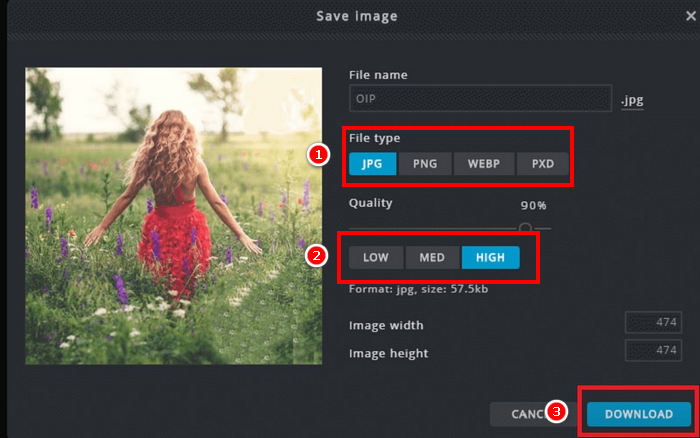
步驟 5:在下載圖片檔案前,先選擇解析度與圖片格式。完成後,點選Download按鈕。
在 Pixlr 中移除浮水印時,請務必放大影像。仔細處理細節有助於更自然地融合編輯區域,避免最終影像出現粗糙或不均勻的色塊。
第三部分:免費去除照片浮水印的方法
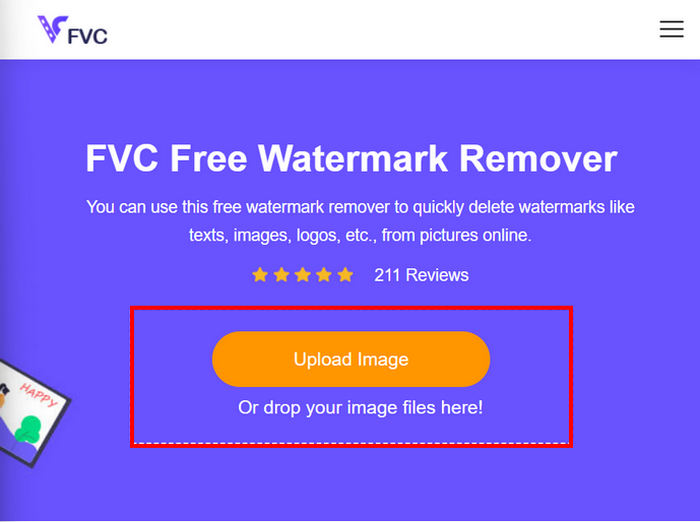
同時,如果你正在尋找除了使用 Pixlr 從照片中移除浮水印以外的免費替代方案,你可以嘗試FVC Free Watermark Remover。這是一款線上工具,基本上可讓使用者從照片中移除浮水印。FVC 支援常見的圖片格式,例如 JPG/JPEG、PNG、BMP 等,讓使用者在處理各種想要去除浮水印的圖片時更具彈性。此外,它提供多種彈性的選取與刪除浮水印方式:你可以繪製多邊形輪廓、使用套索工具,或用筆刷在浮水印區域上塗抹。如此一來,就能依照浮水印的形狀與大小來調整選取範圍。
主要特點:
• 從照片中移除文字、圖像和標誌浮水印。
• 支援 JPG、JPEG、PNG 和 BMP 格式。
• 移除浮水印後保持原始影像品質。
• 使用畫筆、套索或多邊形輪廓選擇浮水印區域。
• 在移除浮水印之前或之後裁剪影像。
• 使用橡皮擦工具擦除並重新選擇區域。
• 相容於 Windows 和 macOS。
以下是在 FVC 中移除照片浮水印的詳細步驟說明:
步驟 1。首先,你需要進入該工具的官方網站。因此,在搜尋引擎中搜尋「FVC Free Watermark Remover」。
步驟 2:找到網站後,點選Upload Image按鈕,匯入含有你需要移除之浮水印的照片。
步驟 3:接著,在上方選單中選擇你偏好的工具來移除照片上的浮水印。本示例中,我們使用Brush工具,將游標移到浮水印上進行塗抹。當浮水印完全被覆蓋後,點選上方的 Remove 按鈕,接著點選Save下載照片。
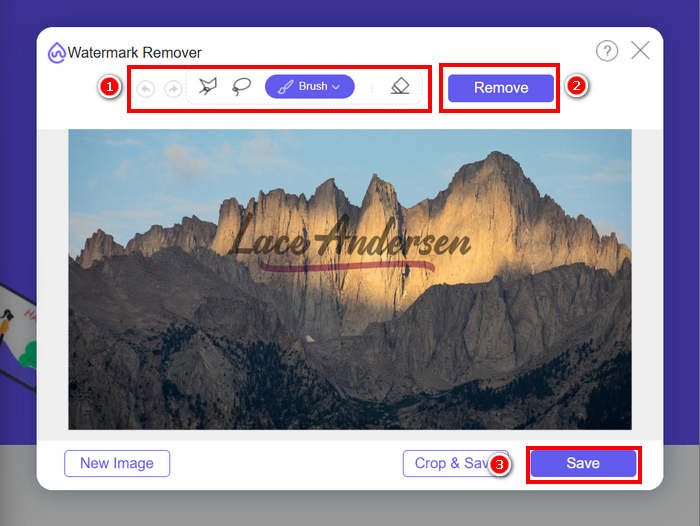
移除水印時,請選擇最符合水印形狀的工具。對於小型或不規則形狀的水印,請使用畫筆工具;對於曲線或自由形狀的水印,請使用套索工具;對於直線或棱角分明的水印,請使用多邊形輪廓工具。選擇合適的工具有助於獲得更乾淨、更精確的去除效果。
第四部分:關於 Pixlr 去除浮水印的常見問題
Pixlr水印去除工具安全嗎?
是的。 Pixlr 可以安全地用於去除照片浮水印。它是一款值得信賴的線上圖像編輯器,使用安全伺服器來保護用戶資料。只需確保您造訪的是 Pixlr 官方網站,以避免潛在風險即可。
如何在Pixlr中將背景設定為透明?
若要在 Pixlr 中建立透明背景,請在 Pixlr 編輯器中選擇“建立新圖片”,輸入檔案名,勾選“透明”複選框,然後按一下“確定”。接下來,點擊頂部選單中的“圖層”,然後選擇“以圖層形式開啟圖像”以上傳要編輯的圖像。使用工具列中的魔棒工具,然後按一下要移除的背景區域。如果需要,可以調整“容差”設定以微調選取範圍。按 Delete 鍵移除背景。如果仍有殘留背景,請使用橡皮擦工具手動擦除。完成後,按一下“檔案”,然後按一下“儲存”。輸入檔名,選擇 PNG 作為檔案格式以保留透明度,然後按一下「確定」。選擇影像的儲存位置,然後按一下「儲存」。
Pixlr浮水印去除工具不再免費了嗎?
Pixlr 提供免費版和高級版。免費使用者可以使用仿製圖章和修復畫筆等基本水印去除工具。但是,一些高級功能和更高品質的匯出選項可能需要 Pixlr 高級版訂閱。
結論
只要使用合適的工具,從照片中移除浮水印其實可以既簡單又有效率。既然你已經了解如何使用 Pixlr 去除浮水印,就能充分享受其操作介面友善的優點,輕鬆完成浮水印移除。的確,Pixlr 為新手與有經驗的使用者都提供了易於上手的選項。此外,如果你正在尋找免費替代方案,FVC Free Watermark Remover 也提供彈性的工具與多種圖片格式支援,讓編輯流程更順暢。請務必時刻尊重照片的著作與所有權,在編輯時遵守相關規範,並選擇最符合你需求的工具,以獲得乾淨、專業的成品效果。
-
 如何在線去除 DeviantArt 水印 [5 種方法]
 想了解如何去除圖像上的 DeviantArt 水印?使用最出色的 DeviantArt 水印去除器,您可以輕鬆去除那些討厭的水印。
-
 如何去除防拍水印的簡單方法
 按照這些簡單的方法刪除防拍水印。使用這些神奇的水印去除劑輕鬆從圖像中去除防拍水印。
-
 使用最佳工具去除 B612 水印的 5 種方法
 想知道如何去除照片中的 B612 水印嗎?您可以使用這些出色的工具輕鬆地從圖像中刪除 B612 水印。
