


 視頻轉換大師
 屏幕錄影大師
 影片修復
影片修復
 安全下載
安全下載如何去除 Pond5 水印的最佳方法 [簡單步驟]
Pond5 是一個在線平台,包含各種視頻剪輯、配樂、音效、3D 模型等。Pond5 是一家總部位於紐約的公司,是一個提供高質量視頻和音頻文件的知名網站。除此之外,它還是一項素材服務,內容創作者可以上傳他們的視頻、音樂和插圖並在線銷售。因此,如果您正在在線搜索高質量的素材,那麼 Pond5 就是您要尋找的。但是,該平台的許多初學者用戶都是從使用免費預覽版開始的。
免費預覽會在你的影片、音訊或圖片上嵌入浮水印,這可能會破壞成品的觀感。本文將教你如何在圖片上移除 Pond5 浮水印。

第 1 部分。 為什麼 Pond5 會在圖像上放置水印
水印是放置在視頻、音頻或圖像中的徽標、文本或圖像。水印疊加,防止侵權,防止輸出被複製。許多向用戶提供付費媒體的公司允許他們免費預覽,但會嵌入水印。 Pond5就是這樣一家公司。 Pond5的一種策略是引導消費者購買他們的產品的無水印版本。
此外,Pond5 在他們的產品上放置了水印,以防止其他沒有使用他們的產品的用戶下載它並將產品當作自己的產品。但是,如果您有一個 Pond5 圖像並且想要刪除圖像上那個討厭的水印,那麼請繼續閱讀這篇文章。
第 2 部分。 如何從圖像中在線刪除 Pond5 水印
許多人正在尋找一種從他們的圖像中刪除 Pond5 水印的方法。但其他人不知道的是,Pond5的聲音片段或音效中還包含一個水印(聲音水印)。所以,我們將首先教你如何去除Pond5聲音水印。
很少有軟件應用程序可以從您的音頻或下載的音效中刪除聲音水印。許多人使用 Adobe Audition 去除 Pond5 聲音水印。要去除聲音水印,您需要將 MP3 文件導入到您的項目中。
以下是使用 Adobe Audition 刪除聲音水印的步驟:
步驟1。 在鍵盤上按下 Ctrl+A 以選取音訊檔。
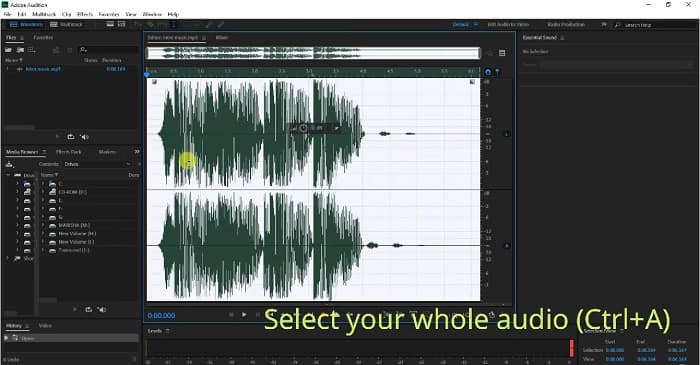
步驟2。 然後,點擊 Effects(效果) 按鈕,接著前往 Stereo Imagery>Center Channel Extractor(立體聲影像>中央聲道擷取器)。
步驟3。 會跳出一個新標籤頁,你可以在其中看到 Presets(預設) 選項。
步驟4。 接著,選擇 Vocal Remover(人聲移除) 選項,以移除語音浮水印。
步驟5。 在點擊 Apply(套用)選項 之前,你可以先試聽音訊,確保音訊浮水印已被移除。
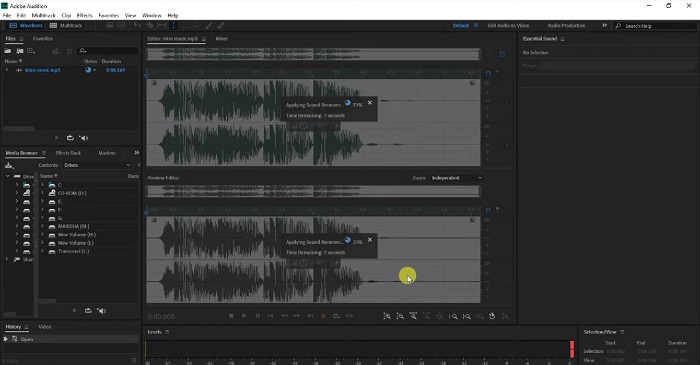
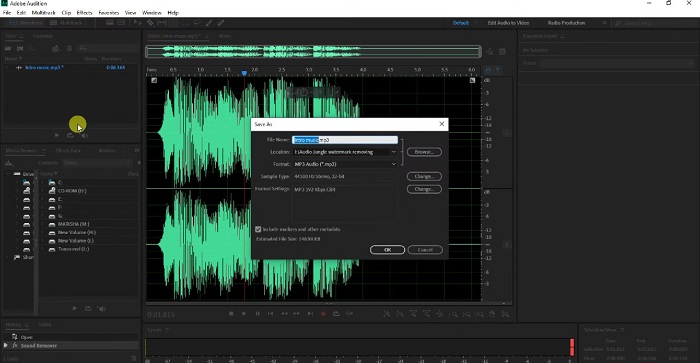
步驟6。 最後,前往 File>Save as(檔案>另存新檔) 來儲存你的檔案,輸入 檔案 名稱並選擇檔案儲存位置。
第 3 部分。從圖像中在線刪除 Pond5 水印的 3 種方法
在這一部分中,您將了解使用終極在線工具去除圖像上的 Pond5 水印的 Pond5 水印去除過程。
FVC免費水印去除
FVC Free Watermark Remover 是最優秀、也最知名的線上浮水印去除工具之一,能讓你輕鬆移除圖片上的任何浮水印(標誌、圖像或文字)。此外,它支援最常見的圖片格式,如 PNG、JPEG、JPG、BMP 等。它也相當適合初學者,因為介面非常直覺易用。你還可以選擇各種選取工具來去除圖片上的浮水印。更進一步來說,它提供多種可用來移除浮水印的選取工具,例如多邊形工具、套索工具和筆刷工具。所以,如果你有興趣使用這款工具,請依照下方的簡易教學操作。
如何去除圖片上的 Pond5 水印的步驟:
步驟1。 在瀏覽器中搜尋 FVC Free Watermark Remover,或直接點擊此連結前往其網頁。
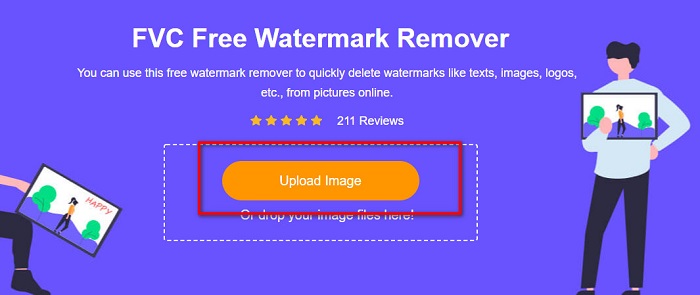
步驟2。 在主介面上,點擊 Upload Image(上傳圖片) 按鈕,上傳你想移除浮水印的 Pond5 圖片。
步驟3。 上傳圖片後,選擇你想使用的選取工具。這裡我們將使用 Polygonal Tool(多邊形工具)。
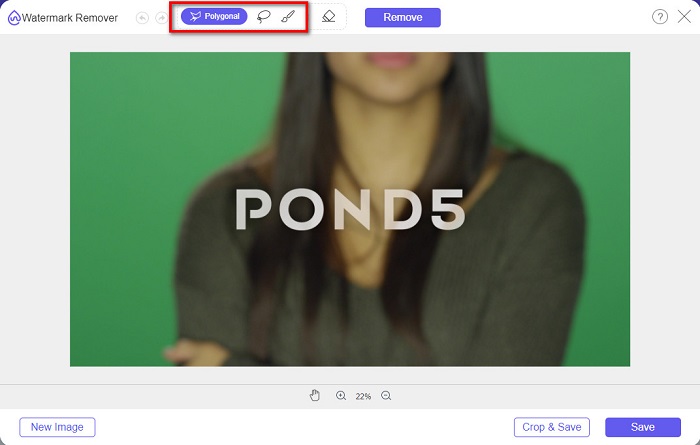
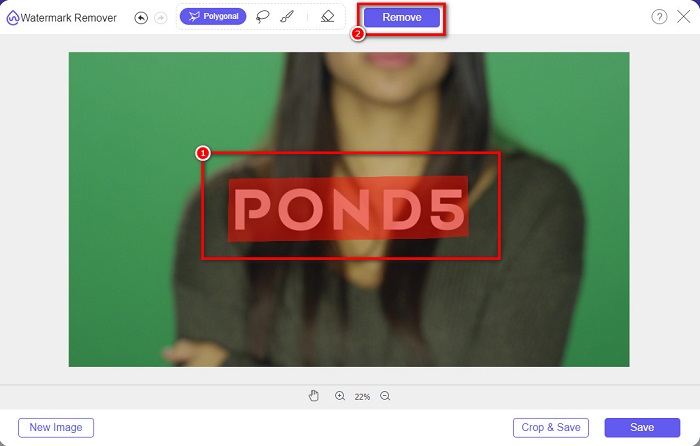
步驟4。 接著,在圖片上沿著浮水印描出範圍。然後,點擊 Remove(移除) 按鈕來消除浮水印。
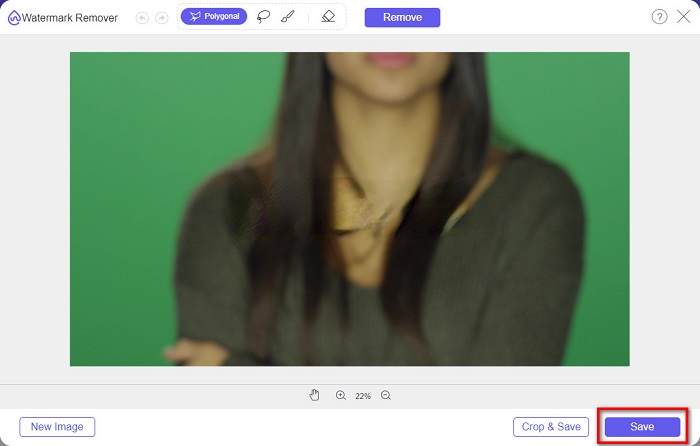
步驟5。 最後,點擊 Save(儲存) 按鈕,把圖片下載到你的裝置。此外,你也可以使用這個線上工具輕鬆移除 Deviantart 浮水印。
水印去除器.io
Watermark Remover.io 是一款線上浮水印去除工具,可讓你移除圖片上的任何浮水印。如果你的圖片上有像 Pond5 這樣的文字浮水印,這個工具能幫你去除惱人的浮水印。它介面簡單易懂,並支援多種常見圖片格式,例如 PNG、JEPG、JPG、WEBP 等。不過,它必須連上網路使用,因此在上傳或儲存圖片時,可能會因網路狀況而出現問題。
步驟1。 開啟瀏覽器,在搜尋欄輸入 Watermark Remover.io。在軟體主頁面上,點擊「Upload Image(上傳圖片)」按鈕,上傳你的 Pond5 圖片。
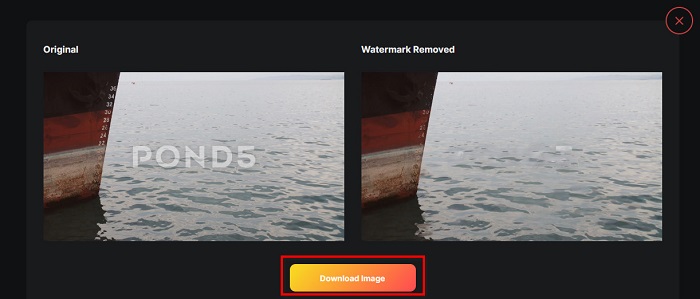
步驟2。 上傳圖片後,Watermark Remover.io 會自動幫你移除圖片上的 Pond5 浮水印。
步驟3。 點擊 Download Image(下載圖片) 按鈕,將圖片儲存到你的裝置。
imgkits
imgkits 同樣是一款線上工具,你可以用它來移除 Pond5 圖片上的文字浮水印。這款浮水印去除工具的亮點在於,你可以自由選擇用來圈選浮水印的工具。此外,由於介面操作簡單,它也是一款相當容易上手的工具。缺點是,它在移除浮水印後,常會在原位置留下模糊痕跡。
如何使用 imgkits 去除 Pond5 水印:
步驟1。 在瀏覽器中搜尋 imgkits,然後進入其網站。接著,在主介面上點擊 Upload Image(上傳圖片) 以上傳你的圖片。
步驟2。 然後,在介面左側選擇你要使用的選取工具,並沿著圖片上的 Pond5 浮水印 描出範圍。
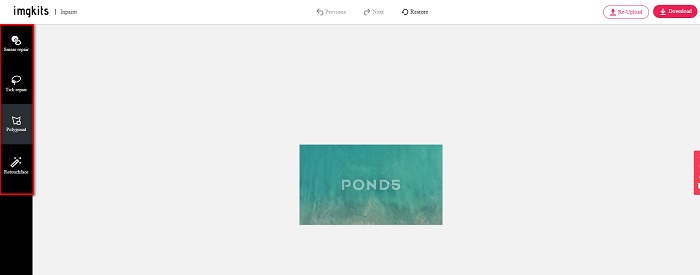
步驟3。 最後,點擊 Download(下載) 按鈕來儲存你的圖片。點此瞭解如何移除 Lomotif 浮水印。
第 4 部分。有關刪除 Envato Pond5 水印的常見問題解答
去除水印會在水印區域留下模糊嗎?
並不是所有工具在移除浮水印後都會留下模糊痕跡。如果你想確保移除浮水印後不會有模糊痕跡,請使用 FVC Free Watermark Remover。
After Effects 可以去除水印嗎?
會。Adobe After Effects 是最受歡迎的剪輯軟體之一,能讓你移除圖片或影片上的任何浮水印。先追蹤你想移除的浮水印,在浮水印上放置追蹤標記。然後前往 Layer(圖層) 面板並建立 Null objects(空物件)。接著點擊 Save Frame(儲存影格)。匯入已編輯好的圖片並調整 Opacity(不透明度)。最後使用 Pick-up(連結)whip 完成整個流程。
去除水印會影響視頻的文件大小嗎?
移除影片上的浮水印,不一定會影響影片的檔案大小。不過,有些浮水印去除工具會影響影片品質。因此,請使用 FVC Video Converter Ultimate 來移除影片中的浮水印,以避免影響畫質。
結論
只要使用合適的工具,要從圖片上移除 Pond5 浮水印並不困難。以上介紹的所有線上工具,都能幫助你快速移除圖片上的 Pond5 浮水印。不過,如果你偏好安全又好上手的線上工具,請試試 FVC Free Watermark Remover。
-
 如何使用水印去除劑從照片中去除遊客
 如何從照片中刪除遊客?如果您想了解如何從照片中刪除不需要的東西,這些工具將為您提供幫助。閱讀本文以了解更多信息。
-
 123rf 水印去除器 – 徹底審查終極工具
 如果您想知道最出色的 123rf 水印去除器是什麼,請仔細閱讀本文。本文對這些工具進行了深入的回顧。
-
 從畢業照片中去除水印的簡單方法
 想知道去除畢業照水印的最佳方法嗎?通過閱讀本文,您將能夠了解如何輕鬆去除畢業照片上的水印。
