


 視頻轉換大師
 屏幕錄影大師
 影片修復
影片修復
 安全下載
安全下載如何輕鬆地將影像大小調整為 100KB [3 種快速方法]
毫不奇怪,當今大多數圖像都包含大檔案。這源自於先進的技術進步,相機系統利用重型功能來實現盡可能高的解析度。文件大小巨大的圖片檔案在使用時會造成不便,尤其是上傳和發送,甚至是網站優化。那麼,如果您只需要照片的特定檔案大小限制呢?
別擔心,我們幫你搞定!有多種解決方案可以幫助你縮小這些圖片。在這篇文章中,你將學到 3 種簡單的方法,輕鬆將圖片縮小到 100KB,達到理想的檔案大小,方便你在各種用途上使用。

第 1 部分:在不損失品質的情況下將影像大小調整為 100KB 的快速簡單方法
其中一款能在不明顯降低畫質的情況下壓縮圖片的完美工具,就是FVC 免費圖片壓縮器。這款快速且操作簡單的工具,專為將圖片縮小到 100KB 而設計,同時盡量不犧牲品質。它擅長壓縮多種圖片格式,如 JPEG、PNG、SVG 和 GIF,相較於其他軟體能提供更出色的壓縮效果。此外,它完全免費,並且可以在各種裝置上透過線上方式輕鬆使用。同時,如果你要壓縮一大批圖片,這個工具非常適合你,因為它能同時處理多張圖片壓縮,並將它們打包成一個 ZIP 檔供你一次下載。
以下是如何使用 FVC 免費影像壓縮器將圖片大小調整為 100KB
步驟 1。首先,你需要前往他們的官方網站。
步驟 2。之後,點擊Upload Images以上傳你想要壓縮到 100KB 的照片。系統將自動開始壓縮你的照片。
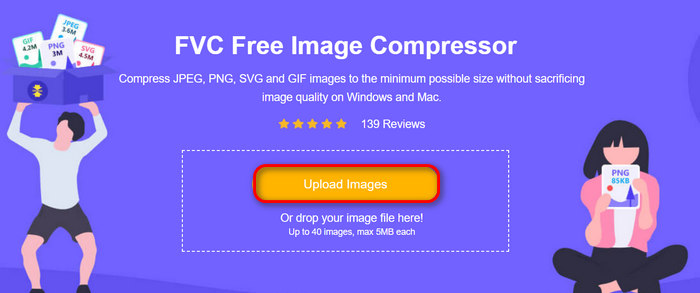
步驟 3。壓縮完成後,你可以預覽圖片壓縮後的新大小。最後,點擊Download All以下載並儲存你的圖片。
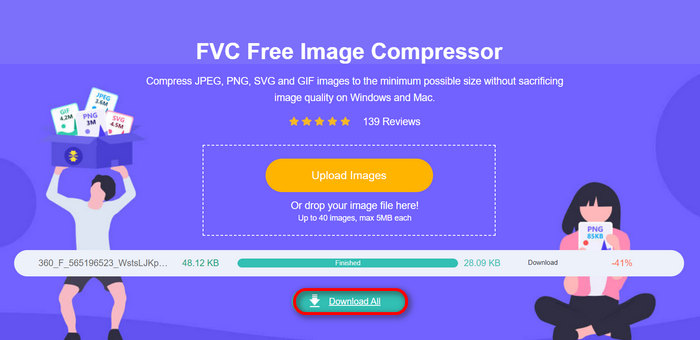
FVC 免費影像壓縮器的最大優點是其簡單且非常直覺的介面。使用者只需要利用上傳步驟,一切都會很容易處理,因為壓縮是自動完成的。
優點
- 自動壓縮照片。
- 擁有最好的優化和壓縮演算法。
- 廣泛支援各種圖像檔案格式。
- 它可以輕鬆地在線訪問。
- 支援最多40張影像批量壓縮。
- 簡單且非常直覺的使用者介面。
缺點
- 沒有針對其他壓縮需求的客製化功能。
第 2 部分. 將影像精確壓縮至 100KB
如果您想將影像精確壓縮到 100KB,您可以使用的最佳工具是 Photoshop。該編輯工具因其全面的功能而聞名,這些功能對於增強和修改圖像非常有價值。使用此工具,您只需調整影像尺寸功能中的必要設定即可精確縮小影像的尺寸。
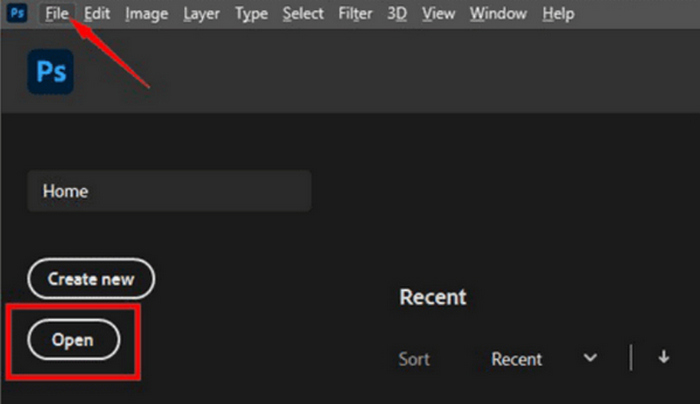
步驟 1。在 Photoshop 中開啟你的圖片,可以點擊Open,或前往File 分頁並選擇你想要壓縮到 100KB 的圖片。
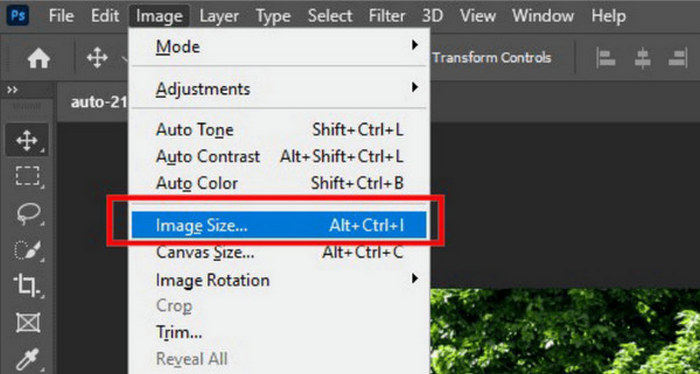
步驟 2。接著,前往Image分頁並選擇Image Size。
步驟 3:在 Image Size(影像大小)對話框中,從下拉式選單中選擇 Pixels(像素)。若要設定具體尺寸,在寬度與高度的文字框中輸入數值,然後點選 OK 以重新調整圖片大小。
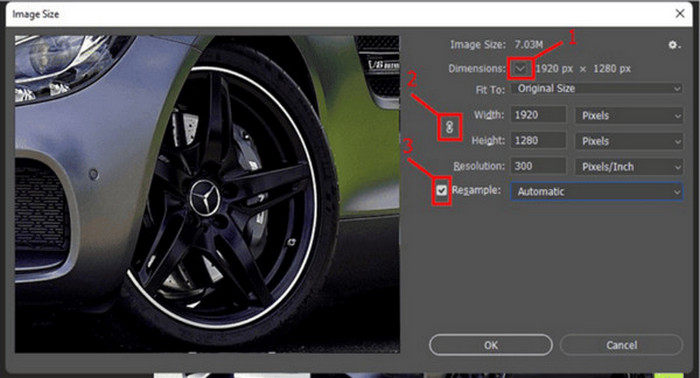
步驟 4。最後,在File分頁下點擊Save As按鈕來儲存。
注意: 在儲存 PSD 檔之前,請先將其另存為圖片格式。
步驟 1。在 Photoshop 中開啟你的圖片,可以點擊Open,或前往File並選擇你想要壓縮到 100KB 的圖片。
步驟 2。接著,前往Image分頁並選擇Image Size。
步驟 3:在 Image Size(影像大小)對話框中,從下拉式選單中選擇 Inches(英吋)。若要設定具體尺寸,在寬度與高度欄位輸入數值,然後點選 OK 以重新調整圖片大小。
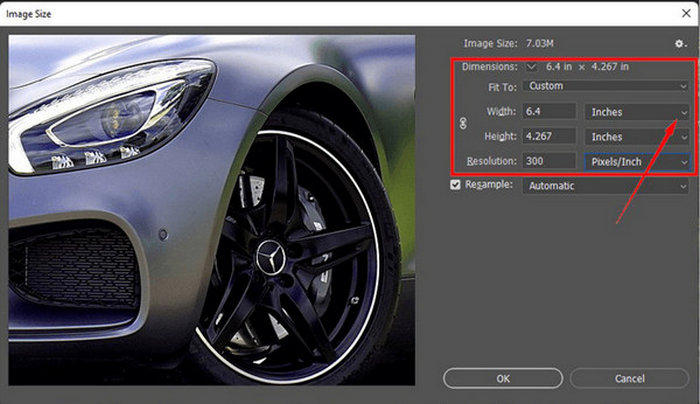
步驟四:最後,在 File(檔案)分頁下點擊 Save As(另存新檔)按鈕,儲存最終圖片。
使用 Photoshop,可以精確地將影像大小調整為 100KB。您只需要謹慎調整像素和英吋的大小。但是,使用者在使用時必須注意一些線性曲線,尤其是對於剛接觸它的使用者。
優點
- 精確控制調整影像大小。
- 更多關於壓縮照片的自訂選項。
缺點
- 介面複雜,不適合初學者。
- 需要訂閱才能享受其所有功能。
第 3 部分. 將影像大小調整為 100KB,無大小限制
如果您希望將影像大小調整為 100KB 而沒有大小限制,則可以使用此影像縮放工具。 GIMP 是一款免費的開源圖像編輯器,具有廣泛的功能,包括無大小限制地調整圖像大小。
以下是使用 GIMP 將圖片縮小到 100KB 的方法:
步驟 1。首先前往File 分頁並點擊Open,開啟你想要壓縮到 100KB 的圖片。
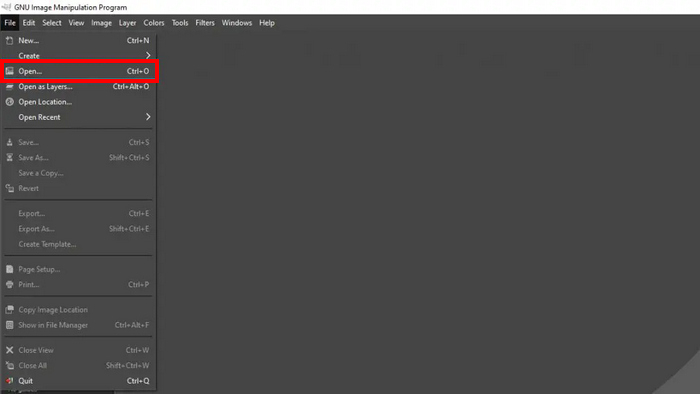
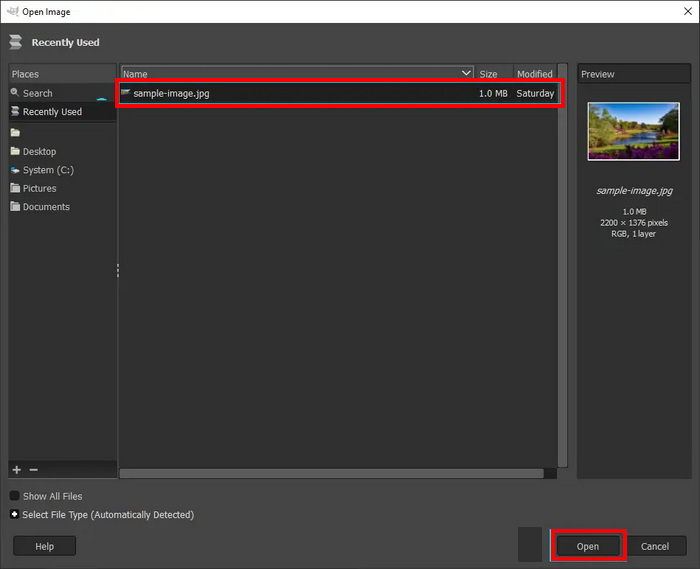
步驟 2。在來源資料夾中選擇你要壓縮的圖片,然後點擊下方的Open按鈕。
步驟 3。接著前往Image 分頁並選擇Scale Image。
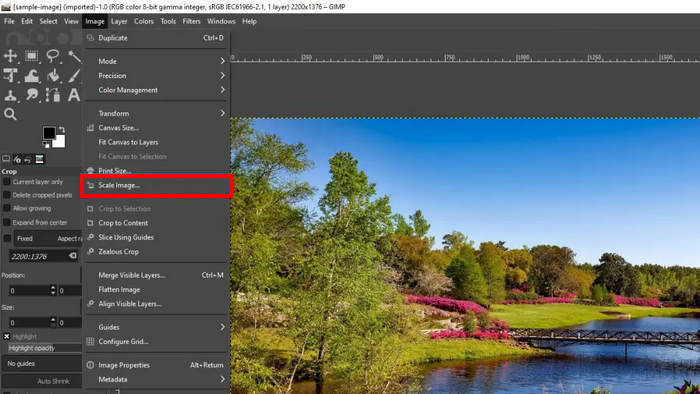
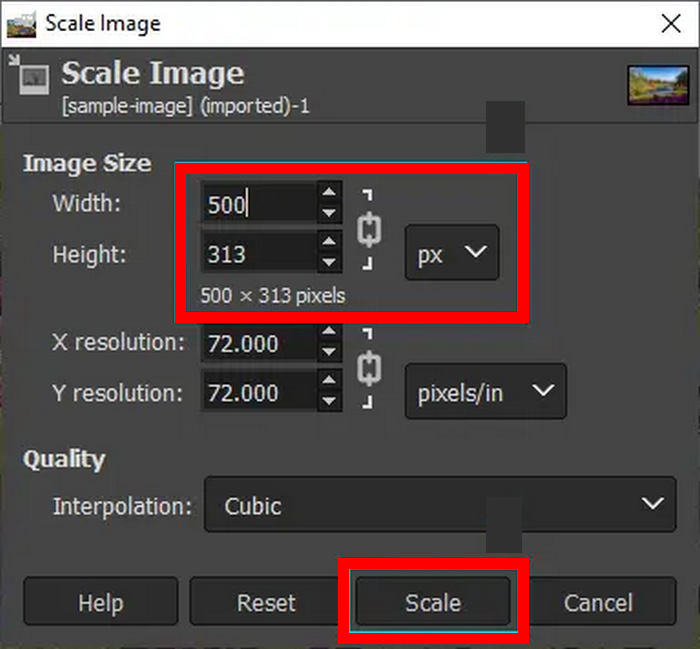
步驟 4。在這裡,你可以透過更改像素的寬度與高度來調整圖片,讓檔案大小約為 100KB。設定完成後,點擊Scale按鈕。
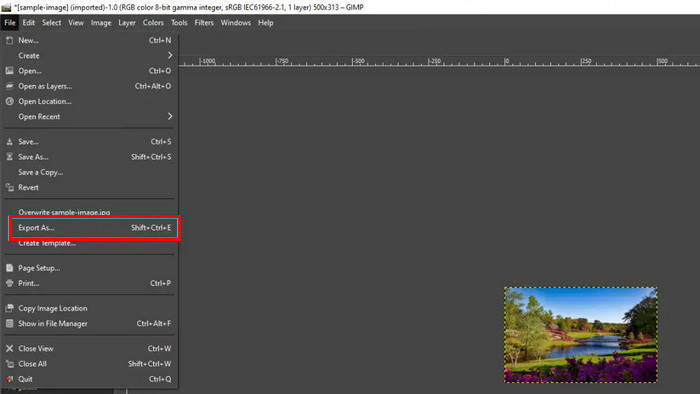
步驟 5。若要儲存新的縮圖,請前往File 分頁並點擊Export As,將其匯出為 JPG。
使用 GIMP,您可以在 Photoshop 上將影像大小調整為 100KB 時享受幾乎相同的功能。但問題是,有了這個工具,你就可以免費做到這一點。但話又說回來,使用者在使用這個工具時應該注意學習曲線。
優點
- 精確控制影像大小調整,就像 Photoshop 一樣。
- 免費和開源。
缺點
- 此介面不方便使用者使用。
- 批次模式可以透過命令列完成。
第 4 部分. 有關將圖像大小調整為 100KB 的常見問題解答
如何在畫圖軟體中將照片大小縮小到100KB?
在 Paint 中將影像大小調整為 100KB 需要幾個簡單的步驟。在「畫圖」中開啟圖像,然後按一下工具列中的調整大小按鈕。選擇百分比選項或輸入特定像素尺寸來縮小影像尺寸。調整大小後,透過選擇另存為並從檔案類型選項中選擇 JPEG,以壓縮格式(例如 JPEG)儲存影像。此方法雖然簡單,但可能需要一些嘗試和錯誤才能達到精確的 100KB 大小。
100 KB 照片的大小是多少?
100KB 照片的實體尺寸可能會根據其解析度、格式和壓縮等級的不同而有很大差異。一般來說,100KB JPEG 影像在中等品質下可能約為 800x600 像素,但這取決於影像內容和所使用的壓縮演算法的效率。關鍵因素是影像品質和檔案大小之間的平衡。
如何離線將 JPEG 壓縮到 100KB?
要將 JPEG 離線壓縮到 100KB,您可以使用 Photoshop、GIMP 等軟體,甚至是 Paint 等更簡單的工具。所有這些工具都提供對壓縮設定的精確控制,使您能夠實現所需的檔案大小,同時保持可接受的影像品質。
結論
學會如何將圖片縮小到 100KB非常重要,因為這能避免在傳送與上傳圖片檔案時產生不便,同時也能幫助圖片在網頁上獲得更佳的載入與顯示表現。本文介紹的所有工具與方法,都能有效滿足你的圖片壓縮需求。那還等什麼呢?趕快開始動手吧!
-
 3 種在不損失品質的情況下調整影像大小的有效方法
 擔心壓縮照片時品質下降?別再擔心了!在本文中,了解 3 種調整影像大小而不會輕易降低品質的方法。
-
 2種有效壓縮TS文件而不損失質量的有效方法
 想要將高清TS視頻文件保存在您的設備上嗎?本文展示了更多TS視頻轉換的方法。
-
 MTS 文件 – 什麼是 MTS 文件以及如何將 MTS 轉換為 MP4/MOV/MKV/AVI
 什麼是MTS文件,我該如何播放?這篇文章為您提供有關MTS文件的基本說明。此外,您可以獲得3種簡單的方法將MTS文件轉換為高質量的MP4,MOV,AVI,MPEG,MTS,MKV或其他格式。
