


 視頻轉換大師
 屏幕錄影大師
 影片修復
影片修復
 安全下載
安全下載使用這些神奇的工具專業地去除防拍水印
Shootproof 是一個客戶照片相簿與作品集網站。如果你在網路上搜尋精美圖片,Shootproof 或許能幫上忙。這個網站提供大量由賣家製作的精美圖片。Shootproof 是攝影師之間知名的相簿分享平台。此外,它還允許攝影師為自己的照片建立線上商店。不過,許多賣家會在圖片上加上浮水印,以避免他人輕易取得圖片所有權。因此,如果你正是想知道如何移除 Shootproof 浮水印的使用者之一,請繼續閱讀本文。

第 1 部分。關於如何輕鬆刪除防拍水印的 2 種方法
如果您有合適的水印去除劑,去除防拍水印並不難。為了幫助您選擇最好的水印去除器,我們在線搜索了最常用的免費水印去除器。要了解此工具,請通讀本部分。
FVC免費水印去除
FVC Free Watermark Remover 是眾所周知的線上浮水印去除工具之一。這款線上應用程式免費且安全可用。此外,它可在所有網頁瀏覽器上使用,如 Google、Firefox 和 Safari。它支援常用的圖片格式,包括 PNG、JPEG、JPG、BMP 等等。在其去除浮水印功能中,你可以從不同的選取工具中進行選擇,以去除圖片上的浮水印。
此外,許多初學者可以使用這款水印去除器,因為它易於使用。此外,當您導出圖像時,它將具有原始文件格式。此工具也不需要您登錄或註冊。
如何使用 FVC Free Watermark Remover 去除 Shootproof 水印:
步驟 1. 先打開瀏覽器,在搜尋框中搜尋 FVC Free Watermark Remover。
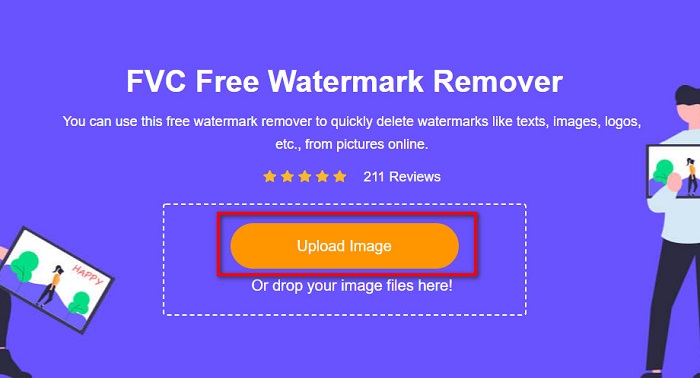
步驟 2. 然後,在主介面上按一下 Upload Image 按鈕,上傳你想移除浮水印的圖片。
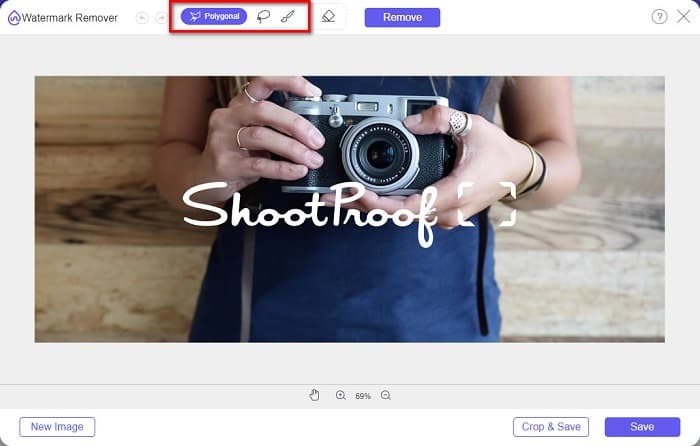
步驟 3. 接著,選擇你想用來移除圖片上浮水印的選取工具。你可以在 Polygonal、Lasso 和 Brush 之間進行選擇。
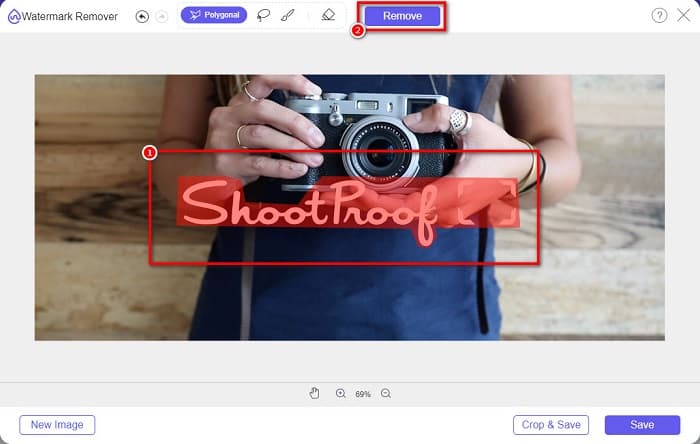
步驟 4. 然後,描繪圖片上浮水印的區域。選取完成後,點擊 Remove 按鈕。你就會看到浮水印已經消失。
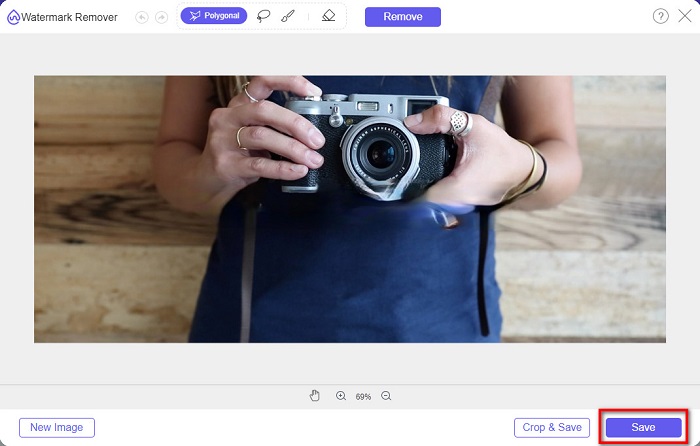
步驟 5. 最後,按一下 Save 按鈕,將成果儲存到你的裝置。就是這麼簡單!透過這幾個簡單步驟,你就可以得到沒有浮水印的 Shootproof 圖片。
Apowersoft 在線水印去除器
Apowersoft Online Watermark Remover 是另一款知名的線上圖片浮水印去除工具。它的介面直覺、操作簡單,是一款相當友善的線上應用程式。此外,它支援最常見的圖片格式,例如 PNG 和 JPG。你也不必擔心檔案安全問題,因為此線上工具相當安全。同時,它還具備移除影片浮水印的功能。不過,如果你的網路連線速度較慢,可能會遇到上傳與匯出過程較慢的情況。
如何使用Apowersoft Online Watermark Remover去除Shootproof水印:
步驟 1. 在瀏覽器中搜尋 Apowersoft Online Watermark Remover,接著進入其主頁。在主介面上,點選 Remove Watermark From Image 選項。
步驟 2. 接著,在下一個介面中,你會看到一個 watermark remover box,將它放置在浮水印所在的位置。

步驟 3. 若要移除圖片上的浮水印,點擊 Erase 按鈕。
第 2 部分。 關於使用防拍水印功能的提示
使用 Shootproof 的水印功能,您可以在圖像上添加和刪除水印。如果您想避免其他用戶擁有您的照片,您可以在圖像上添加文本作為水印。
如何在Shootproof上添加水印:
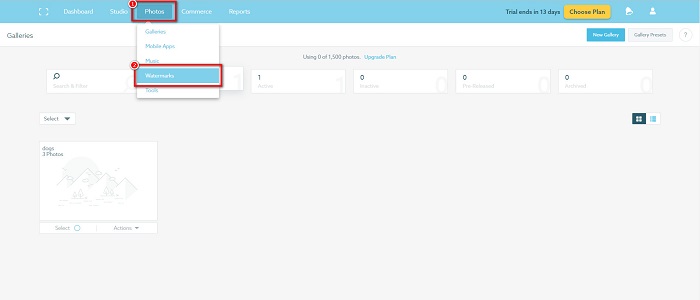
步驟 1. 前往 Photos,然後點選 Watermarks 選項。
步驟 2. 接著,在 文字或圖片 浮水印之間進行選擇。
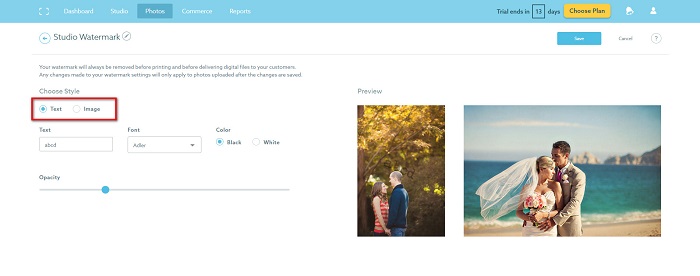
如果要使用圖片水印,建議必須上傳透明背景的高分辨率PNG文件。您也可以使用 JPG 文件。
步驟 3. 然後調整 Watermark Settings。在浮水印設定中,你可以選擇浮水印在照片上的位置,也可以調整浮水印的大小與透明度。
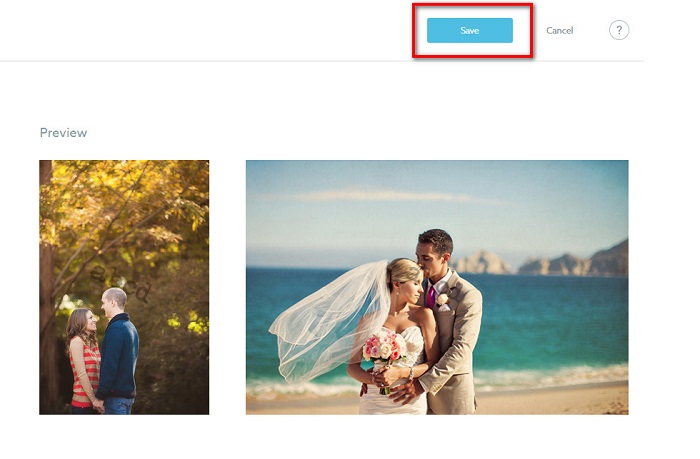
步驟 4. 最後,點選 Save 按鈕,儲存你所做的設定變更。
在您上傳的圖像上應用水印。
在水印頁面上,您可以選擇默認水印。您還可以為所有未來上傳的內容打開水印。您可以在上傳新圖像之前更改此設置。
當您通過基於網絡的上傳器或桌面上傳器將新照片上傳到您的畫廊時,您可以在上傳屏幕上選擇要使用的水印。
如何在 Shootproof 中去除水印
永遠記住,編輯或添加現有水印只會影響您以後的上傳。您所做的更改不會影響畫廊中已有的圖像。但是,如果您想更改水印或刪除 Shootproof 水印,您可以刷新水印以在您的圖庫中更新它。以下是如何刪除或更改防拍水印的方法。
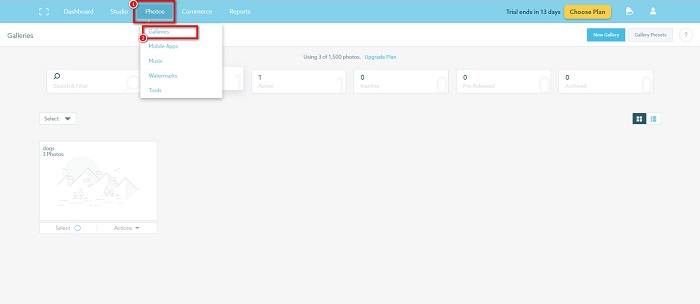
步驟 1. 前往 Photos > Galleries,然後點擊你的相簿。
步驟 2. 在相簿中,點選介面右上角的 More Actions 按鈕。
步驟 3. 接著,選擇 Refresh Watermark,以移除你上傳之每張圖片上的浮水印。
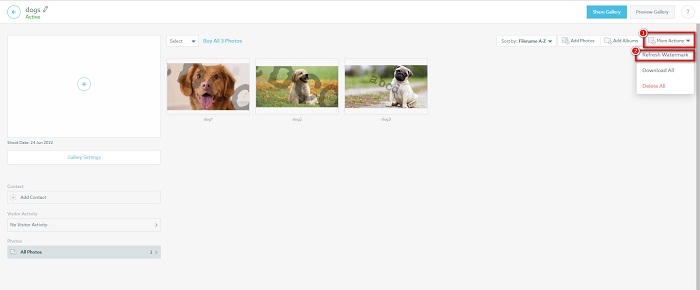
步驟 4. 若要移除浮水印,將滑桿關閉即可。如果你只想更換浮水印,則選擇 New Watermark。
步驟 5. 最後,點擊 Apply Change 以儲存你所做的變更。
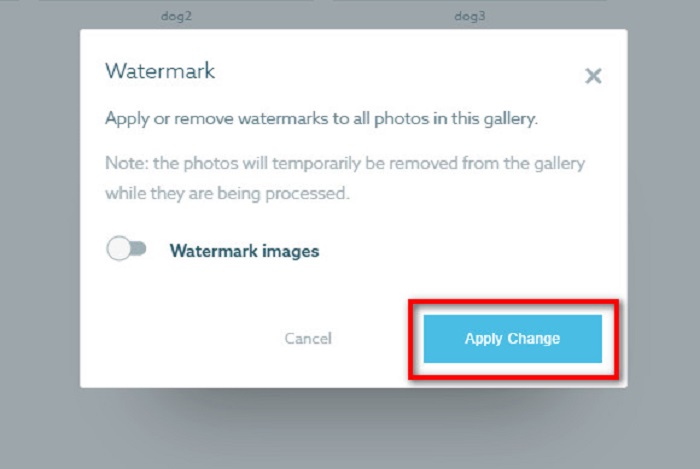
您將看到照片將自動顯示為正在處理。應用更改後,您將看到圖像將返回到您的圖庫。
相關內容:
第 3 部分。 關於防拍刪除水印的常見問題解答
可以去除數字水印嗎?
去除不可見的數字水印很難。例如,由 Digimarc Photoshop 插件嵌入的那些很難刪除。裁剪、調整大小、添加噪點和適度模糊可能不適用於數字水印。
您可以從視頻中刪除徽標水印嗎?
是的。可以刪除視頻上的徽標水印。許多水印去除器允許您刪除視頻上的徽標。如果要刪除視頻上的徽標,請使用 Video Converter Ultimate。
如果您截屏,Shootproof 會顯示嗎?
Shootproof 採取了多種措施來保護賣家的照片。但是,Shootproof 無法阻止人們在您的圖庫中截取您的圖像。
結論
以上就是全部內容!依照上述方法,你現在就可以從圖片上移除 Shootproof 浮水印。雖然在 Shootproof 上移除浮水印是免費的,但實際操作流程可能有點複雜。所以,如果你想更輕鬆地移除圖片上的 Shootproof 浮水印,建議使用 FVC Free Watermark Remover。
-
 優秀的Photobucket水印去除器在線和離線
 了解如何使用這些神奇的 Photobucket 水印去除器從您的照片中去除 Photobucket 水印。閱讀本文以了解方法。
-
 使用簡單的步驟輕鬆從 PDF 中刪除水印
 按照這些簡單的步驟從 PDF 中刪除水印。了解如何使用這些神奇的工具輕鬆地從 PDF 文件中刪除水印。
-
 從畢業照片中去除水印的簡單方法
 想知道去除畢業照水印的最佳方法嗎?通過閱讀本文,您將能夠了解如何輕鬆去除畢業照片上的水印。
