如何使用最熟練的工具將 VOB 轉換為 MOV [免費和簡單]

In the case of a DVD, a VOB file is a movie data file that is typically kept in the VIDEO TS folder at the root of the DVD. It contains a large portion of the material recorded on a disc, which includes video and audio files and subtitles, DVD menus, and other navigational content. However, the QuickTime File Format (QTFF) is a multimedia container file format that can be used to save a MOV file. Media data, including video, audio, and text, can be stored on one or more tracks (subtitles). To save video files, MOV files are often utilized.If you have a second thought of his video format and need to know all the details about it or how to convert it to other video formats using different converters? This is the right article for you, presenting the best and easiest ways to convert VOB to MOV.

VOB 轉 MOV

第 1 部分。什麼是 VOB 和 MOV?

DVD 上的大部分數據都包含在這種文件格式中,其中包括數字視頻、音頻、導航內容、DVD 菜單和字幕。 VOB 文件存儲在 VIDEO TS 文件夾中,是任何 DVD 視頻的核心。這是電影的數據。 MP2、DTS、AC3 和 MPEG-2 視頻流均來自該位置。以 VOB 格式保存的文件可能已被加密。 VOB 是一種非常適合 WMV 的視頻文件。 VOB 文件擴展名用於 VOB 文件。例如,VOB 格式是基於 MPEG 節目流格式,但它在私營部門中包含額外的限制和標準。

Nevertheless, In the QuickTime framework of Mac, the MOV file extension indicates the QuickTime video format, developed by Apple. The Windows platform also supports this multimedia container's capacity to store several tracks, each one containing a specific sort of data (audio, video, subtitles). Video editing programs can benefit significantly from separating media data from media offsets, abstract data references, and track edit lists. For sharing movies and videos on the internet, the MOV video container is a popular choice.

文件擴展名 VOB 影片
文件類型 DVD 視頻對象文件 蘋果 QuickTime 電影
由開發 不適用 蘋果
優點 高質量;可以用它製作 DVD。 出色的視頻質量;適合網絡廣播;主要元素的明顯分離
缺點 2 小時的電影需要 4.7 GB,空間很大 這種格式的文件大小比其他流行的流格式更大。

第 2 部分。 如何將 VOB 轉換為 MOV [Mac & Windows]

Starting with converting VOB to MOV offline, this best tool is the most reliable in restoring a wide range of formats. Video Converter Ultimate can convert VOB to MOV in the fastest way possible. Plus, you can change the quality output of the video before you upload the file. This converter also has different tools that can help you improve your video file to the next level. Since it supports a massive amount of video formats, you won't have to worry about converting unfamiliar video formats to your desired format. Now that you have learned about this best converter, you can now learn the procedures given below:

Step 1. To begin, click on the Free Download button below to start the download process. You have the option of downloading the software from Windows or Mac if you prefer once the download is complete. Before you simply run the program, you need to get it installed on your computer's desktop and click Start Now to get started.

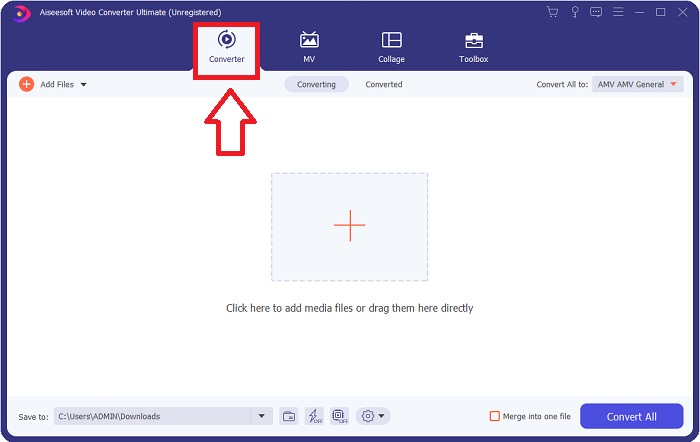
Step 2. Launch the downloaded application. When you first start the program, a window will appear with the Converter interface. This is where you'll enter your video file and begin converting.

打開文件視頻轉換器

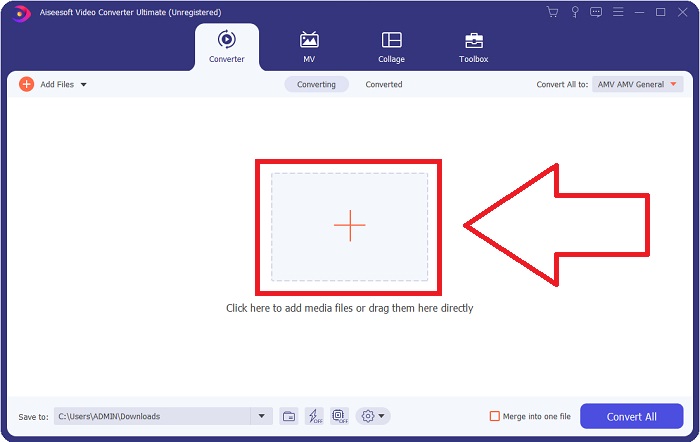
Step 3. Import your files into the converter to begin the conversion process. Drag and drop the video file you want to convert onto the + icon.

添加要轉換的文件

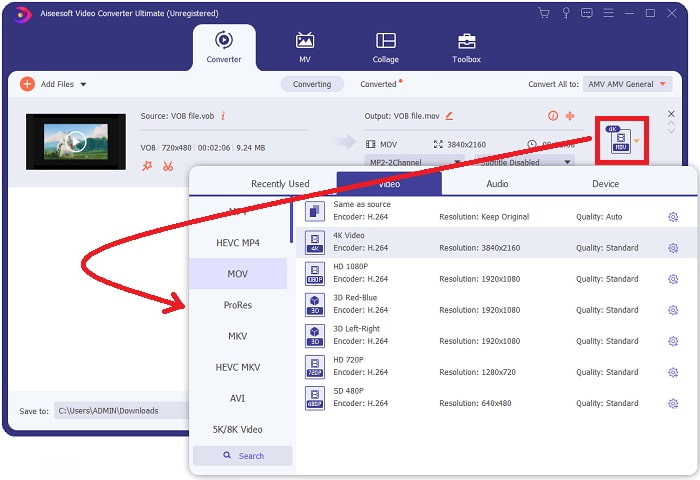
Step 4. Select a video format from the list in the upper-right corner of the screen. Locate and select the MOV file type from the drop-down menu. There are several video qualities options available once you've chosen an MOV format. However, if your preferred video output isn't listed, you can change the quality settings to suit your needs. You can alter the display's resolution, frame rate, and even audio quality by clicking the gear icon. To keep your changes, click the Create New button.

轉換過程

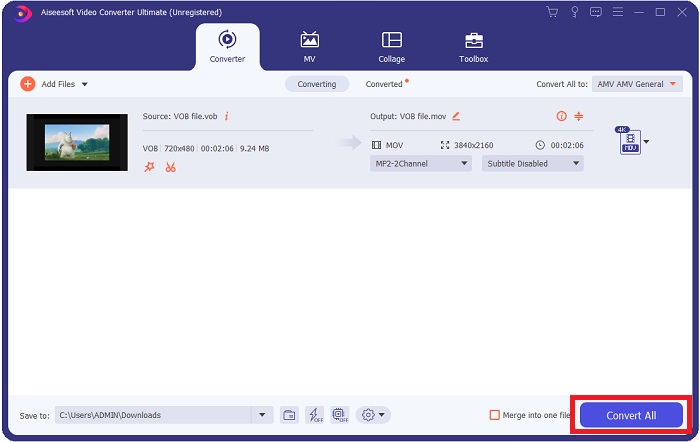
Step 5. Once you've finished editing the video and it's ready to be converted, click Convert All to start the process of transferring it to your computer.

導出文件

第 3 部分。 如何將 VOB 轉換為 MOV [在線]

If you don't have time to download the Video Converter Ultimate, you can also use this online version of the software. Free Video Converter Online is the best online web tool you can access on the internet that can convert many varieties of formats in a fast manner. Other than an online converter, this converter doesn't limit formats it can support. That's why it is recommended to use for some beginner users. To know more about this online web tool, here are the procedures given below.

Step 1. Navigate to the main website of this online converter by clicking on the link here.

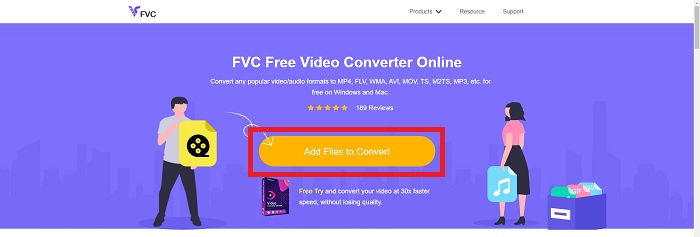
Step 2. If this is your first time using it, click the Add Files to Convert button to download the launcher for your computer. It will automatically launch when it has been downloaded once more. Select the file from your folder and click Open after it has been downloaded once again.

單擊添加要轉換的文件

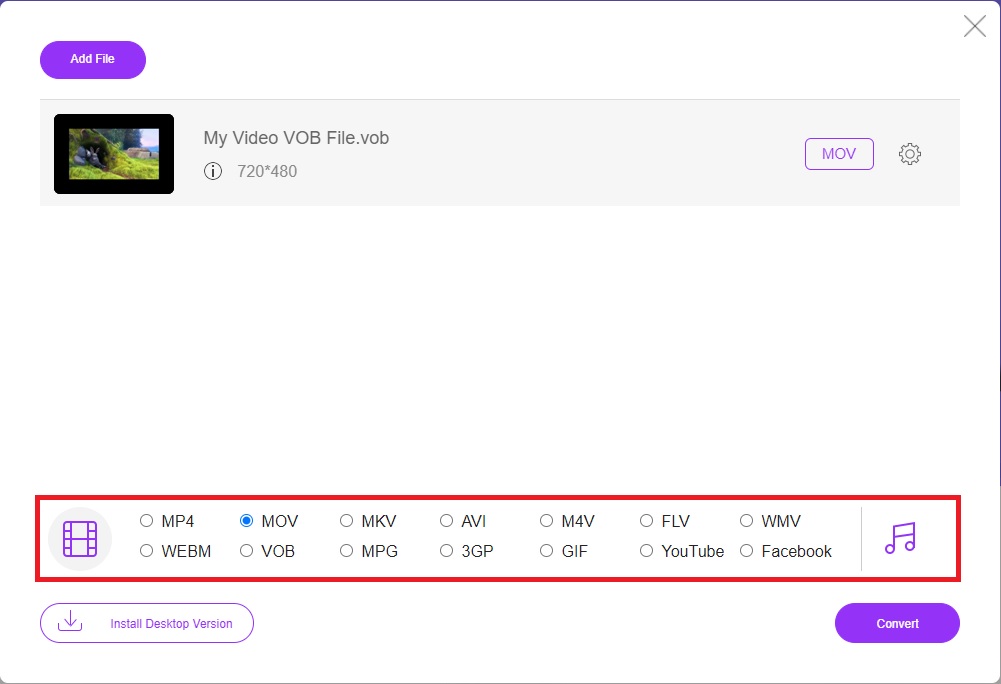
Step 3. Before the conversion process begins, select the MOV format from the category list of Video below by clicking on it.

可在下方進行格式化

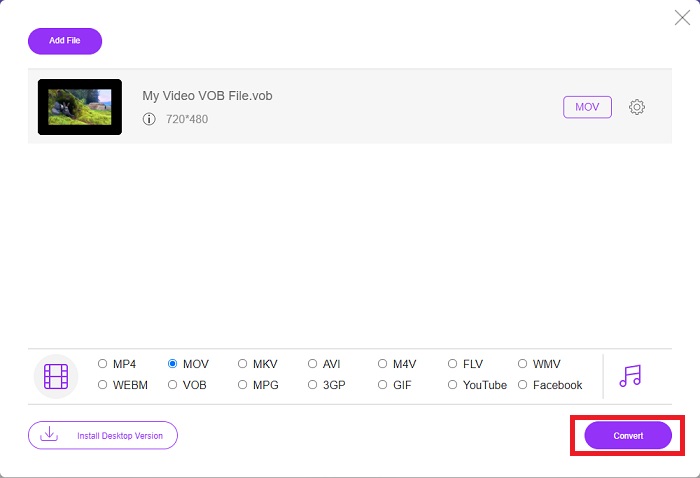
Step 4. After selecting a format, click Convert to begin the process of converting the format to another.

選擇後轉換

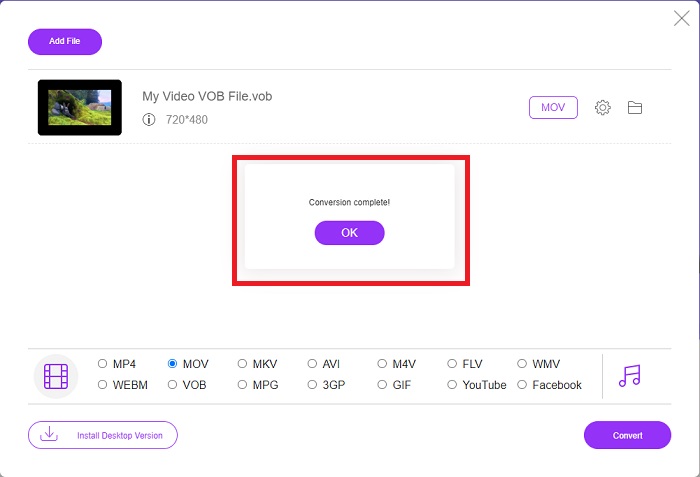
Step 5. After a few minutes, a file folder containing the converted file will appear; simply click on it to begin watching it.

等待然後觀看

第 4 部分。有關將 VOB 轉換為 MOV 的常見問題解答

為什麼VOB文件這麼大?

There is no reason for the big downloads other than the videos themselves (including audio). Because the video codecs use variable bit length encoding, they are diverse in length. It's, therefore, possible to encode the same number of images into a variety of various file sizes. Click here to learn how to compress large VOB files.

VOB 和 DVD 一樣嗎?

對於視頻對象,DVD-Video 媒體使用 VOB(視頻對象的縮寫)。字幕、DVD 菜單和導航信息都可以包含在 VOB 文件中,這是一個多格式文件。 VOB 文件可以加密。

MOV文件包含什麼?

可以利用 MOV 文件來存儲和同步多種媒體形式,包括視頻、音頻、時間碼和文本。有多種編解碼器可用於對給定的內容進行編碼。在壓縮方面,MOV 文件通常使用 MPEG-4 編解碼器。

結論

Overall, it is clear to state the differences between the software or online converter given above, and they always have flaws and good qualities in using them. But if you choose to use a very professional-wise and user-friendly converter, the software Video Converter Ultimate is the best recommended to use. As the article said about this video converter, they are nothing compared to another competitor in achieving the standard this software has brought. They can't get to the level of how excellent this software is.

優秀的

Rating: 4.0 / 5 (based on 142 votes)