


 視頻轉換大師
 屏幕錄影大師
 影片修復
影片修復
 安全下載
安全下載如何使用最好的音頻轉換器將 AIFC 轉換為 MP3
AIFC 是 Audio Interchange File Format 的縮寫,是一種最初由 Apple Inc. 開發的音頻格式。它是存儲音頻數據的標準,在 Mac 系統上通常可以找到 AIFF 文件。 AIFC 是 AIFF 的擴展,其中壓縮變體用 .aifc 文件擴展名進行標識。
AIFC 檔案的挑戰在於其與各種裝置與媒體播放器的相容性有限。此外,在編輯 AIFC 檔案時,若編輯器不支援此格式,相關的相容性問題也可能帶來嚴重困擾。為了解決這個問題,我們整理了一些有效的方法,協助你將 AIFC 檔案轉換為廣泛支援的 MP3 格式。將你的AIFC 檔案轉成 MP3,可確保在各種裝置上的更佳相容性,並帶來更流暢的編輯體驗。現在就來探索這些轉檔方法,幫助你的音訊檔案克服相容性難題。

第 1 部分. 將 AIFC 轉換為 MP3 的 5 種方法
1. Video Converter Ultimate
Video Converter Ultimate 是一款可靠且專業的 AIFC 轉 MP3 轉檔工具,能夠將 AIFC 格式無縫轉換為 MP3 及多種其他格式。此軟體讓你能輕鬆、安全地轉換視訊與音訊檔案,在確保最佳相容性的同時,提升你的離線娛樂體驗。立即下載此軟體免費試用,充分發揮其強大功能。
請按照以下簡單步驟使用 Video Converter Ultimate 將 AIFC 文件轉換為 MP3:
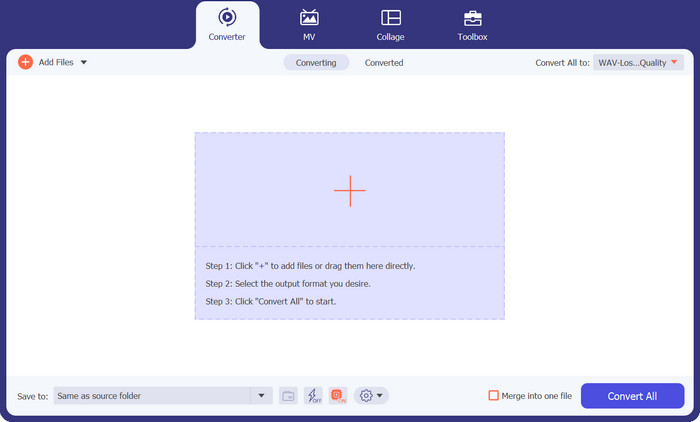
步驟一:匯入 AIFC 檔案
在 Windows 或 Mac 電腦上安裝完成 Video Converter Ultimate 後啟動軟體。點選上方工具列中的 Add Files 按鈕,匯入你想要轉換的 AIFC 檔案。
步驟二:選擇 MP3 作為輸出格式
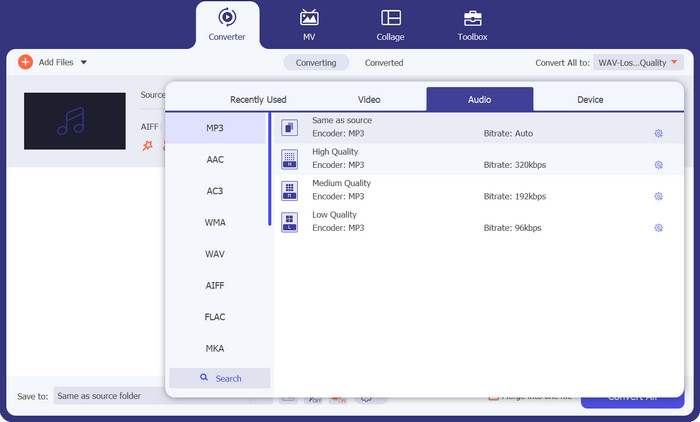
在媒體庫中找到 AIFC 音訊檔,點擊右側的 Convert All to 下拉選單。選擇 Audio 分頁,並將 MP3 設為想要的輸出格式。接著,點擊底部的下拉按鈕,瀏覽並指定一個資料夾來儲存轉換後的 MP3 檔案。
步驟三:將 AIFC 轉換為 MP3
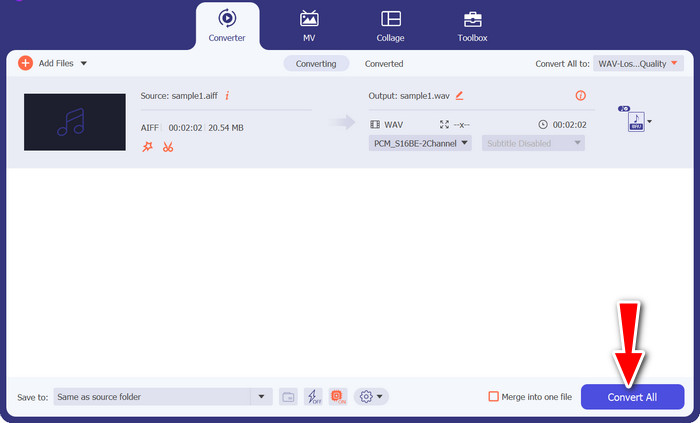
完成輸出設定後,在媒體庫區域勾選所有你想轉換的 AIFC 檔案。點擊右下角的 Convert All 按鈕開始轉檔流程,將你的 AIFC 檔案轉成 MP3 格式。轉換完成後,你就可以輕鬆將這些 MP3 檔案傳輸到任何相容裝置並盡情播放。
2. iTunes
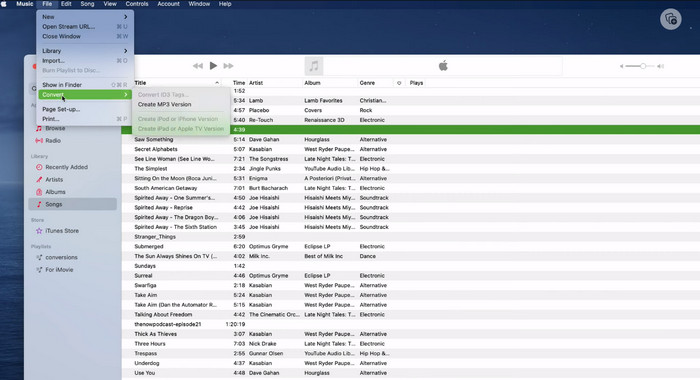
iTunes 是一個多功能平台,用於在 Mac OS X 和 Windows 操作系統上播放、管理和下載音樂和視頻。此外,它還具有轉換 AIFC 音頻文件的內置功能。下面,您將找到有關在 Mac 上使用 iTunes 將 AIFC 高效轉換為 MP3 的全面分步指南。
步驟一。 在電腦上開啟 iTunes。在 Mac 上,可從螢幕頂端的選單列選擇 iTunes > Preferences 來開啟 iTunes。
步驟二。 在 iTunes 偏好設定視窗中,前往 General 分頁,然後點擊底部的 Import Settings。在 Import Settings 對話框中,點擊 Import Using 旁的下拉選單,選擇 MP3 Encoder。點擊 OK 以確認選擇。若你使用的是 Mac,請按住 Option 鍵,依序點擊 File > Convert > Convert to MP3,然後選取包含要轉換之 AIFC 歌曲的資料夾。
步驟三。 完成轉檔程序後,歌曲會被轉換成 MP3 格式並出現在你的 iTunes 資料庫中,可隨時播放或傳輸到你的裝置。到這裡,你應該已經學會如何在 Mac 上將 AIFC 轉換為 MP3。
3.免費在線MP3轉換器
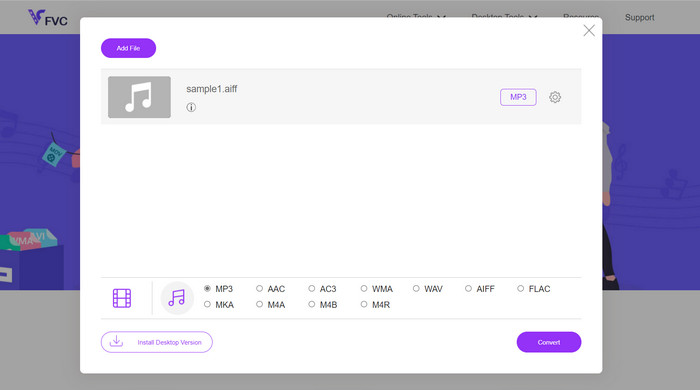
最簡單、最方便的解決方案是使用值得信賴的線上 AIFC 轉 MP3 轉檔器,而我個人最推薦的是 Free MP3 Converter Online。這個網頁服務無需登入或提供電子郵件地址,使用者可以直接新增檔案並進行轉檔,相當省事。值得一提的是,它支援的格式種類相當豐富。
步驟一。 先前往此程式的官方頁面。點擊 Add Files to Convert 按鈕,從電腦硬碟中選擇想要轉換的 AIFC 檔案。
步驟二。 檔案加入後,開啟格式選單,將 MP3 選為想要輸出的檔案格式。
步驟三。 最後,點擊 Convert 按鈕啟動轉檔程序。幾秒鐘內,檔案便會成功轉成 MP3 格式,並直接儲存到你的電腦,方便隨時存取。
4. 扎姆扎爾
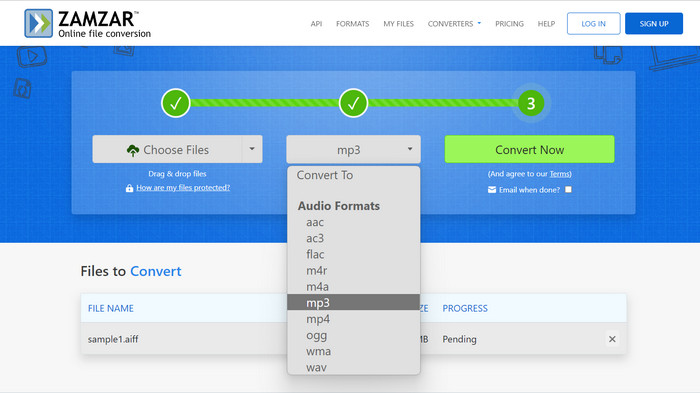
選擇基於 Web 的音頻轉換應用程序是將 AIFC 轉換為 MP3 的誘人替代方案。無需安裝,這些應用程序即可有效地處理音頻轉換任務。為了說明該過程,我們將使用 Zamzar 作為示例。
步驟一。 在瀏覽器中開啟 AIFC 轉 MP3 的轉檔頁面。從電腦硬碟、網址或直接從雲端儲存空間上傳你的 AIFC 檔案。
步驟二。 若要修改輸出格式,請點擊格式下拉選單並選擇 MP3 作為目標格式。
步驟三。 完成相關設定後,點擊 Convert Now 按鈕開始轉檔。等待轉檔完成後,將轉換好的 MP3 檔案下載到電腦,即可立即使用。
5.轉換
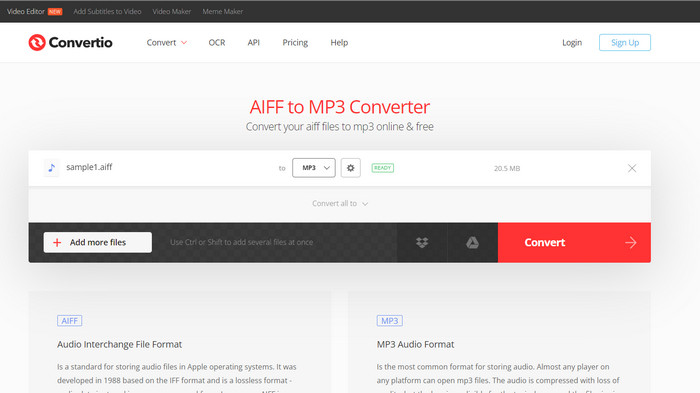
Convertio 不僅限於 AIFC 到 MP3 的轉換。事實上,它提供了將 AIFC 文件轉換為各種其他流行格式的廣泛可能性,包括 WAV、WMA、AAC、AC3、FLAC、OGG、RA 等。使用 Convertio,您可以輕鬆地將 AIFC 文件轉換為您喜歡的音頻格式,使其成為多功能且有價值的音頻轉換工具。
步驟一。 在瀏覽器中造訪 Convertio 網站(https://convertio.co/aifc-mp3/)。
步驟二。 點擊 Choose Files 按鈕,從電腦上傳你的 AIFC 檔案。或者,你也可以直接將檔案拖放到網站頁面中。
步驟三。 上傳 AIFC 檔案後,點擊輸出格式的下拉選單,從可用音訊格式清單中選擇 MP3。
步驟四。 點擊 Convert 按鈕開始進行 AIFC 轉 MP3 的轉檔程序,並耐心等待轉換完成。
延伸閱讀:
第 2 部分. AIFC 到 MP3 轉換的常見問題解答
QuickTime 能否將 AIFC 轉換為 MP3?
雖然 QuickTime 可以讀取 AIFC 文件,但它不具備將 AIFC 轉換為 MP3 的功能。
AIFC 比 AIFF 更好嗎?
AIFC 是 AIFF 的一種流行變體,它採用壓縮技術,因此文件大小比 AIFF 更小。然而,這種壓縮也會導致音頻質量低於原始 AIFF 格式。
MP3 和 AIFC 哪個更好?
AIFC 是一種有損格式,其質量由所選的比特率決定。修改比特率會影響 AIFC 的音頻質量是否超過或落後於 MP3。儘管如此,MP3 仍具有廣泛的設備兼容性。 MP3 和 AIFC 之間更好的選擇取決於您的具體要求和偏好。
我可以在移動設備上將 AIFC 文件轉換為 MP3 嗎?
是的,為了方便起見,一些移動應用程序或在線轉換器直接在您的移動設備上提供 AIFC 到 MP3 的轉換。
如何在轉換過程中確保最佳的音頻質量?
為了獲得最佳音頻質量,請在轉換過程中使用更高的比特率。但是,請記住,較高的比特率會導致較大的文件大小。
結論
將AIFC 轉為 MP3能帶來更大的彈性與更廣泛的裝置相容性,因此在音訊轉檔上十分受歡迎。雖然 AIFC 在較高位元率下可能提供更佳音質,但 MP3 仍是日常使用中實用且被廣泛接受的選擇。
-
 在 Mac 和 PC 上將 AIFF 轉換為 MP3 的最佳 4 種方法
 由於 AIFF 文件太大而無法保存而遇到困難?因此,您必須繼續閱讀我們解釋如何通過將 AIFF 轉換為 MP3 格式來修復它。
-
 MP3 播放器下載 – 2023 年 10 款最佳免費 MP3 音樂播放器
 最好的 MP3 音樂播放器是什麼?如何將音樂放入 MP3 播放器?如何讓MP3音樂播放器下載?這篇文章為您詳細介紹了適用於 Windows PC 和 Mac 的 10 款最佳免費 MP3 播放器。
-
 5 個 MP3 切割器,可輕鬆切割任何音頻 [2023 年更新]
 您需要 MP3 切割器來修剪音頻嗎?在這種情況下,請閱讀本文,因為我們提供了您可以依賴的工具,這些工具可以輕鬆剪切音頻。
