免費 AIFF 到 MP3 轉換器

快速將您的文件轉換為其他高質量的格式。
添加文件進行轉換

下載桌面版桌面版以批次轉換檔案。

資源資源 > MP3轉換 > AIFF 轉 MP3

使用分步指南將 AIFF 轉換為 MP3 的最佳轉換器

AIFF files store the highest form of the audio files you have ever heard about. Although this format can be stored on a desktop program because it is uncompressed, it is not ideal to be stored or downloaded on your phone. So, there is a way you can store AIFF files on your phones and even on your desktop with less storage to be eaten up. The best way to aid this problem is to convert AIFF to MP3 format. Although, converting can have a side effect on your audio files. And so, we gather enough tools you can choose to convert the AIFF without losing the quality of the file. So go on, let's continue investigating the tools below and let's start straight away by introducing and providing steps.

AIFF 轉 MP3

第 1 部分。如何在 Windows 和 Mac 上將 AIFF 轉換為 MP3

1. Video Converter Ultimate

Converting formats can be phenomenal via Video Converter Ultimate. If you don't receive a special treatment on your converter then try to use this tool. Because the ultimate converter presents a lot of advanced features that the other converters for AIFF to MP3 on Windows or Mac doesn't have. Also, this tool is not limited to Windows programs only, you can also download it on your Mac . So, if you want to experience the ultimate conversion, then it is a must to follow the steps and have a successful conversion for your AIFF file.

Step 1. To use the converter, you must download it first on your PC or Mac drive. Then install it, modify the settings, and click the finish to launch the tool after.

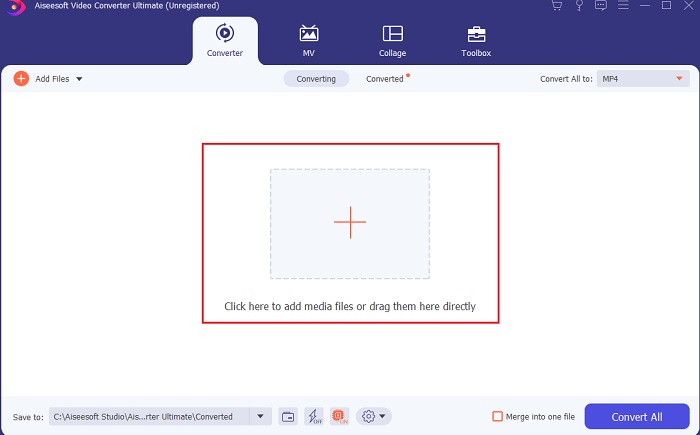
Step 2. After the installation of the converter, click the Add Files to add the AIFF files you want to be converted. If the files are a lot to be selected on the folder, you can drag and drop them to the interface.

轉換器安裝後

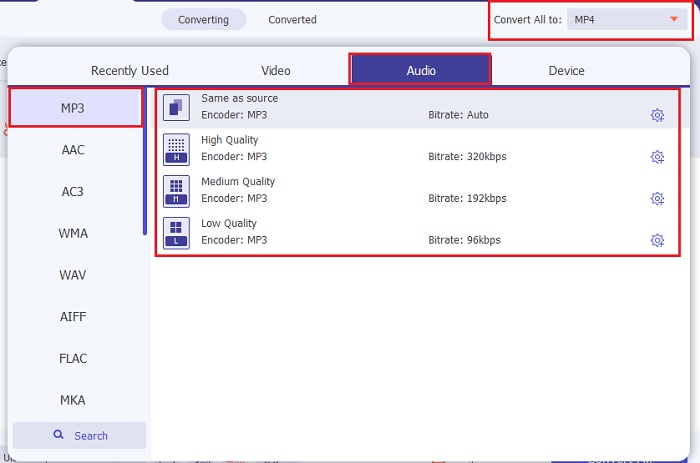
Step 3. Proceed on the next step by clicking the Convert All to option. Then choose what audio format you want it to be. For example, you can select MP3 as the final output.

選擇您想要的音頻格式

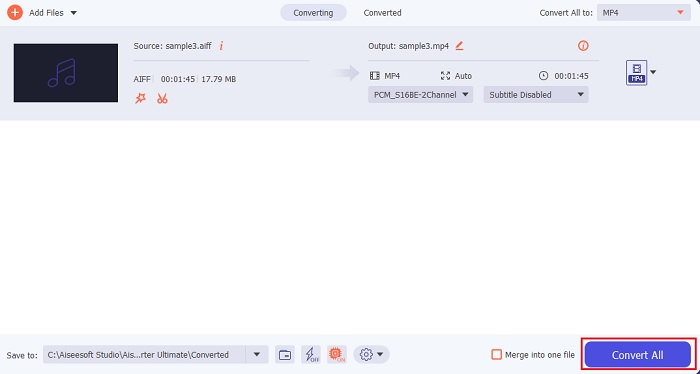
Step 4. Click the Convert All button to start the conversion of AIFF files.

開始轉換 AIFF

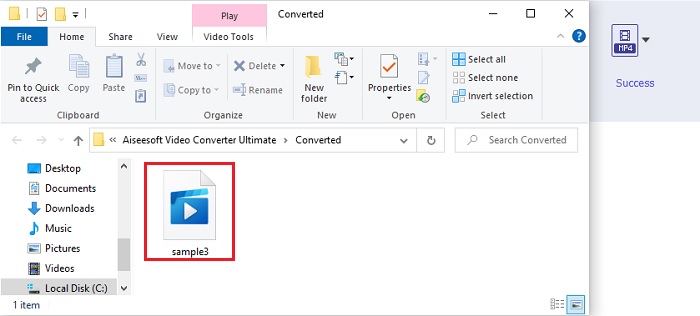
Step 5. Wait for a couple of seconds to convert, then a file folder will be shown into your screen. Click the newly converted MP3 file and listen to the finest sound you ever heard.

新轉換的 MP3

2. iTunes

的iTunes

This native media player can also convert AIFF files to MP3 on Mac, iTunes. This media player developed by Apple to be their default music library and player to all iOS and Mac programs. Also, one of its features you can use here is the converter. Although it has converting features still it supports less format than online tools to convert. But it is effective and safe to use and convert files into a new format to be played. Also, this native media player can't be accessed on non-Apple's products like Android or Windows. So, follow the steps indicated below to know more about the iTunes converting feature.

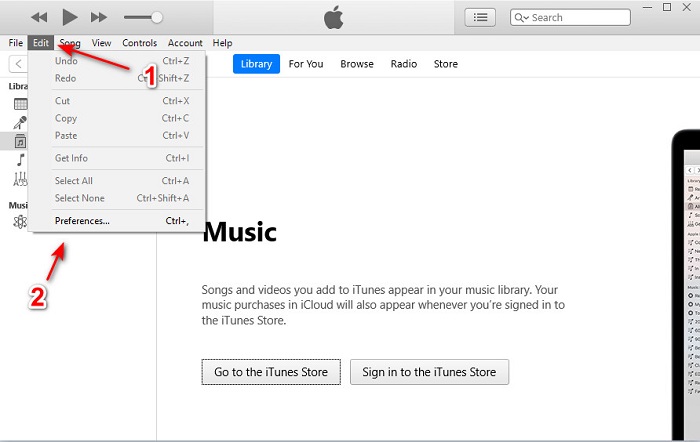
Step 1. Open iTunes on your desktop, then click Edit and Preferences.

iTunes

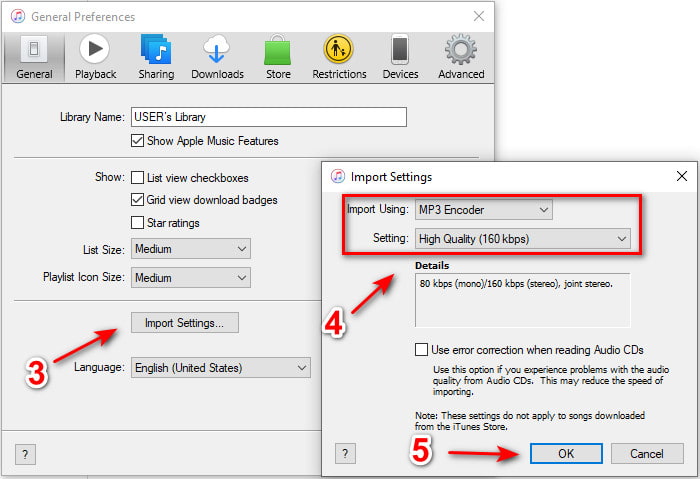
Step 2. On the General click the Import Settings. A smaller menu will show up, change the format and quality here then click OK to save.

iTunes

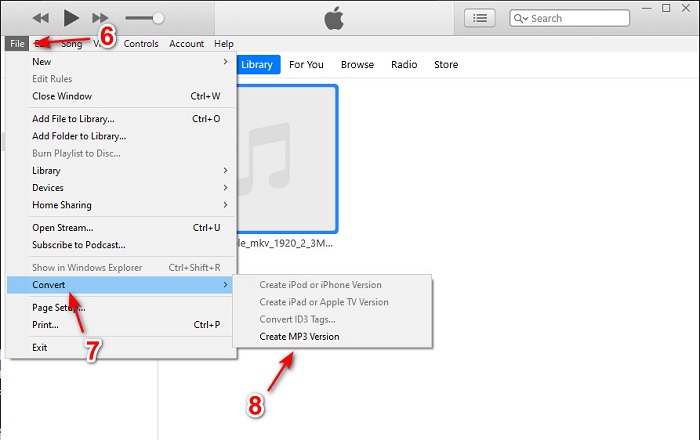
Step 3. Drag the file to the interface and click it. Go to the File, Convert and click the Create MP3 Version to start the conversion.

的iTunes

第 2 部分。 將 AIFF 轉換為 MP3 的前 2 個免費在線轉換器

1. FVC免費音頻轉換器
音頻轉換器

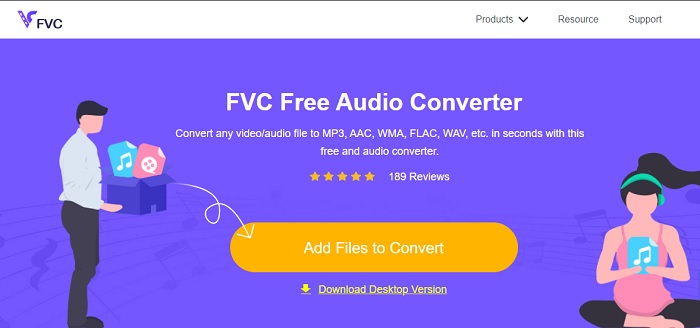
If you convert AIFF to MP3 you will receive less 320 kbps of the file size if you use this web converter, FVC Free Audio Converters. This solution has been used by millions of users over the web to convert file formats. Although, this tool doesn't have major features like the premium version provides FVC Video Converter Ultimate because it is free. But you can still experience a medium level of the ultimate conversion if you try to use this tool. Also, it supports a lot of audio formats than iTunes. Follow the steps indicated below on how to use this web tool.

Step 1. To be located on the main website of the audio converter click this link.

Step 2. Then click the Add Files to Convert button and allow the tool to start the launcher. Extended information, if this is your first time using this webtool, you must download and install the launcher first.

添加文件進行轉換

下載桌面版以批次轉換檔案。

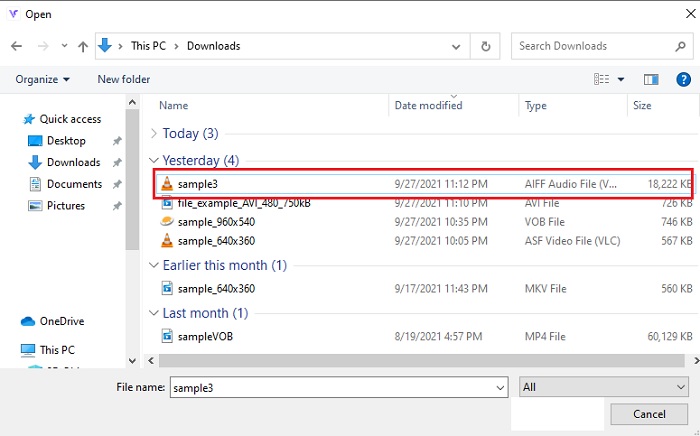
Step 3. After you launch the webtool, you must select the AIFF files and click open to be redirected to the main interface of the web tool.

點擊打開重定向

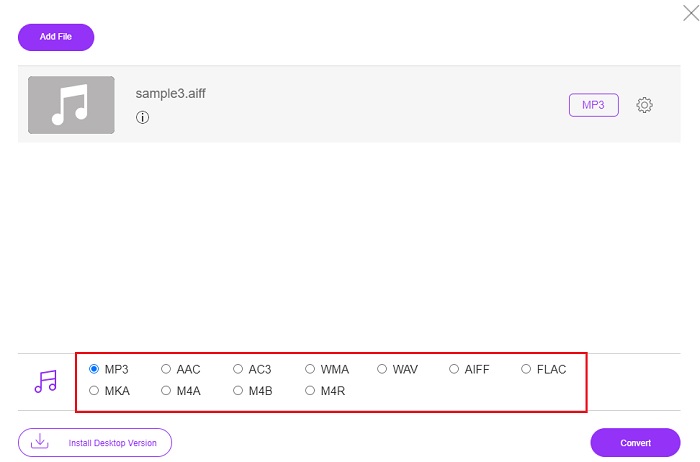
Step 4. Choose the audio format you want it to be below. Then click the Convert button and select the destination of the file to start the changing process.

開始改變過程

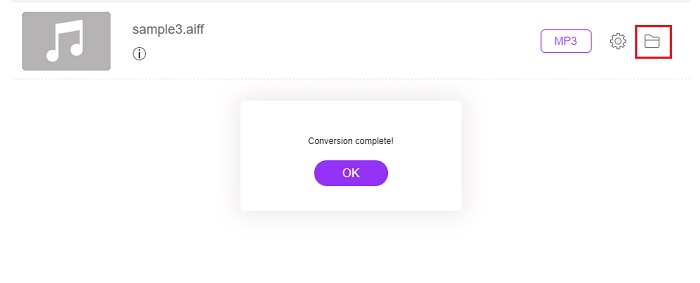
Step 5. Let's locate the converted file if the conversion is finished by clicking the folder. And a file explorer will be shown to your screen, click the converted file and listen to it.

定位文件轉換

2.扎姆扎爾

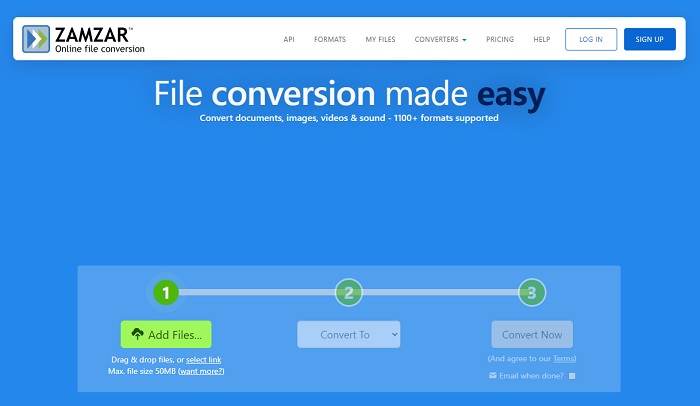
Zamzar 界面

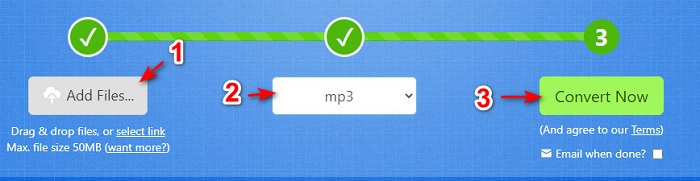
Converting using Zamzar might be the best choice you make to convert files. This tool is very easy to understand as it shows only three basic steps or processes to be converted. But this tool has its file size limit and limited files to convert. Also, the conversion process here is so bad. It will take a lot of your time and if the conversion has already started you can't cancel the conversion if you may. So, before you can do another conversion you better wait for it to be finished then add the file again. Read the steps below and follow it to convert.

Step 1. Search the main webpage of Zamzar on your browser.

Step 2. Then click the Add File to choose the audio file you want to be converted. Choose the format by clicking the Convert to.

Step 3. If you're ready to start the conversion, click the Convert Now to start the process.

扎姆扎爾台階

延伸閱讀

如何將 WAV 轉成 MP3

How to Convert M4V to MP3

AIFF 與 MP3

聯合會

AIFF,即音頻交換文件格式,由 Apple 開發。它是 IFF 格式的變體。 AIFF 文件是未壓縮的,因此它比類似的 MP3 文件具有更高的音頻質量。這也可能導致用戶出現磁盤空間不足的問題。

MP3 格式由運動圖像專家組 (MPEG) 於 1993 年發布。它是存儲音樂的標準,因為它可以將音頻壓縮到比其他未壓縮格式小得多的大小。它現在仍然被廣泛使用,特別是用於在線分發音頻。

第 3 部分。 關於 AIFF 到 MP3 的常見問題解答

哪個更好:AIFF 還是 MP3?

雖然相同的格式存儲了高質量的音頻文件,但讓我們比較每種格式。簡而言之,MP3 以更少的空間產生良好的質量,但 AIFF 以更大的空間產生高質量的音頻文件。

AIFF 文件的最佳用途是什麼?

由於 AIFF 文件存儲自然和高質量的音頻文件,因此這種格式的文件大小仍然很大,因為它沒有被壓縮。但是這種 AIFF 格式非常適合用於編輯和添加效果以使音頻聽起來更好。

AIF、AIFF 和 AIFC 之間有什麼區別?

AIF 文件最常用於在 CD、DVD、藍光和 AIFF 文件上存儲音頻文件,用於存儲個人和聲音數據,這意味著它的文件大小很大。但 AIFC 是 AIFF 的壓縮版本,這種格式最常被媒體播放器用來播放高質量的 .aiff 格式。

結論

To end the discussion, it is now easier for us to understand what the AIFF file is. But this format is huge in size as we talk about it, and to fix this is to convert it to the universal audio format, MP3. So, searching which tool you need to use is a bit of a hassle because they can damage your AIFF files. As we present different solutions, there is still one tool that is phenomenal in the job of converting. FVC Video Converter Ultimate can be your aid to fix this simple problem. So, what are you waiting for? You must now download the tool and experience the phenomenal conversion ever.

優秀的

Rating: 4.5 / 5 (based on 250 votes)

免費在線視頻轉換

Free Convert AIFF to MP3 Online!

添加文件進行轉換