


 視頻轉換大師
 屏幕錄影大師
 影片修復
影片修復
 安全下載
安全下載如何在台式機和在線平台上將FLV視頻轉換為MP3音頻文件
我下載了一些FLV格式的視頻文件,但我只想從中獲取背景音樂,如何在不損失音頻質量的情況下將FLV轉換為MP3?
如果您想在後台聽音樂,則必須將視頻(例如FLV文件)轉換為標準音頻格式(例如MP3)。與其他視頻容器不同,FLV是用於Internet的Flash視頻格式。結果,從FLV視頻中提取音軌並不容易。好消息是您可以獲得4種經過驗證的方法來快速進行操作。

第1部分:將FLV轉換為MP3的最佳免費方法
FLV 是由 Adobe 專為線上影片傳輸所開發的格式。因此,它不僅檔案體積小,音量也偏低。人們在將 FLV 轉換為 MP3 時會擔心音訊品質是很合理的。所幸,FVC Free FLV to MP3 Converter 能滿足你的需求。

FVC免費FLV到MP3轉換器
120,335+下載- 從FLV視頻中提取音頻並轉換為MP3格式。
- 轉換時自動保持原始音頻質量。
- 支持多種音頻輸出格式,例如MP3。
- 將FLV轉換為MP3,以便在便攜式設備上收聽。
簡而言之,免費的FLV到MP3轉換器是在您的桌面上進行FLV到MP3轉換的最佳方法,而無需支付任何費用。
如何在不損失質量的情況下將FLV轉換為MP3
步驟1:導入FLV視頻
下載免費的FLV到MP3轉換器,然後按照屏幕上的說明將其安裝到硬盤上。
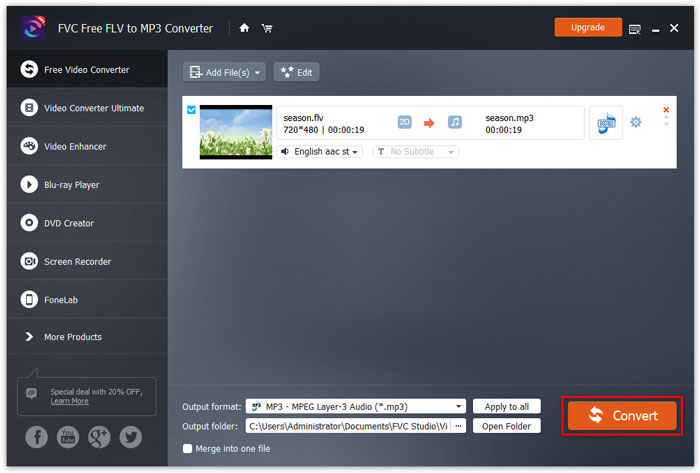
接著啟動程式,點擊大的 Add File(s) 按鈕,匯入所有你想要轉檔的 FLV 檔案。或者,你也可以將影片檔拖放到虛線框中,直接匯入。

步驟2:將MP3設置為輸出格式
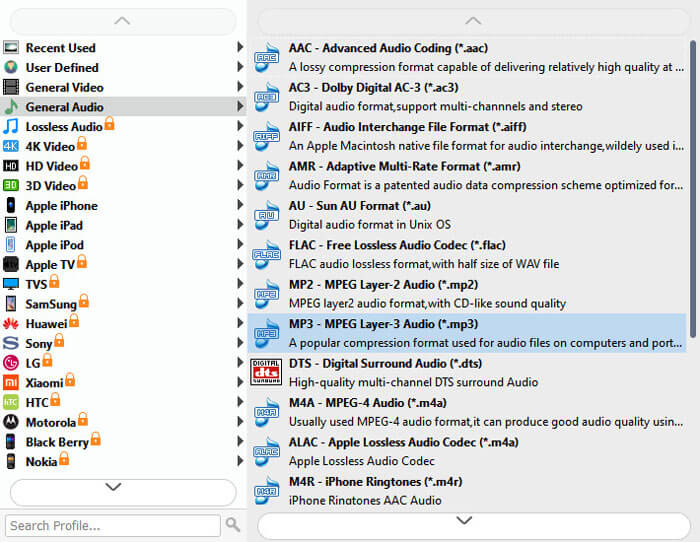
移至下方區域。點擊並展開 Output format 的下拉清單,在 General Audio 分頁中選擇 MP3。若你想在 iPhone 或 Android 手機上播放音樂,請先選擇裝置製造商,再選擇你的裝置型號。
若要編輯影片檔,請點擊上方功能列中的 Edit 功能表。
步驟3:一鍵將FLV轉換為MP3
點擊 Open Folder 按鈕,設定儲存 MP3 輸出檔案的指定資料夾。最後,點擊 Convert 按鈕,立即開始批次將 FLV 轉換為 MP3。根據我們的研究,處理數十個 FLV 影片僅需數分鐘。
此程式不只支援 FLV,還可將 MP4、MOV、MKV、MXF、MTS/M2TS 等格式轉換為 MP3。
第2部分:如何在線將FLV轉換為MP3
在線FLV到MP3轉換器應用程序是將FLV文件轉換為MP3的便捷方法。他們可以直接下載和轉換在線視頻。考慮到網絡應用不穩定,我們在下面分享三種方法。
方法1:使用FVC免費在線視頻轉換器將FLV轉換為MP3
步驟1.添加FLV文件
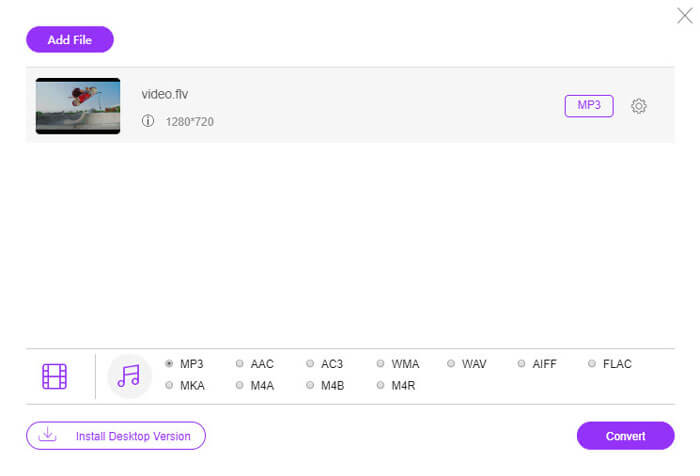
單擊將文件添加到轉換按鈕,然後會出現一個彈出窗口,您需要下載並安裝轉換啟動器。成功安裝後,將顯示一個窗口,您可以選擇要轉換的FLV文件。
步驟2.將FLV轉換為MP3
選中底部的MP3複選框,然後單擊“轉換”,它將彈出一個窗口,以選擇保存轉換文件的目標位置。然後,它將開始將FLV轉換為MP3。成功轉換後,它將自動將轉換後的MP3文件下載到您的計算機中。
方法2:如何使用Zamzar將FLV轉換為MP3
Zamzar是在線文件轉換器的集合。它最多可以免費處理5個小於150MB的FLV文件。要處理大型視頻文件,您必須註冊一個帳戶並支付計劃費用。
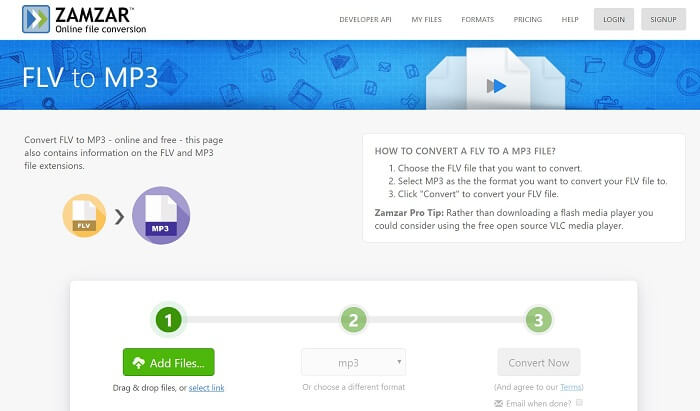
步驟 1:在瀏覽器中造訪 https://www.zamzar.com/convert/flv-to-mp3/。
步驟 2:點擊 Add Files 按鈕,從電腦上傳 FLV 檔案,或按下 select link 透過 URL 匯入影片。
步驟 3:點擊 Convert Now 按鈕啟動轉檔流程。完成後即可取得 MP3 檔。
方法3:如何使用Chrome擴展程序將FLV轉換為MP3
ClipConverter不僅是Web FLV到MP3轉換器的應用程序,還提供了Chrome的擴展程序。它為每個在線視頻添加了兩個按鈕,因此您可以直接轉換FLV。
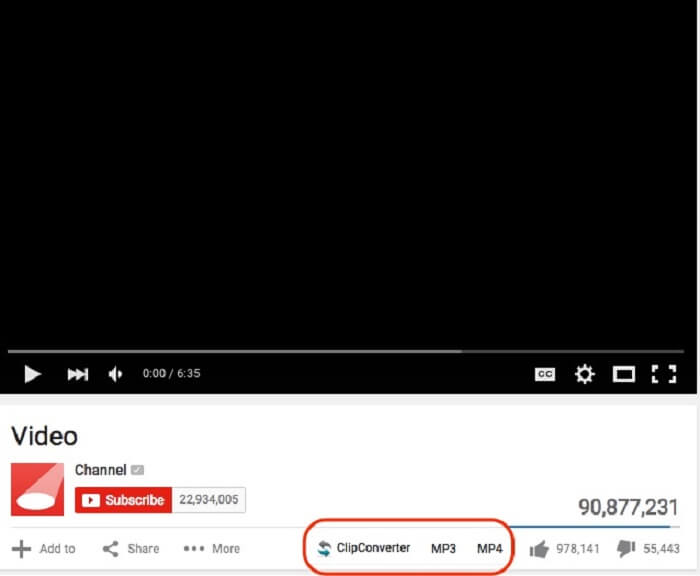
步驟 1:安裝 Chrome 擴充功能,並重新啟動 Chrome 瀏覽器。
步驟 2:在網頁上找到你想轉換並下載的 FLV 影片。接著你會看到媒體播放器下方出現 MP3 和 MP4 兩個按鈕。
步驟 3:選擇 MP3,即可在 Chrome 擴充功能中下載並將 FLV 轉換為 MP3。
第3部分:如何使用VLC將FLV轉換為MP3
VLC是具有廣泛功能的開源媒體播放器。它依靠FFmpeg在MacOS,Windows和Linux上免費將FLV轉換為MP3。
步驟 1:執行免費的 FLV to MP3 轉換器,並從 Media 功能表中選擇 Convert/Save。
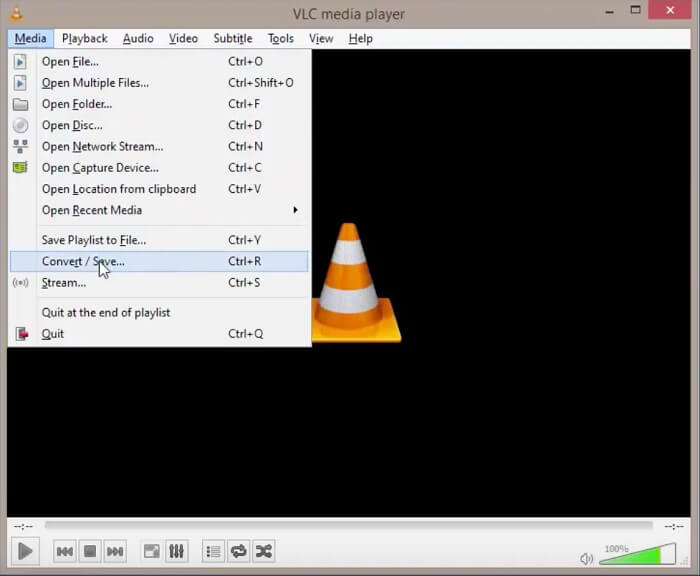
步驟 2:在 Open-Media 對話框中點擊 Add 按鈕,匯入你打算收聽的 FLV 影片。然後按下 Convert/Save 按鈕。
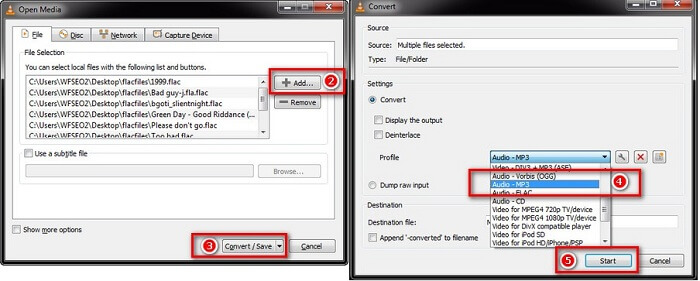
步驟 3:從 Profile 下拉清單中選擇 Audio-MP3,並設定 Destination file。
步驟 4:點擊 Start 按鈕,開始將 FLV 轉換為 MP3。
第4部分:將FLV轉換為MP3的常見問題解答
Windows Media Player可以將FLV轉換為MP3嗎?
Windows Media Player是Windows計算機和便攜式計算機上的預安裝媒體播放器。不幸的是,它無法將視頻文件轉換為MP3格式。要將FLV轉換為MP3,必須使用多媒體轉換器。
將FLV下載到MP3是否合法?
FLV 不僅是一種在線媒體格式,而且能夠對內容進行加密。下載在線 FLV 視頻並將其轉換為 MP3 格式是否合法取決於您的情況。如果您只想在機器上聽音樂,那可能沒問題。下載私人或原創媒體文件,最好徵得作者同意。
結論
本指南分享了四種在桌面上或在線免費將FLV轉換為MP3的方法。它們可用於不同的條件。基於Web的媒體轉換器應用程序用於將在線FLV視頻直接轉換為MP3。如果您的計算機上已經裝有VLC,則最好從FLV文件中提取MP3。為了獲得更多高級功能,我們還共享了FVC Free FLV到MP3轉換器。儘管它是免費使用的,但您可以找到廣泛的獎勵功能。還有其他問題嗎?請在下面留言。
-
 如何將TS轉換為MP4的綜合指南
 什麼是TS文件,想要將TS轉換為MP4?在這篇文章中,我們將與您分享免費和在線的方法來將TS轉換為MP4。
-
 如何將MTS文件轉換為MP4
 不知道如何將MTS文件轉換為MP4?在本指南中,您將找到6種免費且簡便的方法,可以在Windows或Mac上將MTS格式更改為MP4,而不會降低質量。
-
 將MTS轉換為MOV的3種免費方式
 什麼是MTS文件,以及如何播放?什麼是最好的MTS Video Converter?這篇文章分享了3種免費的簡便方法,可幫助您將MTS轉換為MOV以獲得更好的播放效果。
