


 視頻轉換大師
 屏幕錄影大師
 影片修復
影片修復
 安全下載
安全下載如何在電腦上免費將 M4A 轉換為 MP3 格式
M4A 是 Apple 專有的音訊檔案格式,採用 MPEG-4 編解碼器。它與 MP4 格式非常相似,不同之處在於 MP4 除了音訊檔案外還可以容納視訊資料。 MP3 發布得更早,在 1993 年,至今仍是儲存音樂最具權威性的標準。它的最大優點是能夠非常有效地壓縮音頻,確保在提供較小文件大小的同時不會顯著損失音頻品質。
M4A 相較於 MP3 為我們提供了更好的音質。如果你認為 M4A 檔案一定比 MP3 檔案更大,那就錯了。事實上,M4A 檔案的大小幾乎可以只有 MP3 的一半,並且還支援使用者加入 DRM 保護,以防止他人未經授權散佈音訊。M4A 一直被視為 MP3 的接班人,但在相容性方面仍然差得多。M4A 音樂只能在部分裝置與平台上播放,因此若想更方便地與朋友分享音訊檔,最好還是將 M4A 轉換成 MP3。這裡我們精選了五種將M4A 轉 MP3的方法推薦給你,並附上各自的操作步驟。

第一部分.將 M4A 轉換為 MP3 的最佳方法 [快速且無質量損失]
FVC Video Converter Ultimate
經過實際測試與比較,FVC Video Converter Ultimate 是目前最值得一試的 M4A 轉 MP3 轉檔工具。作為桌面應用程式,它同時相容於 Windows 與 Mac 作業系統,並支援多達 1000+ 種輸入與輸出格式,幾乎能輕鬆完成任何檔案轉換任務。雖然 M4A 格式的音質原本就會比 MP3 高,但當我們使用 FVC Video Converter Ultimate 將 M4A 轉成 MP3 時,幾乎感覺不到任何音質變化。而且這款程式還內建硬體加速引擎,保證檔案輸出效率可達 30 倍加速,甚至能一鍵批次處理多個任務。
它值得嘗試,不僅僅是因為它在格式轉換方面的出色表現。它的介面還包含一整套音訊編輯工具,可輕鬆改善音質、消除噪音、修剪長度等。有了這個一體化軟體,將 M4A 轉換為 MP3 將非常容易。
以下是使用 FVC Video Converter Ultimate 將 M4A 轉換為 MP3 的方法。
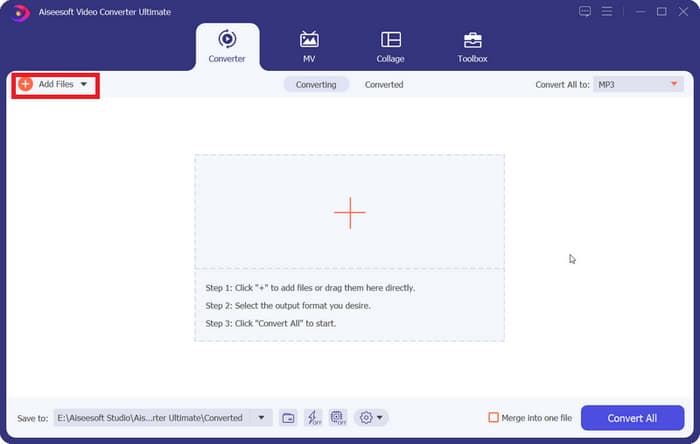
步驟 1. 在你的裝置上安裝 FVC Video Converter Ultimate。完成基本設定後在桌面啟動它。進入主介面後,點擊 Add Files 選擇你的 M4A 音訊。
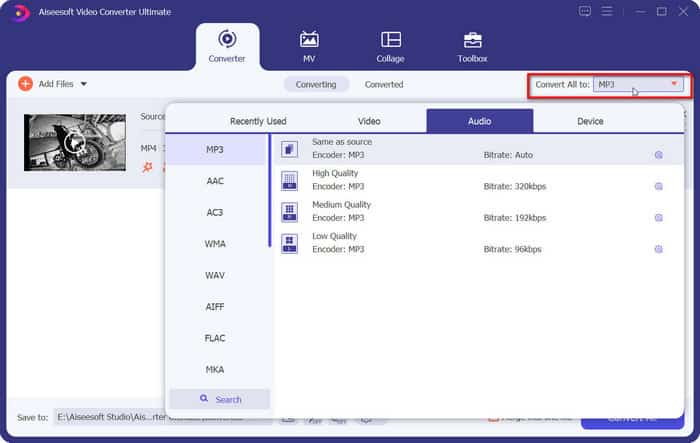
步驟 2. 所選音訊會很快載入。前往 Convert All to,選擇 Audio > MP3。頁面上會顯示多種不同位元率與音質的輸出選項,選擇一個符合你需求的。
如果你想進一步編輯,請點擊 Cut 圖示。
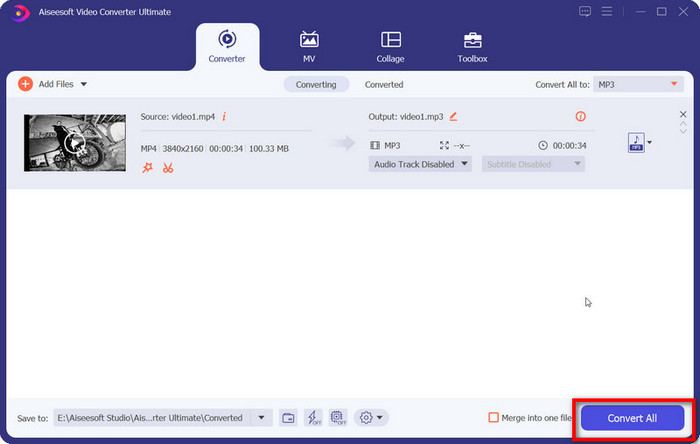
步驟 3. 前往 Save to,為轉換後的 M4A 音訊設定儲存路徑,然後點擊 Convert All。
二、如何在線上將 M4A 轉換為 MP3
FVC免費音頻轉換
雖然桌面工具更穩定、功能也更完整,但在開始轉檔前,我們必須先完成一連串下載與安裝,軟體安裝包也會佔用不少儲存空間。如果想立即開始轉檔並節省部分儲存空間,我們可以求助於線上 M4A 轉 MP3 轉檔器。在這方面,我們推薦 FVC Video Converter Ultimate 的線上平台。該平台支援多種常見音訊格式,包括 MP3、WMA、AAC、WAV、AC3、FLAC 等。一些線上轉檔工具會限制檔案大小,但 FVC Free Audio Converter 則沒有這樣的限制,我們甚至可以一次轉換大量檔案。
以下是使用 FVC 免費音訊轉換器將 M4A 轉換為 MP3 的方法。
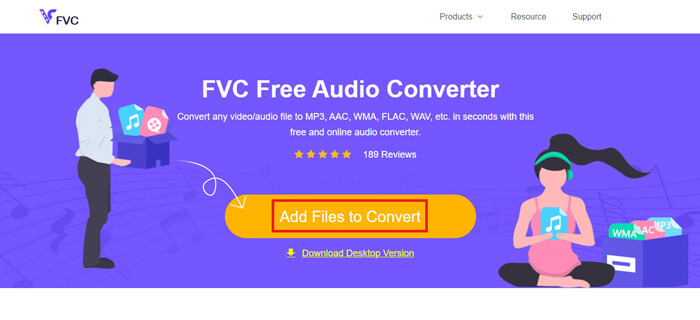
步驟 1. 使用瀏覽器開啟 FVC Free Audio Converter。當網頁載入完成後,點擊 Add Files to Convert 並上傳你的 M4A 音訊。
步驟 2. 新增完成後,前往下方區域並選擇 MP3 作為輸出格式。若想進一步調整,請點擊設定圖示。
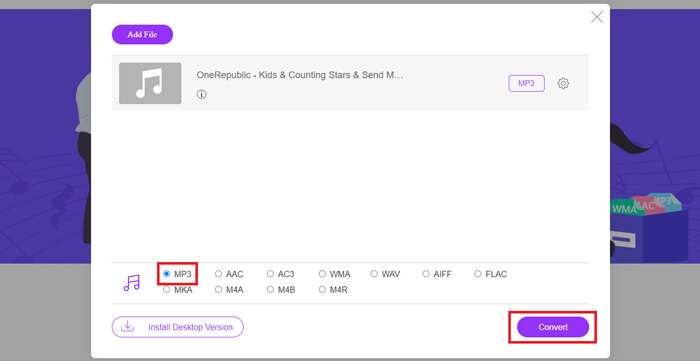
步驟 3. 最後,點擊 Convert 開始轉換。
第 3 部分。如何在 Mac 上將 M4A 轉換為 MP3
使用 iTunes 將 M4A 轉換為 MP3
上述兩種方法均適用於 Windows 和 Mac。如果您是 Mac 用戶,並且想要找到與您的作業系統更相容的免費轉換器,我們推薦 iTunes。這款軟體內建於蘋果系統,雖然通常被視為多媒體播放和管理工具,但它也支援執行一些簡單的格式轉換操作。順便說一句,即使是 Windows 用戶也可以嘗試 iTunes。
以下是如何使用 iTunes 在 Mac 上將 M4A 更改為 MP3。
步驟 1. 如果你的電腦已安裝 iTunes,請開啟它;若尚未安裝,請先下載並安裝。你需要使用 Apple ID 和密碼登入。
步驟 2. 點擊 File > Add Folder to Library,選擇儲存 M4A 音訊的資料夾,然後點擊 Open,將 M4A 檔案上傳到 iTunes。
步驟 3. 選擇 Edit > Preference 開啟另一個視窗。
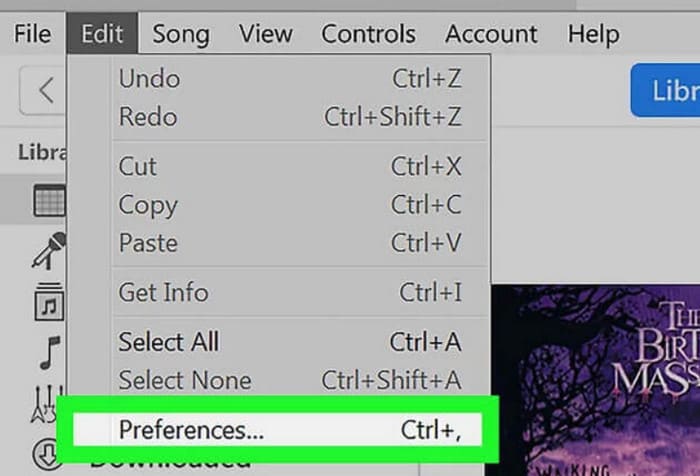
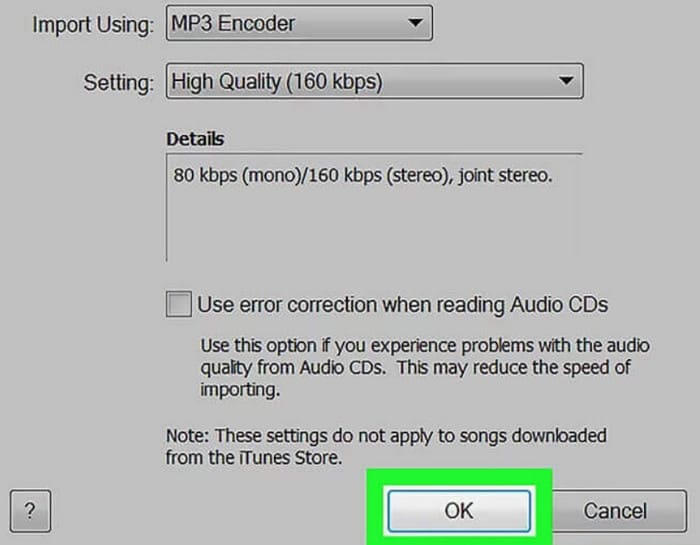
步驟 4. 在新視窗中,點擊 Import Settings,並找到 Import Using 對話框。選擇 MP3 Encoder,再點擊 OK 儲存設定。
步驟 5. 回到 iTunes 資料庫中找到目標 M4A 檔案,點擊 File > Convert > Create MP4 Version。

第 4 部分。如何免費將 M4A 轉換為 MP3
在免費的常用工具中,還有兩個可以幫助我們轉換檔案格式的工具,分別是FFmpeg和VLC Media Player。在本部分我們將分別展示如何使用它們。
使用 FFmpeg 將 M4A 轉換為 MP3
FFmpeg 以其能夠執行的任務數量而聞名。不過,相較於傳統的帶有按鈕和預覽視窗的多媒體編輯軟體,FFmpeg 的操作有其獨特之處。我們需要準備程式碼模板,並填寫文件存放路徑。將編碼指令輸入到FFmpeg中,我們就可以得到轉換後的檔案。不過這款應用程式對於沒有經驗的新手來說並不是很友善;準備程式碼比較麻煩。
閱讀本指南以了解如何使用 FFmpeg 將 M4A 轉換為 MP3。
步驟 1. 在你的電腦上下載並安裝 FFmpeg,然後開啟 Terminal 終端機程式。
步驟 2. 準備你需要使用的指令。
ffmpeg -i input.m4a output.mp3
將上面範例中 input 的位置替換為來源 M4A 檔案實際所在的儲存路徑,再將 output 替換為你希望輸出的路徑。如果你想將 MP3 轉成 M4A,只要交換這兩個儲存路徑的位置即可。
步驟 3. 在 FFmpeg 中輸入指令,然後按下 Enter 開始轉檔。
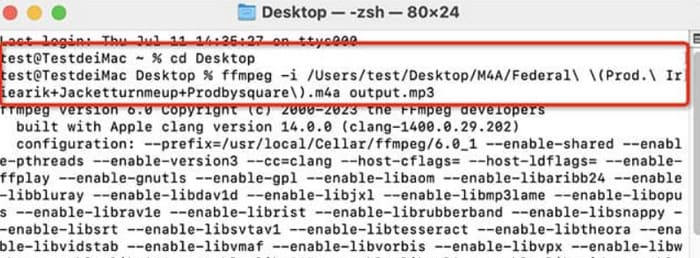
透過 VLC 媒體播放器執行從 M4A 到 MP3 的轉換
VLC Media Player 是最知名的免費 M4A 播放器 之一,同時也是格式轉換工具。它幾乎可以開啟所有格式的多媒體檔案,並且相容於 Windows、Mac 和 Linux 裝置。在它的介面中,我們也能找到一些基本的音訊編輯工具。
以下是使用 VLC 媒體播放器將 M4A 轉換為 MP3 的方法。
步驟 1. 在電腦上開啟 VLC Media Player。點擊 Media > Convert/Save。
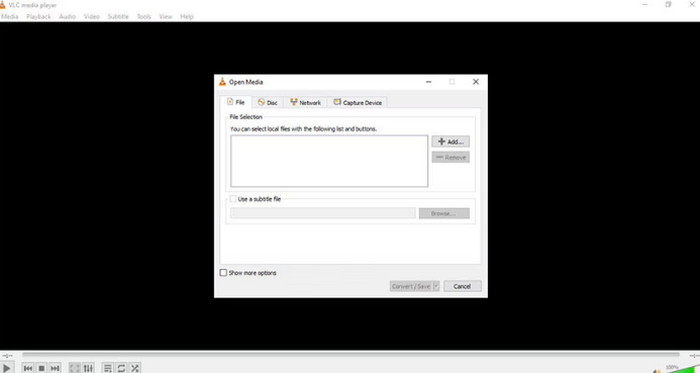
步驟 2. 開啟 Open Media 視窗,然後按下 + Add 上傳你的 M4A 檔案,接著再點擊一次 Convert/Save。
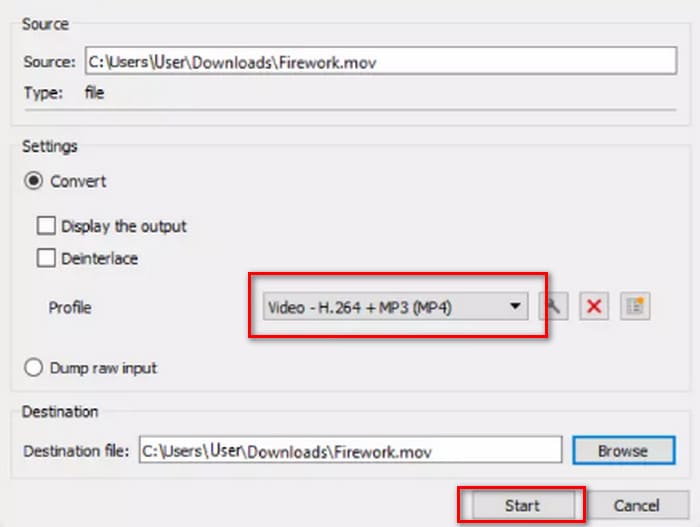
步驟 3. 會跳出一個 Convert 視窗。選擇 Profile > Audio - MP3,最後點擊 Start。
部分4。結論
在本文中,我們推薦了五款將M4A 轉 MP3的工具及其使用方法。其中,桌面軟體裡 FVC Video Converter Ultimate 功能最全面、轉檔速度也最快;iTunes 適合 Mac 用戶;VLC Media Player 完全免費,但編輯工具較少;FFmpeg 功能非常強大,但操作相對困難。如果你想避開軟體下載與安裝流程,可以選擇使用 FVC Free Audio Converter。
-
 將WMA轉換為MP3的4種方法
 是否可以使用Windows Media Player將WMA轉換為MP3?怎麼把WMA轉換成MP3免費?這篇文章分享了4種簡單的方法來幫助您在Mac,Windows PC和在線上將音頻從WMA轉換為MP3。
-
 將MP4轉換為MP3音頻的8種方法(批量轉換和大尺寸)
 如果要從MP4視頻中提取MP3音頻,則可以查看本文並獲得8個解決方案。有在線和離線方法,可輕鬆在手機或計算機上將MP4轉換為MP3。
-
 M4A播放器–適用於Android和計算機的前5名M4A播放器
 如何在Android手機上播放M4A文件?哪些玩家可以玩M4A?此帖分享了5個針對Android,Mac和PC的最佳免費M4A播放器。

