


 視頻轉換大師
 屏幕錄影大師
 影片修復
影片修復
 安全下載
安全下載如何在Windows 10和Mac上使用圖像將MP3轉換為MP4
MP3是運動圖片專家組開發的標準音頻格式。它使用MPEG-1和MPEG-2標準化。 MP3被認為是網站和多媒體播放器上最常見的音頻格式。好吧,MP4是所有年齡段的用戶中最受歡迎的視頻格式。
For many times, you want to add a matched picture to the MP3 file as a background. Here are 3 free and quick solutions to convert MP3 to MP4 on Windows and Mac. After that, you can upload and share the converted video to YouTube or Facebook.
第1部分。如何免費在線將MP3轉換為MP4
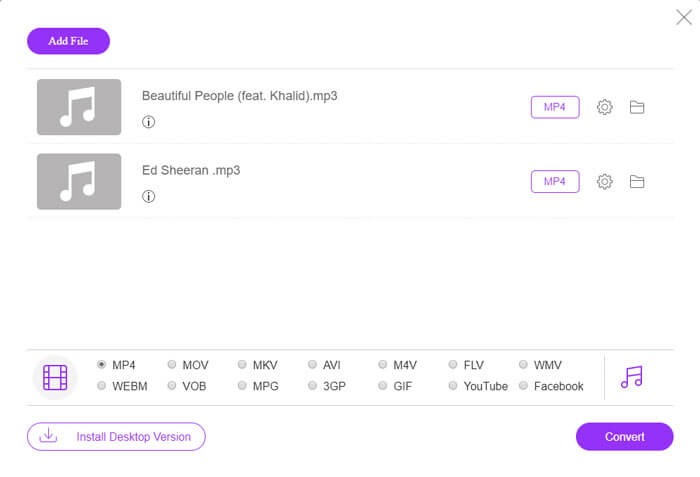
FVC Free Online Video Converter can easily convert any audio or video file to MP4, MOV, MKV, AVI, M4V, FLV, WMV, WEBM, VOB, etc. for free on Windows and Mac. It also allows you to batch convert MP3 to MP4 by uploading multiple MP3 files. This free online tool also supports adjusting video encoder, frame rate, resolution, bitrate, audio encoder and channel. It’d be your best choice if you don’t want to install the third-party software.
Step 1. Click Add Files to Convert button to download the launcher. In the pop up window, select and upload your MP3 files. You can upload more than one MP3 files.
Step 2. Select MP4 at the bottom of this online MP3 converter. You can click the gear icon to set the video and audio settings.
Step 3. After all preferences are set, click Convert button and select the output folder. Then the MP3 to MP4 conversion will start automatically.
成功轉換後,輸出文件夾將立即彈出,以便您可以根據需要查看或共享轉換後的文件。這個免費軟件使MP4文件具有黑色背景。
第2部分。如何使用VLC將MP3轉換為MP4
VLC Media Player是一個免費的開源多媒體播放器,可以播放所有多媒體文件,例如DVD,VCD,各種視頻和音頻文件。它還是一個免費的MP3到MP4轉換器,適用於Windows,Mac,Linux,Android和iOS用戶。在這裡,我們將向您展示如何使用VLC Media Player將MP3轉換為MP4。
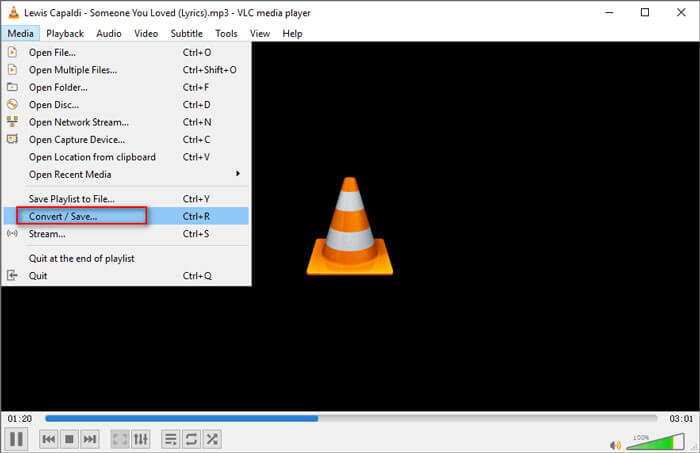
Step 1. Open VLC on your computer. Click Media, then click Open File and import your MP3 file.
Step 2. Click Media, then click Convert/Save. In the pop up window, select Convert under the drop-down button of Convert/Save.
Step 3. Click the drop-down button next to Profile, and select Video - H.264 + MP3 (MP4) as the output format.
Step 4. Click Browse button to select the output folder. Then click Start button to begin converting MP3 to MP4 with black background for free. (How to convert MP4 to MP3?)
第3部分。用圖像將MP3轉換為MP4的專業方法
The above methods bring a black background to your MP3 file after conversion. If you want to add a cover to the converted MP4 file, you can use a professional MP3 to MP4 converter. FVC Free MP3 to MP4 Converter provides a more professional way to convert your MP3 music to MP4 with colorful picture.

免費的MP3到MP4轉換器
113,435+下載- 將MP3音樂文件轉換為MP4,AVI,MOV,MKV,WMV等。
- 為您的MP3文件提供色彩繽紛的主題,調整開頭和結尾。
- 在使用內置播放器進行轉換之前,請預覽轉換後的MP4文件。
- 支持將MP3批量轉換為具有高視頻質量的MP4文件。
步驟1.添加MP3文件
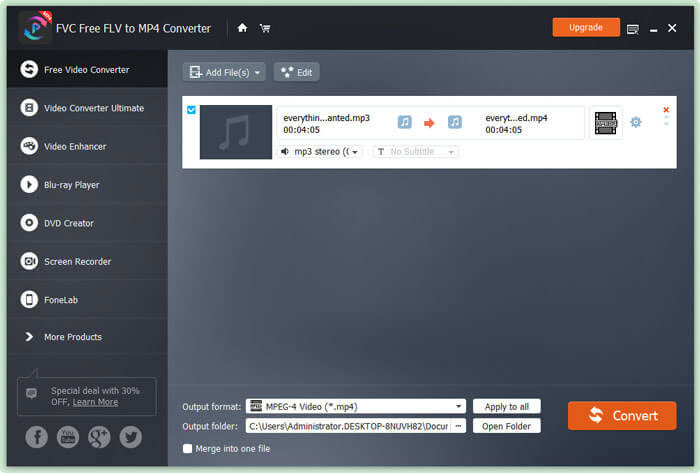
Free download, install and launch this MP3 to MP4 converter on your Windows computer. Click Add File(s) button to import the MP3 file to this converter. This free MP3 to MP4 converter is equipped with a batch conversion feature which allows you to convert one or more MP3 files at a time.
步驟2.選擇主題
Select your MP3 file and click Edit button to add the theme. Here are several different types of themes for you to choose from. Then click Next button to edit the opening and ending of the video.

步驟3.將MP3轉換為MP4
Select MP4 as your target format from the drop-down list of Output format. Then click Convert button to start converting MP3 to MP4 with picture for free.

With the adoption of the latest accelerate technology, it enables you to convert MP3 to MP4 in a super-fast converting speed. What’s more, it guarantees that there won’t be any quality loss during the audio conversion. (Find more MP4 players)
第4部分。將MP3轉換為MP4的常見問題解答
我可以從iTunes導出到MP3嗎?
是。打開iTunes並轉到“編輯›首選項”。在“常規”選項卡中,找到並單擊“導入設置”。然後在“導入方式”旁邊的下拉按鈕中選擇“ MP3編碼器”,然後單擊“確定”保存更改。突出顯示要轉換的音樂,然後轉到文件›轉換›創建MP3版本。然後,iTunes音樂將轉換為MP3。
iTunes歌曲是MP3還是MP4?
他們都不是。您從iTunes購買的音樂是AAC(m4a)格式。您可以將AAC格式轉換為MP3,以便在其他設備上播放。
我可以使用Audacity將MP3轉換為MP4嗎?
是。 Audacity本身不支持從MP3導出MP4。但是,您可以安裝可選的FFmpeg庫以導出更多音頻格式,例如AC3,MP4,M4A,WMA,AMR。
HandBrake可以從MP3導出MP4嗎?
不能。HandBrake是一種開源視頻轉碼器,可與多種音頻和視頻格式進行相互轉換。不幸的是,它不支持任何純音頻轉換,例如MP3到MP4的轉換。
結論
We mainly introduced 3 free ways to convert MP3 to MP4 with image on Windows and Mac. FVC Free Online Video Converter is the most convenient way to change MP3 music file to MP4. If you have any better suggestions, please don’t hesitate to leave us a comment.
-
 MOV VS MP4 –哪個更好
 MOV VS MP4,哪個更好?這篇文章講述了MP4和MOV之間的區別,以便您可以更好地選擇用於視頻文件。
-
 如何在不損失質量的情況下將MOV轉換為MP4
 要將MOV(Apple QuickTime電影)文件轉換為MP4?這篇文章分享了4種免費方法,可將Windows 10/8/7 / XP和Mac OS X上的MOV視頻文件轉換為MP4格式。
-
 將WMA轉換為MP3的4種方法
 是否可以使用Windows Media Player將WMA轉換為MP3?怎麼把WMA轉換成MP3免費?這篇文章分享了4種簡單的方法來幫助您在Mac,Windows PC和在線上將音頻從WMA轉換為MP3。
