


 視頻轉換大師
 屏幕錄影大師
 影片修復
影片修復4 個最可靠的 MPEG 轉 MP3 轉換器,可在線和離線使用
MPEG 或電影專家組是一個視頻和音頻容器文件。作為 ISO 和 IEC 的一部分,此文件格式使用 MPEG-1 或 MPEG-2 視頻編碼算法進行壓縮。從技術上講,這種格式製作的視頻是令人滿意的。這也是許多人更願意以這種格式在不同的社交媒體網絡或視頻流媒體網站上上傳視頻的原因之一。同樣,該文件的音頻質量非常清晰,幾乎就像音頻提供商的錄音一樣。因此,當您考慮將 MPEG 轉換為 MP3 以從視頻中提取音頻時,這就是您可能想要找到以獲得令人滿意的音頻質量的文件。

第 1 部分。 如何將 MPEG 轉換為 MP3 的前 2 種可行方法
如今,將 MPEG4 轉換為 MP3 並不是一件難事。網上有很多工具可用。您可以找到在線免費工具,以及可以下載到您的計算機上的離線工具。不幸的是,只有少數是可靠的,不會對您的設備造成任何傷害。不是每個站點都可以信任,也不是每個軟件都是安全的。因此,為了讓您更輕鬆,我們列出了一些您可以信賴的最佳在線和離線應用程序。
在線工具:FVC 免費音頻轉換器
說到安全性和可靠性,像 FVC Free Audio Converter 這樣的工具真的很少見。只有少數在線轉換器可以保證您 PC 的安全,但是使用 FVC Free Audio Converter,您的設備在轉換和下載 MP3 輸出時肯定不會受到惡意軟件的侵害。您可以將任何視頻格式的任何文件轉換為 MP3、WMA、AAC、WAV、AC3、AIFF 和 FLAC 文件。只需三個簡單的步驟,您就可以完成轉換。更重要的是它是 100% 免費的,可以通過瀏覽器訪問,並且沒有使用限制。您的隱私受到保護,因為該工具致力於保護您的個人數據。在列出了所有這些強大的功能之後,您應該知道這個工具是如何工作的。
Step 1. Visit the official web page of FVC Free Audio Converter then click Add Files to Convert.
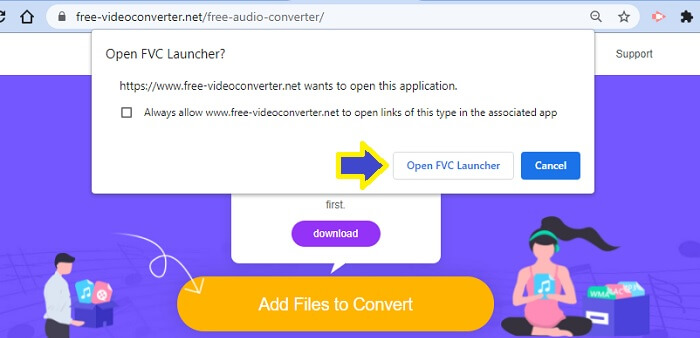
Step 2. Open the launcher as prompted. Click the button that says Open FVC Launcher.
Note: the second step is only applicable for first time users only. When you get to convert the second time you do not have to install it. Proceed to the next step immediately.
Step 3. After that, click Add Files to Convert and choose the file you want to convert from your folder.
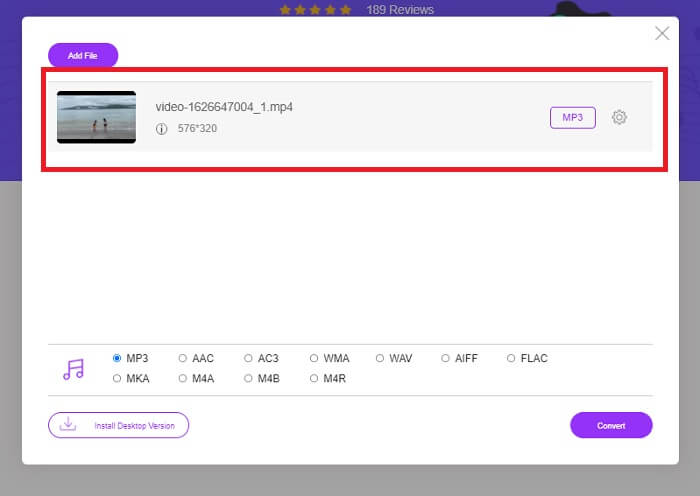
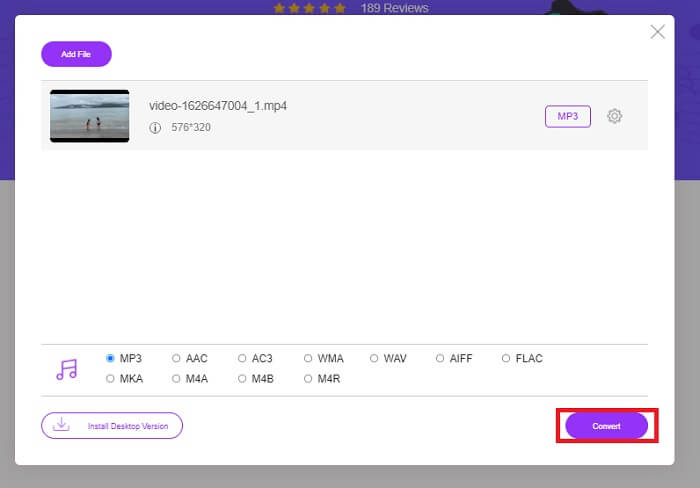
Step 4. Once the file is uploaded on the tool, you will see the file will default to MP3. This means you don't need to toggle anything. Just click Convert.
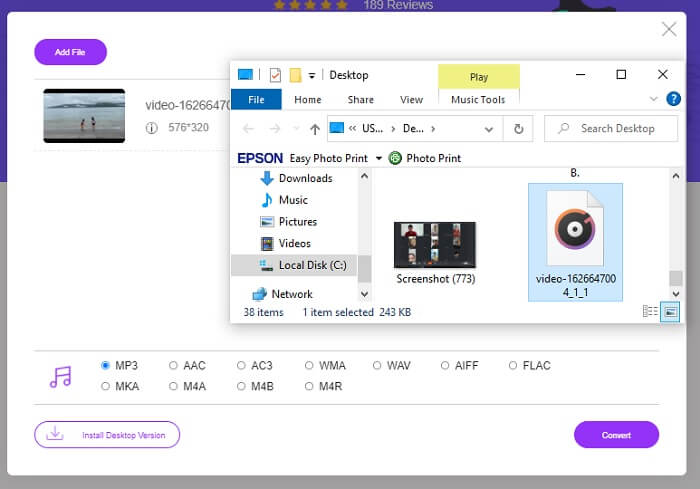
Step 5. Choose the folder location where you will save the file. Then click Select folder and the file will be automatically saved.
優點
- 自由。
- 無需註冊。
- 無需下載。
- 快速轉換過程。
- 遠離惡意軟件。
缺點
- 它純粹是轉換沒有編輯功能。
離線工具:Video Converter Ultimate
同時,如果您對上面給出的在線工具的輸出結果仍然不滿意,您也可以考慮下載可以幫助您的軟件。 FVC Video Converter Ultimate 是最好的工具之一,可以在網上輕鬆找到。 Video Converter Ultimate 是您最好的音頻轉換器、編輯器、壓縮器和提取器,目前已被全球許多用戶使用。
With this, you can convert your video and adjust the frame rate and bitrate of the video depending on your needs. You can also create memes out of a video by converting the video into a GIF file to share with your friends through different social media networks. Most importantly, it can convert MPEG videos to MP3 without a complicated process. There is more to learn about this tool, you can also check out more of it if you are going to personally try it. You can refer to the steps below to see how.
Step 1. Download and Install the Video Converter Ultimate on your PC. Use the download buttons below and wait until the set-up wizard is finished.
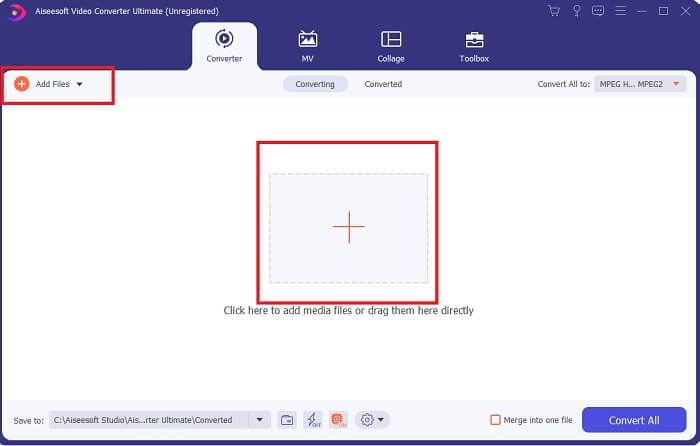
Step 2. There are two ways to upload the file, either you Drag and Drop the file, click Add Files or click the plus sign at the center of the interface.
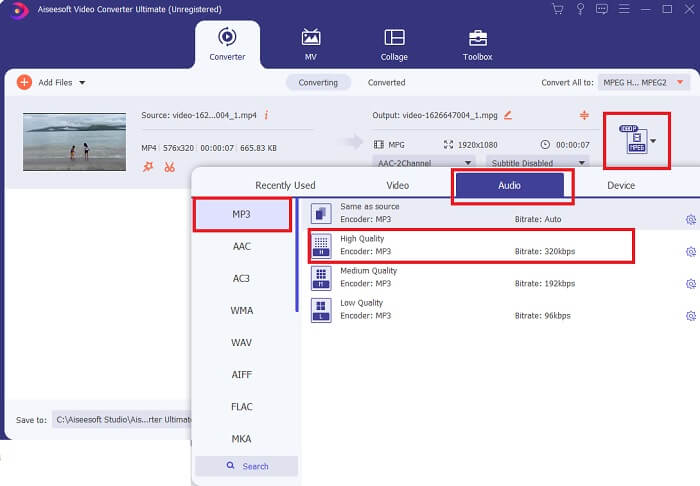
Step 3. Once the file is uploaded, you can now change the format and the quality of the audio file you wanted to extract.
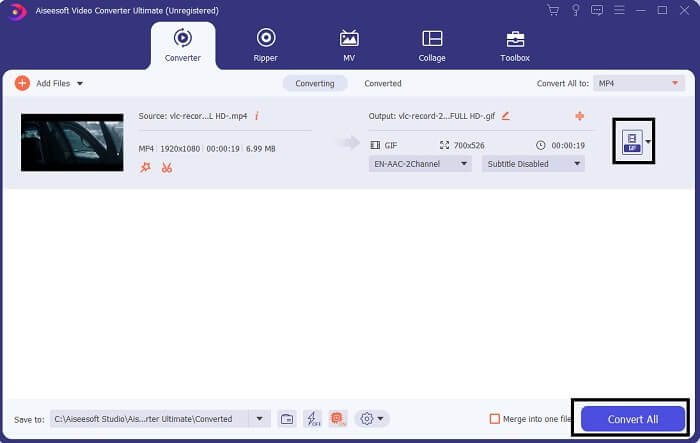
Step 4. Once done with the customization, you can now click on Convert All.
Step 5. Check the converted file from the folder located at the bottom part of the main interface.

優點
- 可靠的。
- 視頻轉換器。
- 視頻編輯。
- 它有一個快速的轉換過程。
- 帶有濾鏡和效果。
缺點
- 這是一個付費應用程序。
第 2 部分。 關於 MPEG 到 MP3 的常見問題解答
MPEG 質量好嗎?
MPEG 是標準的視頻格式,支持高清晰度質量,但需要大量文件才能實現。它也是視頻流站點和 Internet DVD 站點上使用的格式。大多數開源站點也使用它。綜上所述,該格式具有良好的質量。
MPEG 或 MP4 哪個更好?
When it comes to storage space, MP4 is better. Both MPEG and MP4 are compressed. But MPEG holds more files than MP4. Meanwhile when we talk about video quality MPEG has an advantage since the video quality is better than MP4. Usability-wise, MPEG is slow-played on mobile devices. Unlike Mp4 it is mobile-friendly. Which is the best then? Well, that depends on your preference. Depending on the device you are using too. Want to convert MPEG to MP4, read on How to Convert MPEG to MP4 to get more information.
哪個是通用的? MP4 還是 MPEG?
顯然 MP4 是通用的。幾乎所有媒體播放器都可以播放 MP4 文件甚至流媒體網站。 MPEG 有一些播放器不會真正播放。
結論
為簡單起見,提取 MPEG 音頻文件的路徑很簡單。使用 FVC 提供的可靠工具,即使不支付服務費用,您也可以完成工作。 MP3 轉換現在不會是一項艱鉅的工作,因為您知道在哪裡可以找到可以使用的最安全的工具。另外,如果您對 MPEG 有疑問,可以參考本文中的常見問題解答。
-
 如何在Mac / Windows / Online上將WMA轉換為MP3
 是否可以使用Windows Media Player將WMA轉換為MP3?怎麼把WMA轉換成MP3免費?這篇文章分享了4種簡單的方法來幫助您在Mac,Windows PC和在線上將音頻從WMA轉換為MP3。
-
 將MP4轉換為MP3音頻的8種方法(批量轉換和大尺寸)
 如果您想從 MP4 視頻中提取 MP3 音頻,您可以查看這篇文章並獲得 8 個解決方案。有在線和離線方式可以輕鬆地將手機或計算機上的 MP4 轉換為 MP3。
-
 WMV 到 MP3 – 如何免費將視頻轉換為音頻 [桌面/在線]
 在觀看 WMV 視頻時,您會發現音頻部分很吸引人。因此,您想在 MP3 播放器上播放它。但顯然您的播放器不支持 WMV 格式。這讓您想知道是否有辦法將 WMV 轉換為 MP3。
