


 視頻轉換大師
 屏幕錄影大師
 影片修復
影片修復
 安全下載
安全下載3種輕鬆在Windows和Mac上將MP4轉換為AMV的有效方法
當您要將一些大型MP4視頻(例如大電影)發送到智能手機時,可能沒有足夠的存儲空間。要將MP4轉換為AMV文件,可以使用高級壓縮算法來獲取小得多的視頻。無論您是需要在線轉換視頻,還是需要調整和編輯特定大小的視頻,都可以從本文中了解有關3種最高效的MP4到AMV轉換器的信息。

第1部分:如何在線將MP4轉換為AMV
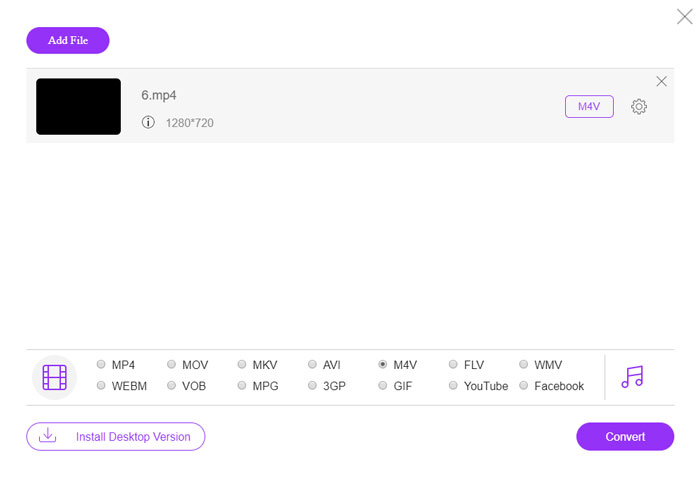
If you just need to convert a simple MP4 to AMV with ease, FVC Free Online Video Converter is a versatile online video converter, which is compatible with MP4, AMV, AVI and more other files. It also enables to tweak the video and audio settings, and even enables you to convert the files without watermark, or other restriction.
- 1.將MP4轉換為AMV, AVI, MKV 以及其他具有原始質量的視頻。
- 2.調整幀速率,視頻質量,視頻編解碼器,音頻質量等。
- 3.提供簡單的用戶界面,僅需3個步驟即可轉換AMV文件。
- 4.轉換沒有水印的文件是一種安全,穩定的方法。
Step 1. Head to the online MP4 to AMV converter on any browser, you can click the Add File to Convert button to install the video converter for the first time. You can also load the MP4 files to the program.

Step 2. Choose the AMV as the output format from the bottom. Of course, you can also tweak the video and audio settings, such as video encorder, video resolution, video bitrate, frame rate and more to get a desired video.

Step 3. After that, you can click the Convert button to start converting MP4 to AMV accordingly. It takes a few seconds to get the desired file, and then you can transfer the video to your smartphone accordingly.
第2部分:如何使用VLC Media Player將MP4轉換為AMV
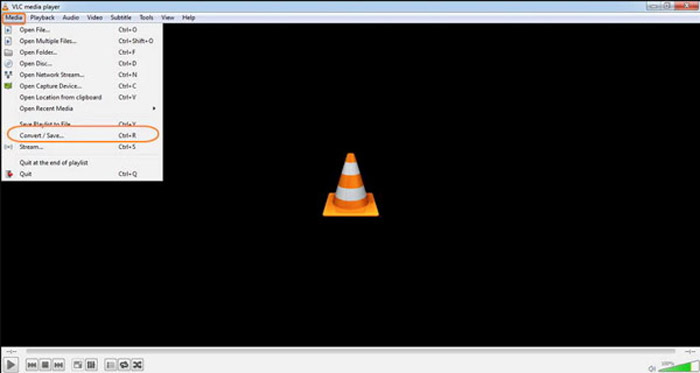
VLC Media Player是最受歡迎的MP4到AMV轉換器之一。它還提供了一些基本的視頻轉換和編輯功能。此外,您還可以在轉換後預覽輸出的AMV視頻。只需查看以下詳細過程即可。
Step 1. Open VLC Media Player on your computer, go to the Media menu and choose the Convert/Save option. Click the Add option to the right of the File Selection list on the File tab and browse the MP4 files.
Step 2. Click the Convert/Save button to continue. Go to the Convert windows, you can select the AMV as the output format. Click the Edit Selected Profile button to tweak the video and audio settings.
Step 3. Click the Browse option and choose a location and filename for the output file. After that, you can click the Start button to convert MP4 files into AMV accordingly on your computer.
第3部分:輕鬆地將MP4轉換為AMV的最佳方法
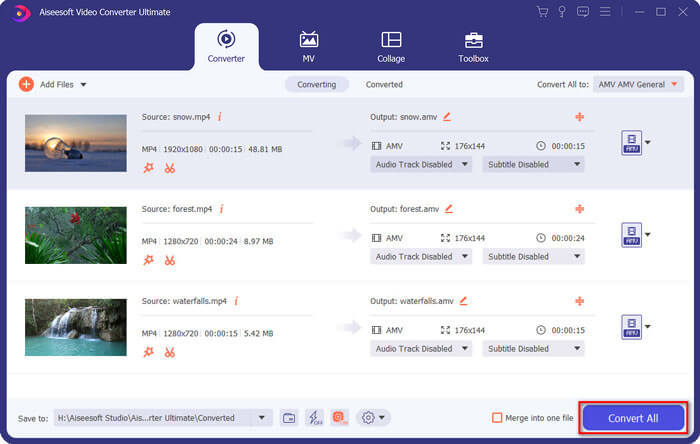
FVC Video Converter Ultimate is an all-in-one MP4 to AMV converter on both Windows and Mac. It not only converts the video formats, but also enables you to adjust the different video and audio parameters, add subtitles/audio tracks, and even edit the converted video files with ease.
- 1.以原始質量將MP4轉換為AMV和其他更多視頻格式。
- 2.調整幀速率,視頻質量,比特率,視頻編解碼器等。
- 3.提供多種視頻編輯功能,以旋轉,剪輯,調整濾鏡等。
- 4.先進的硬件加速功能,可將視頻轉換速度提高70倍。
Step 1. Download and install the MP4 to AMV converter, launch the program on your computer. Choose the Convert button and click the Add File option to load the MP4 files, or directly drag multiple MP4 files to this program.

Step 2. Click on the format icon on the right side of the video file and choose the AMV as the output format. You can also click the Gear icon to adjust the video and audio settings, or even edit the video/adjust filters with ease.

Step 3. Once you are satisfied with the output AMV, such as the video size, you can click the Convert All button to start the MP4 to AMV conversion. After that, you can transfer the AMV files to another device.
第4部分:有關將MP4轉換為AMV文件的常見問題解答
1.什麼是AMV文件格式?
AMV文件被稱為動漫音樂視頻文件。它通常是來自和來自中國的便攜式媒體播放設備使用的。 AMV視頻格式具有低分辨率特性,視頻分辨率在94x64和160x120之間。將MP4轉換為AMV時,可以輕鬆地將更多視頻發送到智能手機。
2.如何在智能手機和計算機上播放AMV文件?
將MP4轉換為AMV文件時,如何在智能手機或計算機上播放視頻文件?實際上,您可以簡單地將AMV作為AVI格式的一種變體,它在大多數媒體播放器上都可以使用。如果需要在iOS設備上播放AMV文件,則可以改用VLC Media Player或其他媒體播放器。
3. AMV和MP4有什麼區別?
MP4是可用於在線流服務和設備的最常用的視頻格式之一。 AMV是Motion JPEG的一種變體,具有固定而不是可變的量化表。將MP4轉換為AMV時,可以壓縮視頻並節省更多的存儲空間,尤其是將視頻傳輸到設備時。
結論
將MP4轉換為AMV的最佳選擇是什麼?只需從本文中了解有關最佳方法的更多詳細信息即可。如果您需要在線轉換和壓縮視頻而無需其他軟件,FVC Free在線視頻轉換器是您可以考慮的最終解決方案。
-
 AVI VS MP4 –哪個更好(質量/壓縮/文件大小…)
 哪種視頻格式更好,AVI或MP4?如果要獲得詳細的比較,可以查看此AVI VS MP4文章。您可以了解AVI和MP4在許多方面的異同。
-
 適用於Windows和Mac的十大MP4播放器軟件(免費和付費)
 從10種最新的MP4視頻播放器軟件的建議中閱讀並獲取最佳MP4播放器。您可以在Windows和Mac上流暢播放MP4視頻文件而不會出現延遲。
-
 如何在Mac / Windows上將MP4轉換為WMV
 這篇文章分享瞭如何在Mac或Windows上將MP4視頻轉換為WMV格式。我們還將為您提供多種選擇,包括桌面軟件和基於Web的在線轉換器。準備知道最好的MP4到WMV轉換工具了嗎?
