


 視頻轉換大師
 屏幕錄影大師
 影片修復
影片修復
 安全下載
安全下載如何免費將MP4轉換為FLV Online / Mac / Windows
FLV是使用HTML5在Internet上流式傳輸媒體的標準,用於在Facebook,YouTube等上嵌入視頻和視頻帖子。當您要在某些網站上上傳或嵌入視頻時,建議的格式是FLV,而不是MP4,儘管MP4被認為是Mac,Windows,智能手機,HDTV,遊戲機,流媒體服務等上最受歡迎的格式。
但好處是,你可以將 MP4 轉換成 FLV。
這裡整理了三款在線、Windows 和 Mac 上排名前 3 的免費 MP4 轉 FLV 轉檔工具,你可以依照簡單教學學會如何將 MP4 變成 FLV。

第1部分。使用免費的視頻轉換器將MP4轉換為FLV
要將 MP4 轉換成 FLV,並不需要什麼特殊的技術知識,你需要的只是 MP4 轉 FLV 轉檔程式。Free FLV Converter 是一款易於使用的影片轉檔軟體,能處理 FLV、MP4、MOV、MKV、MTS、M2TS、ASF、WMV、AVI 等多種格式,包含將 MP4 轉成 FLV,或將 FLV 轉回 MP4。

- 將MP4批量轉換為FLV / SWF / ASF,以節省時間。
- 借助H.264支持將MP4轉換為FLV。
- 調整FLV參數,例如分辨率,比特率等。
- 編輯FLV文件的開始和結束主題。
現在,請按照下面提到的簡單步驟進行操作。
步驟 1.下載免費 MP4 轉 FLV 轉檔程式
從下面的下載鏈接中下載免費的視頻轉換器。
此免費軟件與 Windows 10/8/7 和 macOS X 10.7 及更高版本兼容。按照屏幕上的說明下載並安裝它。
步驟 2.加入 MP4 檔案
啟動程式視窗,點選中央或左上角的 Add File(s) 按鈕新增 MP4 檔案。它支援批次轉檔,你可以一次加入多個 MP4 檔案到這個工具中。
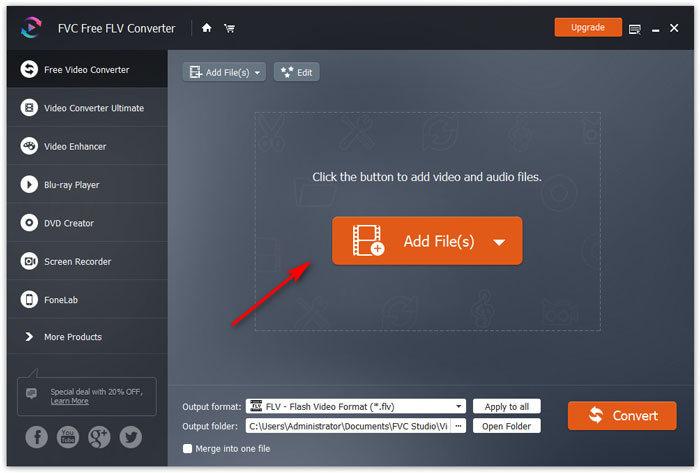
步驟 3.將 MP4 轉換為 FLV
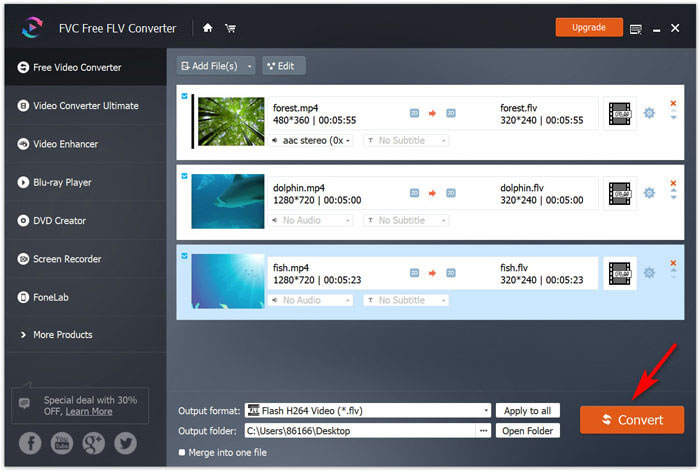
在底部的 Output format 下拉選單中選擇 FLV。點選 Output folder 旁邊的三點圖示,指定存放轉檔後 FLV 檔案的資料夾。
最後,按一下 Convert 按鈕,即可開始將 MP4 轉換為 FLV。
你也可以在主介面中使用 Edit 編輯選項,將片頭與片尾主題加入影片中,再上傳到網路分享。
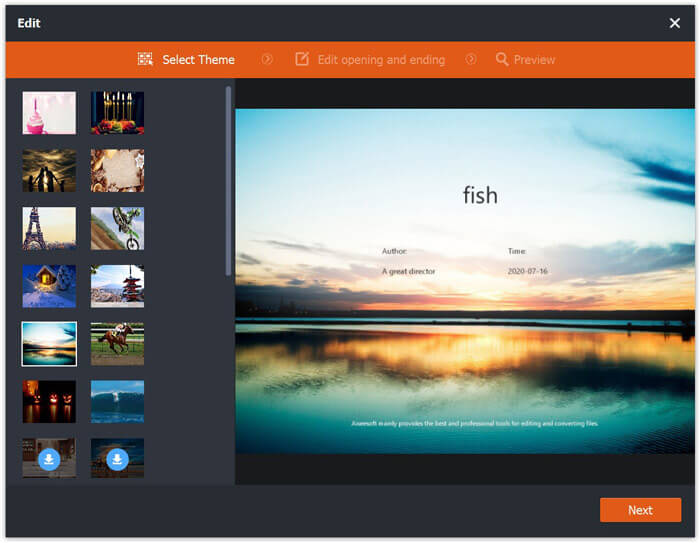
這樣,您可以將所有MP4文件安全地轉換為FLV視頻。
第2部分。通過免費的在線視頻轉換器將MP4更改為FLV
將MP4轉換為FLV的第二種方法是使用免費的在線轉換器。
無需下載大exe或dmg文件,您就可以通過瀏覽器在線完成整個轉換。
Free Online Video Converter 是一款免費線上工具,可以將 MP4 轉成 FLV 以及其他主流格式。不僅能把 MP4 轉為 FLV,還能直接將 MP4 轉檔成適用於 YouTube 和 Facebook 的格式。當你想把 MP4 上傳到這些線上平台時,無需再自行調整參數以符合它們的需求。
在線將MP4更改為FLV的步驟非常簡單。
步驟 1.在電腦瀏覽器中開啟這個線上網站。點選 Add Files to Convert 按鈕安裝啟動器,讓轉檔與下載過程能結合在一起,減少多餘點擊。
下載桌面版以批次轉換檔案。
步驟 2.在跳出的對話框中,選取你想轉成 FLV 的 MP4 檔案。
步驟 3.勾選 FLV 選項,然後點選 Convert 來選擇儲存轉檔後 FLV 檔案的位置。再按一次 Convert 按鈕,即可開始轉換 MP4,並將轉檔完成的 FLV 檔案下載到硬碟。
您可以根據自己的喜好,通過FLV輸出格式旁邊的齒輪圖標來調整編解碼器,分辨率,比特率等。
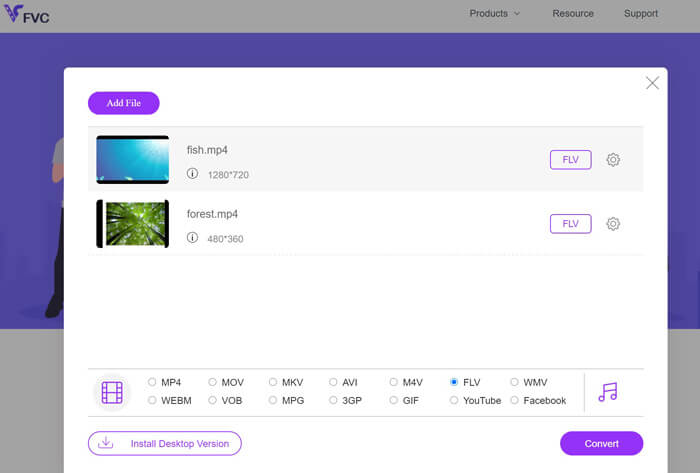
這個方法的額外優點是,當你想在 Facebook、Instagram 等平台上傳動畫時,還可以把 MP4 轉成 GIF。
當然,如果您想進一步編輯 FLV 效果,建議您使用 Video Converter Ultimate。
- 將MP4轉換為FLV和其他500多種格式。
- 將任何其他視頻轉換為 FLV、SWF 和 ASF 以進行在線流式傳輸。
- 編輯視頻效果(修剪,修剪,過濾,旋轉,合併,水印等)
- 壓縮視頻,編輯ID標籤,創建GIF並提高視頻質量。
第3部分。通過VLC將MP4轉換為FLV
VLC以免費的媒體播放器而聞名。在這裡,它可以是免費的MP4到FLV轉換器。但是,有人可能會抱怨他們無法從VLC中找到FLV輸出格式。不用擔心,現在請按照以下步驟使用VLC從MP4文件中獲取FLV文件。
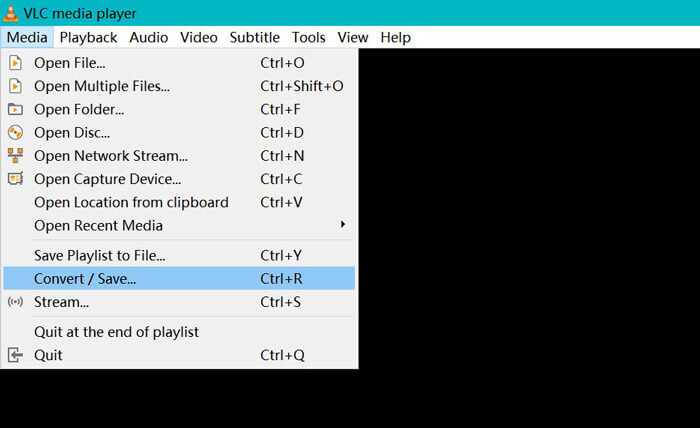
步驟 1.在電腦上下載 VLC,開啟此軟體。前往選單中的 Media,並選擇 Convert / Save 選項。
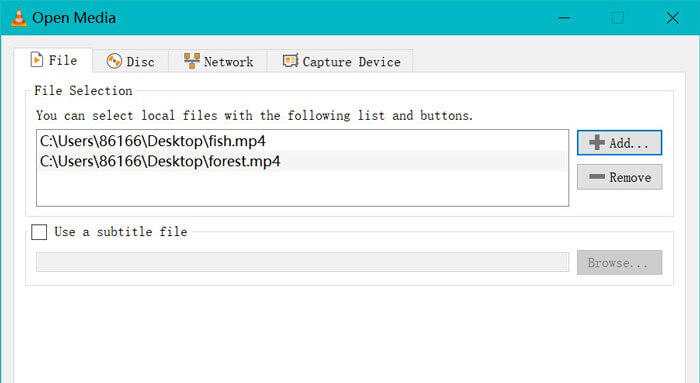
步驟 2.點選 Add 選項開啟對話框,找到並加入要在 VLC 中轉檔的 MP4 檔案。
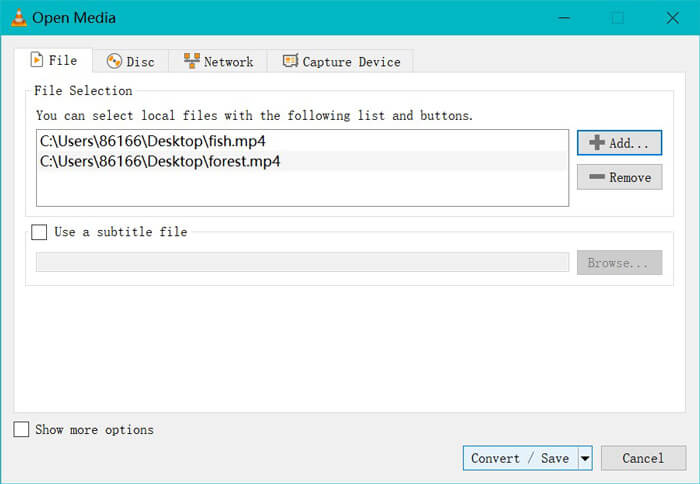
步驟 3.MP4 檔案載入完成後,點選底部的 Convert /Save 按鈕。
步驟 4.首先選擇 Dum Raw input,再點選 Browse 選擇儲存轉成 FLV 檔案的位置。最後按下 Start,開始將 MP4 檔案轉換為 FLV。
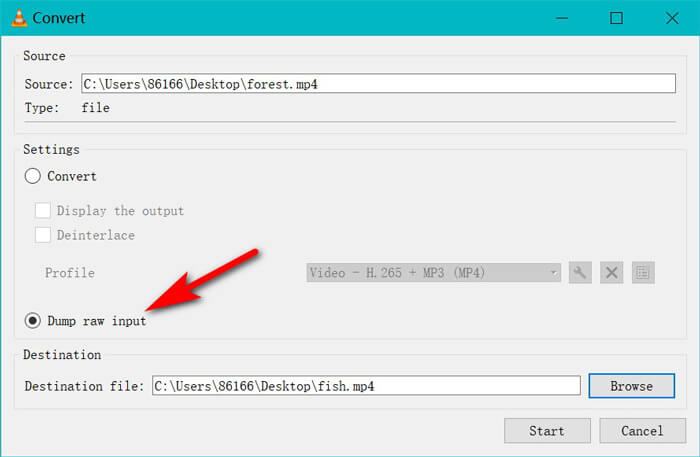
轉換完成後,您可以找到轉換後的文件是.flv的擴展名。 (通常在計算機上的“視頻”文件夾中)。
如果你想轉換其他格式,例如將 SWF 轉成 MP4,只要在 Profile 的下拉選單中選擇 MP4 即可。
需要明確的是:VLC不是專業的MP4到FLV轉換器,並且轉換器界面不是用戶友好的。
MP4 與 FLV
第4部分。MP4到FLV的常見問題解答
什麼是FLV?
Flash視頻是一種容器文件格式,可使用Adobe Flash Player通過Internet傳遞視頻。 FLV文件可通過Adobe Flash Player或Web瀏覽器插件在大多數操作系統上播放。
手剎可以將MP4轉換為FLV嗎?
不可以。HandBrake可以打開FLV,WebM,MP4和許多其他格式的Web視頻。但是它不能將其他視頻轉換為FLV。支持的輸出視頻格式為MP4和MKV。
FLV是否小於MP4?
否。FLV和MP4都是媒體容器。雖然它們具有相同的視頻和音頻編解碼器,但FLV文件比MP4文件大一點。
Free Online Video Converter是否將MP4轉換為有限大小的FLV?
否。沒有使用免費的在線視頻轉換器將MP4轉換為FLV的文件大小限製或時間限制。
結論
儘管MP4是Windows,Mac,手機和流媒體平台的通用格式,但是當您要在線上傳MP4視頻時,FLV是某些網站推薦的格式。這篇文章收集了前3個免費的MP4到FLV轉換器,以便您可以在Mac和Windows計算機上在線將MP4更改為FLV。
您首選哪種方式?
-
 如何在Windows / Mac上將MKV轉換為MP4
 無法播放 MKV 視頻?想在不支持 MKV 的設備上觀看 MKV 視頻嗎?這裡有 2 種免費方法可以將 MKV 轉換為 MP4 而不會降低質量。
-
 WTV到MP4轉換器:如何將WTV轉換成MP4
 怎麼把WTV轉換成MP4?這裡有2個免費的WTV到MP4轉換器,您可以使用它們將Windows錄製的WTV文件轉換為在線和桌面上免費的MP4視頻。
-
 如何免費將RM / RMVB轉換為MP4在線和計算機
 怎麼把RM轉換成MP4?這是2 100%免費的RM / RMVB到MP4轉換器,可以在線和在Windows和Mac計算機上將RM更改為MP4。

