


 視頻轉換大師
 屏幕錄影大師
 影片修復
影片修復
 安全下載
安全下載如何免費將MP4在線轉換為WAV
MP4 是人們日常生活中相當常見的影片格式。同時,WAV 也是一種非常適合用來存放無損音訊的選擇。但有時候,你可能想要將 MP4 轉換成 WAV,以便在各種裝置上收聽。這種情況下,你就需要一款專業的轉檔工具,能在不犧牲音質的前提下,從影片中擷取音訊。
因此,今天我們會詳細比較 MP4 和 WAV,並向你介紹數款最佳的MP4 轉 WAV 轉換器,包括線上與離線工具。

第1部分。MP4與WAV
老實說,MP4和WAV之間沒有什麼可比較的。畢竟,它們是在不同情況下使用的兩種不同格式,一種用於存儲視頻,另一種用於保存音頻。但它們都是文件類型,並且可以包含數字聲音。基於此,下表列出了它們之間的一些差異。
| MP4 | WAV | |
| 包含 | 視頻,音頻和字幕 | 僅音頻 |
| 文件擴展名 | .mp4,.m4a,.m4p,.m4b,.m4r和.m4v | .wav和.wave |
| 由開發 | 國際標準化組織 | IBM和Microsoft |
| 物產 | 壓縮且有損(大多數時間) | 無壓縮且無損 |
第2部分。最佳MP4到WAV轉換器在線
現在,您已經了解了這兩種格式的優點。是時候找到一個可以滿足您所有轉換需求的有用的MP4到WAV轉換器了。
在這裡,我們推薦一款名為 FVC Free Audio Converter 的線上轉檔工具,它能幫助你輕鬆在網路上將 MP4 影片檔轉成 WAV,而且完全免費。這款線上轉換器最大的優點在於,你可以在任何作業系統上使用它,例如 Windows 和 Mac OS,而無需下載龐大的軟體安裝包。你只需要一個瀏覽器和穩定的網路連線,就能輕鬆將像 MV、脫口秀等 MP4 影片轉成 WAV 檔案,毫不費力。
請按照以下步驟操作,您也可以像專業人士一樣進行轉換。
步驟 1: 點擊上方連結,前往 FVC Free Audio Converter 官方網站。按一下Add Files to Convert 按鈕,接著依提示下載並安裝一個簡單的啟動工具。
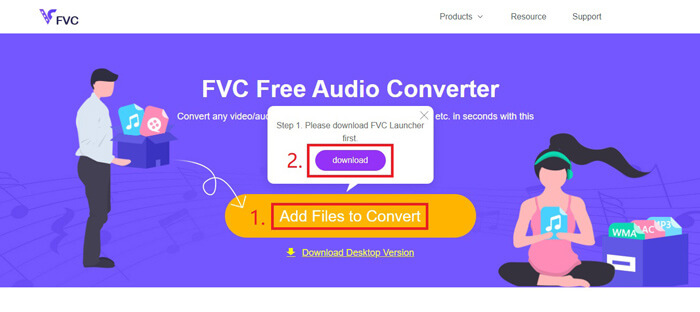
步驟 2: 安裝完成後,Open 視窗會立刻跳出。此時你可以選擇想要轉換的 MP4 影片。
步驟 3: 由於你要輸出的是 WAV 檔案,因此需要將輸出格式改為 WAV。點擊Convert,並選擇儲存 WAV 檔案的目的資料夾。
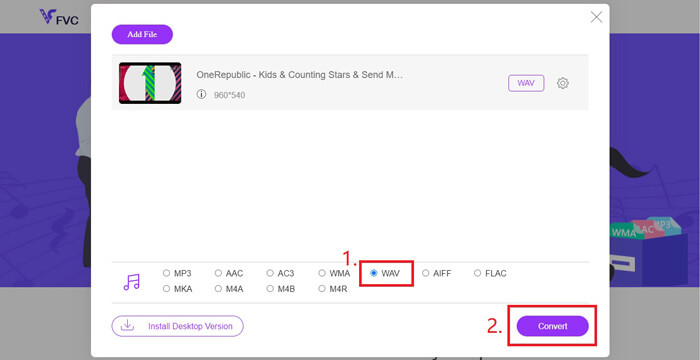
步驟 4: 等待片刻,轉換完成後,檔案會自動儲存到你的電腦中。
第3部分。通過Audacity將MP4轉換為WAV
許多人會問要如何使用 Audacity 將 MP4 轉成 WAV。因此我們進行了一番研究,發現這個方法可能稍微複雜一些。因為如果沒有安裝額外的 FFmpeg 函式庫,Audacity 並不能直接開啟 MP4 檔案。不過還好,我們透過使用 Audacity 的錄音功能,成功解決了這個問題。
對於那些不熟悉Audacity的人,它是由志願者開發的開源和跨平台音頻免費軟件。通常,它用於編輯和錄製多軌音頻。要使用Audacity從MP4導出WAV文件,您需要執行以下步驟。
步驟 1: 找到你想要轉換的 MP4 影片檔,並使用電腦上的媒體播放器播放它。為了確保內容不會有遺漏,開啟影片後請先暫停,再將進度條拉回到影片開頭。
步驟 2: 現在你可以啟動 Audacity。首先,把麥克風靜音,將錄音音量滑桿拖到 0。再依照自己的需求調整系統音量,然後點擊Record(錄音)按鈕。
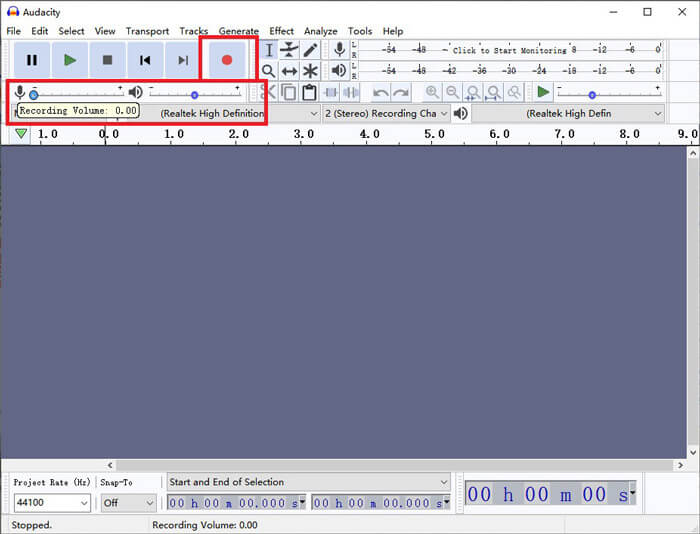
步驟 3: 回到媒體播放器並播放 MP4 影片。Audacity 會錄下影片中的音訊部分。當 MP4 影片播放結束後,你就可以關閉媒體播放器。
步驟 4: 回到 Audacity,點擊Stop(停止)圖示。之後,請在上方選單列找到 File,點選Export,再選擇Export as WAV。
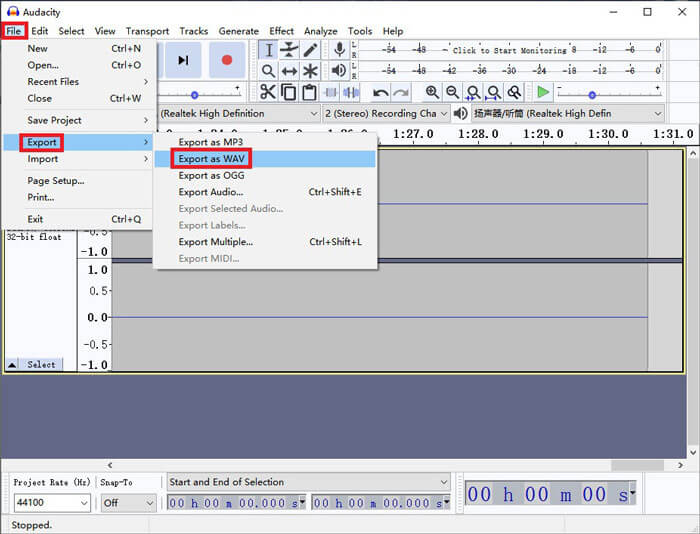
步驟 5: 在將音訊檔儲存到電腦之前,請先幫它命名。
第4部分。將MP4轉換為WAV的常見問題解答
1.如何在iTunes中將MP4轉換為WAV?
開啟 iTunes,並在上方選單列找到Edit,然後選擇「Preferences(偏好設定)」。在「一般偏好設定」視窗中找到 Import Settings。接著將 Import Using 從 AAC Encoder 改為 WAV Encoder,再按一下OK。之後,右鍵點擊你想要轉換的影片檔,選擇Create WAV Version(建立 WAV 版本)。
2.如何在Windows Media Player中將MP4轉換為WAV?
以 Windows Media Player 開啟 MP4 檔案。點擊Menu 圖示,回到 Windows Media Player 的主畫面。按一下Organize,並選擇Options。然後切換到 Rip Music 分頁,將輸出格式改為 WAV。你也可以在此修改音訊檔的儲存位置。最後按一下OK 按鈕,開始將 MP4 轉換成 WAV。
3. MP4或WAV哪個更好?
若只是單純比較音質,那麼 WAV 顯然比 MP4 更好,因為採用 WAV 格式的音訊是未壓縮、無損的。不過,也正因如此,在儲存相同音訊內容的情況下,WAV 檔案的容量通常會比 MP4 更大。如果你想進一步了解 MP4 影片格式,就需要至少將它與其他影片格式比較,例如 AVI VS MP4 或 MOV VS MP4。
結論
包含我們在常見問答中提到的方法在內,現在你已經掌握了 4 種將 MP4 轉換成 WAV 的方式。如果你只想使用一款省時、方便的工具來轉換音訊,那麼 FVC Free Audio Converter 就能在不增加額外麻煩的情況下,幫你輕鬆完成任務。
如果您覺得這篇文章有幫助,可以與您的朋友分享。請隨時留下您的意見。
-
 如何在Mac / Windows上將MP4轉換為WMV
 這篇文章分享瞭如何在Mac或Windows上將MP4視頻轉換為WMV格式。我們還將為您提供多種選擇,包括桌面軟件和基於Web的在線轉換器。準備知道最好的MP4到WMV轉換工具了嗎?
-
 如何在Windows / Mac / iPhone / Android / Online上將MP4轉換為MP3
 如果要從MP4視頻中提取MP3音頻,則可以查看本文並獲得8個解決方案。有在線和離線方法,可輕鬆在手機或計算機上將MP4轉換為MP3。
-
 如何在台式機和在線平台上將WMV轉換為MP3
 您可以從FVC Studio中找到任何免費的視頻轉換器軟件。支持任何視頻/音頻格式,包括MP4,MOV,TS,AVI,WMV,FLAC,MP3等。
