


 視頻轉換大師
 屏幕錄影大師
 影片修復
影片修復
 安全下載
安全下載在不損失品質的情況下縮小 PDF 大小的 3 種有效方法
最簡單上傳、開啟與分享大型 PDF 檔案的方式,就是先將它們壓縮。壓縮的意思是減少檔案大小,原因可能是檔案中包含大量圖片、創意字型,以及像是動態 PNG 等各種內嵌的圖像設計。不過,有時候壓縮會造成畫質大幅下降,讓文件變得不易閱讀或不夠專業。為了避免這種情況,我們整理了 3 種可靠的方法,幫助你在不降低品質的情況下壓縮 PDF 檔案。
繼續閱讀以發現這些有效的技術,並確保您的 PDF 保持清晰和高品質,同時尺寸更易於管理。讓我們開始吧!
第 1 部分:在不損失品質的情況下壓縮 PDF 的最佳方法 [簡單且安全]
當我們在討論最佳 PDF 壓縮工具時,清單中會有各式各樣的工具,但若要在不失真、不降低品質的前提下壓縮 PDF,最好的方法之一就是使用 FVC Free PDF Compressor。這款工具專為解決大型 PDF 檔案問題而設計,介面友善、安全,適合所有使用者。此外,這個線上壓縮工具可以在不犧牲品質的情況下減少 PDF 檔案大小,因為它在壓縮過程中會維持原始內容的完整性。
使用 FVC Free PDF Compressor 在不降低品質的情況下壓縮 PDF 的步驟:
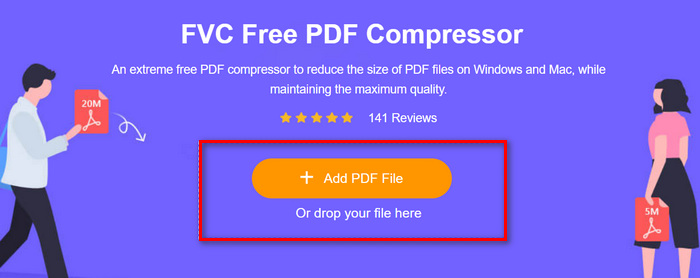
步驟 1:首先,在線上工具的主介面中,點擊 Add PDF File 按鈕,匯入你想要壓縮的 PDF 檔案。
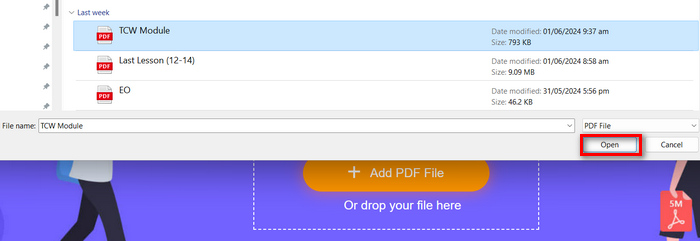
步驟 2:接著,選取你要壓縮的 PDF 檔案並按下「開啟」。系統會立即開始處理壓縮。
步驟 3.完成後,先預覽壓縮好的 PDF 檔案,接著點擊 下載 PDF 按鈕將其儲存。
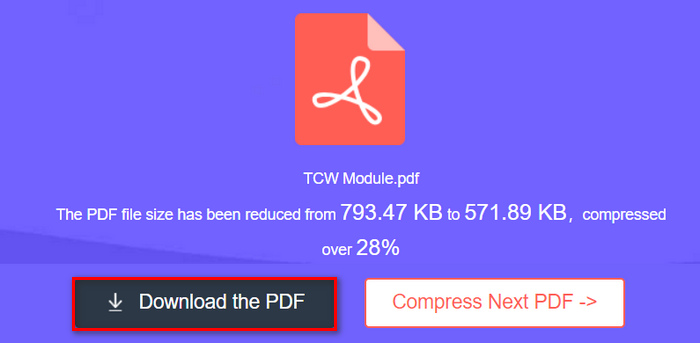
給你了!如果您需要一種快速、簡單且安全的方法來壓縮 PDF,而不用擔心複雜的設定或進階功能,那麼此方法最適合您。
第 2 部分:在不損失品質的情況下壓縮 PDF [使用自訂選項]
同時,如果您希望在不損失品質的情況下壓縮 PDF 並自訂 PDF 的壓縮級別,則可以使用 Adobe Acrobat 線上 PDF 壓縮器。這款線上PDF壓縮器提供多種壓縮級別,讓使用者可以根據需要自訂壓縮設置,同時保持PDF檔案的原始品質。此外,憑藉其跨各種裝置和作業系統的兼容性,您可以從任何地方輕鬆存取和使用此強大的壓縮工具,確保無縫生產力,無論您的位置或裝置偏好如何。
使用 Adobe Acrobat 線上 PDF 壓縮工具在不降低品質的情況下壓縮 PDF 的步驟:
步驟 1:首先,點擊 Select a File 按鈕,匯入你想要壓縮的 PDF 檔案。
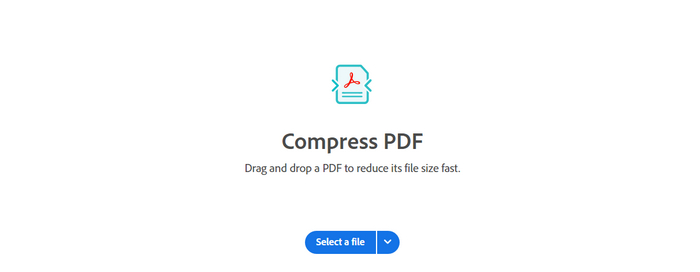
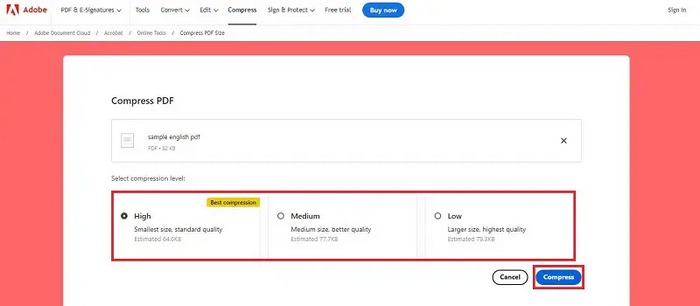
步驟 2:接著,在檔案總管中選擇你要壓縮的檔案。之後,再選擇你想套用的壓縮等級。
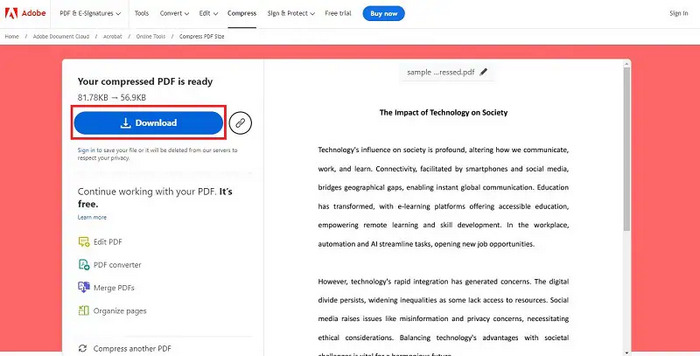
步驟 3:最後,若要儲存壓縮後的 PDF,請點擊 Download 按鈕。
此方法非常適合需要對壓縮過程進行更多控制的用戶,提供自訂選項來平衡檔案大小和品質。
第 3 部分:在 MAC/PC 上減少 PDF 檔案大小而不損失品質 [適合專業人士]
當使用者希望採用專業的方法在 Mac/PC 上壓縮 PDF且不降低品質時,Adobe Acrobat 可說是首選方案。這款完整的 PDF 管理解決方案提供了進階的 PDF 壓縮功能。藉由這些功能,工具能確保高品質壓縮,非常適合需要精準掌控 PDF 文件、並且必須維持最高品質標準的使用者。
使用 Adobe Acrobat 在不降低品質的情況下壓縮 PDF 的步驟:
步驟 1:首先,在你的裝置上開啟 Adobe Acrobat。於上方工具列點選 Tools。
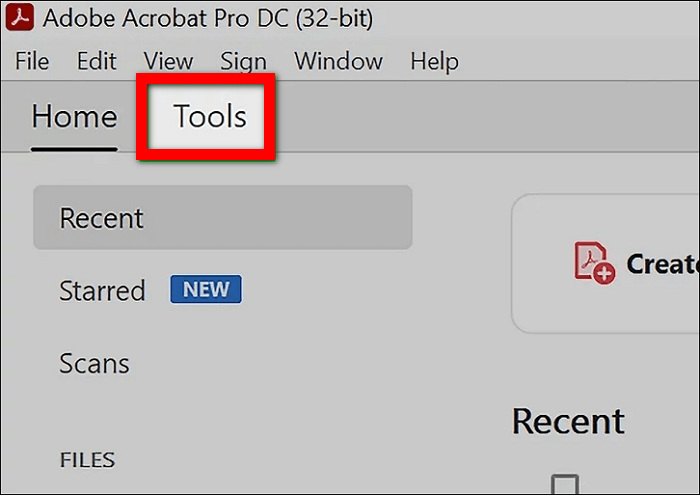
步驟 2:然後前往 Protect & Standardize,在 Tools 區段中選擇 Optimize PDF。
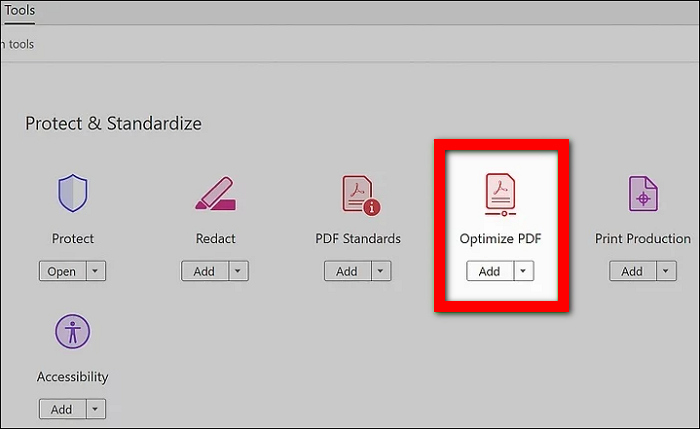
步驟 3:接著,從電腦的檔案資料庫中選擇你想要壓縮的 PDF 檔案。
步驟 4.在 PDF 工具列中,找到並點擊 減少檔案大小。
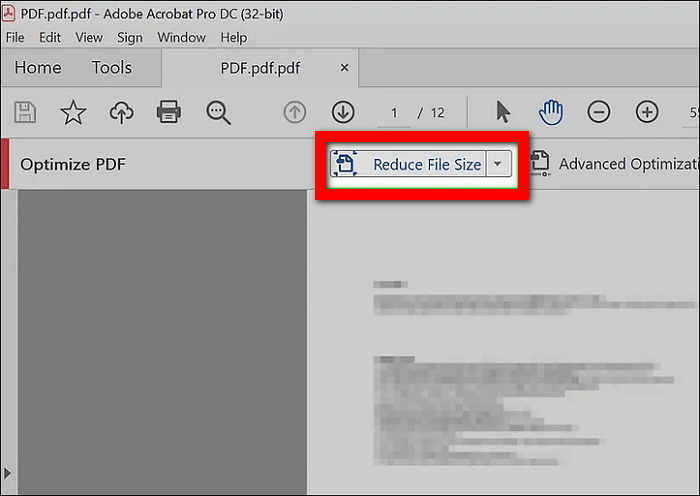
步驟 5:最後,選擇你要儲存壓縮後 PDF 的位置,並點擊 Save。
Adobe Acrobat 確實提供了全面的選項,以確保壓縮 PDF 的最高品質輸出,同時顯著減少其大小。因此,此方法最適合需要強大、功能豐富的工具來管理和壓縮 PDF 的專業人士和高級用戶。
第 4 部分:有關在不損失品質的情況下壓縮 PDF 的常見問題解答
壓縮 PDF 會降低品質嗎?
如果操作正確,壓縮 PDF 不會降低其品質。 FVC 免費 PDF 壓縮器、Adobe Acrobat Online PDF 壓縮器和 Acrobat Pro 等工具旨在保持文件的原始質量,同時減少其大小。
我可以大幅減小 PDF 檔案的大小嗎?
是的。您可以使用 Acrobat Pro 等高級工具大幅縮小 PDF 檔案的大小,該工具提供各種壓縮設置,可在不影響品質的情況下實現所需的檔案大小。
如何在 Windows 11 壓縮 PDF?
要在 Windows 11 中壓縮 PDF,您可以使用 FVC 免費 PDF 壓縮器等線上工具。該工具直接從您的網頁瀏覽器提供方便且可存取的解決方案。它不需要安裝任何軟體,適合追求簡單和高效的用戶。
壓縮 PDF 會影響其格式或佈局嗎?
使用 FVC 免費 PDF 壓縮器或 Acrobat Pro 等信譽良好的 PDF 壓縮工具時,壓縮不應影響文件的格式或佈局。這些工具旨在保留或維持 PDF 的原始結構和外觀,同時減少其檔案大小。不過,在共享或列印之前預覽壓縮的 PDF 始終是一個好主意,以確保所有內容都按預期顯示。
PDF 壓縮如何影響文件中影像的解析度?
PDF 壓縮對影像解析度的影響因所使用的壓縮方法而異。借助 FVC 免費 PDF 壓縮器,該軟體旨在減小檔案大小,同時有效保持影像清晰度和清晰度。因此,用戶可以信賴 FVC 免費 PDF 壓縮器可以有效地壓縮 PDF,而不會損失質量,尤其是文件中嵌入的圖像。
結論
學會如何有效又簡單地在不降低品質的情況下壓縮 PDF,對於提升文件管理與分享效率非常關鍵。無論你是需要像 FVC Free PDF Compressor 這樣快速簡便的解決方案、像 Acrobat Online PDF Compressor 這類可自訂設定的線上工具,還是專業級的 Acrobat Pro 應用程式,都能找到符合你需求的方法。選擇最適合自己的工具,享受優化後、高品質 PDF 帶來的好處。準備開始了嗎?立刻試試上述任一工具,體驗輕鬆無憂的 PDF 壓縮流程吧!
-
 Adobe 壓縮 PDF:輕鬆壓縮 PDF 檔案的 3 種方法
 想知道 Adobe Compress PDF 是用於壓縮大型 PDF 文件嗎?在本文中,了解如何利用它們輕鬆縮小 PDF 文件。
-
 如何快速在任何視頻上添加水印的 4 種最佳方法
 如果您閱讀本文,讓我們通過詳細步驟了解如何在 Windows、Mac、在線、iOS 和 Android 上的任何視頻中添加水印。
-
 在線和離線向 GIF 添加水印的 3 種最簡單的方法
 如果您正確使用正確的工具,向 GIF 中添加水印可以像 1-2-3 一樣簡單。市場上的工具過於廣泛,但我們將介紹您可以依賴的三種工具。
