


 視頻轉換大師
 屏幕錄影大師
 影片修復
影片修復
 安全下載
安全下載WebEx ARF Player –在Windows和Mac上播放和轉換ARF文件
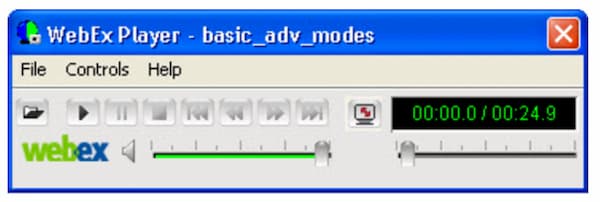
如果您是WebEx會議主持人,則可以從WebEx下載錄製的視頻文件。默認情況下,您的WebEx錄製視頻將保存為.arf文件擴展名。許多第三方媒體播放器並未廣泛支持Cisco WebEx ARF格式。如果要打開ARF記錄文件,則需要WebEx ARF播放器。本文主要討論如何獲取和使用WebEx播放器進行ARF播放。只需閱讀並關注。

第1部分:如何使用WebEx ARF Player打開和轉換ARF文件
Cisco WebEx是用於交互式網絡研討會和大規模虛擬事件的視頻會議和在線會議工具。對於全世界的同事來說,長途運輸不再是一個難題。
聯機會議後,您會收到一封電子郵件,其中包含WebEx錄音的鏈接。您可以單擊鏈接並直接觀看錄製的WebEx會議。不需要這樣的ARF文件播放器。
如果您下載WebEx文件以供離線觀看,則需要使用.ARF播放器來進一步播放WebEx。這是使用WebEx ARF Player軟件播放和轉換ARF文件的方法。
步驟 1: 前往你的 WebEx 平台。選擇 My WebEx, My Files 和 My Recordings。選擇你的錄製檔案。然後依序點選 More 接著 Download。你可以將 WebEx 檔案以下載為 .ARF 副檔名。
步驟 2: 前往 WebEx 的 Meeting Center。選擇 Support,然後選擇 Downloads。進入 Recorder and Players,接著選擇 Recording and Playback。
步驟 3: 在 for .ARF 區塊中,選擇 Download 以免費下載並安裝適用於 Windows 或 Mac 的 WebEx 播放器。你可以利用這個 ARF 播放器立即在電腦上開啟 ARF 檔案。點選 Pause 可暫停或繼續播放 ARF。
步驟 4: 進入桌面版 ARF 播放器後,你可以將檔案格式從 ARF 變更為 MP4。從 File 下拉式選單中,於 Convert Format 清單選擇 .MP4。
步驟 5: 指定輸出檔案名稱與資料夾。點選 OK 以確認並開始將 ARF 轉換成 MP4 影片。同樣地,你也可以直接在 WebEx ARF Player 中將 ARF 轉為 MP4 格式。
第2部分:適用於Windows和Mac的最佳WebEx ARF Player替代品
如果你在尋找其他 ARF 檔案播放器,可以看看 FVC Free Video Player。它能免費在線上播放 ARF 檔案。安裝啟動器後,只需幾下滑鼠就能完成 WebEx ARF 回放。得益於最新的音訊編碼技術,你可以以無損音效觀賞 ARF 影片。此外,你還可以靈活自訂視訊與音訊的播放參數。總之,FVC Free Video Player 可以成為你在 Windows 10/8/7 和 Mac 上最佳的 ARF 播放器之一。
- 1. 播放下載的視頻。
- 2.廣泛支持輸入視頻和音頻格式,包括WebEx ARF, MP4,MOV,AVI,FLV等。
- 3.使用最新的DTS-HD和Dolby TrueHD音頻編碼技術增強音頻質量。
- 4.使用可自定義的選項和滑塊調整亮度,對比度和其他參數。
- 5.獲得3D視頻播放和屏幕捕獲支持。
步驟 1: 在瀏覽器中造訪 FVC Free Video Player 官方網站。先點選 Play Now 和 Download 以安裝 FVC 啟動器。

步驟 2: 在跳出的 WebEx 檔案播放器視窗中,於主介面點選 Open File。瀏覽並匯入你已下載的 WebEx ARF 會議檔。
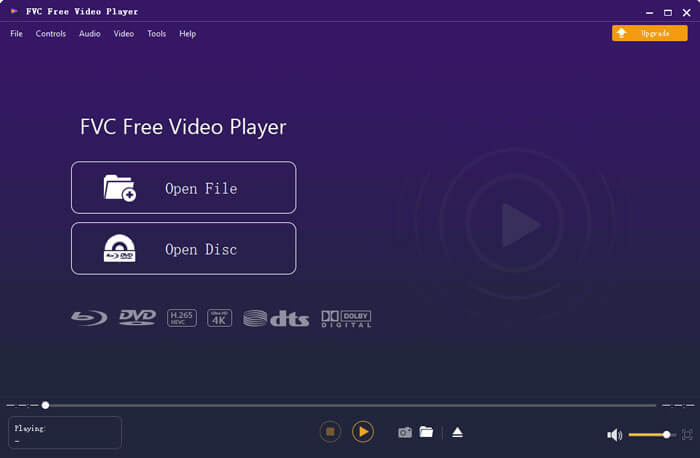
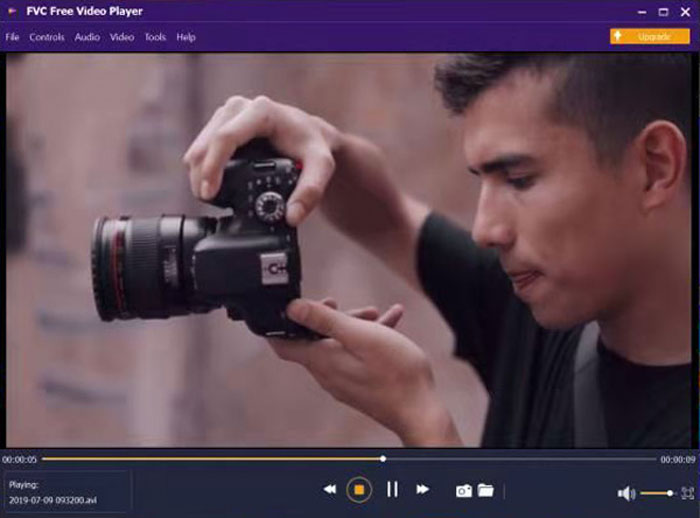
步驟 3: 匯入後 ARF 影片會自動開始播放。你可以透過上方與下方工具列控制其播放速度與視訊效果。
第3部分:ARF文件播放器的常見問題解答
在哪裡可以獲得Chrome擴展程序的ARF播放器?
您可以直接從Chrome網上應用店下載Cisco WebEx擴展。但是還沒有這樣的ARF播放器Chrome擴展程序。
是否有用於移動應用程序的ARF播放器?
如果你想在 iPhone 或 Android 上播放 ARF 和 WRF 檔案,VLC for Mobile 可以是你的選擇。你可以先將 ARF 轉換為 MP4 格式,而不是使用 ARF 播放器的可攜版 App。它同樣可以作為 Android 和 iPhone 的 ARF 播放器 App。它也是一款相當不錯的 音樂播放器 App。
如何將ARF轉換為MP4?
市面上有許多線上與離線的 ARF 轉 MP4 轉檔工具。例如,你可以使用 FVC Free Online Video Converter、Video Converter Ultimate 等工具來將 ARF 檔案轉成 MP4。
為什麼您不能下載WebEx錄音?
只有WebEx管理員才能下載WebEx錄製文件。同時,WebEx管理員應打開用於WebEx提前下載錄製文件的管理選項。
為什麼WebEx轉換在Mac上失敗?
請注意,WebEx ARF到MP4的轉換需要基於Windows的應用程序。您應該在Windows計算機上安裝ARF到MP4轉換器。目前不支持在Mac上將ARF轉換為MP4。一般來說,您可以在Mac上播放WebEx錄音。但是您不能在Mac上將.arf文件轉換為MP4和其他格式。
這就是有關WebEx ARF播放器教程和替代方法的全部內容。您可以輕鬆地在Windows和Mac計算機上播放WebEx ARF文件。此外,您可以將WebEx ARF轉換為MP4和其他兼容格式。如果您仍然對ARF播放器有疑問,可以在下面留言或隨時與我們聯繫。
-
 適用於Windows和Mac的11大MP4播放器軟件(免費和付費)
 從10種最新的MP4視頻播放器軟件的建議中閱讀並獲取最佳MP4播放器。您可以在Windows和Mac上流暢播放MP4視頻文件而不會出現延遲。
-
 8個最佳Adobe SWF播放器在Windows和Mac上打開Flash視頻文件
 當您想在PC和Mac上欣賞SWF電影和遊戲時,可以從本文中了解更多關於8種最佳SWF文件播放器的出色功能的信息。
-
 您必須嘗試的適用於Windows 10/8/7,Mac,iOS和Android的10個最佳FLV視頻播放器(最新2021年)
 FLV播放器可幫助您輕鬆地在Windows,Mac,Android,iOS設備上訪問FLV文件。查看可以立即下載的最佳FLV文件播放器。
