


 視頻轉換大師
 屏幕錄影大師
 影片修復
影片修復
 安全下載
安全下載當 iPad 停止播放視頻時,您可以做什麼
根據最近的一項調查,在影片播放方面,iPad 比智慧型手機更受歡迎,部分原因是它擁有更大的螢幕。然而,iPad 並不完美,許多使用者都會遇到iPad 無法播放影片的問題。一般人不僅找不出問題發生的原因,更不用說如何解決。因此,本文將整理並分享 100% 個實際可行的解決方案,幫助你再次流暢欣賞喜愛的影片。

第 1 部分:為什麼 iPad 不播放視頻
iPad 停止播放您記憶中或 YouTube 上的視頻的原因有很多。最常見的原因包括:
- 1. iPad 不支持視頻格式。它與 H.264、MPEG-4 和動態 JPEG 兼容。
- 2. 網絡連接不良。
- 3. 過時的軟件或應用程序。 Apple 不斷發布 iOS 更新,以修復錯誤並引入新功能。如果您沒有更新您的軟件和視頻應用程序,可能會導致視頻無法在 iPad 上播放。
- 4. 沒有足夠的空間。在 iPad 上播放視頻需要大量內存和內部存儲空間,尤其是高分辨率視頻。
- 5. iPad 卡死或卡住。有時,iPad 響應速度不夠快,視頻根本無法播放。
第 2 部分:修復 iPad 不播放視頻的 5 種解決方案
解決方案 1: 轉換為 iPad 視頻格式
如果本機影片在 iPad Pro 上無法播放,主要原因往往是相容性問題。FVC Free FLV Converter 可以幫助你將任何影片轉換成適合 iPad 的格式,例如將 MP4 轉成 iPad 格式、將 M2TS 轉成 iPad 等。雖然這是一款免費工具,但這個影片轉檔程式提供了大量專業等級功能,而且操作方式容易上手。
如何將視頻轉換為 iPad 格式
步驟 1:加入影片
在電腦上安裝並啟動這款最佳 iPad 影片轉檔工具。接著點擊 加入檔案 功能表,匯入在 iPad 上無法播放的影片。它支援批次轉檔多個影片檔案。
提示:你需要先將影片從 iPad 傳輸到電腦上。

步驟 2:將 iPad 設為輸出格式
點擊並展開 輸出格式 選項,向下捲動找到 Apple iPad 並選取,然後選擇你的 iPad 型號。之後,轉檔程式會自動設定格式、編解碼器等參數。

步驟 3:為 iPad 轉檔影片
回到主畫面,點擊 開啟資料夾 按鈕,設定儲存輸出檔案的位置。最後按一下 轉換 按鈕,開始將影片轉檔為可在 iPad 上播放的格式。完成後,將結果傳回 iPad 並開始觀看。

解決方案 2:重新啟動 iPad
iPad 可能會卡在特定模式並且無法播放視頻。幸運的是,擺脫這個問題很容易。
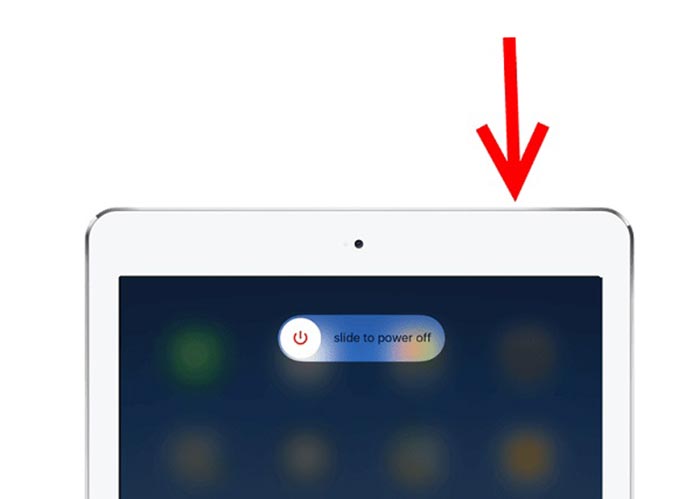
步驟 1:長按 電源 或 側邊 按鈕,直到出現關機畫面。
步驟 2:將滑桿滑到右側,iPad 螢幕會變成黑色。
步驟 3:等待至少 20 秒,再次長按 電源 按鈕,直到螢幕出現 Apple 標誌。現在,再試著播放影片。
解決方案 3:清除 iPad 緩存
存儲空間不足是 iPad 無法在網站上播放視頻的另一個原因。解決方法很簡單,關閉後台應用,清除Safari中的緩存。
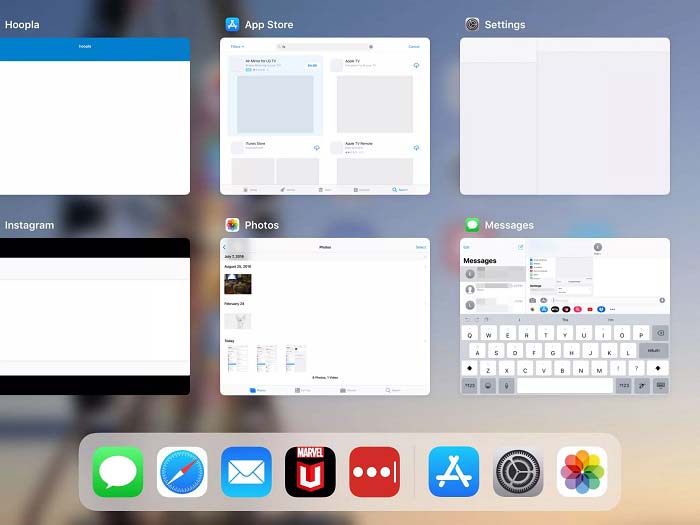
步驟 1: 用手勢進入多工處理模式,關閉所有在背景執行的 App。
步驟 2: 開啟 設定 App,點選 Safari,然後點選 清除瀏覽記錄與網站資料。
步驟 3: 再次在 iPad 上播放影片,此時應可正常播放。
解決方案 4:更新軟件
過時的軟件會導致很多問題,包括視頻在 iPad 上停止播放。事實上,更新軟件很容易。
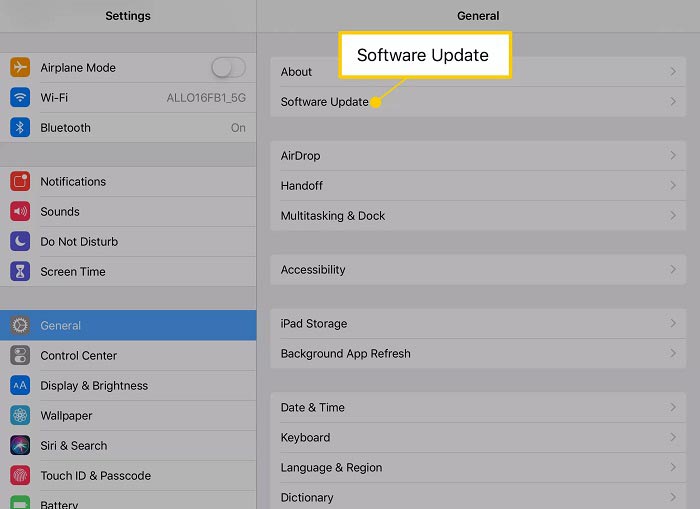
步驟 1: 從主畫面開啟「設定」App,點選 一般,再點選 軟體更新。
步驟 2: 如果有可用更新,點選 下載並安裝 按鈕。出現提示時,輸入你的密碼。
步驟 3: 等待安裝完成,然後再次播放影片。
解決方案 5:檢查 Apple 服務
雖然這種情況很少見,但在這種情況下,Apple 服務可能會中斷,並且視頻將無法在 iPad 上播放。如果您已嘗試上述解決方案但問題仍然存在,請執行以下步驟進行檢查。
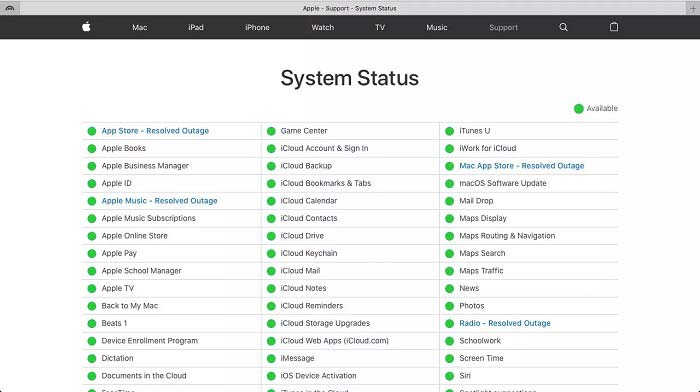
步驟 1: 開啟瀏覽器並前往 https://www.apple.com/support/systemstatus/。
步驟 2: 如果某項 Apple 服務的狀態圖示顯示為黃色或紅色,就代表該服務目前故障。你只能等待該服務恢復正常。
第 3 部分:有關 iPad 不播放視頻的常見問題解答
為什麼我無法在 iPad 上播放 MKV?
iPad 不支援播放 MKV 影片。你必須先將 MKV 影片轉換成 iPad 支援的格式,例如 MOV,之後才能在 iPad 上播放。請繼續閱讀2 種簡單方法在 iPad 上播放 MKV 檔案,以了解更多詳情。
為什麼 TikTok 視頻不能播放?
首先,當 TikTok 視頻停止播放時,請檢查您的互聯網連接。然後將您的 TikTok 應用更新到最新版本。此外,您最好使用 Wi-Fi 網絡而非蜂窩數據觀看 TikTok。
如何在 iPad Air 上播放 MP4?
iPad Air 支持帶 AAC 音頻編解碼器的 MP4 視頻。您可以直接在手機上嘗試播放。
結論
這篇故障排除可幫助您解決 iPad 無法在內存中播放視頻的問題。 FVC Free FLV to MP4 Converter 是本地視頻無法播放的最佳解決方案。它能夠調整視頻編解碼器並為幾乎所有 iPad 設備提供預設。更重要的是,轉換器非常易於使用。如果您有其他問題,請隨時在本文下方的評論區留言。
-
 在Chromebook上播放MP4的三種最佳方法
 您可以在Chromebook上播放視頻嗎?如何在Chromebook上通過USB播放MP4文件?這篇文章分享了3種在Chromebook上播放MP4的方法。
-
 WebM Player評測-5種流暢播放WebM文件的最佳軟件
 如果要在設備上成功播放WebM,則應從本文中了解有關適用於Android,iPhone,Windows和Mac的前5名最佳WebM播放器的更多信息。
-
 您必須嘗試的適用於Windows 10/8/7,Mac,iOS和Android的10個最佳FLV視頻播放器(最新2021年)
 FLV播放器可幫助您輕鬆地在Windows,Mac,Android,iOS設備上訪問FLV文件。查看可以立即下載的最佳FLV文件播放器。
