


 視頻轉換大師
 屏幕錄影大師
 影片修復
影片修復
 安全下載
安全下載修復 VLC 播放器無法播放 MKV 的 4 個有用提示
MKV(Matroska 視訊檔)是一種免費且開放的多媒體檔案格式。但它無法被許多常用的播放器支援,包括 Windows Media Player 和 QuickTime Player。因此,你可能會改用熱門的 VLC Media Player 來播放 MKV。不過,許多使用者遇到了 VLC 播放器無法播放 MKV 的問題。

MKV 的播放問題可能各不相同,例如 MKV 檔案的音軌播放延遲、播放卡頓、畫面模糊,以及介面錯誤與小故障等等。本文將與你分享 4 個實用方法,幫助你修復 VLC 無法播放 MKV 檔案的問題。
第 1 部分。設置首選項以修復 VLC 播放器無法播放 MKV
VLC 是一種非常流行的媒體文件播放工具,它可以支持大多數數字視頻和音頻格式,包括 MKV、MP4、AVI、FLV、MP3、AAC、M4A、FLAC 等以及 VCD、音頻 CD 和 DVD。
VLC 媒體播放器吸引了數百萬用戶,因為它可以播放您擁有的任何媒體文件。但是VLC播放器不會播放MKV文件問題時有發生。如果 VLC 播放器只是跳過您的 MKV 或 HD MKV 文件,您可以自定義首選項來修復它。
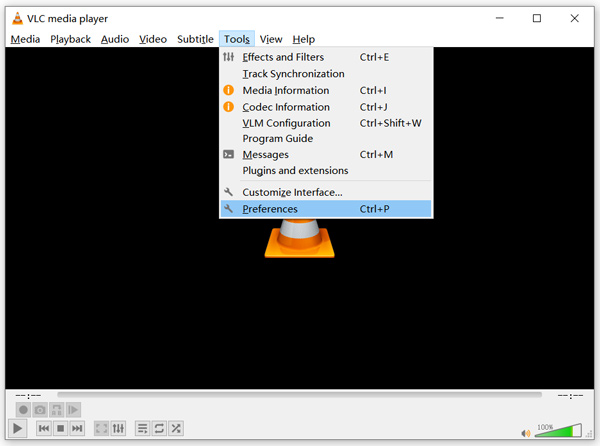
步驟 1: 開啟 VLC Media Player,選擇「工具(Tools)」選單。從下拉清單中選擇「偏好設定(Preferences)」選項。
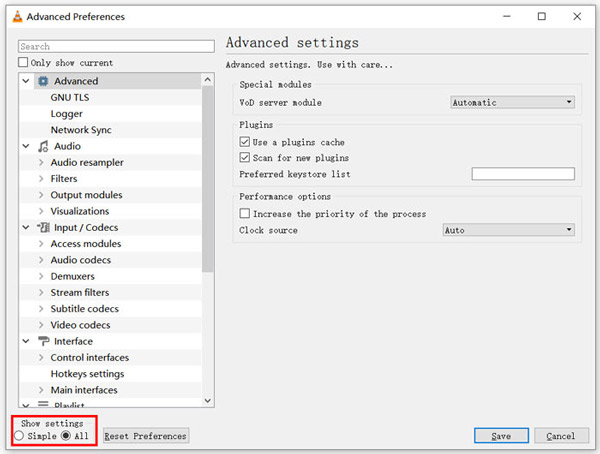
步驟 2: 在對話視窗左下角的「顯示設定(Show settings)」下勾選「全部(All)」。這樣就能顯示「進階偏好設定(Advanced Preferences)」視窗。
步驟 3: 在左側選擇「輸入/編解碼器(Input/Codecs)」,然後在右側找到「檔案快取(毫秒)(File Caching(ms))」選項。你可能需要向下捲動才能看到它。
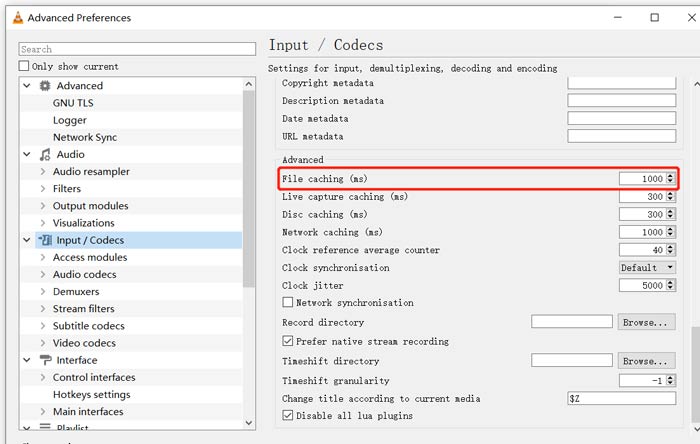
步驟 4: 將檔案快取數值設為 1000,然後點擊「儲存(Save)」按鈕來確認操作。之後,重新啟動 VLC,並再次播放你的 MKV 檔案。
第 2 部分。更新或重新安裝 VLC 以修復播放器無法播放 MKV
如果 VLC 播放器不會播放 MKV 問題仍然存在,您可以選擇將其升級到最新版本。您應該知道,新版本總會修復舊版本的許多錯誤。您可以按照以下步驟更新您的 VLC 媒體播放器。
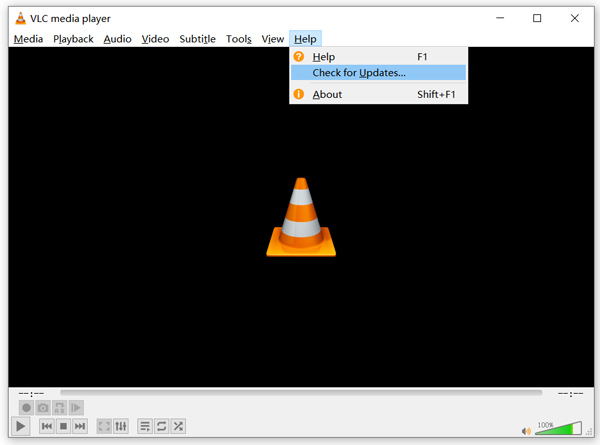
開啟 VLC,點擊「說明(Help)」選單。從下拉清單中選擇「檢查更新(Check for Updates)」選項。VLC 會開始檢查是否有可用的新版本。接著依照指示將 VLC 升級到最新版本。
你也可以直接將 VLC 從電腦中移除,然後前往其官方網站 VideoLAN 下載並安裝適合的版本。當你安裝好新的 VLC Media Player 後,就可以播放 MKV 檔案,檢查是否能正常播放。
第 3 部分。 啟用音頻以修復 VLC 播放器在播放 MKV 時沒有聲音
如果您的 VLC 媒體播放器可以播放 MKV 文件但沒有聲音,您應該檢查其音頻設置是否正確。
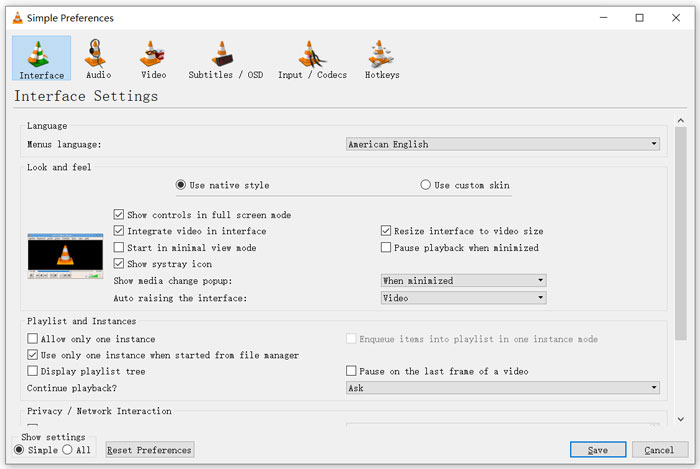
步驟 1: 在 VLC 功能表列中選擇「工具(Tools)」選項。從下拉選單中選擇「偏好設定(Preferences)」。接著你會進入「簡易偏好設定(Simple Preferences)」視窗。
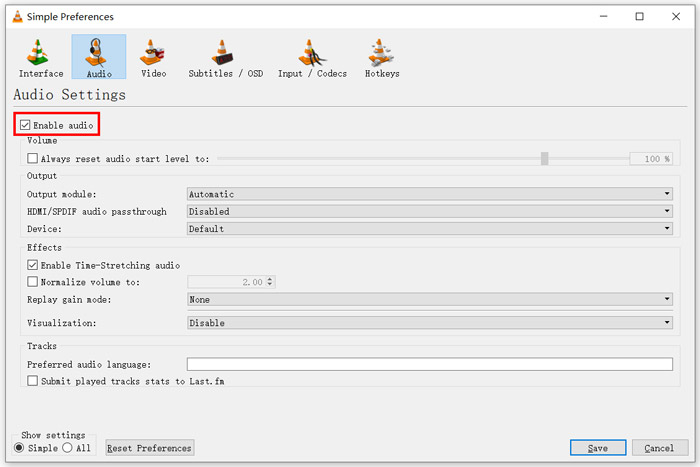
步驟 2: 點擊「音訊(Audio)」分頁,然後勾選「啟用音訊(Enable Audio)」選項。在此步驟中,你也可以依需求自訂「輸出模組(Output Module)、HDMI/SPDIF 音訊直通(audio passthrough)」以及「裝置(Device)」。點擊「儲存(Save)」按鈕以儲存變更。
現在會回到 VLC 的主介面,你可以點擊「媒體(Media)」,再選擇「開啟檔案(Open File)」來播放 MKV 檔案。
第 4 部分。選擇一個 VLC 播放器替代播放 MKV 文件
當你想觀看 MKV 電影時,也可以選擇其他播放器來取代 VLC。你可以試試熱門的 免費線上影片播放器(Free Online Video Player)。無論你使用的是 Windows 10/8/7 電腦或 Mac,都可以依靠它以高品質播放任何 MKV 檔案。
這款免費的在線播放器能夠流暢地播放 4K、1080p/720p 高清、標清視頻、3D 視頻和音頻文件。除了 MKV,它還支持許多其他格式,包括 MP4、MOV、FLV、AVI、MPEG、WMV、WMA、AAC、MP3 等。
步驟 1: 當你想觀看 MKV 檔案時,可以前往這個 免費線上影片播放器 網站。它與任何瀏覽器相容,例如 Chrome、IE、Firefox 和 Safari。點擊「立即播放(Play Now)」按鈕,快速安裝一個用於播放 MKV 的小型啟動程式。
步驟 2: 安裝完成後,這款免費的線上 MKV 播放器會自動啟動。點擊「開啟檔案(Open File)」按鈕匯入你的 MKV 檔案。在這裡你也可以點擊「開啟光碟(Open Disc)」來觀看 DVD 電影。
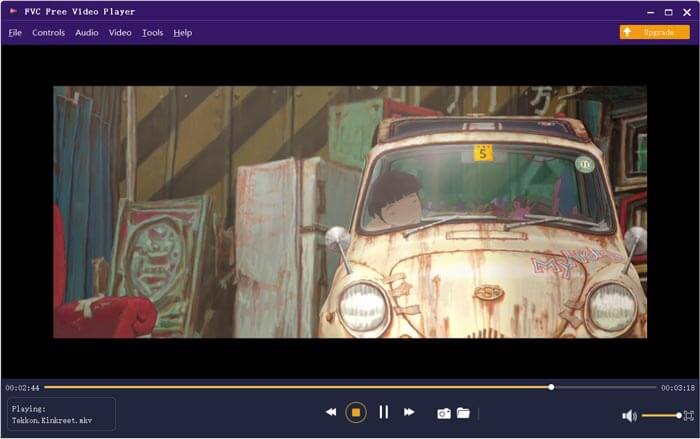
你的 MKV 影片之後會自動播放,你可以完全掌控 MKV 的播放過程。與 VLC Media Player 相比,它提供一種更簡單的方式來欣賞 MKV 檔案。這個免費的線上 MKV 播放器 支援 DTS-HD 和 Dolby TrueHD,確保你能擁有出色的音效體驗。
第 5 部分。 VLC 播放器的常見問題解答不會播放 MKV
智能電視可以播放 MKV 文件嗎?
是的。許多可以支持 MKV 文件的智能電視,如索尼和三星。您可以通過外部硬盤驅動器或 UBS 設備播放您的 MKV
如何使用 VLC 媒體播放器播放 DVD?
當您想使用 VLC 播放 DVD 電影時,您應該首先將 DVD 光盤插入您的計算機光驅。打開 VLC,單擊菜單欄上的媒體,然後選擇打開光盤。瀏覽此 DVD 電影並將其加載到 VLC 並播放。
如何在 VLC 上禁用硬件加速解碼?
要在 VLC 媒體播放器上禁用硬件加速解碼,您應該從工具菜單轉到首選項。選擇輸入/編解碼器類別,然後選擇編解碼器。找到硬件加速解碼選項並在那裡禁用它。
結論
當你遇到 VLC 播放器無法播放 MKV的問題時,可以直接使用其他播放器,例如推薦的免費線上影片播放器來觀看 MKV 檔案。同時,你也可以選擇升級 VLC Media Player,或自訂各種設定來加以修復。
-
 免費和專業的方法將MKV轉換為MOV
 如何在Mac上將MKV轉換為MOV? iMovie可以讀取MKV嗎? MOV格式是什麼意思?這篇文章介紹了2種簡單的方法來幫助您使用免費的在線和專業視頻轉換器將MKV轉換為MOV。
-
 如何在不損失質量的情況下將M2TS轉換為MKV
 是否要在保持原始質量的同時將M2TS轉換為MKV?這篇文章向您展示了免費和在線方法無損地將M2TS更改為MKV。
-
 VLC Media Player –簡要回顧視頻播放器以及Windows和Mac上的最佳替代方案
 為什麼音頻在VLC Media Player上不起作用?如果您想了解有關流行媒體播放器的更多信息,可以從本文中了解有關本評論和最佳替代方案的更多信息。
