


 視頻轉換大師
 屏幕錄影大師
 影片修復
影片修復
 安全下載
安全下載修復 Windows Media Player 無法在 Windows 7/8/10 上運行的 5 種方法
Windows Media Player 已停止工作。一個問題導致程序停止正常工作。它也將播放音頻但不播放視頻。如何解決這個問題?
當 Windows Media Player 停止工作時,您可能會收到錯誤“Window Media Player 已停止工作”而沒有任何具體信息,或者您會收到“不支持該文件類型”的通知。即使沒有提示,您的點擊也不起作用。
造成Windows Media Player 無法正常運作的原因有很多。最常見的問題是檔案格式不受支援,這會導致播放的影片沒有畫面、沒有聲音或沒有字幕。除此之外,還可能出現各種未顯示具體提示的錯誤。在這種情況下,你就必須逐一檢查下文列出的所有問題,才能排除這種複雜錯誤。不過,你也可以選擇最省事的方式,改用其他影片播放器來觀看任何影片,避免各種問題與限制。

第 1 部分:您不容錯過的最佳替代媒體播放器
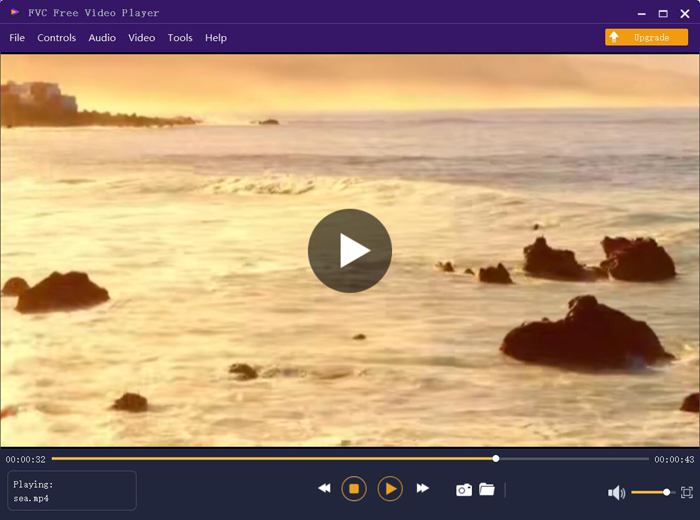
為了避免發生 Windows Media Player 無法使用的情況,最好改用專業的替代方案。FVC Free Video Player 是一款免費的線上影片播放器,可以解決你在使用 Windows Media Player 時可能遇到的所有問題。它支援在沒有格式與解析度限制的情況下播放影片,而且無需另外下載任何軟體,就能順暢播放所有影片格式。
- 1. 支持播放幾乎所有格式,包括FLV、MKV、RMVB,以及DVD或藍光文件。
- 2. 播放達到 4K 分辨率的高質量視頻。
- 3. 可以調整不同語言的音軌和字幕。
- 4.播放視頻時隨時截圖。
步驟一: 在任意瀏覽器中前往 FVC Free Video Player 的官方網站。然後點擊「Play Now」按鈕安裝啟動器。幾分鐘後,再次點擊Play Now 按鈕即可啟動 FVC Free Video Player。

步驟二: 點擊Open Files 按鈕選擇想要播放的影片,之後會自動開始播放。在Control 功能表中,你可以查看用來調整音量的快速鍵,也可以依需求選擇音訊或視訊軌。此外,如果點擊 Tools 按鈕並選擇Effect 選項,還能調整色相、亮度、對比度、飽和度與伽馬值。
第 2 部分:如何修復無法在 Windows 7/8/10 上運行的 Window Media Player
如前所述,導致 Windows Media Player 無法運行的原因有很多,在不同情況下有 3 種方法可以解決此問題。
方法一:啟動Window Media Player疑難解答
當您的 Windows Media Player 在點擊後沒有響應時,這種方式將幫助您解決問題。
步驟一: 同時按下鍵盤上的Windows 鍵與R 鍵,啟動執行程式。接著在搜尋列中複製並貼上msdt.exe -id WindowsMediaPlayerConfigurationDiagnostic。點擊確定 (OK),開啟 Windows Media Player 設定的疑難排解工具,然後點擊下一步 (Next)開始。
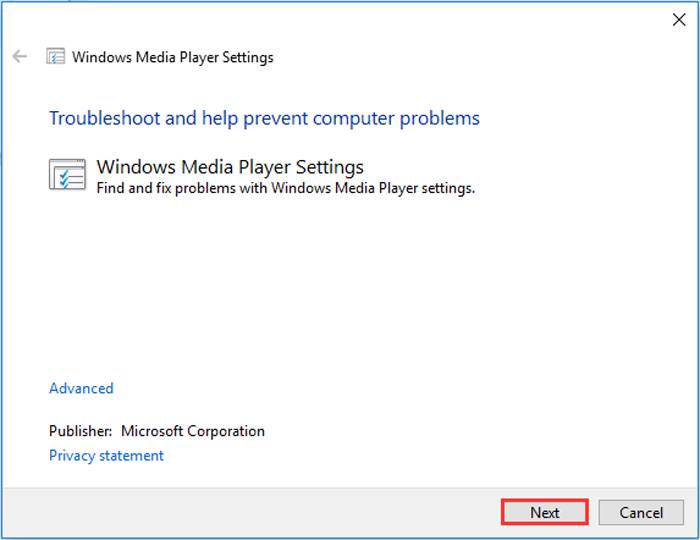
步驟二: 視窗跳出後,點擊套用此修正 (Apply this fix)按鈕,將 Windows Media Player 重設為預設設定。之後你可以嘗試重新啟動 Windows Media Player。
方法 2:在 Windows Media Player 上安裝其他解碼器
如果您的 Windows Media Player 無法處理某些特殊的視頻或音頻,您可以下載相應的解碼器來播放這些視頻。
步驟一: 在電腦上打開 Microsoft Store。點擊搜尋按鈕,然後在搜尋列中輸入Video Extension。即可在電腦上下載所需的影片擴充套件。
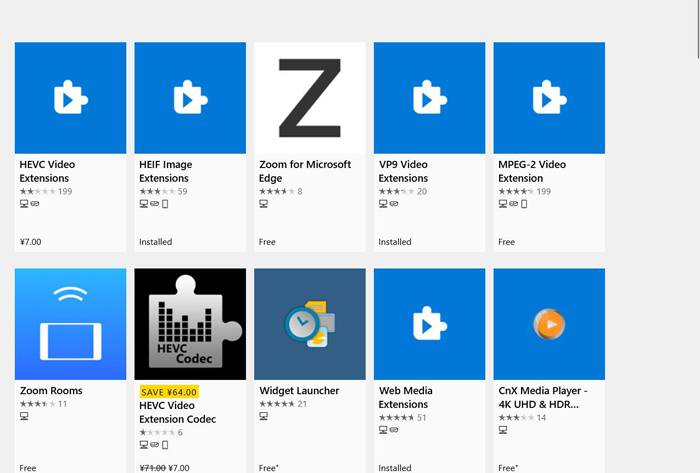
步驟二: 安裝完成後,再次透過 Windows Media Player 重新開啟影片。不過你需要注意,仍然有許多格式不受支援,包括 FLV、RMVB 等。
方法 3:重新安裝 Windows Media Player。
如果上述方法不起作用,您應該嘗試在 Windows Media Player 停止工作時重新安裝該軟件。
步驟一: 同時按下鍵盤上的Windows 鍵與R 鍵,開啟執行程式。然後在搜尋列輸入optionalfeatures.exe。點擊確定 (OK)以開啟或關閉功能。接著取消勾選 Windows Media Player。
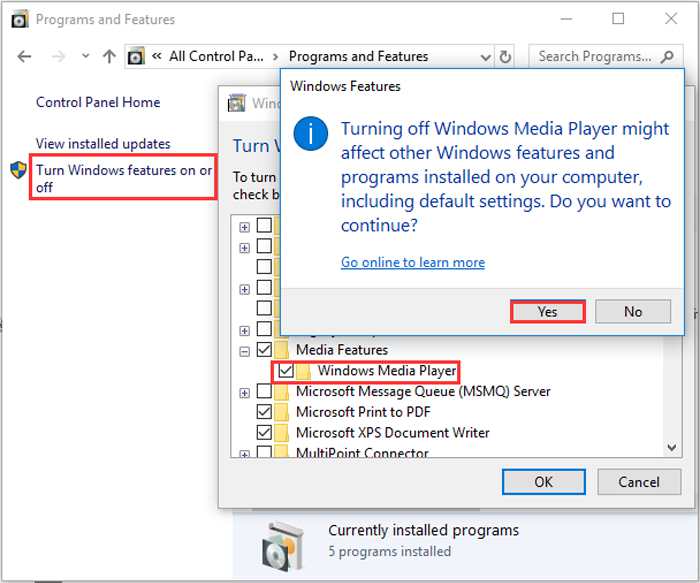
步驟二: 重新啟動電腦,並重複前述操作。這次勾選 Windows Media Player。之後再重新啟動電腦,軟體就會自動在你的電腦上重新安裝。
除了這些問題,Windows Media Player 也有很多缺點。不能調節視頻播放速度,熱鍵總是沒用。那麼為什麼不選擇免費的在線視頻播放器來解決所有問題呢?
第 3 部分:Windows Media Player 不工作的常見問題
1. 為什麼 FLV 視頻文件不能在 Windows Media Player 上播放?
雖然 Windows Media Player 支援安裝多種解碼器,以播放一些較少見格式的影片,但仍不支援 FLV 格式。在這種情況下,你可以嘗試下載Windows Media Player 替代播放器,或將影片格式進行轉檔。
2. 為什麼我的 Window Media Player 在 Windows 10 更新後無法工作?
也許 Windows Media Player 更新後損壞了。您可以嘗試上述方法 3 重新安裝 Windows Media Player。
3. 如何在Window Media Player 上選擇字幕軌道?
不幸的是,在 Windows Media Player 上沒有選擇不同的字幕、視頻和音軌的選項。您可以選擇其他選項來播放視頻。
結論
導致 Windows Media Player 無法正常工作的原因非常複雜,因此很難解決此問題。因此,您只需下載最好的替代媒體播放器 - FVC 免費視頻播放器即可流暢地播放高質量的視頻。通過這種方式,您可以防止 Windows Media Player 永遠無法工作。
-
 如何在2021年在Windows Media Player上播放DVD
 為什麼我的DVD無法在Windows Media Player上播放?如何在Windows 7媒體播放器上播放DVD?這篇文章分享了有無WMP播放DVD的3種方式。
-
 6種經過驗證的解決方案,可修復無法在Chrome上播放的視頻
 要解決視頻無法在Chrome上播放的問題,您需要做的就是閱讀我們的問題排查並逐一執行經過驗證的解決方案。
-
 5 100%修復無法在iPad上播放的視頻的工作解決方案
 您的視頻無法在 iPad 上播放?這裡有五個解決方案可以幫助您擺脫這個問題,然後您可以輕鬆地在手機上欣賞您喜歡的視頻。
