


 視頻轉換大師
 屏幕錄影大師
 影片修復
影片修復
 安全下載
安全下載修復視訊錯誤代碼 0xc00d5212 的 3 種經過測試的方法
如果你在觀看影片時遇到0xc00d5212 錯誤代碼卡住了,你並不孤單。這份指南將幫助你了解這個錯誤代表什麼,更重要的是,教你如何修復它。透過文中介紹的方法,你就能處理 0xc00d5212 錯誤,順利恢復觀賞你喜愛的內容。現在就來看看這些簡單明瞭的解決方案,徹底終結惱人的影片中斷問題。

部分。 1 什麼是錯誤碼0xc00d5212
錯誤代碼 0xc00d5212 是嘗試播放 AVI 檔案時出現的特定問題。此錯誤表示與文件中的音訊和視訊編解碼器相關的潛在挑戰或指示檔案損壞。當嘗試播放 AVI、MOV、MKV 和 MP4 等格式的影片檔案時,通常會遇到此問題。要解決此錯誤,需要採取糾正措施,例如更新顯示適配器驅動程序,這可能會解決播放問題。此外,確保安裝或更新特定檔案格式所需的音訊和視訊編解碼器對於解決錯誤代碼 0xc00d5212 並確保無縫視訊播放至關重要。
部分。 2 如何解決錯誤0xc00d5212?
別擔心!因為有多種方法可以解決錯誤0xc00d5212。本指南旨在為您提供在系統上恢復無縫視訊享受的工具。
方法一:使用FVC視訊修復
解決 0xc00d5212 錯誤最有效的方法之一,就是使用影片修復工具。此工具專門用來解決影片檔案相關問題,例如檔案損毀或相容性問題。因此,如果你遇到 0xc00d5212 錯誤,請依照下列步驟操作來排除問題。
步驟 1. 首先,在你的裝置上下載 FVC 影片修復軟體工具。下載完成後,進行安裝。
步驟 2. 不用被兩個按鈕搞混。若要加入出現 0xc00d5212 錯誤的影片檔案,請點擊紅色加號按鈕。若要加入範例影片,請點擊藍色加號按鈕。
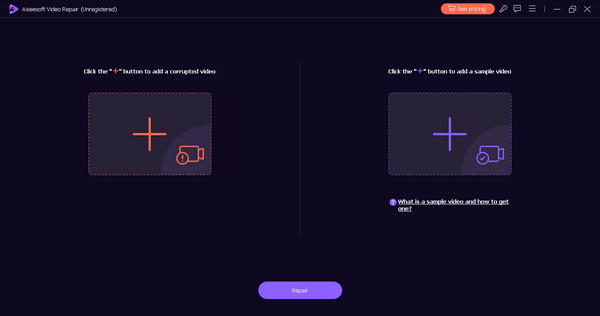
步驟 3. 接著,點擊修復按鈕。軟體會自動為你處理影片檔案的修復流程。
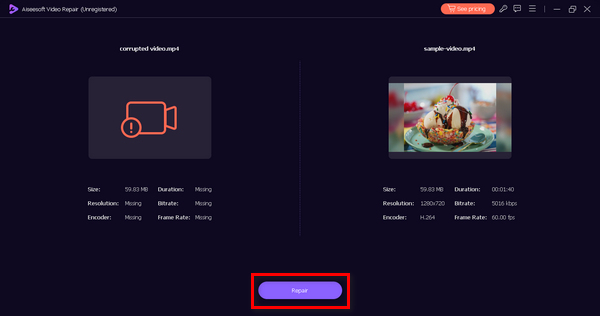
步驟 4. 完成後,你可以按下預覽按鈕進行預覽,確認 0xc00d5212 錯誤是否已被修復。
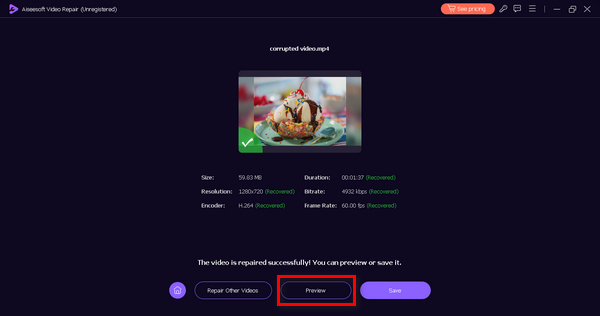
FVC Video Repair 是每個人的首選工具,尤其是那些在播放影片時遇到錯誤的人。憑藉其用戶友好的介面和易於理解的導航,您使用此工具檢索影片永遠不會出錯。因此,要解決 0xc00d5212 錯誤,請立即嘗試這個工具!
方法 2:更新顯示適配器
過時或不相容的顯示適配器驅動程式可能會導致視訊播放問題,從而導致 0xc00d5212 錯誤。這些驅動程式在促進設備硬體和多媒體內容的視覺元素之間的互動方面發揮著至關重要的作用。
當這些驅動程式過時或不相容時,可能會導致影片播放中斷。要解決這個問題,需要採取全面性的作法,著重於更新並確保顯示介面卡驅動程式的相容性,以提升整體影片播放體驗。這個解決方式同樣適用於其他影片錯誤,例如 錯誤 0xc10100bf、224003 等。
這樣,請按照以下步驟輕鬆更新您的顯示適配器。
步驟 1. 在你的裝置上,於 Windows 搜尋列中搜尋裝置管理員(Device Manager)。
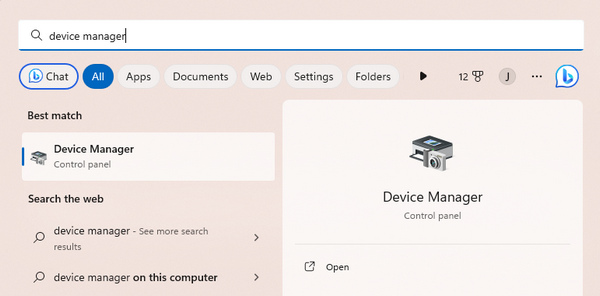
步驟 2. 點擊更新顯示介面卡(Update Display Adapter)。
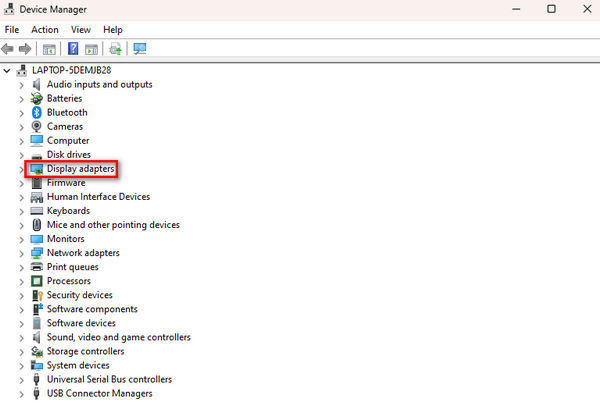
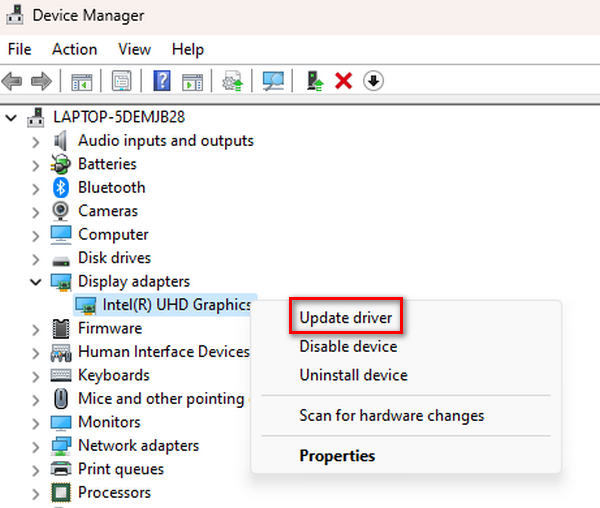
步驟 3. 若要更新顯示介面卡,請在其上按右鍵,然後點擊更新驅動程式(Update Driver)。.
步驟 4. 接著,點擊自動搜尋驅動程式(Search Automatically for Driver)。
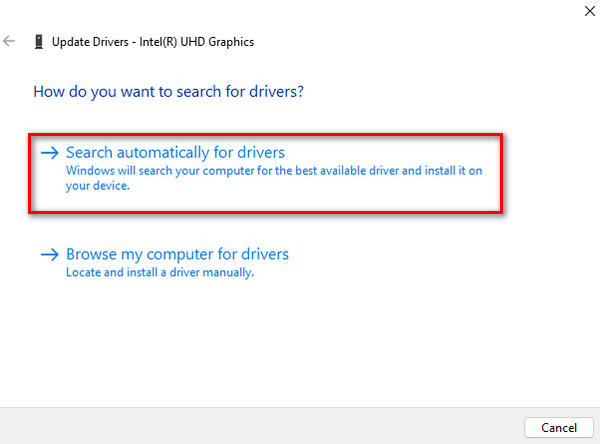
它將自動搜尋新的更新驅動程式並將其安裝在您的裝置上。
方法三:安裝視訊編解碼器
編解碼器是幫助您的電腦理解和播放影片的工具。當您看到錯誤 0xc00d5212 並且視訊無法播放時,這表示存在某種語言不符。下載編解碼器就像為您的電腦提供正確的工具來正確理解和播放影片。這是一個簡單的修復。只需按照以下步驟操作即可使您的影片順利運行。
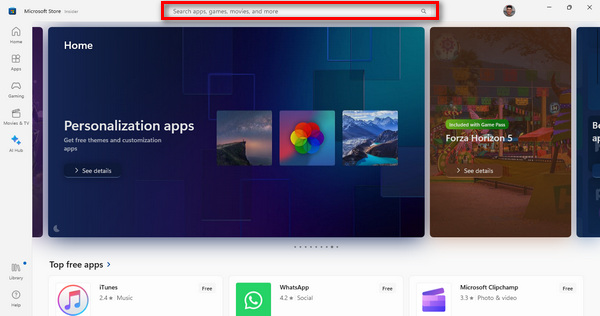
步驟 1. 先按下電腦上的Windows按鈕開啟「開始」選單。然後在搜尋列輸入Microsoft Store並加以選取。
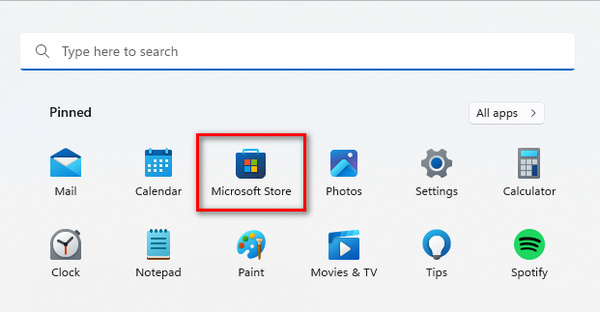
步驟 2. 進入 Microsoft Store 後,你會看到搜尋列。在其中輸入你所需的編解碼器或影片延伸功能名稱。
步驟 3. 找到所需的編解碼器或延伸功能後,點擊它以安裝(Install)。
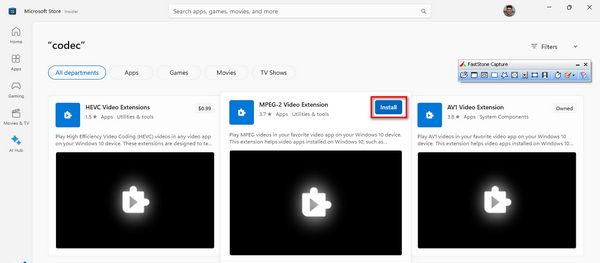
完成安裝後,開啟你的媒體播放器,播放先前無法播放的影片。這一步相當關鍵,可用來確認影片現在是否能順暢播放且沒有任何問題。
第3部分.有關0xc00d5212錯誤的常見問題解答
在哪裡可以安裝免費的視訊編解碼器?
您可以為來自各種信譽良好的線上來源的影片安裝免費的編解碼器。一些流行的選項包括 Microsoft Store(您可以在其中找到一系列適用於 Windows 的編解碼器)以及提供編解碼器套件的可信任網站。確保您從可靠的來源下載,以避免潛在的安全風險。
更換媒體播放器可以解決錯誤代碼嗎?
更換媒體播放器確實可以解決錯誤代碼 0xc00d5212。不同的媒體播放器都帶有內建編解碼器,切換到支援更廣泛格式或具有更廣泛編解碼器庫的媒體播放器可能會解決相容性問題並減輕錯誤。例如,VLC 以其全面的編解碼器支援而聞名。
如果 VLC 顯示缺少編解碼器問題該怎麼辦?
如果 VLC 顯示缺少編解碼器問題,您可以採取幾個步驟來解決它。首先,考慮將此工具更新到最新版本,因為較新的版本通常包含其他編解碼器。或者,下載並安裝指示缺少的特定編解碼器。此工具通常提供有關遺失的編解碼器的信息,從而更輕鬆地識別和解決問題。此外,探索 VLC 的編解碼器配置首選項/設定可能會為缺少編解碼器問題提供解決方案。
將影片轉換為其他格式可以修復 0xc00d5212 錯誤嗎?
是的。將影片轉換為其他格式是解決 0xc00d5212 錯誤的潛在解決方案。如果錯誤是由目前影片格式的相容性問題引起的,將其轉換為更廣泛支援的格式可以解決播放問題。利用 FVC Video Converter Ultimate 等影片轉換工具來變更格式,確保與您選擇的媒體播放器相容。
如何辨識影片檔所需的編解碼器?
若要識別影片檔案所需的編解碼器,您可以使用媒體播放器軟體或線上工具。 VLC 等媒體播放器通常會在其設定或屬性部分顯示編解碼器資訊。編解碼器標識符網站等線上工具可以分析影片檔案並提供有關所需編解碼器的資訊。了解所需的特定編解碼器後,您可以下載並安裝它,從而解決潛在的播放問題。
結論
現在你已經了解什麼是0xc00d5212 錯誤代碼以及如何解決它,就沒有理由再讓這種情況一再發生。透過 FVC 影片修復工具及文中提到的其他方法,你可以輕鬆修復這個問題。
不要讓技術問題妨礙您的娛樂。利用這些方法並在您的裝置上體驗無憂的影片播放。
-
 如何修復模糊影片:水晶般清晰的影片等著您
 如何把模糊的影片變清晰?不要讓模糊的影片讓您的內容變得乏味;#039;尋找水晶般清晰的觀看解決方案,以實現專業的鏡頭效果。
-
 如何修復像素化影片:是什麼原因以及如何修復它
 不要讓像素化毀掉您的影片。#039;了解如何透過我們的專家策略減少影片像素化。提升您的影片以獲得完美像素品質。
-
 什麼是影片中的 0xc10100bf 錯誤以及如何修復它
 您的影片是否因錯誤 0xc10100bf 而無法播放,並且您正在尋找修復方法?在本文中,您將了解它是什麼以及如何修復它。
