


 視頻轉換大師
 屏幕錄影大師
 影片修復
影片修復
 安全下載
安全下載免費輕鬆在線修復損壞的視頻
你是否曾因即將播放的影片損壞而感到挫折?接著你想立刻用線上工具修復它,卻又擔心效果、不知道該選哪一個。別擔心,這篇文章已幫你整理好了!你可以在下面探索數種線上免費修復損壞與馬賽克影片的最佳方法。因此,話不多說,現在就開始探索並著手修復你那些有問題的影片吧。

第 1 部分:你真的可以在線上修復損壞的影片嗎?
憑藉當今的技術,在線修復物理損壞的影片是可能的。因此,如果您的視訊檔案因丟失資料或編碼錯誤而損壞,則一些線上工具聲稱可以修復它們。然而,他們在線上免費修復損壞影片的成功率仍然存在差異,建議您在使用這些工具時務必小心。因此,需要注意的是,如果您的視訊物理損壞、儲存媒體本身有問題或檔案結構嚴重受損,則線上工具可能不會百分之百有效。但話又說回來,我們的技術領域總是在不斷發展,更新的服務或工具可能仍在不斷出現,讓您希望在不久的將來有更好的解決方案。
另一方面,已經有一些可用的工具比其他工具表現出更高的效率,幸運的是,這些工具可以在下面的資訊中介紹。
第 2 部分:修復損壞影片的最佳線上工具
1.在線轉換器
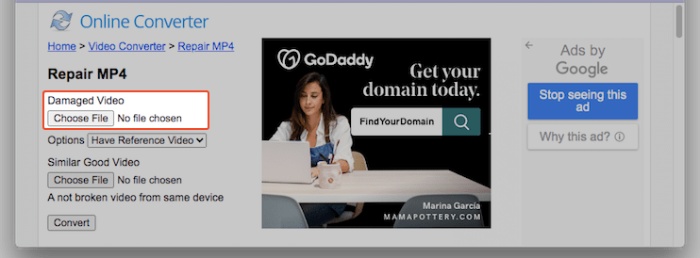
首先,為了示範線上修復卡頓影片的能力,我們要使用這款 Online Converter。這個線上 MP4 影片修復工具可以直接在瀏覽器中修正影片檔的基本錯誤,能有效解決播放中斷或檔案損毀等問題。此外,此免費線上影片修復服務會從損毀影片中擷取有用資料,並提供 MP4、MOV、3GP 和 M4V 影片的修復功能,輸出格式為 MP4。不過,它無法開啟受加密或密碼保護的影片檔。為了獲得最佳修復結果,建議同時提供一支可正常播放、且與損壞影片出自同一裝置(例如同一支手機或相機)拍攝的相似影片作為參考。
如何使用在線轉換免費在線修復像素化視頻
步驟一:前往網站上的 Repair MP4 工具,點擊 Choose File 按鈕上傳影片。
步驟二:選擇輸出存放位置,然後按下 Repair 按鈕。
步驟三:處理完成後,下載已修復好的影片。
2. 恢復。媒體
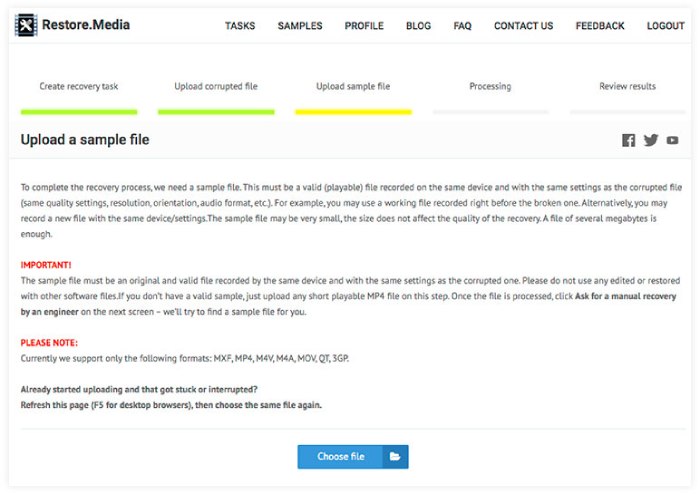
清單中的下一個是 Restore.media,這是另一個免費解決影片問題的可靠線上解決方案。透過免費註冊免費帳戶,該程式可以輕鬆地立即修復受損的音訊檔案。無需任何下載或安裝。線上影片修復過程可以透過您的網路瀏覽器無縫執行。此外,該程式能夠修復幾乎所有裝置上錄製的音訊檔案。同時,它支援的檔案格式包括 MP4、MOV、M4A、3GP、MXF、INSV 等。但是,線上工具僅以較低的解析度為您提供恢復文件的免費預覽。批准後,可以付費以恢復文件的初始品質和解析度。
如何使用 Restore.media 在線修復 MP4 視頻
步驟一:註冊一個免費帳戶,並點擊 Get Started 按鈕。
步驟二:完成後,點擊 Choose File 按鈕,上傳顆粒感重或損壞的影片,之後再上傳一支範例影片。
步驟三:當處理程序完成時,工具會自動還原這支損壞影片。
3.修復視頻
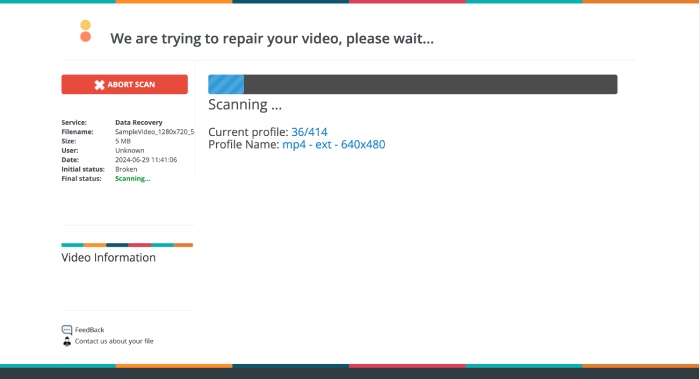
你的影片無法播放嗎?這時可以試試 Fix.VIDEO。這個程式能流暢地修復毀損或受損的影片,包括被截斷、損壞與無法播放的檔案。即使你的影片檔已損壞、被截斷、破損或無法播放,Fix.VIDEO 也能輕鬆將其修復。整個修復過程在線上、透過你慣用的瀏覽器完成,非常方便。而且只要幾分鐘,你就能下載修復後的影片檔,且工具會將整個流程中的下載或註冊要求一併移除。此外,這款線上工具允許你處理幾乎不限數量的影片。不過,你可能會發現它的介面與其他工具略有不同。
如何使用 FIX.VIDEO 在線修復顆粒狀視頻
步驟一:在網站主介面中,使用 Upload Your Broken Video 按鈕上傳顆粒感明顯或損壞的影片。
步驟二:之後等待處理程序直到成功完成。
步驟三:當修復程序完成後,只需點擊 Download Full Video 按鈕即可下載完整影片。
第 3 部分:獎勵:有效離線修復損壞的視頻
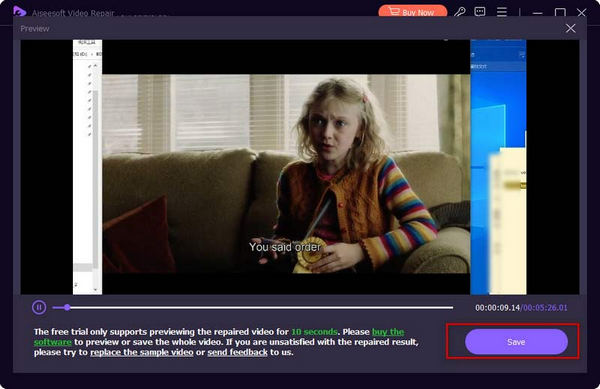
線上工具很好,但如果您想要更強大的方法來修復視頻,請選擇離線解決方案,例如 FVC 推薦的視頻修復。與線上工具一樣,FVC Video Repair 具有最快的上傳、修復和匯出流程。與網絡工具相反,FVC 配備了最先進的技術來在線修復滯後視頻,確保您珍貴的回憶或專業努力與參考視頻同樣令人印象深刻,保護每一個細節和清晰度,以增強您的享受或演示。此外,它還採用了神奇的視訊恢復在一分鐘內的過程。就是這樣。
步驟一:點擊下方的 Free Download 按鈕,將影片修復工具安裝到電腦上,然後啟動程式。
步驟二:接著,用藍色的 Add 按鈕上傳範例影片,再用紅色按鈕上傳損壞影片。載入完成後,點擊 Repair 按鈕。
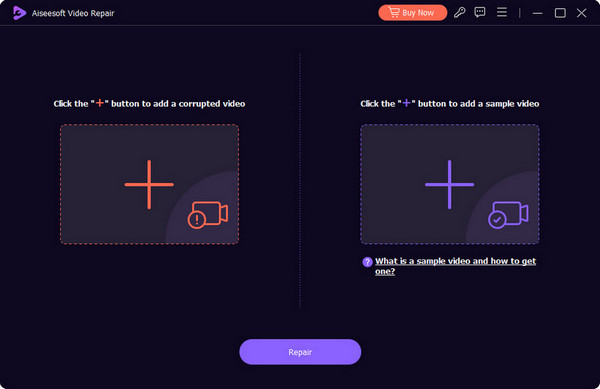
步驟三:數秒後,你就可以點擊 Save 按鈕,匯出修復好的影片。
第 4 部分. 線上影片修復常見問題解答
為什麼我不能在線觀看影片?
您無法在線上觀看影片的可能原因是影片檔案損壞、網路連線速度慢和瀏覽器問題。
修復時我必須保持瀏覽器開啟嗎?
這取決於您使用的修復工具。有些工具可能需要開啟瀏覽器,而其他工具則可以在背景執行。
使用線上視訊修復工具安全嗎?
一般來說,使用線上修復工具是安全的。但是,這只適用於您選擇信譽良好的工具並且對上傳敏感或私人影片持謹慎態度的情況。
結論
本文介紹了多種可以線上免費修復損壞影片的工具;另外也推薦了一款功能強大的桌面程式——FVC Video Repair,這款軟體專為影片修復而設計,讓你能直接在電腦上修補受損影片。
-
 什麼是黑屏視頻,我該如何解決它
 您是否想知道為什麼在播放影片時螢幕會變黑?不用再擔心,在本文中,我們將幫助您解決黑屏視訊問題。
-
 如何修復影片錯誤代碼 224003:您的終極修復指南
 了解如何解決此影片無法播放錯誤代碼 224003 的問題,並解決該問題以獲得無縫的用戶體驗。與我們的導遊一起回到正軌!
-
 如何輕鬆修復無法播放影片錯誤 5 問題
 您是否遇到過播放下載的影片之一但被無法播放影片錯誤 5 訊息中斷的情況?這是您需要了解的一切。
