


 視頻轉換大師
 屏幕錄影大師
 影片修復
影片修復如何排除和修復 MP4 無聲音
Have you encountered watching a video when all of a sudden there’s no audio coming out? This problem roots from various reasons, but one is only certain: it's a common issue that can ruin our viewing experience. But fear not, because we've got you covered with a step-by-step guide on how to fix and troubleshoot MP4 no sound on Windows Media Player, Adobe Premiere, and OBS Recording. So, if you’re facing this issue right now, read the post to ease that problem.

一、MP4沒有聲音的原因
MP4沒有聲音的原因有很多,尤其是在Windows Media Player、OBS錄製和Adobe Premiere等各種媒體播放器上。以下是您檢查的原因。
Volume Settings
最簡單但經常被忽視的原因是設備或媒體播放器上的音量設定。用戶可能會忽略這一基本配置,從而導致在期望音訊播放時感到困惑。
Audio Codec Issues
當媒體播放器缺乏對 MP4 檔案中嵌入的特定音訊編解碼器的支援時,就會出現不相容性。音訊編解碼器對數位音訊訊號進行編碼和解碼;如果沒有匹配的編解碼器,播放器將無法正確解釋和再現聲音數據,從而導致 MP4 無聲音問題。
Corrupted or Damaged File
MP4 檔案可能會因損壞或損壞而缺少聲音。這可能是由於下載不完整、檔案傳輸期間出現錯誤或檔案系統內的問題造成的。這種損壞會破壞音訊資料的連貫性,導致音訊播放錯誤。
Audio Driver Issues
過時或故障的音訊驅動程式對聲音播放造成技術障礙。這些驅動程式和媒體播放器之間的相容性問題可能會中斷音訊訊號的處理和傳輸,從而導致 MP4 檔案中沒有聲音。
Hardware Issues
揚聲器、耳機或音效卡等硬體組件的實體或技術問題可能會導致聲音中斷。這些設備中的故障會阻礙音訊訊號的傳輸和再現,從而影響整體音訊體驗。
你有它。 MP4 沒有聲音的情況不會僅因特定或單一原因而發生,但無論這些原因為何,您都將在下一部分中了解如何解決此問題。
第 2 部分. 3 種修復無聲音的解決方案
以下是有關如何修復 Windows Media Player、OBS 錄製和 Adobe Premiere 中 MP4 無聲音的一般指南。
檢查設備上的音訊設置
MP4 沒有聲音的原因之一是音訊設定裝置上的音量被忽略、靜音。若要解決此問題,請按照下列步驟操作。
Step 1. Go to the Taskbar, right-click on the Volume icon, and select the Volume Setting.

Step 2. On the sound system, Slide to 100 the volume.
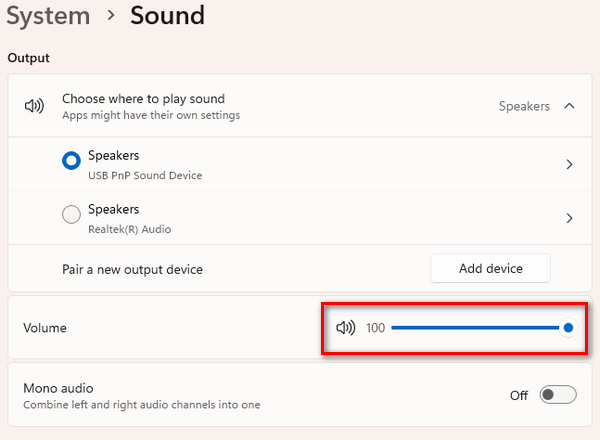
Step 3. If there’s a problem with the audio, scroll down, go to the Advanced, and troubleshoot it by clicking the Output devices. Meanwhile, click the Input device to troubleshoot the problem that has something to do with the audio input.
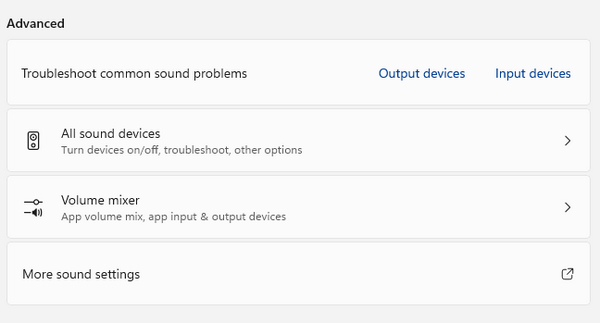
如果您的任何媒體播放器仍然沒有音訊輸出,請繼續下一個指南。
更新您的音訊驅動程式
音訊驅動程式在我們設備上任何媒體播放器的音訊播放中發揮著至關重要的作用。如上所述,過時的音訊播放器可能會導致不相容或技術障礙。因此,要更新您的音訊播放器,請按照下面的簡單指南進行操作。
Step 1. First, head on to the Windows and type in Device Manager. Once done, click Open.
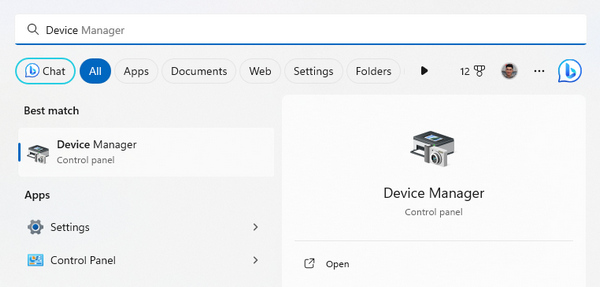
Step 2. Right-click the Sound, Video, and Game Controllers, select the audio driver you have installed, and click on Update Driver. It will automatically search for updates.
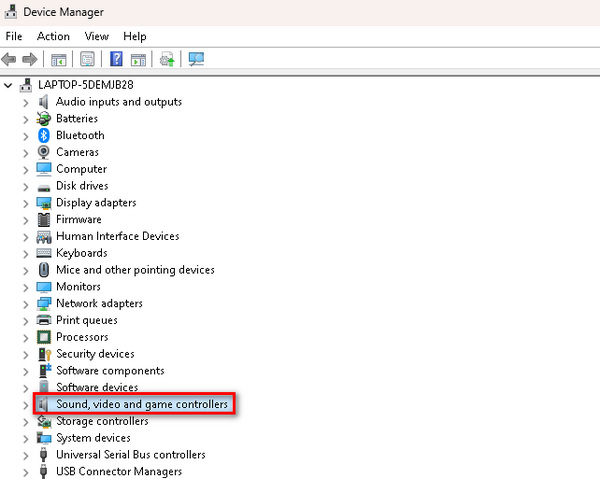
You can install a new audio driver if the problem persists after updating it. Also, this solution also works when your video is not playing.
使用視頻修復工具修復 MP4 視頻
如果更新音訊驅動程式並檢查音量設定未能解決音訊問題。下一個解決方案是修復 MP4 影片本身。大多數情況下,MP4 沒有聲音是由於下載不完整或資料遺失而導致視訊損壞。因此,使用 FVC Video Repair 等視訊修復工具可以幫助解決此問題。
FVC Video Repair is a powerful program that fixes broken or corrupted video. In this case, using this tool can fix the audio problem of an MP4 file. It will be playable on any media player, like the Windows Media Player, OBS Recording, and Adobe Premiere. To fix this problem, follow the steps below.
Step 1. First, Download FVC Video Repair on their official website and Install it.
Step 2. Next, add the MP4 that has no sound by clicking the Red Plus button. Also, click the Blue Plus button to add the sample MP4 file.
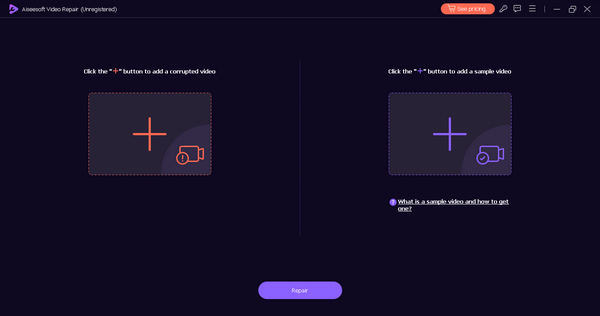
Step 3. Now, click the Repair button.
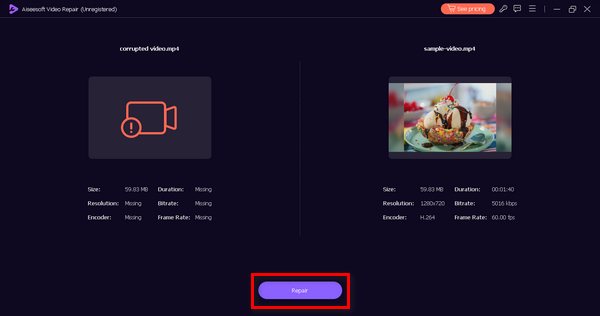
Step 4. Lastly, check if the file is successfully repaired by checking the audio to hear if there’s a sound by clicking the Preview button.
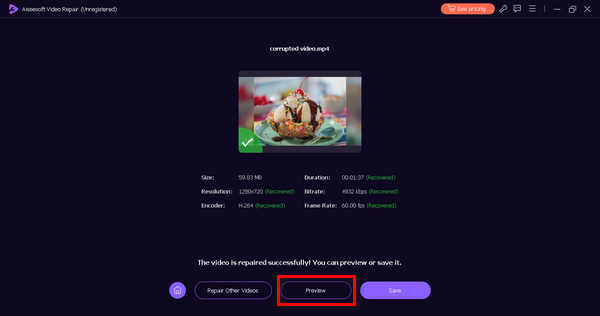
Step 5. When things are all set, it will automatically be saved and when it’s done, use your desired media player to play the video and check if the audio is fixed.
FVC Video Repair is indeed a great tool. It doesn’t only fix displays on videos but can also repair audio errors, like MP4 no sound in OBS recording, Windows Media Player, and Adobe Premiere, video black screen, and more.
三、MP4沒有聲音的常見問題解答
如何判斷 MP4 影片是否缺少音軌?
您可以使用媒體播放器軟體檢查 MP4 影片中是否缺少音軌。只需播放影片並尋找音訊指示器,例如音量條或靜音圖示。此外,右鍵單擊檔案並檢查其屬性可以提供有關音軌是否存在的資訊。
您可以在 Windows Media Player 中新增額外的音軌嗎?
Windows Media Player 的基本形式不提供向現有影片添加額外音軌的直接選項。要合併其他音頻,您可能需要使用支援音軌插入的第三方視訊編輯軟體,或考慮使用提供此功能的更高級的媒體播放器。
一個 MP4 影片中可以編碼多少個音軌?
MP4 影片中可編碼的音軌數量取決於所使用的編解碼器和規格。一般來說,MP4格式支援多個音軌。 AAC 等高階編解碼器支援各種通道,有助於在單一 MP4 檔案中包含多個音軌。
損壞的音軌會導致 MP4 聲音問題嗎?
是的。損壞的音軌可能會導致 MP4 檔案出現聲音問題。如果 MP4 中的音軌損壞或不完整,可能會導致無聲播放或聲音失真。確保音軌的完整性對於無縫音訊體驗至關重要。
您可以從現有 MP4 影片中提取並替換音軌嗎?
是的。可以擷取並取代現有 MP4 影片中的音軌。各種視訊編輯軟體工具允許用戶從視訊檔案中分離音軌,用新音訊取代它們,然後將修改後的音訊與視訊內容同步。高級視訊編輯應用程式提供更全面的音訊處理選項。
結論
While there are various reasons why MP4 has no sound, it’s also important to take note that there are ways to fix it. Fortunately, there is a versatile video repair tool that can also fix audio problems in videos whether you are using a Windows Media Player, OBS Recording, or Adobe Premiere. Use FVC Video Repair now and reclaim your interrupted viewing experience.
-
 如何修復影片錯誤代碼 224003:您的終極修復指南
 了解如何解決此影片無法播放錯誤代碼 224003 的問題,並解決該問題以獲得無縫的用戶體驗。與我們的導遊一起回到正軌!
-
 7 個免費視頻修復:恢復損壞的視頻
 發現最好的 7 個免費線上影片修復工具來修復損壞或損壞的影片檔案。使用這些頂級影片修復工具恢復您的珍貴記憶。
-
 修復無法播放影片錯誤 150 的快速解決方案
 您在觀看影片的過程中是否遇到過無法播放影片錯誤150的令人沮喪的情況?不用擔心,因為我們已經向您介紹瞭如何修復它。
