


 視頻轉換大師
 屏幕錄影大師
 影片修復
影片修復
 安全下載
安全下載尋找修復視訊錯誤代碼 224002 的快速解決方案
嘗試播放影片時遇到影片錯誤代碼嗎?雖然這種不幸的情況並不常見,但一旦發生,就代表背後存在某些需要立即處理的問題。若你正在尋找快速解決影片錯誤(例如惱人的錯誤代碼 224002)的方法,那麼你來對地方了。我們理解影片播放錯誤會令人感到挫折,打斷娛樂或工作。因此,先了解問題根源,是找到有效解決方案的第一步。不多說了,在接下來的內容中,你將學到處理並迅速修復這類影片問題所需的一切資訊。

第 1 部分。
錯誤代碼 224002 是指派給使用者在嘗試查看線上內容時可能遇到的影片播放問題的特定名稱。此錯誤代碼通常與串流媒體服務和視訊平台相關,表示串流媒體過程中正常資料流發生中斷。
以下是觸發視訊錯誤代碼 224002 的一些潛在原因:
網路連線問題。
網路連線薄弱或不穩定是常見的罪魁禍首。如果您的網路中斷或波動,可能會導致串流服務無法順利傳輸影片內容,從而觸發錯誤代碼 224002。
相容性問題。
您正在使用的視訊播放器或串流服務可能會面臨與您的瀏覽器或裝置的相容性問題。這些相容性差距可能會導致出現 224002 等錯誤代碼。
伺服端故障。
在某些情況下,錯誤可能是由於串流平台伺服器端的臨時故障或維護問題造成的。這超出了使用者的控制範圍,在技術團隊解決這些與伺服器相關的問題時,耐心是關鍵。
軟體版本過舊。
如果您的作業系統、瀏覽器或影片播放器已過時。它將導致與最新的串流媒體協議缺乏相容性。定期更新軟體有助於確保更流暢的影片播放體驗。
快取與 Cookie。
您的瀏覽器中累積的快取和 cookie 可能會幹擾串流媒體處理。清除這些儲存的檔案是解決影片播放錯誤的簡單而有效的解決方案。
行動網路切換。
對於行動用戶來說,在影片播放過程中在 Wi-Fi 和行動數據之間切換可能會導致中斷。這可能是行動裝置上出現錯誤代碼 224002 的潛在原因。
第 2 部分:快速修復 - 修復 xc00d36e5 錯誤
若你正在尋找快速有效的方法來解決 xc00d36e5 錯誤代碼,非常建議使用專業的影片修復工具。FVC Video Repair是處理此類特定影片問題的極佳選擇。這款工具的優勢在於具備先進功能,能夠深入分析並無縫修復受損的影片檔案。其一大特色是內建 AI 驅動,可自動修復各類影片問題,並支援多種常見的影片格式。要使用此工具,請按照下列步驟操作:
步驟 1。 先透過下載取得軟體。只要點擊免費下載按鈕即可。下載完成後,在電腦上安裝程式。
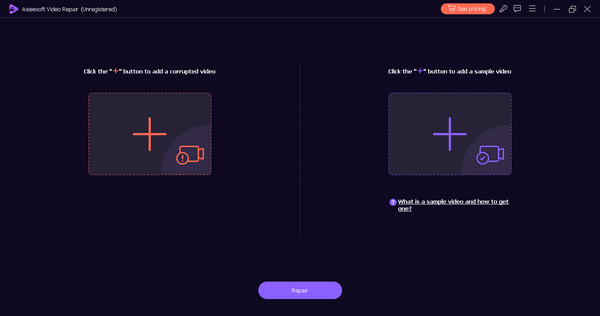
步驟 2。 接著啟動工具。請不要被畫面上的兩個按鈕搞混。你會在螢幕左側看到紅色加號按鈕,在右側看到藍色加號按鈕。現在,先點擊紅色加號按鈕新增含有 xc00d36e5 錯誤代碼的影片,再點擊藍色加號按鈕新增範例影片。
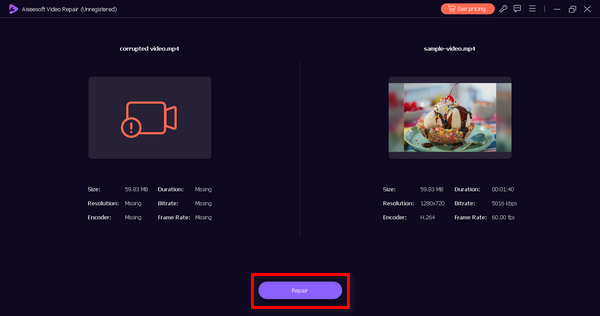
步驟 3。 然後,點擊修復按鈕。軟體就會開始處理並修復你的影片檔案。
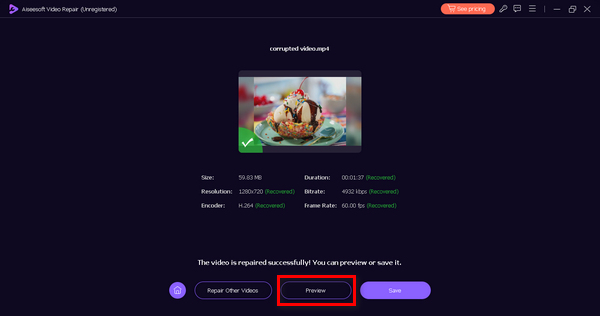
步驟 4。 最後,點擊預覽按鈕,檢查 xc00d36e5 錯誤代碼是否已成功排除。若你對結果滿意,就可以將檔案儲存下來。
除了使用視訊修復工具之外,沒有其他方法可以快速修復錯誤代碼 xc00d36e5,強烈建議使用 FVC Video Repair。憑藉其頂級的特性和功能,毫無疑問,您可以使用該軟體有效地解決任何類型的視訊問題。
第 3 部分. 修復 0xc00d36e5 錯誤的手動解決方案
除了使用視訊修復工具來修復 xc00d36e5 錯誤之外,還有手動方法來解決此類視訊問題。
方法 1:更新您的 Google Chrome
更新 Google Chrome 瀏覽器是解決影片播放期間出現 0xc00d36e5 錯誤的主動方法。此錯誤可能源自於相容性問題或過時的瀏覽器版本中存在的錯誤。透過讓 Chrome 保持最新狀態,您可以確保與最新網路標準的兼容性,受益於增強穩定性的錯誤修復,並獲得安全修補程式以防範潛在威脅。為此,請按照以下步驟操作:
步驟 1。 開啟你的 Chrome。
步驟 2。 接著,點擊右上角的三個小點,亦即自訂及控制按鈕。
步驟 3。 前往說明。
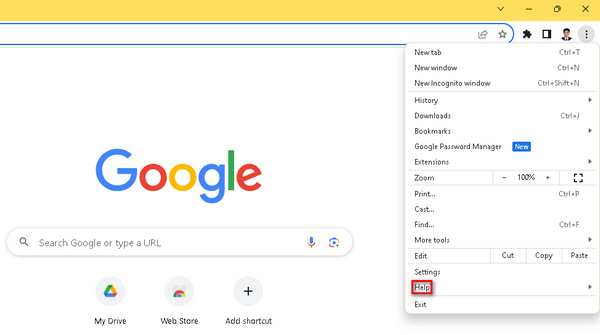
步驟 4。 然後選擇關於 Google Chrome。若有新版本可用,你會看到更新 Google Chrome的選項。點擊後依照畫面指示操作。若無更新,則會看到重新啟動按鈕。
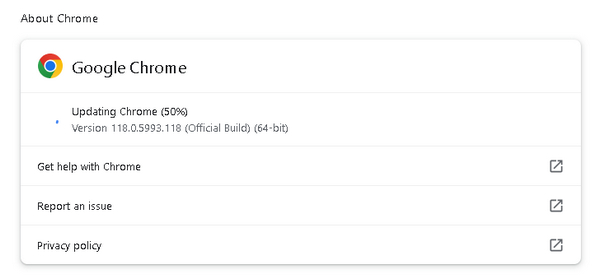
更新你的 Google Chrome 不僅能降低遇到 0xc00d36e5 錯誤的機率,也能提升整體瀏覽的安全性與流暢度。此外,當影片在 Chrome 中無法播放時,這個方法同樣適用。
方法二:清除Cookie和快取
清除cookies和快取是解決0xc00d36e5錯誤的另一種有效方法。此手動程序有助於消除可能破壞視訊播放的潛在資料幹擾來源。損壞或過時的 cookie 和快取文件可能會導致播放錯誤,透過清除這些文件,您的瀏覽器將從伺服器獲取新數據,從而降低遇到 0xc00d36e5 錯誤的可能性。為此,請按照以下步驟操作:
步驟 1。 首先,在主畫面的搜尋列輸入控制台(Control Panel),然後開啟它。
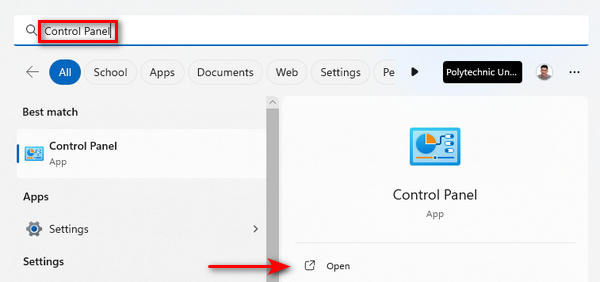
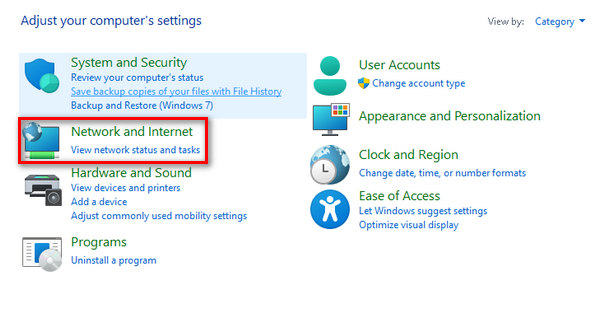
步驟 2。 接著點擊網路和網際網路選項。
步驟 3。 現在,點選刪除瀏覽記錄與 Cookie。
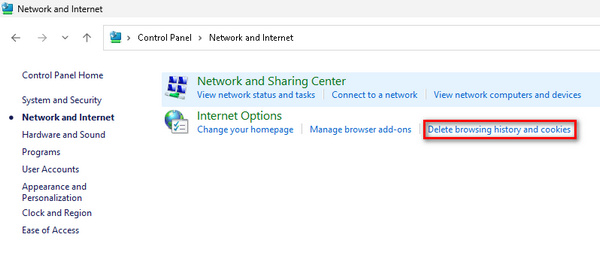
步驟 4。 之後,會在新視窗中出現選項,勾選你想要清除的項目。完成選擇後,點擊刪除按鈕結束流程。
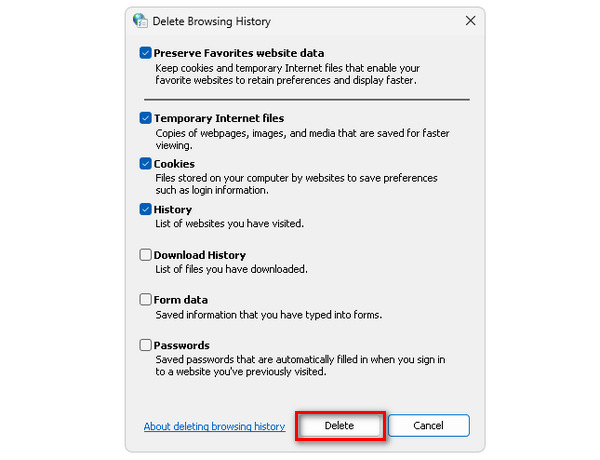
定期清除瀏覽器的 Cookie 與快取,有助於提升瀏覽器效能,清除累積的雜訊資料,並在串流影片時更有效率地讀取乾淨且最新的資料。當你的影片無法播放、原因多樣時,這也是一種可行的解決方式。
第 4 部分:有關錯誤代碼 224002 的常見問題解答
Kickassanime 上的錯誤代碼 224002 是什麼?
Kickassanime 上的錯誤代碼 224002 通常表示影片播放出現問題。此錯誤可能是由於網路連線不良、瀏覽器設定或相容性問題等問題造成的。要解決此問題,請考慮檢查您的網路連線、清除瀏覽器快取和 cookie,並確保您的瀏覽器和系統軟體是最新的。
如何修復 Mac 上的錯誤代碼 224002?
若要解決 Mac 上的錯誤代碼 224002,請先檢查網路連線的穩定性。清除瀏覽器的快取和 cookie 並進行更新。另外,請確保您的 Mac 作業系統是最新的,因為過時的軟體可能會導致影片播放問題。此外,請考慮關閉任何可能幹擾串流媒體的瀏覽器擴展,並嘗試調整視訊品質設定。
Wii 上的錯誤代碼 244002 是什麼?
Wii 上的錯誤代碼 244002 表示影片播放有問題,與其他平台上的錯誤代碼 224002 相關的問題類似。透過檢查您的網路連線、更新 Wii 的瀏覽器或相關軟體以及檢查是否有任何相容性問題來排除故障。清除 Wii 瀏覽器上的 cookie 和快取也可能有助於緩解該錯誤。如果問題仍然存在,請諮詢 Wii 平台提供的支援資源或尋求其客戶支援的協助。
結論
總結來說,播放影片時遇到錯誤代碼 224002的確令人困擾。不過,這份完整指南為你提供多種有效方案,協助你迅速處理並解決相關問題。從了解錯誤代碼 224002 的成因,到嘗試更新 Google Chrome、清理 Cookie 與快取等手動方法,你現在已掌握多項具體可行的步驟,能夠有效提升影片串流與播放體驗。
-
 如何快速手動修復錯誤代碼 102630
 不要讓錯誤代碼 102630 破壞您的觀看體驗!透過我們的有用指南了解如何修復它。請遵循這些綜合指南進行快速修復
-
 快速有效地修復影片 0xc00d36e5 錯誤D
 嘗試播放影片時遇到 0xc00d36e5 錯誤?了解簡單而有效的方法來修復此錯誤,以獲得流暢的視訊播放體驗。
-
 如何用 3 種方法修復 0xC10100BE 錯誤(100% 工作)
 透過我們全面的故障排除指南,了解如何解決 0xC10100BE 錯誤並恢復電腦的順利運行
