


 視頻轉換大師
 屏幕錄影大師
 影片修復
影片修復
 安全下載
安全下載如何修復 iPhone 聲音不工作的問題 [3 種簡單方法]
你是否已經嘗試過無數方法想讓 iPhone 影片恢復聲音,結果音訊還是沒反應?其實,並不是你的 iPhone 影片聲音問題無法解決,而是你過去採取的做法並不是正確的方式。因此,在這篇文章中,我們將介紹 3 種最簡單的方法,來解決「我的 iPhone 錄的影片沒有聲音」這個問題。我們很清楚這個情況相當惱人又讓人挫折。所以,如果你正被這個問題困擾、迫不及待想修好 iPhone 影片的聲音,就請繼續閱讀本文,先了解為什麼你的影片沒有聲音,再依照原因對症下藥地排除問題。

第 1 部分:為什麼我的 iPhone 播放影片時沒有聲音
為什麼我的iPhone看影片沒有聲音確實是很多人面臨的疑問和問題。造成這種情況的原因有很多種,但是您真的了解為什麼會發生這種情況嗎? iPhone播放影片沒有聲音的原因有以下幾種:
iPhone 影片中的照片沒有聲音
Photos 是 Apple 推出的一款廣為人知的照片管理和編輯應用程式。用戶可以在其中儲存照片和影片、查看和編輯它們等等!雖然「照片」是一個信譽良好的查看和播放影片的平台,但在某些情況下,在此應用程式上播放影片時沒有聲音。以下是 iPhone 影片在「照片」中沒有聲音的一些原因:
• 音量可能被靜音或開得太小。請確認 iPhone 的音量已調高,並且鈴聲切換鍵沒有被設為靜音。
• 影片檔案可能已損毀,導致音訊軌異常或完全無法播放。
• 可能是「照片」App 的軟體問題或程式錯誤,導致無法播放聲音。
• 「照片」App 可能無法正確讀取影片的音訊編解碼器,特別是當影片格式未被完整支援時。
• iPhone 可能連接到藍牙裝置,例如耳機或喇叭,但實際沒有在使用,導致聲音被重新導向到該裝置。
iPhone 相機膠卷中的影片沒有聲音
直接在 iPhone 上拍攝時,您可以從相機膠卷中播放影片來預覽影片。然而,一些 iPhone 用戶在播放相機膠卷中的影片時沒有聲音,這讓他們感到惱火和困惑,為什麼他們的影片沒有聲音。以下是 iPhone 在相機膠卷中播放時聲音不起作用的一些原因:
• 錄影時麥克風可能被遮住或發生故障,導致沒有錄到任何聲音。
• 如果你的 iPhone 開啟「勿擾模式」,在相機膠卷中預覽影片時,可能會被限制播放聲音。
• iPhone 若處於靜音模式,也有可能導致影片播放時沒有聲音。
iPhone 播放 IG 影片時沒有聲音
在 Instagram 上播放影片有時會出現問題。有些人遇到無法播放影片的情況;在某些情況下,在 IG 上播放影片時,只有聲音不播放。現在,為了更好地理解為什麼會發生這種情況,以下是 iPhone 在 IG 中播放影片沒有聲音的原因:
• Instagram 可能預設將影片設為靜音,需使用者點擊喇叭圖示才會開啟聲音。
• Instagram 應用程式內部的音量,可能被單獨調低或設為靜音,與 iPhone 系統音量無關。
• Instagram App 可能有暫時性的故障或程式錯誤,需要重新啟動或更新。
• 網路連線不良或不穩定,可能導致影片載入異常,進而沒有聲音。
• iPhone 若設定為靜音或震動模式,可能會影響 Instagram 內的聲音輸出。
第 2 部分:修復 iPhone 上沒有聲音的解決方案
現在您已經了解了 iPhone 在影片中沒有聲音的一些原因,是時候學習如何解決這個問題了。
方法一:使用FVC視訊修復
當你的 iPhone 播放影片沒有聲音,是因為播放到損毀的影片檔時,最理想的解決方案就是使用 FVC 視訊修復工具。大家都知道,影片一旦損毀,不只會影響畫面的可播放性,也會連帶影響音訊,造成例如沒有聲音等問題。影片檔案的損毀可能會破壞音訊與影像軌道的同步,甚至完全移除或干擾音訊軌,最後導致播放時一片寂靜。有鑑於此,FVC 視訊修復工具就是專為解決這類問題而設計,可同時修復影片的畫面品質以及隨附的音訊,讓你重新獲得流暢且有聲音的播放體驗。
步驟 1:首先,前往其官方網站。然後下載此工具並將其安裝在你的裝置上。
步驟 2:接著,點擊紅色加號按鈕加入受損影片,就像先前點擊藍色加號按鈕加入範例影片一樣。之後,點擊「修復」按鈕,開始修復音訊問題。
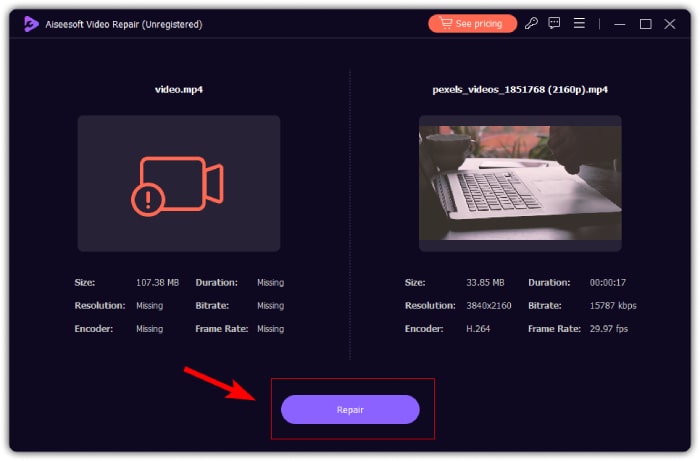
步驟 3:最後,點擊預覽按鈕,先預覽已修復的影片,確認音訊是否已恢復。若修復程序成功完成,你就可以按下儲存按鈕將檔案存到裝置中。
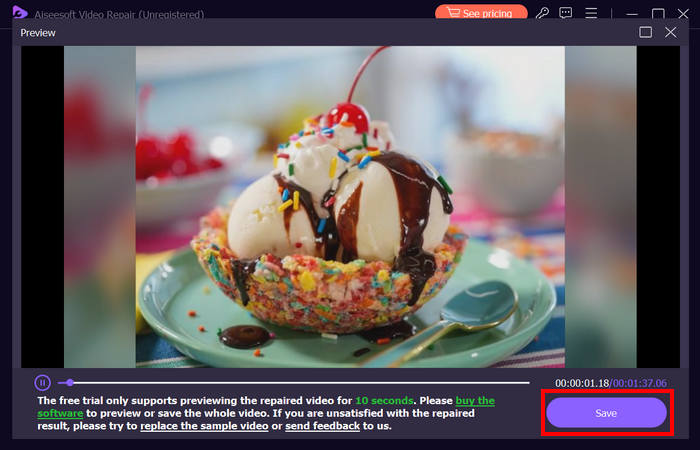
FVC Video Repair確實可以輕鬆修復iPhone影片沒有聲音的問題。憑藉最新的AI演算法,自動偵測生命資訊並直接修復,可以有效還原iPhone上的視訊聲音。
方法2:使用FVC選擇的Video Converter Ultimate
另外,如果你的問題是因為音訊軌遺失,也就是說影片中的音訊部分遺失、損毀,或是沒有正確編碼,你可以改用 FVC 精選的 Video Converter Ultimate 視訊轉檔工具。此工具能透過將影片轉換成相容格式,來協助修復遺失的音訊軌。若要解決因音訊軌遺失導致 iPhone 無法播放聲音的情況,請依照以下步驟操作:
步驟 1:如果你的電腦尚未安裝此工具,請先在電腦上下載並安裝。
步驟 2:接著,點擊新增檔案按鈕,加入在 iPhone 上播放沒有聲音的那個影片。
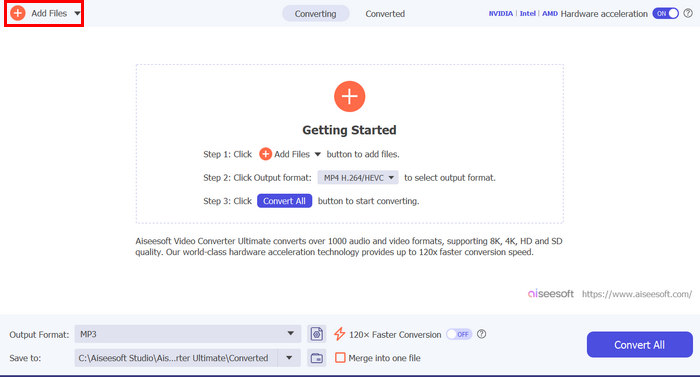
步驟 3:現在,點擊輸出格式,選擇MP3,並在選單中挑選你想套用在該影片上的音訊格式。最後,點擊全部轉換按鈕,將檔案保存下來。
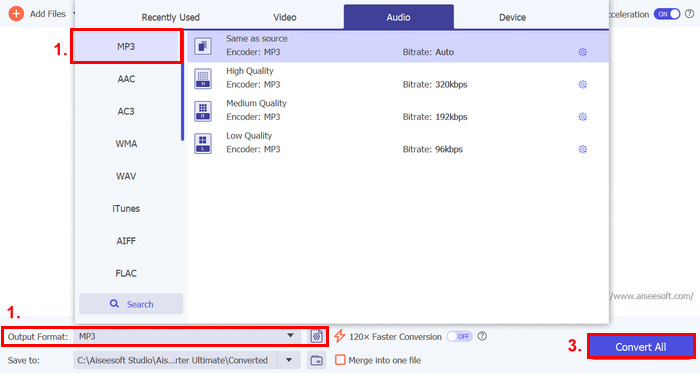
這款功能齊全的 FVC 精選 Video Converter Ultimate 工具確實是解決任何視訊和音訊相關問題的首選工具。無論出現什麼問題,無論是文件損壞、編解碼器不正確還是格式不受支持,此工具都可以真正提供幫助。
方法3:重啟iPhone
如果您的 iPhone 出現一些系統問題,影響播放影片時的音頻,您只需重新啟動 iPhone 即可。透過這種方式,您可以刷新裝置的作業系統,從而清除可能導致聲音問題的臨時故障或錯誤。以下是如何簡單地重新啟動 iPhone 來修復 iPhone 影片沒有聲音的問題:
適用於 iPhone X 及後續機種
步驟 1:要重新啟動 iPhone,請同時按住側邊按鈕以及其中一個音量鍵,直到螢幕出現關機滑桿。
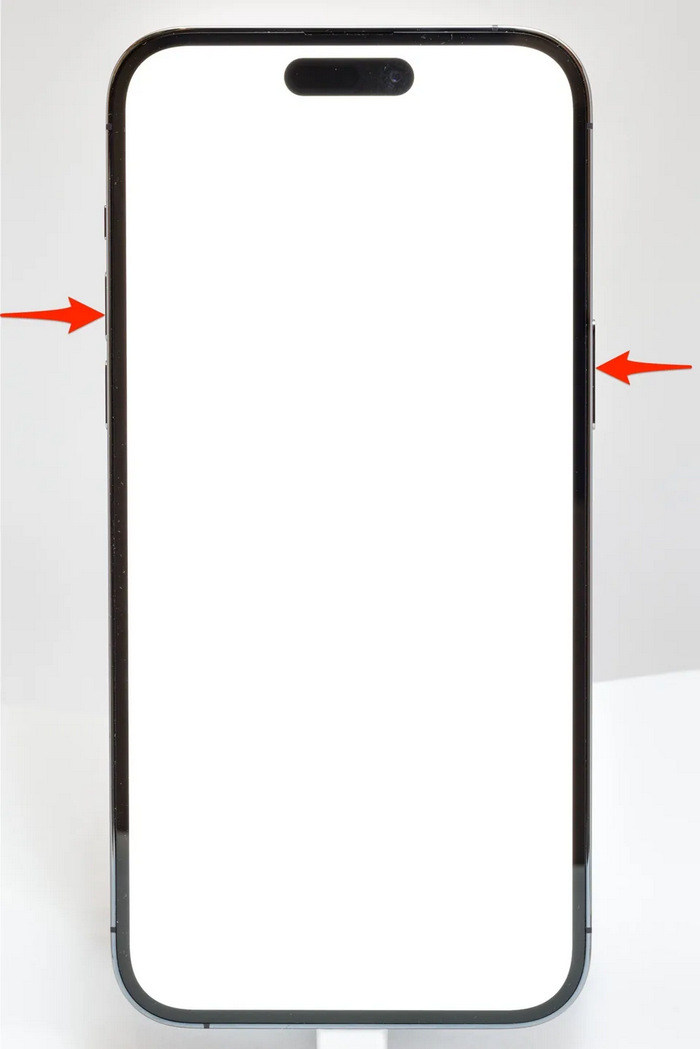
步驟 2:將滑桿滑動到一側,讓 iPhone 完全關機。
步驟 3:之後要開機時,再次按住側邊按鈕即可。
適用於 iPhone 6、7、8 和 SE
步驟 1:首先,長按側邊按鈕不放。
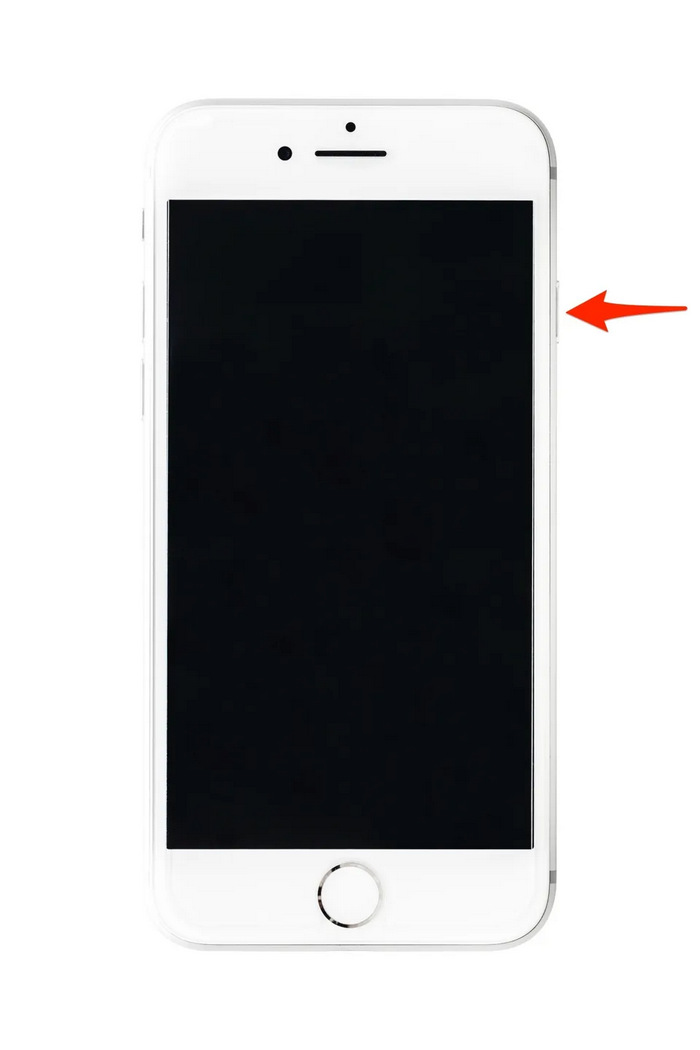
步驟 2:等待關機滑桿出現後,滑動滑桿以關閉裝置。
步驟 3:之後要開機時,再次按住側邊按鈕即可。
這些方法操作起來很簡單,不需要您使用任何第三方工具。然而,這是非常基本和常見的解決方案,他們不能保證完全修復此 iPhone 影片沒有聲音的問題。
第 3 部分:Stellar 視訊修復常見問題解答
哪些 iPhone 支援杜比視界或 DTS 音效?
iPhone 12 系列及更新版本的 iPhone 支援杜比視界,可透過更好的色彩和對比度來增強視訊品質。然而,iPhone 不直接支援 DTS 聲音,因為它們使用杜比全景聲 (Dolby Atmos) 等其他音訊技術。
可以在 iPhone 上播放 FLAC auan dio 嗎?
是的,您可以在 iPhone 上播放 FLAC 音頻,但您需要 VLC 等第三方應用程式或專用音頻播放器,因為 iPhone 的內建音樂應用程式本身並不支援 FLAC。
iPhone 上的影片會在靜音模式下播放聲音嗎?
不,如果您的 iPhone 處於靜音模式,影片將不會播放聲音。要聽到聲音,您需要透過翻轉 iPhone 側面的開關來關閉靜音模式。
結論
造成 iPhone 錄影沒有聲音 的原因很多樣,對應的解決方式也各不相同。既然你現在已經知道該如何處理,就不必在日後遇到類似問題時感到氣餒。就目前而言,如果你正碰到同樣的困擾,可以試試本文介紹的任一方法來排除故障。
-
 免費將 FLV 轉換為 iPhone 視頻的前 2 種方法
 這個具體的指南分享了兩種最簡單的方法,幫助您學習如何將 FLV 文件轉換為 iPhone 視頻或許多其他格式,而無需支付一分錢。
-
 [已解決] 如何通過詳細步驟修復無法在 iPhone 上播放的視頻
 圖庫中的本地視頻無法通過默認視頻播放器在您的 iPhone 上播放?在線 YouTube 視頻總是無法在 iPhone 上播放?在本文中,這裡有 5 個解決方案可以幫助您。
-
 將FLV視頻上傳到YouTube的具體指南
 將 FLV 上傳到 YouTube 但失敗?您可以自行解決此問題,並按照我們的分步指南將 FLV 轉換為 YouTube 支持的編解碼器。
