


 視頻轉換大師
 屏幕錄影大師
 影片修復
影片修復
 安全下載
安全下載視訊審核的一流修復:您應該期待什麼?
沒有什麼比在裝置上觀看您喜愛的影片時遇到意外的影片問題更煩人的了。雖然這可能是很常見的事情,但如果您缺乏如何修復它們的知識,您將別無選擇,只能永久發送這些視訊檔案。但這裡有一些好消息!您仍然可以藉助視訊修復工具恢復影片。因此,無論您的影片是否無法播放、損壞或編解碼器錯誤,您都可以修復它。
在本文中,我們將對 Stellar Repair for Video 進行全面評測,以評估它是否符合你的期待,並幫助你判斷它是否值得投入時間與金錢。我們理解有必要從實務與技術層面來檢視這款工具。此外,我們也會列出這款影片修復工具的優缺點,並討論其功能、支援的影片格式,以及整體價值與限制,最後形成我們的評價結論。
您準備好進一步了解這個工具了嗎?閱讀更多!

第 1 部分:Stellar 視訊修復值得購買嗎?
Stellar Repair for Video 是一款旨在修復各種影片檔案問題的工具。它的自動修復功能使損壞和損壞的視訊檔案可以播放。除了修復視訊檔案之外,該軟體還修復了視訊檔案的其他常見問題,例如模糊、對比度、不必要的噪音、視訊編解碼器不正確等。讓我們來看看它的優點和缺點:
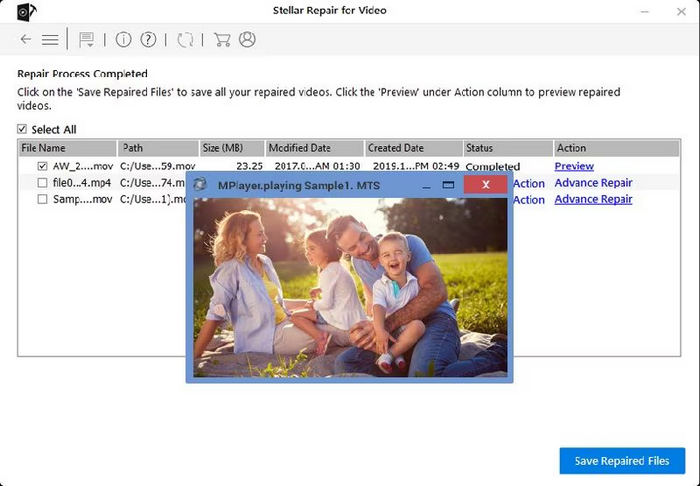
優點:
• 付費方案提供一套非常完整的功能組合,適合進階的影片修復需求。
• 操作非常簡單,特別適合新手與不熟悉科技的使用者。
• 支援廣泛使用的影片格式與編碼(codec),提升相容性。
• 支援 HD、4K、8K、12K、16K 及 VR 影片素材。
• 具備批次修復功能。
缺點:
• 價格偏高。
• 免費試用版的功能受限。
• 缺少一些進階功能,例如可自訂的修復設定,以進行手動修復流程。
• 與較舊版本作業系統存在相容性問題。
我們的判決:
讓我們把事情說清楚,Stellar Repair for Video 是一款很棒的影片修復工具,物有所值。如果您經常遇到視訊檔案損壞或損壞的情況,那麼您沒有理由不對此進行投資。但是,請注意,就像任何其他視訊修復工具一樣,它也有一些限制。因此,如果您預算緊張,那麼這個工具就相當昂貴。可能還有另一種工具比這個便宜得多,但提供相同的功能。此外,它的免費版本缺乏一些基本功能,這意味著您確實需要選擇付費版本。儘管如此,該工具仍然是滿足視訊修復需求的絕佳選擇。
二、Stellar影片修復的特點
現在,讓我們來看看這個工具到底能提供什麼。好吧,這個工具提供了一套全面的功能,旨在解決各種視訊檔案問題,這並不奇怪,因為,首先,它很昂貴,其次,它在當今可用的視訊修復工具清單中非常受歡迎。現在,讓我們深入研究一下使該工具脫穎而出的具體功能。了解這些方面將使您全面了解 Stellar Repair for Video 的功能,並幫助您確定它是否符合您的特定視訊修復需求。
主要特點:
• 修復顆粒感重與畫面模糊的影片,包括畫面卡頓、閃爍、黑畫面、聲畫不同步、斷斷續續、抖動、被截斷以及畫面凍結的影片。
• 修復受損的 MP4、MOV 與 AVI 檔案。
• 修復破損或損壞的影片。
• 修正不支援的影片編碼錯誤。
• 可在儲存前預覽修復後的影片。
• 可同時修復多部影片。
• 可修復嚴重受損的影片檔案。
• 廣泛支援所有數位媒體播放器。
兼容性:
在相容性方面,Stellar Repair for Video 可在 macOS 和 Windows 作業系統中運行,並且對各種裝置具有廣泛支援。它可以修復從記憶卡、USB 驅動器、SSD、HDD 和 CF 卡保存的損壞影片。此外,它還可以修復在 Android 或 iPhone 智慧型手機甚至 DSLR、DJI、GoPro 和 CCTV 上拍攝的無法播放的影片。
支援的影片格式:
Stellar Repair for Video 支援多種流行的視訊格式,包括 MP4、MOV、AVI、ASF、WMV、MKV、FLV、DIVX、WEBM、MJPEG、MPEG、AVCHD、MTS、M4V、F4V、3G2 和 3GP 格式。
價格:
Standard 一年授權:$49.9
修復損壞、損壞、損壞或無法播放的影片。
• 修復受損的 MP4、MOV、AVI 等多種影片。
• 具備針對嚴重損毀影片的進階修復功能。
• 可一次修復多個影片檔案。
Professional 一年授權:$59.99
在修復影片的同時,還可以修復損壞或損壞的照片。
• 修復受損的 MP4、MOV、AVI 等多種影片。
• 具備針對嚴重損毀影片的進階修復功能。
• 可一次修復多個影片檔案。
• 修復受損或損壞的相片。
Premium 一年授權:$69.99
多功能升級版可以修復損壞的影片和照片,此外還可以恢復已刪除的照片、影片和音訊。
• 修復受損的 MP4、MOV、AVI 等多種影片。
• 具備針對嚴重損毀影片的進階修復功能。
• 可一次修復多個影片檔案。
• 修復受損或損壞的相片。
• 復原遺失或被刪除的相片與影片。
第 3 部分:影片 Stellar 修復的替代方案
如果 Stellar Repair for Video 無法滿足你的需求,還有一個與 Stellar 功能相當類似的替代工具可以嘗試。FVC Video Repair 是一款可協助修復 MP4、MOV 和 3GP 影片的工具,能將遺失或受損的資料還原為可正常播放的影片。這款工具與 Stellar 最大的不同在於它採用了最新的 AI 演算法,也就是說,它能更高效地修復各種影片問題。FVC Video Repair 的運作方式是先上傳受損影片,接著工具會自動偵測影片檔案的各項資訊,識別問題後便會持續進行修復,直到影片被成功還原。
主要特點:
• 採用最新 AI 演算法,實現全自動修復。
• 可修復來自多種裝置的影片,包括手機、相機、硬碟等。
• 可預覽已還原的影片。
• 支援 MP4、MOV、3GP 等影片格式。
• 能修復受損與無法播放的影片。
• 還原受損的影片檔案。
• 保留修復後影片的解析度、幀率與位元率。
以下是使用 FVC 視訊修復的方法:
步驟 1:首先,前往其官方網站。然後下載此工具並將其安裝在你的裝置上。
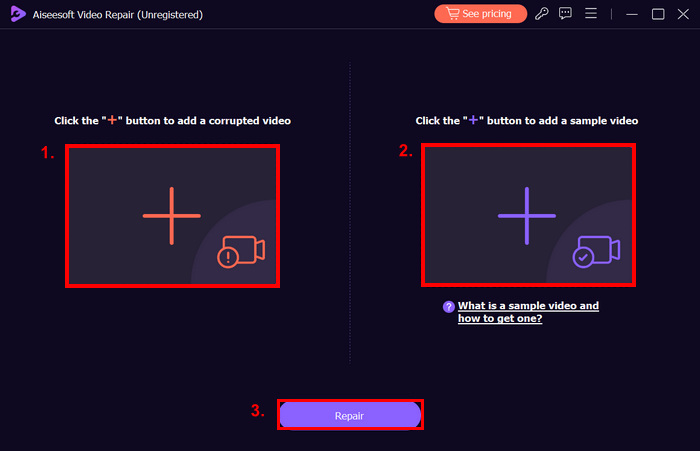
步驟 2。接著,點擊 紅色加號 按鈕新增受損影片,同樣地,點擊 藍色加號 按鈕加入範例影片。之後,只要點擊 Repair 按鈕即可開始修復流程。
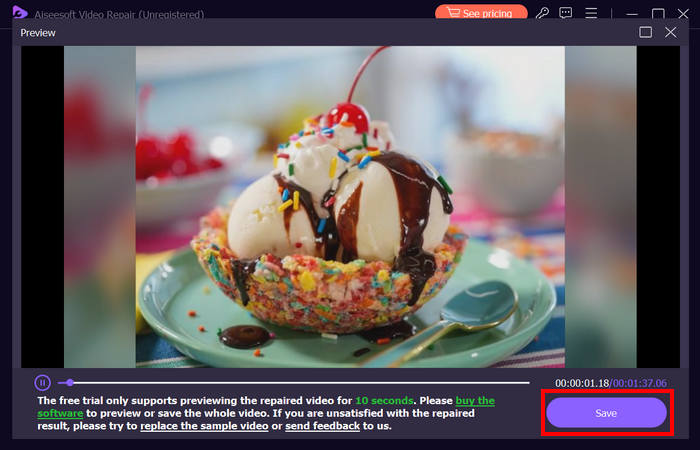
步驟 3。最後,點擊預覽按鈕預覽已處理完成的影片。當修復程序成功後,你可以點擊儲存按鈕將其保存。
事實上,FVC Video Repair 是 Stellar Repair for Video 的最佳替代視訊修復工具。除了其超級視訊修復功能之外,它的價格也更實惠。因此,如果您不確定要使用哪種視訊修復工具,可以檢查一下。
第 4 部分:Stellar 視訊修復常見問題解答
Stellar Repair for Video 是免費的嗎?
恆星影片修復完全不是免費的。然而,就像其他視訊修復工具一樣,它提供免費試用選項。這個免費試用版使用戶有機會測試該工具的功能,特別是透過了解其功能和其他方面,而無需承諾購買。同時,為了讓用戶完全存取該影片修復工具的所有功能,他們需要購買許可證。
恆星影片修復是否包含廣告?
不會。這個影片修復工具提供完全無廣告的體驗,因為用戶必須購買許可證才能完全使用它。
Stellar Repair for Video 影片修復成功率高嗎?
是的。 Stellar Repair for Video 以其修復許多影片檔案相關問題的高成功率而聞名。無論您是在處理小故障還是嚴重損壞的文件,該工具通常都能有效地將影片恢復到可播放狀態。但是,成功率將取決於視訊檔案損壞的嚴重程度。
Stellar Repair for Video 好用嗎?
是的。 Stellar Repair for Video 非常容易使用。事實上,這使得即使那些不太精通技術的人也可以使用該工具。此介面直觀、簡單,透過簡單的逐步流程引導您完成視訊修復。大部分的修復過程都是自動化的,用戶只需點擊幾下即可修復影片。即使那些在視訊修復方面幾乎沒有經驗的人也可以有效地使用該軟體。
結論
如果你經常遇到各種影片問題,在裝置中安裝一款影片修復工具是非常有必要的。希望這篇 Stellar Repair for Video 評測 能在多方面提供幫助,特別是協助你決定是否值得購買。不過別擔心,即使它無法完全符合你的需求與偏好,你仍然可以嘗試文中提到的替代工具。
您現在準備好修復您的影片了嗎?立即嘗試這些工具中的任何一個!
-
 5 100%修復無法在iPad上播放的視頻的工作解決方案
 您的視頻無法在 iPad 上播放?這裡有五個解決方案可以幫助您擺脫這個問題,然後您可以輕鬆地在手機上欣賞您喜歡的視頻。
-
 7 個免費視頻修復:恢復損壞的視頻
 發現最好的 7 個免費線上影片修復工具來修復損壞或損壞的影片檔案。使用這些頂級影片修復工具恢復您的珍貴記憶。
-
 關於 MP3Tag 的回顧:2024 年您需要了解的一切
 MP3Tag 是 Mac 上眾所周知的標籤編輯器。但是,它是音頻編輯的最佳選擇嗎?讀完本文後就有了答案。
