


 視頻轉換大師
 屏幕錄影大師
 影片修復
影片修復
 安全下載
安全下載Mac 上影片無法播放的原因和解決方案 [2024]
想知道為什麼你的影片在 Mac 上無法播放,又為尋找有效解決方案而感到挫折嗎?雖然 Mac 使用者並不常遇到這類影片問題,但發生的可能性仍然存在。不必再東奔西走,這篇完整的文章已為你準備好一切。在本指南中,我們將說明 Mac 上影片無法播放的常見原因,並提供實用的解決方法,幫助你讓影片再次順暢播放。

第 1 部分:為什麼我的影片無法在 Mac 上播放
Mac 上的影片播放問題可能與多種因素有關,這些因素共同阻礙了媒體內容的順利運作。以下是 Mac 上無法播放影片的可能原因:
軟體版本過舊。
如果您的 macOS 或視訊播放器軟體不是最新的,則可能無法處理較新的視訊格式。
不支援的影片格式。
Mac 上的媒體播放器可能不支援或相容於某些影片格式。檢查您的影片是否採用播放器支援的格式。
影片檔案毀損。
如果影片檔案損壞或損壞,則可能無法正常播放。嘗試播放其他視頻,看看問題是否仍然存在。
硬體資源不足。
播放高解析度影片可能需要大量 CPU 和 GPU 資源。較舊的 Mac 或規格較低的 Mac 可能會難以流暢播放。
瀏覽器問題。
如果您嘗試在線播放視頻,瀏覽器擴充功能、設定或相容性問題可能會影響播放。
網路連線。
串流媒體視訊需要穩定的網路連線。緩慢或不可靠的網路可能會導致緩衝問題。
硬體加速。
在視訊播放器設定中開啟或關閉硬體加速可能會影響播放。嘗試這個選項,看看它是否會有所不同。
第 2 部分. 修復 Mac 上無法播放影片的快速方法
若想快速修復在 Mac 上無法播放的影片,可以考慮使用影片修復工具,輕鬆解決問題。其中一款相當有效的工具是 FVC Video Repair,它運用人工智慧的強大功能,讓整個影片修復流程更加順暢。此工具會自動修復你的影片,利用進階演算法來偵測並修正影片檔中的問題。
要使用它,請按照以下步驟操作:
步驟 1。 從其官方網站下載並安裝該程式到你的裝置上。
步驟 2。 接著,點擊紅色加號按鈕,加入在 Mac 上無法播放的影片。同樣地,點擊藍色加號按鈕加入範例影片。
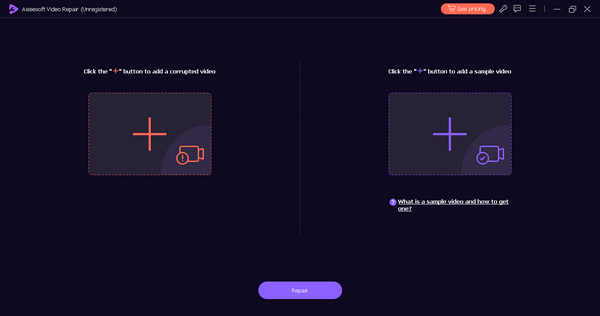
步驟 3. 現在,點擊修復按鈕。
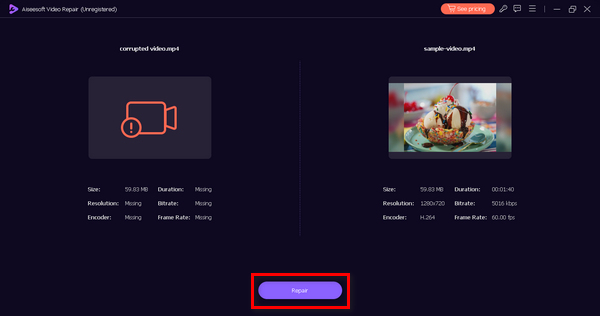
步驟 4。 最後,點擊預覽按鈕檢查影片。若影片已可正常播放,就可以點擊儲存按鈕將影片存下來。
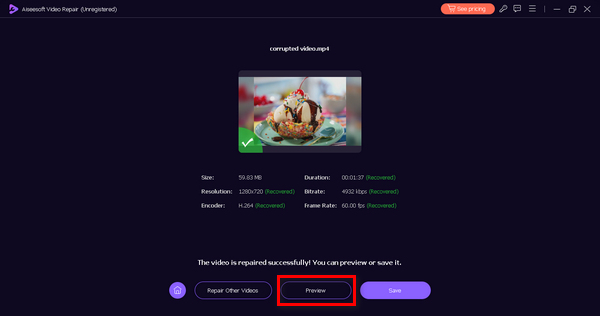
FVC Video Repair 提供了一種介面友善且高效的方式,用來修復在 Mac 上無法播放的影片。此外,它的 AI 整合可自動化整個修復流程,確保使用者能輕鬆且完好地救回自己的影片。
第 3 部分. 修復影片無法在 Mac 上播放的手動方法
有多種手動方法可以修復無法在 Mac 上播放的影片。以下是您可以遵循的常見方法:
方法一:檢查網路連線狀態
有時,視訊無法在 Mac 上播放的原因是網路連線不穩定或緩慢。確保強大且一致的網路連線對於流暢的視訊串流至關重要。
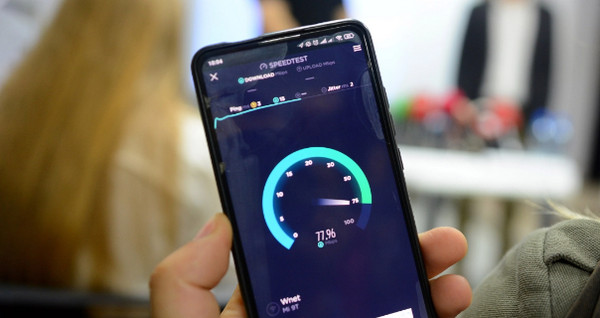
現在,使用線上速度測試工具檢查您的網路連線。
確定網路連線的狀態可以幫助您識別和解決可能影響影片播放的任何連線問題。
方法2:更新MacOS
過時的 MacOS 軟體通常會導致與較新的視訊格式的兼容性問題。讓您的 MacOS 保持最新狀態可確保您的系統能夠處理視訊播放技術的最新進展。
定期更新 MacOS 可以解決與軟體相關的底層問題並增強整體系統效能,從而有可能解決視訊播放問題。
步驟 1。 前往畫面左上角的 Apple 選單。
步驟 2。 選擇系統偏好設定,然後點選軟體更新。
步驟 3。 如果「軟體更新」偵測到有新軟體,請點擊立即升級按鈕。
定期更新 MacOS 可以解決與軟體相關的底層問題並增強整體系統效能,從而有可能解決視訊播放問題。
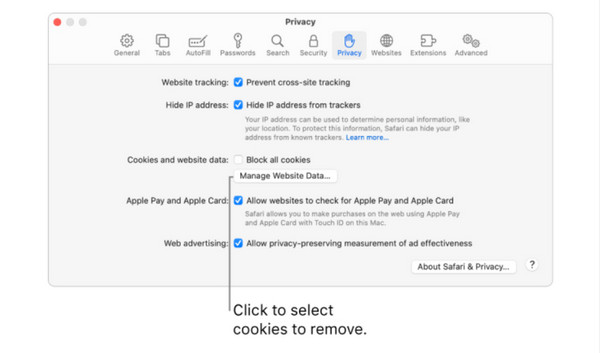
方法 3:清除 Safari 快取
如果您在使用 Safari 時遇到影片播放問題,瀏覽器的快取可能是罪魁禍首。清除快取可以消除可能導致影片播放衝突的儲存資料。
步驟 1。 開啟 Safari,依序前往 Safari、偏好設定、隱私權。
步驟 2。 前往管理網站資料。
步驟 3。 選擇一個或多個網站,然後點擊移除或全部移除以清除快取。
此方法旨在刷新瀏覽器,可能解決與快取資料相關的阻礙影片正確載入和播放的任何問題。
第 4 部分:有關 Mac 上無法播放影片的常見問題解答
為什麼 MP4 影片無法在 Mac 上播放?
由於多種原因(例如編解碼器不相容或檔案損壞),MP4 影片可能無法在 Mac 上播放。確保您的媒體播放器支援 MP4 格式,並考慮使用視訊修復工具來修復潛在的檔案問題。
如何在 Safari 中啟用影片?
若要在 Safari 中啟用視頻,請前往 Safari、「首選項」、「網站」和「自動播放」。調整設定以允許影片自動播放或提示您進行操作。此外,請確保瀏覽器擴充功能或外掛程式不會阻止影片播放。
為什麼我的影片可以在 Chrome 中播放,但不能在 Safari 中播放?
瀏覽器設定、支援的格式或外掛程式的差異可能會導致這種差異。檢查 Safari 的設置,更新瀏覽器,並確保其支援影片格式。清除瀏覽器快取也可以解決播放問題。
如果我的影片在 Mac 上播放時卡住了怎麼辦?
影片凍結或出現影片異常(glitch),可能是由於系統資源不足、軟體過舊或應用程式衝突所導致。請關閉不必要的程式,更新作業系統與影片播放器,並確保你的 Mac 硬體規格符合流暢播放影片的需求。
如何修復 Mac 上影片播放失真或像素化的問題?
視訊失真或像素化可能是由於檔案損壞或編解碼器不相容造成的。考慮使用視訊修復工具來修復檔案問題。此外,請驗證您的媒體播放器和 Mac 系統是否已更新以支援視訊格式,並檢查是否有任何可能影響播放品質的硬體加速設定。
結論
總結來說,影片在 Mac 上無法播放其實不必過於煩惱,因為已有有效的解決方案。本指南提供多種實用方法,包括使用 FVC Video Repair 等工具,來處理造成影片播放問題的各種情況。因此,只要採取正確的做法,影片在 Mac 上無法播放的難題就能輕鬆化解。
-
 如何修復 PowerPoint 中影片無法播放的問題快速指南
 您的 PowerPoint 影片無法播放嗎?使用我們最好的五種解決方案,輕鬆解決嵌入式影片無法播放的問題。
-
 如何修復 MP4 檔案:在幾分鐘內恢復您的視頻
 揭開MP4修復的秘密!請按照我們易於理解的教程進行故障排除和修復。不要讓損壞的影片破壞您的媒體體驗。#039;
-
 如何輕鬆修復無法播放影片錯誤 5 問題
 您是否遇到過播放下載的影片之一但被無法播放影片錯誤 5 訊息中斷的情況?這是您需要了解的一切。
