


 視頻轉換大師
 屏幕錄影大師
 影片修復
影片修復
 安全下載
安全下載什麼是 BUP 檔案格式 - 如何在 Windows 或 Mac 上開啟它
我們如今可以看到各種各樣的檔案格式,它們各自代表完全不同的含義與資料類型。當我們點開一個副檔名十分陌生的影片時,往往會發現電腦裡根本沒有任何軟體或播放器可以播放它。一般的數位格式問題較少,因為我們裝置上的播放器與串流平台可以相容數百甚至上千種多媒體格式。然而,DVD 卻是個例外。當我們打開光碟資料夾時,就會發現裡面不只有單一的電影檔案,而是包含許多不同的項目。這也是為什麼在拷貝 DVD 時,我們需要專業工具幫忙將影片匯出為數位格式。BUP 就經常出現在這些項目之中。因此,BUP 檔案是什麼?這種光碟資料類型有什麼重要性?本文將幫助你了解 BUP 格式的意義,以及如何開啟它並將其轉換為其他常見格式。

第 1 部分。什麼是 BUP 格式
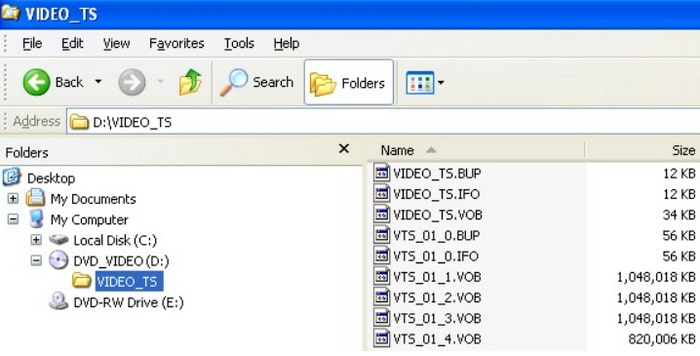
BUP 檔案通常出現在 DVD 資料夾中,是 IFO 檔案的備份。它們儲存與 IFO 類似的數據,例如字幕、音軌、菜單等。 BUP、IFO 和 VOB 檔案通常位於 DVD 的 Video_TS 資料夾中。 DVD 播放器在播放 DVD 內容時通常會開啟光碟上的原始 IFO 檔案。但是,當 DVD 表面磨損或出現刮痕時,光碟機或播放器將難以讀取 IFO 檔案。這時,BUP 格式的備份檔案就派上用場了,播放器會切換到使用 BUP 檔案。 BUP 不受加密保護,因此任何使用者都可以存取此格式的檔案。我們也可以將 BUP 轉換為其他常見的數位格式。但是,不建議在 IFO 檔案完好無損的情況下開啟 BUP。
第二部分:BUP/IFO/MOV/VBO/MP4 的區別
在 DVD 資料夾中,我們可以看到五種格式:BUP、VOB、IFO、MOV 和 MP4。上一篇文章粗略地解釋了 BUP 檔案類型的含義。那麼,剩下的四種格式分別代表什麼呢?它們之間又有什麼差別?您將在本節中找到答案。我們還將使用一個比較表來展示它們之間的差異。
• IFO
IFO,全名為 DVD 資訊文件,是 DVD 資料夾的核心文件。它儲存了光碟的所有內容,包括字幕、音軌、選單等。可以說,IFO 檔案包含了播放 DVD 和瀏覽章節內容所需的所有資訊。
• BUP
BUP 的全名是 Backup 文件,即 IFO 文件的備份。當 IFO 檔案損壞時,播放器會切換到開啟 BUP 檔案。但這並不是真正的影片。
• MOV
與之前的格式不同,MOV 是 QuickTime Movie 檔案的常見數位視訊格式。 MOV 影片可直接播放,並與眾多影片平台和編輯軟體相容。
• VOB
VOB 檔案代表 DVD 資料夾中的視訊資料。它可以保存 MPEG-2 視訊以及 MP2、AC3 或 DTS 格式的音訊。 VOB 的全名是「視訊物件」。我們需要一個支援此格式的 DVD 播放器來播放 VOB 影片。
• MP4
這是最受歡迎的影片格式。 MP4 仍然是相容性最強的格式,幾乎所有裝置型號和平台都支援。它的特點是檔案大小盡可能小,且視訊品質幾乎無損,非常適合分發和共享。
三、如何翻錄 NTSC DVD
現在我們知道了 BUP 的含義以及它在 DVD 資料夾中的作用。那麼,如何播放 BUP 檔案呢?哪些播放器相容於不同作業系統裝置上的 BUP?我們將在本節列出一些選項。然而,在開始之前,我們想提醒您,由於 BUP 是備份文件,因此每個 BUP 文件的內容並不相同,用途也不同。除了 DVD 之外,BUP 還可以在一些遊戲應用程式資料夾中找到。如果您想從 DVD 開啟 BUP 文件,可以嘗試一些第三方視訊播放器;如果您想從遊戲中讀取 BUP 文件,則需要找到特定的應用程式。在這裡,我們主要推薦與 DVD BUP 相容的多媒體播放器。
• 對於 Windows
如果你是 Windows PC 使用者,可以考慮以下這些免費 DVD 播放器。
Nero ShowTime、5K 播放器、VLC 媒體播放器、PowerDVD、Windows DVD Maker
• 對於 Mac
如果你想要一款與 BUP 相容的免費 Mac DVD 播放器,請參考下列選項。
5K 播放器、Apple DVD Studio Pro、Roxio Popcorn
第 4 部分:如何將 BUP 轉換為常見影片格式
除了 VLC 媒體播放器和 5K Player 之外,大多數 BUP 視訊播放器並不常見。此外,BUP 檔本身可能容易受到惡意軟體的攻擊,直接開啟它們往往既不方便又有風險。基於這些原因,一般不建議直接播放 BUP 檔,除非在萬不得已的情況下。
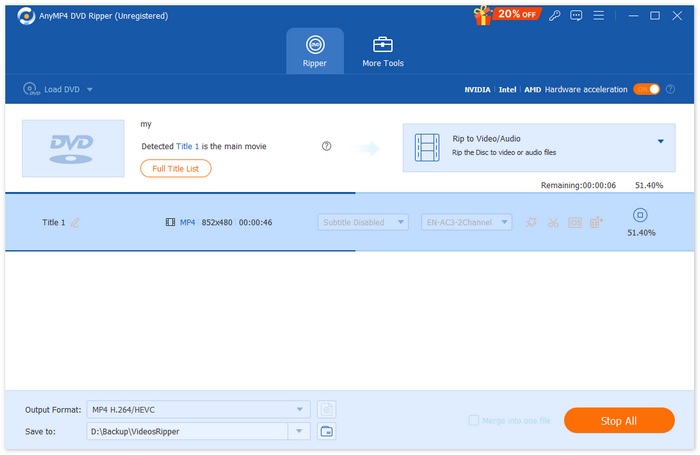
更安全且更實用的做法是,將 DVD 上整個 VIDEO_TS 資料夾轉換成一種廣泛支援的數位格式,例如 MP4。這樣一來,BUP 檔所對應的內容就能以更穩定、也更適合播放的格式保存,方便觀賞與儲存。AnyMP4 DVD Ripper 是處理這項工作的一款可靠工具。它可以協助你擷取 DVD,並將 VIDEO_TS 資料夾或 ISO 映像檔輕鬆轉換成常見的視訊格式。AnyMP4 DVD Ripper 支援多種輸出格式與裝置預設,確保在各種媒體播放器與平台上都有出色的相容性。在匯出之前,你也可以自訂視訊設定,例如輸出格式、解析度、時長與畫質,讓你能完全掌控最終的輸出結果。
若要使用 AnyMP4 DVD Ripper 將 BUP 轉換成常見的視訊格式,請按照下列步驟操作。
步驟 1. 在電腦上下載並安裝 AnyMP4 DVD Ripper。將 DVD 放入光碟機,或確認 VIDEO_TS 資料夾或 ISO 檔已儲存在你的電腦本機。
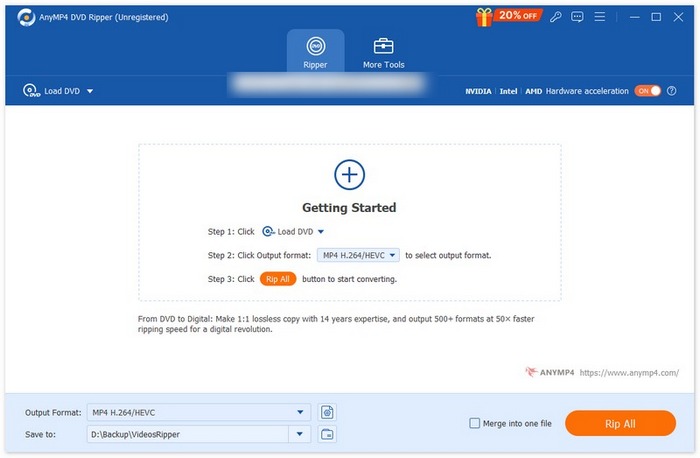
步驟 2. 啟動程式並點擊「Load DVD」。你可以選擇載入 DVD 光碟、DVD 資料夾(VIDEO_TS)或 DVD ISO 檔。軟體會自動分析 DVD 的內容。
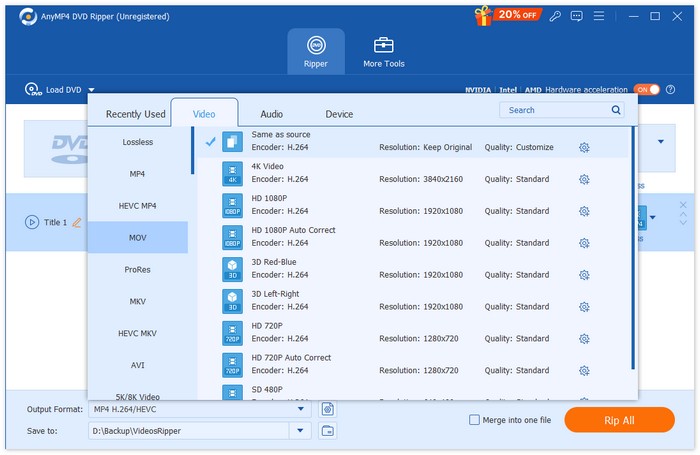
步驟 3. 點擊「Output Format」下拉選單,依照你的播放需求與裝置相容性,選擇常見的數位格式,例如 MP4、MOV、AVI 或 MKV。
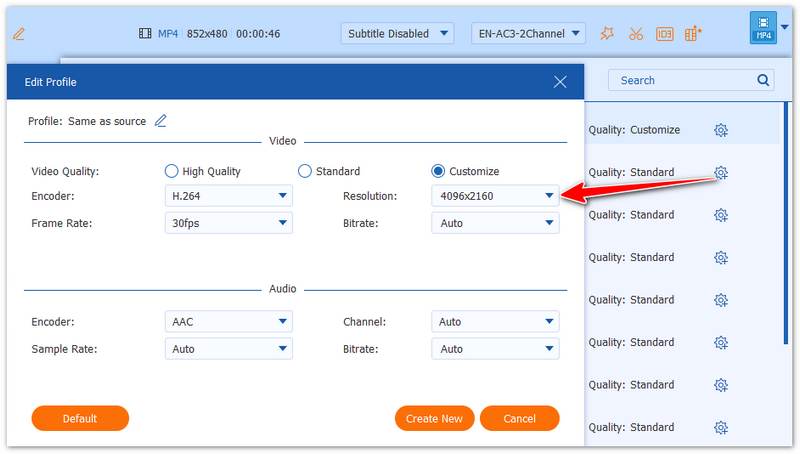
步驟 4. 如有需要,點擊「Custom Profile」或「Edit」來調整解析度、位元率、幀率、畫質或剪輯長度等參數,確保輸出影片符合你的喜好。
步驟 5. 選擇目標儲存資料夾,然後點擊「Rip All」開始轉檔。完成後,與 BUP 相關的內容會被儲存為標準視訊檔,可在多數裝置上安全播放。
第 5 部分。 BUP 檔案是什麼的常見問題解答
如何開啟 BUP 檔案?
你可以在 DVD 檔案中選取 VIDEO_TS 資料夾,然後找到副檔名為 .bup 的檔案。點兩下開啟,並將 VLC Media Player 設為開啟方式。
什麼媒體播放器可以播放 VOB 檔案?
一些免費播放器,如 Windows Media Player 和 VLC Media Player 都是不錯的選擇。
我可以將 VOB 檔案轉換為 MP4 嗎?
當然可以。由於 VOB 格式的相容性不高,你可以選擇使用 AnyMP4 DVD Ripper 將其轉換成更常見的格式,例如 MP4 和 MOV。
結論
本文介紹了一種較不常見的檔案格式 BUP,它通常出現在 DVD 中。BUP 檔是 IFO 檔的備份,會儲存目錄結構、字幕與導覽資料等重要資訊。除了說明什麼是 BUP 檔之外,文章也將它與 IFO、VOB 等相關格式進行比較。
然而,直接開啟和播放 BUP 檔既不方便,往往也不實用。因此,我們建議使用像 AnyMP4 DVD Ripper 這樣的專業工具來擷取 DVD,並將其內容轉換為支援度更廣的視訊格式,讓播放與保存變得更加輕鬆。
-
 適用於 iPad 的 DVD 播放器:如何在 iPad Air/Mini/Pro 上播放 DVD 視頻
 當您想在 iPad Pro 上播放 DVD 時,您會發現沒有可以將外部 DVD 播放器連接到 iPad 的接口。您可以從本文中了解如何將 DVD 翻錄或轉換為支持的格式。
-
 Wii/Wii U 可以在沒有 Homebrew 的情況下播放 DVD 嗎? 2 為您提供解決方案
 當您將 DVD 光盤插入 Wii 時,您會發現 Wii 由於區域鎖定而無法讀取和播放 DVD。在本文中,您將學習如何在沒有 Homebrew hack 的情況下輕鬆地在 Wii/Wii U 上播放 DVD。
-
 如何修復 Windows Media Player 無法播放 DVD:3 種方法
 Windows Media Player 無法播放 DVD 嗎?無論您的裝置使用的是 Windows 7、8 還是 10,都沒關係。您可以找到解決方案。以下是一些最佳播放器。
