


 視頻轉換大師
 屏幕錄影大師
 影片修復
影片修復
 安全下載
安全下載Adobe Captivate 在 2025 年還值得買嗎?完整評測
在這個數位時代,人們對教學影片與互動式訓練模組等線上學習素材的需求持續攀升。Adobe Captivate 長期以來一直是製作引人入勝、回應式且專業學習內容的首選工具。但隨著科技發展與新工具不斷問世,這款工具是否依然值得使用?在這篇深入評測中,我們將從核心功能、優點與限制到價格等面向,帶你全面了解 Adobe Captivate。同時,你也能發現一款可用來錄製螢幕的替代工具,協助你製作教學影片等各式內容。那麼,你還在等什麼?一起看下去吧!

第 1 部分:您應該了解的 Adobe Captivate 知識
Adobe Captivate 是一款專業且先進的工具,以其創建互動式、響應式且多媒體豐富的培訓內容的能力而聞名。該工具的主要功能是建立用於教育或企業培訓的線上課程、影片教學、測驗和其他教學材料。換句話說,您可以使用 Adobe Captivate 截取電腦螢幕。
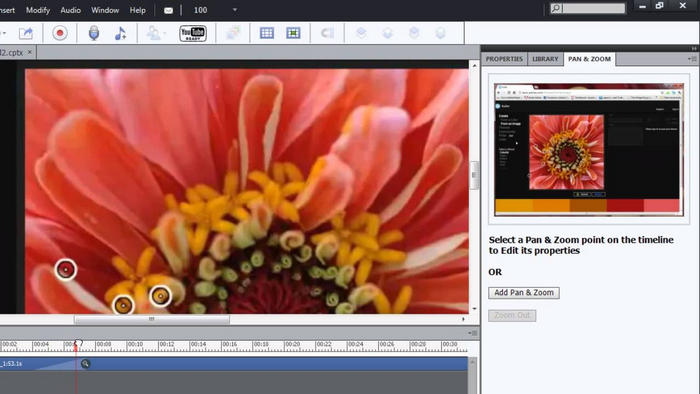
主要特點:
• 記錄全螢幕或螢幕的特定區域。
• 自動產生的文字標題、滑鼠路徑和點擊框。
• 允許在錄製期間或錄製後進行音訊旁白。
• 支援網路攝影機錄影中畫教學。
• 讓您在 Captivate 中逐幀編輯錄音。
• 將螢幕錄影轉換為互動式模擬。
• 匯出為影片或直接整合到互動式專案中。
優點
- 允許用戶選擇如何錄製他們的螢幕。
- 錄音流暢,即使錄音時間較長也能很好地工作。
- 您可以在錄製時輕鬆添加畫外音或網路攝影機鏡頭。
- 編輯靈活,可新增動畫、彈出視窗和亮點。
- 內建隱藏式字幕和文字轉語音功能,具備輔助功能。
缺點
- 僅有 30 天的免費試用期。
- 在低系統計算機上可能會故障和延遲。
- 此介面不適合初學者,需要技術知識。
- 錄音能力有限。
結論:
說實話,Adobe Captivate 是一款非常棒的工具,尤其適合創建專業且互動的電子學習內容。它提供了強大的功能,例如響應式設計、測驗,以及用於軟體演示和教程的高級螢幕錄製功能。
然而,它並非最容易使用的工具,尤其對於初學者而言。介面可能相當複雜,可能需要一些時間學習。價格也略高,如果您只想使用基本功能,這可能並不理想。因此,它最適合經驗豐富的使用者或經常創建培訓內容的專業人士。如果您是新手,或者主要需要一款簡單的螢幕錄影機,那麼還有其他更實惠且更適合初學者的選擇。
第 2 部分。 Adobe Captivate 的價格是多少?
Adobe Captivate 是一款付費軟體,提供 30 天免費試用。試用期結束後,您可以完全存取其所有功能,非常適合在購買前進行探索。不過,免費試用期結束後,軟體每月收費 $33.99。其終身價格最高可達 $1099,但請注意,此價格包含定期更新。最後,Adobe 目前不提供一次性購買選項,但偶爾會為學生、教師或機構提供折扣計劃。
第 3 部分。 Adobe Captivate 值得這個價格嗎?
鑑於 Adobe Captivate 的功能,它物有所值,尤其對於經常創建互動式學習內容的教育工作者、教學設計師和企業培訓師而言。然而,如果您只是普通用戶,只需要它作為講座或演示的螢幕錄製工具,那麼它的價格可能不值得,因為其他視訊螢幕錄製工具也提供相同的功能。因此,在決定它是否物有所值時,請考慮您是否真的需要它的所有功能,是否能適應其複雜的介面,以及它是否在您的預算範圍內。
第 4 部分:最佳 Adobe Captivate 替代方案
由於螢幕錄製只是 Adobe Captivate 的其中一項功能,其他影片螢幕錄製軟體在直覺性與易用性方面往往更勝一籌。FVC 螢幕錄影工具 就是目前市面上其中一款最佳螢幕錄影軟體。它擅長以多種模式輕鬆高畫質錄製你的螢幕。此外,它能錄製系統音訊、麥克風輸入,或同時錄製兩者,非常適合想要製作教學影片、錄製線上會議、遊戲畫面以及配音內容的使用者。
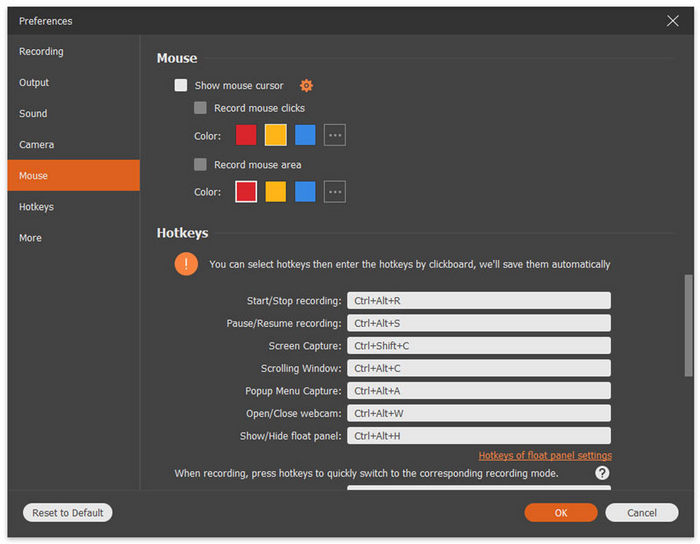
主要特點:
• 讓您錄製全螢幕、選定視窗或自訂區域
• 可錄製系統音訊和麥克風聲音。
• 錄製視訊通話、會議、遊戲實況與線上課程
• 允許在錄製時添加文字、線條、高亮和形狀。
• 支援多種輸出格式。
• 錄製的影片上沒有浮水印。
• 簡單直覺的介面。
如果您想要 Adobe Captivate 的替代品,FVC 螢幕錄影機確實是個不錯的選擇。它非常易於使用,非常適合所有類型的用戶,即使是初學者也能輕鬆上手。此外,它還提供了一些高級功能,用戶可以用來增強螢幕錄製效果。
第 5 部分。關於 Adobe Captivate Review 的常見問題解答
Adobe Captivate 主要用於什麼?
雖然 Adobe Captivate 包含螢幕錄製功能,但這只是冰山一角。該工具是一個著名的學習管理系統,主要用於創建互動式的專業電子學習內容,例如線上課程、軟體模擬、視訊教學和培訓模組。
Adobe Captivate 適合初學者嗎?
並非如此。 Adobe Captivate 已被許多用戶評測,並被描述為介面複雜、學習難度高。然而,它受到教學設計師和教育工作者等經驗豐富的用戶的稱讚,因為它擁有錄製講座、創建模擬等功能。
Adobe Captivate 可以錄製網路攝影機和音訊嗎?
是的。 Adobe Captivate 同時支援網路攝影機錄製和音訊錄製。它允許您在錄製螢幕的同時捕捉網路攝影機的畫面,非常適合創建畫中畫教學。您還可以在螢幕錄製期間或之後添加語音旁白,從而靈活地呈現內容。這使得 Adobe Captivate 成為創建引人入勝、多媒體豐富的學習材料和教學影片的絕佳工具。
Adobe Captivate 提供免費試用嗎?
是的。 Adobe Captivate 提供 30 天免費試用,使用者可以完全存取所有功能,在決定購買之前先了解其功能。
結論
為了回應這個數位時代不斷演變的需求,特別是對於可近用且具互動性的學習素材日益增長的渴望,Adobe Captivate 依然是製作互動式、專業線上學習內容的一款強大工具,非常適合教育工作者、培訓人員與教學設計師使用。然而,它複雜的介面與較高的價格,可能並不適合初學者或一般休閒用戶。因此,如果你正在尋找更加易用、且具成本效益的替代方案,最值得一試的螢幕錄製工具就是 FVC 螢幕錄影工具。
-
 Dxtory 評論:這個螢幕錄影工具值得嗎?
 您對 Dxtory 感興趣嗎?在這篇全面的評測中,我們將重點放在它的優缺點和整體功能,看看它是否真的值得一試。
-
 行動!屏幕錄像機評論–缺點,優點及其最佳替代方案
 Action Screen Recorder 是錄製遊戲視頻所需的軟件嗎?本文顯示了評論及其替代方案。
-
 適用於計算機、iOS 和 Android 的 3 款最佳 Facebook 通話記錄器
 當您想記錄 Facebook 通話以保存有價值的東西時,有很多 Facebook 通話記錄器可供選擇。在這裡,您可以了解 3 種為 PC、iOS 和 Android 錄製 Facebook 視頻通話的最佳工具。
