


 視頻轉換大師
 屏幕錄影大師
 影片修復
影片修復
 安全下載
安全下載適用於所有平台的最佳 ASF 流記錄器,用於錄製 ASF 視頻
Microsoft 操控 ASF(Advanced System Format,高級系統格式)的內容。此外,Mac 使用者也可以使用這種格式。同樣地,它相當於一種儲存庫,可在 Windows Media 中容納多個彼此獨立或相互依賴的影音內容。你可以使用 ASF 格式串流影片和音訊檔案。不過,有些使用者會覺得,要挑選一款符合自身需求標準的 ASF 串流錄影工具並不容易。隨著你往下閱讀更詳細的內容,會看到支援不同平台的多種工具。以下列出的都是支援 ASF 檔案格式的優質ASF 錄製工具。請仔細閱讀各項細節,讓我們一起了解這些軟體及其獨特功能。

第 1 部分。 適用於 Windows 和 Mac 的最佳 ASF 記錄器(有限且免費)
FVC免費屏幕錄像
一款完全免費、可用來錄製直播節目的工具是 FVC Free Screen Recorder。只要有網路想錄製串流、新聞或任何即時直播節目以供日後免費觀看,即使用便宜甚至零成本的工具也無妨。你也可以搭配網路攝影機、麥克風與其他硬體來錄製。此工具允許使用者將任何即時畫面錄製成 MP4 或 WMV 格式。另一個突出優點是無需下載安裝,只要打開瀏覽器、啟動它,就能讓工具為你工作。以下在更詳細的說明中,會介紹幾個錄製 ASF 直播串流的操作步驟。
步驟 1: 打開瀏覽器並造訪 FVC Free Screen Recorder 的官方網站。你可以點擊連結來啟動該應用程式。螢幕上會出現浮動工具列與紅色虛線框。

步驟 2: 點擊 REC 下方的 Settings(設定)圖示。你可以調整符合自己需求的熱鍵(Hotkeys)。點擊下方的 OK 以儲存變更。
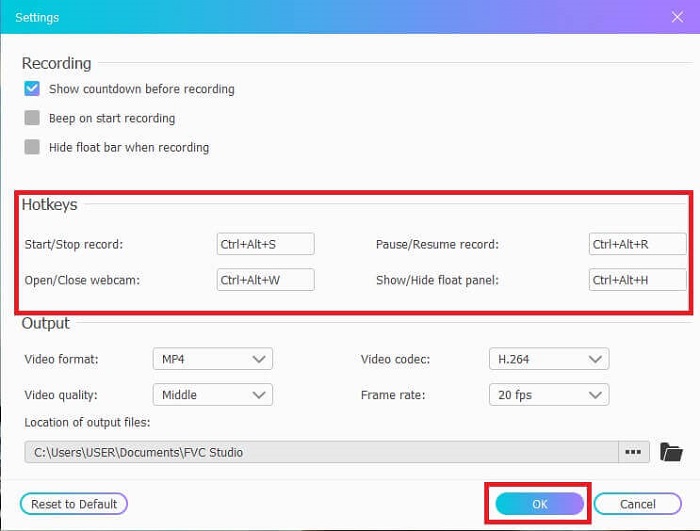
步驟 3: 調整畫面框架大小,如有需要可改變長寬比。開啟Speaker 以錄製系統聲音,開啟 Mic 以加入你的聲音,開啟 Webcam 以錄製你本人影像。最後點擊圓形的 REC 按鈕開始錄製 ASF 影片。
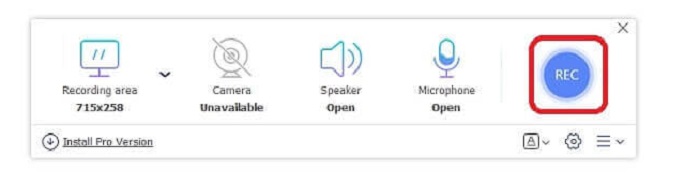
步驟 4: 等待3 秒後開始錄製。同時也會顯示你為此次錄製所設定的各項控制鍵與熱鍵列表。
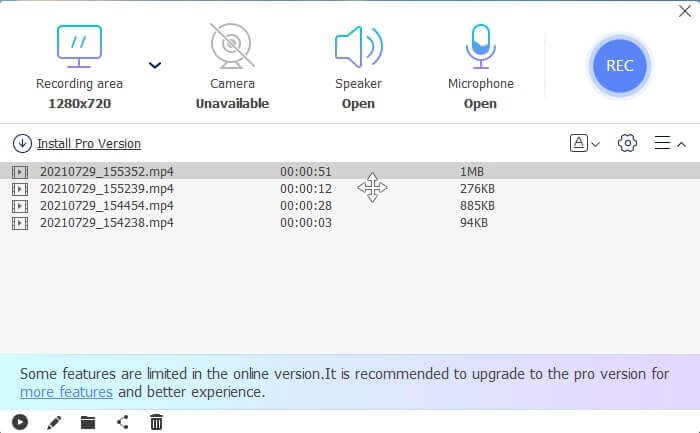
步驟 5: 點擊方形按鈕停止錄製。播放上方最新的影片檔案以檢視剛錄好的內容。播放影片後,你也可以點擊鉛筆(Pencil)圖示進行裁切、繪圖或套用慢動作效果。編輯完成後儲存,盡情欣賞你錄製的影片。
優點
- 在線免費屏幕錄像機。無需下載,只需啟動應用程序。
- 用戶友好的界面,允許用戶以如此簡單的方式操作工具本身。
- 由於其壓縮數據,存儲友好。完全無需擔心您的存儲空間。
缺點
- 如果您沒有互聯網,則屏幕記錄不是最佳選擇。因為這個工具依賴於互聯網。
第 2 部分。 其他流行的 ASF 錄製器來錄製 ASF 視頻(專家和無限)
1. FVC 屏幕錄像機
這款螢幕錄影工具之所以受歡迎,是因為它符合多數使用者的需求。許多使用者會選擇 FVC Screen Recorder,是因為它擁有相當友善的介面。這是一款需下載安裝、付費使用的工具,可完整捕捉你螢幕上的所有操作,不論線上或離線。同時支援使用者常用的各大平台。選擇這款工具作為 ASF 串流錄製器是最佳方案,因為它具備頂級螢幕錄製軟體才有的關鍵功能。此外,如果你在尋找兼具低預算與專業級影片輸出的螢幕錄影軟體,這款工具非常適合。請依照以下步驟了解該工具的詳細操作,你會發現使用它進行螢幕錄影實在是輕而易舉。
步驟 1: 依據你的作業系統(Windows 或 Mac)點擊Free Download(免費下載)按鈕並完成安裝。調整符合你需求的偏好設定(preference)。啟動工具後,會跳出一個浮動工具列。
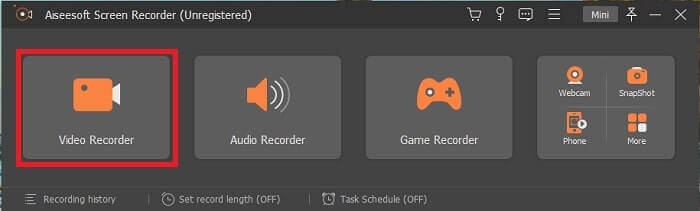
步驟 2: 點擊 Video Recorder(錄影)來錄製螢幕上的內容。
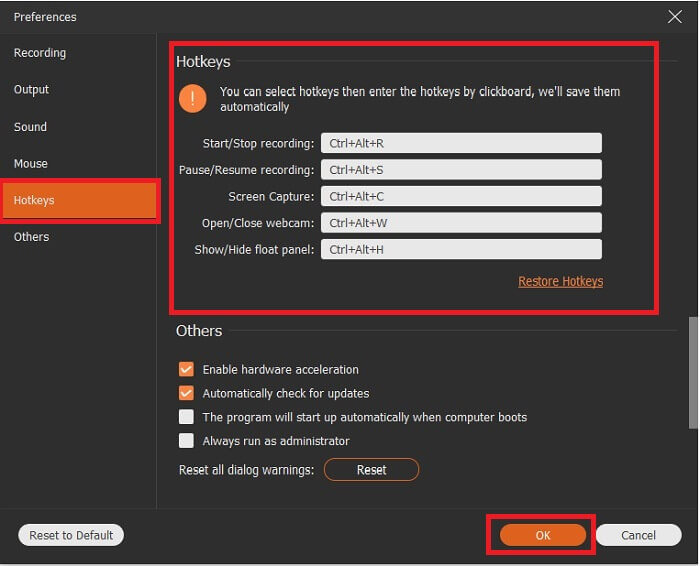
步驟 3: 接著點擊 Record setting(錄製設定)按鈕,隨後會出現設定視窗。在介面中點擊 Hotkeys(熱鍵),於錄製前先設定你偏好的熱鍵。別忘了點選 OK 儲存調整。
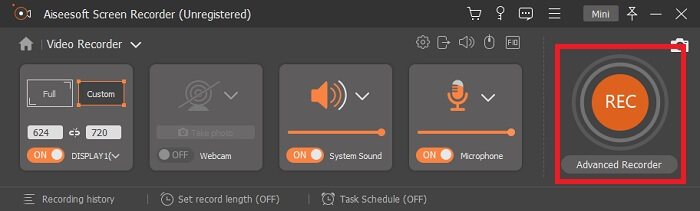
步驟 4: 在 Display(顯示)下點擊 Custom 來錄製螢幕上的特定區域。你也可以開啟 Speaker 來錄製系統聲音。請注意,其餘工具功能在搭配硬體時才能運作。若要錄製你的聲音,請開啟 Microphone(麥克風);若要錄下你在螢幕上的畫面,也可以開啟 Webcam(網路攝影機)。設定完成後,點擊碟片形狀的 Rec 按鈕開始錄影。經過3 秒倒數後影片便會開始錄製。
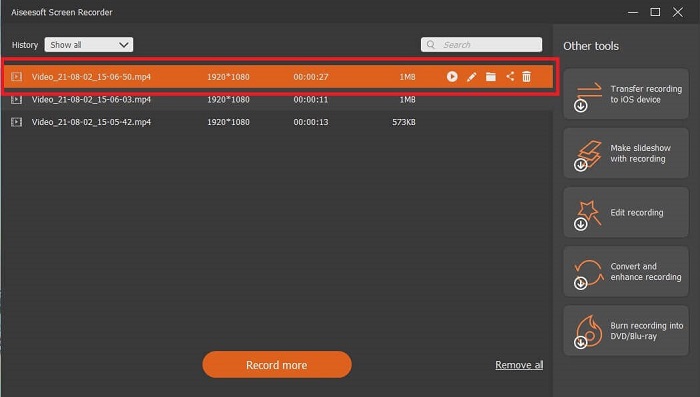
步驟 5: 錄製完成時,點擊紅色方形按鈕停止錄影,接著點選 Save(儲存)與 Next(下一步)繼續操作。點擊 Play(播放)按鈕即可觀看你剛錄製的直播內容。
優點
- 該工具的獨特之處在於它具有鎖定屏幕功能,因此不會打擾用戶。
- 經濟實惠且靈活。它可在所有不同平台上使用,因此如果您更改平台,則無需擔心。
- 視頻輸出本身比其他屏幕錄像機更出色。
缺點
- 它需要你花錢,但並不昂貴。
- 需要佔用 2.4mb 的存儲空間才能下載。
2.OBS工作室
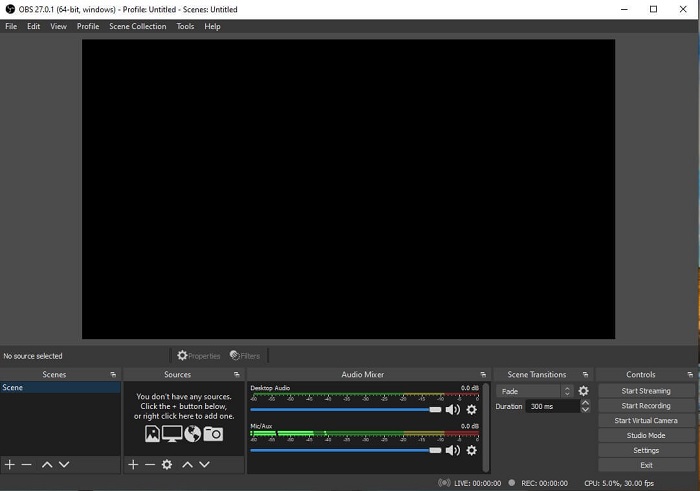
OBS Studio 是可下載的免費軟體,能讓你的錄影與直播表現達到最佳水準。你也可以透過自訂轉場,在無數個情境場景間自由切換。不過,對於一款功能與其他錄影工具大致相同的 ASF 錄影程式來說,它本身佔用的檔案空間偏大。此外,介面上顯示的內容過多,有些設計偏舊,視覺上略顯凌亂與惱人。由於細節與設定較複雜,並不是初學者的最佳選擇。
優點
- 可以免費下載。
- 具有 VST 支持的直觀混音器。
- 監控多達 8 個不同的場景,只需單擊兩次即可輕鬆轉換。
- 為幾乎每個動作設置熱鍵。
缺點
- 需要下載一個巨大的文件。
- 其界面上的細節太多。
3. Fraps
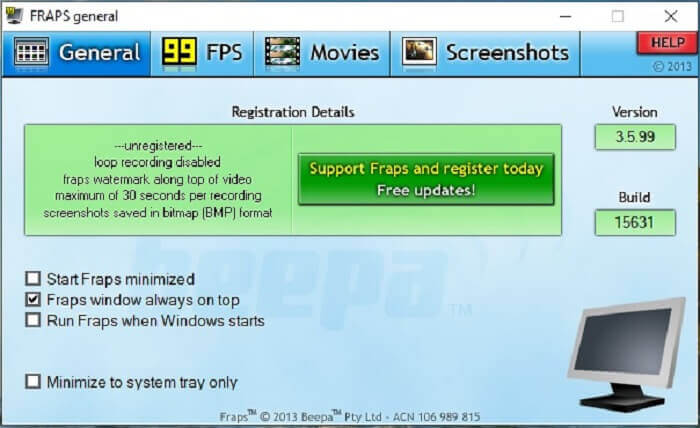
透過 Fraps,你可以分享自己最精彩的剪輯與其他影片。它能為使用者提供高品質的輸出。此外,正因為支援最高 120 fps 的畫面更新率,它也成為 ASF 串流錄製的重要選擇之一。不過,免費版本最多只允許錄製 30 秒。另外,Fraps 視窗永遠在最上層顯示,確保程式持續在運作。最後,只要設定成於 Windows 啟動時自動執行,開機後便會立即啟動此工具。
優點
- 由於 120 fps 的高質量視頻。
- 基準測試軟件會在屏幕一角為您提供有關 fps 的詳細信息。
- 從開始到完成視頻沒有任何問題。
缺點
- 免費版僅適用於帶水印的 30 秒錄音。屏幕截圖將僅以 BMP 格式提供。
- 由於其未壓縮的文件格式,視頻的海量存儲空間。不是小型存儲桌面的最佳選擇。
4.分享X
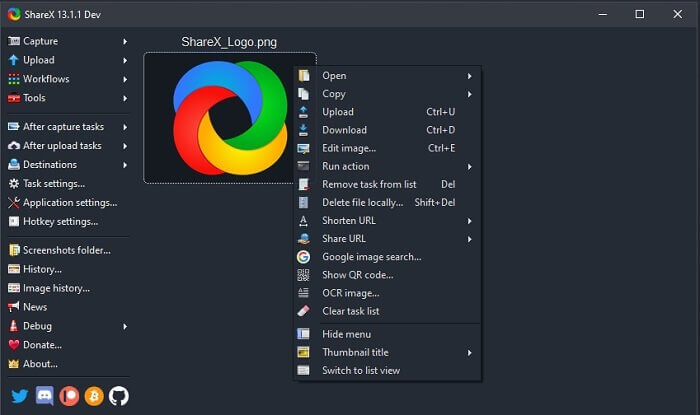
另一種錄影工具是 ShareX。它在螢幕截圖、註解與上傳方面的表現相當出色。只是這款工具本身不易上手,需要花費不少時間熟悉其操作。你可以選擇上傳圖片、文字及其他多種類型檔案至 80 多個支援的目的地。不過,整體來說並不算友善好用。原本想輕鬆錄製或直播影片,卻可能必須先花時間摸索功能才能真正派上用場。
優點
- 它是開源和免費的。
- 讓您自定義鍵盤快捷鍵以獲得更好的 ASF 流記錄器。
- 您也可以進行屏幕捕獲、註釋並輕鬆上傳。
缺點
- 這對新用戶來說太過分了,即使你是專業人士,這個工具也很值得一試。
- 惡意軟件問題。
第 3 部分。 比較圖表
如果您不喜歡閱讀文章,那麼此圖表將幫助您做出決定。
| 特徵 | FVC免費屏幕錄像 | FVC 屏幕錄像機 | OBS工作室 | 弗拉普斯 | 分享X |
| 視頻/音頻屏幕錄製 |  | | | | |
| 熱鍵可用性 | | | | | |
| 鎖定屏幕功能 |  | | | | |
| 錄製時編輯工具 | | | | | |
| 惡意軟件安全 | | | | | 它有一個可執行文件。在某些情況下,它可能會損壞您的計算機。但是下載是安全的。 |
| 可用的操作系統 | 在所有平台 | 在所有平台 | 在所有平台 | Windows XP、2003、Vista 和 Windows 7 | 視窗 |
| 文件大小 | 啟動器的幾KB沒有在線下載 | 2.1mb | 85.8mb | 2.4mb | 最新的 7.84 MB。 |
| 工具的複雜性 | 易於使用和非常直接的設置。 | 易於使用和非常直接的設置。 | 複雜但不難學。 | 簡單的點工具,但有很多事情要做。 | 易於操作,但不是很到位。 |
| 可用的輸出格式 | ASF 和 MP4 | WMV,MP4,MOV,F4V,TS,AVI,WMA,MP3,M4A,AAC,PNG,JPG / JPEG,BMP,GIF,TIFF | FLV 和 MKV | AVI格式 | MP4、WebM、MKV、AVI |
| 價格範圍 | 一個免費的開源在線 | 1個月:$25.00 一年:$31.20 終身許可證:$55.20 | 一個免費下載的工具 | 它是免費的,您也可以註冊 $37 | 永久計劃 $59.99 年度計劃 $39.99/年 月度計劃 $7.99/月 |
第 4 部分。 ASF Recorder 的常見問題
ASF 文件中有什麼?
這分為 ASF 文件的 3 個部分:標題、數據和簡單索引。
ASF 文件中存儲的其他擴展數據是什麼?
.WMA 等文件擴展名是一種音頻有損文件格式。它產生比 .mp3 音頻格式更高質量的聲音。另一種是 .WMV,通常用於在 Windows 中存儲大量視頻輸出。如果您使用的是 Windows 平板電腦、Lumia 或 Windows PC,它還可以為您提供高質量的視頻並為您的數據節省很小的磁盤空間,因此最好使用這種類型的格式。
VLC 支持這種格式嗎?
是的,VLC media player 支援這種格式,因為它具備編碼與解碼能力。其他支援 ASF 的媒體播放器包括適用於 Windows 的 GOM Player、Media PlayerLite 和 PotPlayer,以及 Mac 上的 QuickTime。
結論
最後,在上面的列表中選擇最適合您需求的 ASF 記錄器。雖然有些是免費的,有些會花錢。但它們將為您提供您希望在截屏錄像機上看到的最佳音頻-視頻輸出。
如果你還拿不定主意該選哪一款 ASF 螢幕錄影工具,那麼以下建議就是為你準備的:最符合錄影需求的工具,就是 FVC Screen Recorder。以下是你該選擇 FVC Screen Recorder 而不是列表中其他工具的幾個理由:它介面友善、功能豐富,而且價格實惠。無須猶豫,因為在眾多工具之中,FVC 的表現脫穎而出,是最佳選擇。
-
 首次亮相屏幕錄像機–終極評測和最佳替代品
 NCH首次亮相視頻捕獲和屏幕錄像機是捕獲任何發送到計算機屏幕(包括鼠標移動)的視頻的絕佳工具。
-
 4個最佳的免費網絡啟動記錄器,以捕獲屏幕視頻
 是否在尋找無需花一分錢就能在桌面上錄製屏幕上活動的最佳方法?這是4種最常用的免費網絡啟動記錄器。
-
 公正的Cinch評論錄音機和最佳選擇
 Cinch Audio Recorder是從流媒體網站下載音樂的最佳方法。只需從本文中了解更多有關無偏見評論和最佳替代方法的信息即可。
