


 視頻轉換大師
 屏幕錄影大師
 影片修復
影片修復錄音軟件的詳盡審查,以有效地錄製音頻
If you are an expert or amateur, you must have audio recording software to maneuver and polish the audio for a particular use. On top of that, choosing a suitable audio recorder on your device must be challenging because many choices are available in the market. Instead of testing out multiple audio recording programs, we will bring the four recorders we found suitable for your needs to avoid downloading or accessing malicious software. The list of audio recorders below sifts thoroughly to offer you only the best and not the poor performing audio recorder.

第 1 部分。 4 Windows 和 macOS 上的最佳錄音軟件
1. FVC 屏幕錄像機
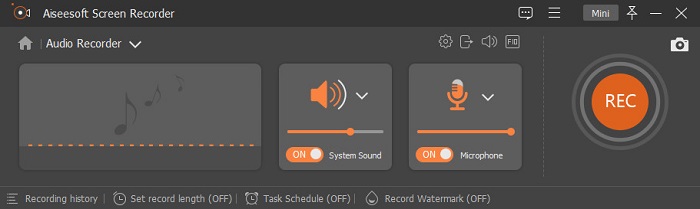
Do you need to record audio from the computer but don't know what to use? If that is the case, we present the best and by far the most picked recorder in the market, the FVC Screen Recorder. It has a brilliant user interface that allows users to interact with the software without doing complicated things. In addition to that, users tend to have a problem with the background noises, so with the help of its new additional noise cancellation, you can record without having trouble with the small background noises. Moreover, it has multiple features that will help you effectively record. Want to know what are these? In that case, let's have a walkthrough of the key features of the FVC Screen Recorder.

屏幕錄影大師
4,988,518+ 次下載- 它以超高的音頻質量記錄聲音。
- 只要您的計算機驅動器上有足夠的存儲空間,就可以 24/7 全天候錄製音頻。
- 您可以同時使用麥克風錄製系統聲音。
- 麥克風增強功能可提供更好的錄音體驗。
- 如果需要,您可以檢查麥克風音頻。
優點
- 該程序讓用戶體驗在 Mac 或 Windows 上錄製音頻的高度刺激。
- 基本的編輯功能可用,例如剪切或修剪音頻。
- 它具有內置的錄音歷史記錄,可以輕鬆找到錄製的音頻。
缺點
- 它不支持在錄製時對音頻添加效果。
- 使用前購買。
2. 大膽
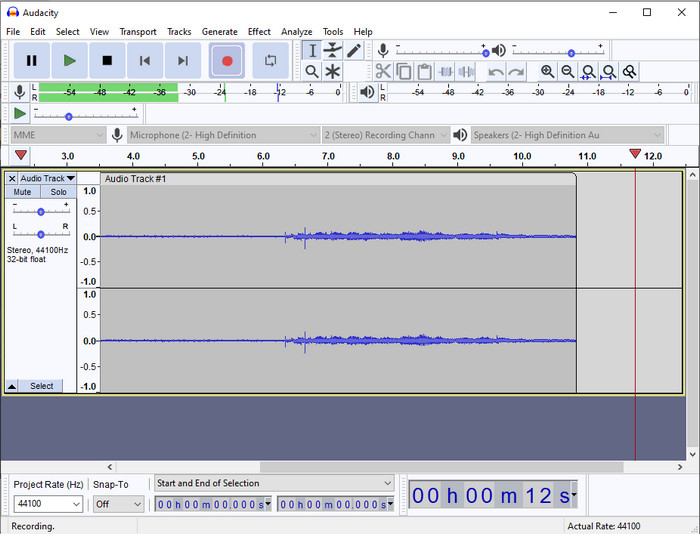
If you need a pro tool to handle your audio recording, then Audacity is a help. This pro-audio recorder has already helped millions of podcasters in their journey of recording audio. If you need to have an advanced recorder for free, this audio recorder is one of them. Although it has some pro recording, it is still hard to familiarize with the tool because of its poor GUI. Even though it responds to professional recording, some of its features still need to be upgraded, like noise cancellation. Nevertheless, Audacity records computer audio in a professional way that not all of the recorders can provide.
優點
- 在所有桌面平台上免費下載。
- 它為專業人士提供專業的編輯功能。
- 它具有創建播客所需的一些高級功能。
缺點
- 軟件的 GUI 已過時。
- 升級需要對其某些功能。
- 對於業餘愛好者和不知道如何錄音的人來說,這不是最佳選擇。
3. QuickTime 播放器
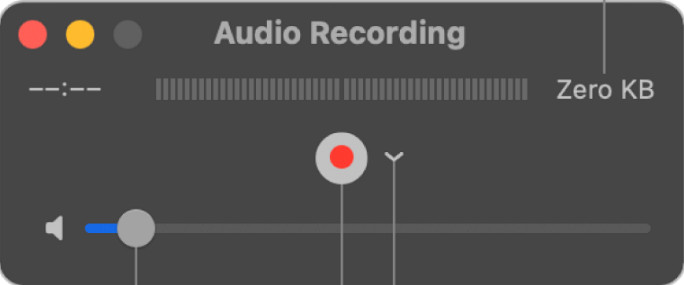
The QuickTime Player can also be used as an audio recorder on Mac if you need it. Although the player is not that sufficient and effective recording, you will experience delays and less quality for the audio output. However, if you need a quick audio recording on your Mac, this is a choice because you won't need to download and it is undoubtedly safe to use. But if you are a pro looking for the best audio recording software, this is not the perfect tool.
優點
- 它已經在每個 macOS 上可用。
- 免費、安全且易於使用。
缺點
- 它不如此列表中的其他錄音機有效。
- 音頻的最終輸出質量低。
- 不是專業錄音和編輯的最佳選擇。
相關閱讀:
How to Record Screen with Audio on Mac Using QuickTime
How to Convert QuickTime to MP4
4. 奧賽諾迪奧
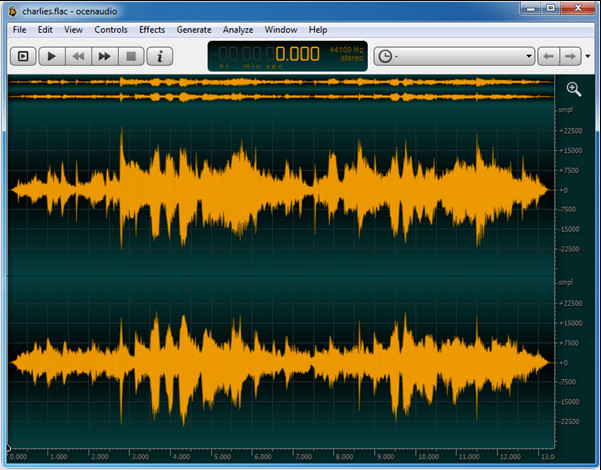
If you need a multiplex recorder to record audio on Windows 10 or higher, then Oceanaudio will help you. This tool has an almost similar interface with Audacity, but it is easier to understand the GUI of this tool. Further explanation, this recorder provides complexity and some features that you will need on audio recording. Although it is a bit hard to use and you will need to watch a tutorial on using it, it is still worth it at the end of the day. So, if you need an editor with a better interface than Audacity, this must be your pick.
優點
- 它使用先進的技術進行錄音。
- 進行錄音是專家的選擇。
- 您可以在錄音時聆聽您的聲音。
缺點
- 它不是用戶友好的。
- 初學者在使用此工具時可能會感到困惑。
Part 2. 錄音機軟件對比圖
| 特徵 | FVC 屏幕錄像機 | 大膽 | QuickTime播放器 | 歐森音頻 |
| 錄製系統聲音和麥克風 |  | | | |
| 編輯錄音 | | |  | |
| 硬件加速 | | | | |
| 實時預聽 | | | | |
| 保存原始質量 | | | | |
| 最佳用戶界面 | | | | |
第 3 部分。 關於錄音機軟件的常見問題解答
Cinch Audio Recorder 是最好的錄音機嗎?
Well, we have a recent review about the Cinch Audio Recorder. So, if you want to know more about the audio recorder, you must click this link and learn more detailed information about the recorder.
好的錄音機具備哪些品質?
在選擇好的錄音機之前,您需要了解基本標準。首先,它應該能夠輕鬆捕捉麥克風上的音頻。其次,它是安全且無惡意軟件的。第三,如果您需要購買該工具,該工具本身應該為用戶提供卓越的服務。第四,有效率意味著該工具必須在記錄中非常有效。第五,必須提供基本或高級功能來幫助用戶記錄。在選擇錄音機來幫助您之前,您可以依賴這些標準。
如何在 Windows 10 上錄製音頻?
Before recording on Windows 10, you must choose the best recorder like the FVC Video Recorder by downloading it on your desktop, promptly installing the tool, and launching it. Next, choose the option the Audio Recorder and click it. You can now easily add the system sound on your recording or the mic by turning them on on the floating toolbar. Once you are ready to record, click the round red button to start. If you need to end the recording, click the square button to stop; after that, a new interface will show you the list of audio recordings you've made.
結論
Today, we know the audio recording software available on your desktop. All of these tools presented here will help with your recording. However, if you are looking for a recorder that outperforms the other recorder, FVC Screen Recorder must be for you. Still, doubting the audio recorder? In that case, downloading it is the only way to test it out and know if it works, as we say in this article.
-
 產生高質量音頻的前 4 名免費 AIFF 錄音機
 本文討論 AIFF 以及一些可用於生成高質量 AIFF 格式的最流行工具。
-
 如何在 iPhone 上錄製音頻的 3 種最佳技術
 因無法在 iPhone 上正確進行錄音而遇到困難?然後閱讀本文以了解如何在 iPhone 上錄製音頻以及可用的工具有哪些。
-
 7 個可在所有平台上訪問的 Magnificent Voice Recorder
 您想學習如何進行錄音嗎?然後轉到這篇文章,因為我們談論可以滿足您需求的最佳錄音機。
