


 視頻轉換大師
 屏幕錄影大師
 影片修復
影片修復
 安全下載
安全下載最佳遊戲錄製軟件的綜合評測
隨著遊戲社區的快速發展,我們現在可以看到每個人都可以 24/7 無限制地玩遊戲。大部分遊戲玩家都是依靠PC來玩遊戲,從即時戰略、角色扮演、模擬、動作冒險、多人遊戲等開始。無論你是年輕人還是成年人,遊戲適合所有人,因此它變得流行起來。在玩遊戲的同時,您還可以通過直播與社區中的其他玩家分享您的體驗。也許,您一直在考慮嘗試在 Twitch 或 Facebook 上直播,這是一個不錯的選擇。但是您需要記住,當您在玩遊戲時進行流式傳輸時,它承載的帶寬很重,這可能會導致我們的連接出現一些延遲和中斷。
我們當中有誰想在網路延遲的情況下邊玩邊直播呢?我們都知道,遇到這種情況會讓人很有壓力。也正因如此,我們更樂於先把遊戲錄製下來,再上傳到另一個影片分享平台,例如 YouTube,之後即使網路不穩定,也能進行直播。如果你也有同樣的想法,那麼下面整理出的 5 款 Windows 和 Mac 上必備的專業遊戲錄影軟體,就是為你準備的。

第 1 部分。 為什麼需要遊戲記錄器
當我們在玩遊戲時,有時我們會考慮使用遊戲記錄器進行一些記錄。我們使用它是因為我們想要捕捉我們正在做的令人驚嘆的技巧、亮點、蒙太奇等。隨著對屏幕錄製工具的需求,您會注意到有些遊戲內置了錄製軟件,可以幫助您記錄遊戲過程中發生的事情,而有些則沒有。
儘管有些遊戲可以幫助您錄製,但它們的質量並不是那麼好。所以,如果你預覽你捕捉的視頻,你會注意到視頻的質量很差。幸運的是,您可以使用遊戲記錄器實時捕捉屏幕上發生的事情,而不會影響其質量。在選擇遊戲記錄器之前,您需要記住三件事,我們將其列為項目符號表以便輕鬆地單獨突出顯示它們。
◆ 確保視頻遊戲錄像機支持高質量的錄製,如果您想要高清分辨率,至少要支持 720 或 1080。
◆ 您使用的軟件必須能夠長時間錄製,因為根據您正在玩的遊戲,遊戲可能需要 30 分鐘甚至更長的時間。
◆ 想要流暢的錄製,錄像機必須支持高幀率。 FPS 越高,錄製越流暢。
既然我們知道了您在屏幕錄製遊戲時必須知道的三件事,我們必須繼續使用您可以用來進行錄製的軟件。我們仍然有不同的偏好,但我們只包括了其中的三個,這是遊戲玩家應該擁有的大多數。這些是遊戲玩家在我們進行此類任務時必須擁有的寶石。當我們分享我們在遊戲時測試屏幕錄像機的經驗時,請繼續保持下去。
第 2 部分。 遊戲玩家必須知道的 5 大專業遊戲記錄器
Aiseeesoft 屏幕錄像機
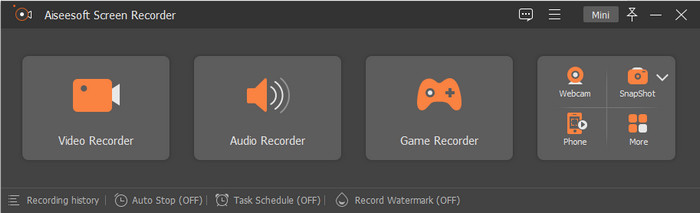
Aiseeesoft Screen Recorder 是一款強大且專業的遊戲螢幕錄製工具,玩家必備。使用這款工具,你可以最高以 60 FPS 錄製遊戲畫面,非常適合想要捕捉每一個遊戲動作的人。此外,若與其他錄影軟體相比,這款工具在功能與特色上更具優勢,是相當可靠的遊戲錄影程式。若你想同時錄製螢幕、網路攝影機與麥克風,也能以最高品質將其保存。
根據我們嘗試以 60 FPS 和最高質量製作 10 分鐘的遊戲記錄器時的經驗。我們注意到錄製時沒有錯誤或崩潰。此外,在開始之前,還有 3 秒倒計時。當我們導出錄音時,文件大小為 1.3 GB,比我們嘗試過的其他錄音機要小,但質量還是一樣的。除此之外,我們嘗試錄製長達一個小時;儘管如此,我們在使用它時沒有遇到任何問題,它給我們留下了深刻的印象。錄音機的優秀是不是很神奇?如果您想了解它的其他功能,您必須閱讀以下內容,如果您想擁有它,請在下面提供下載按鈕。

Aiseesoft屏幕錄像機
4,988,518++ 次下載- 借助其 Game Recorder 進行遊戲時不間斷錄製。
- 它支持以最高質量的視頻輸出錄製 60 FPS。
- 它可以像專業人士一樣使用網絡攝像頭和麥克風記錄您的屏幕。
- 如果需要,您可以將特定格式設置為音頻和視頻。
- 立即在您的 Windows 和 Mac 上下載它。
班迪康
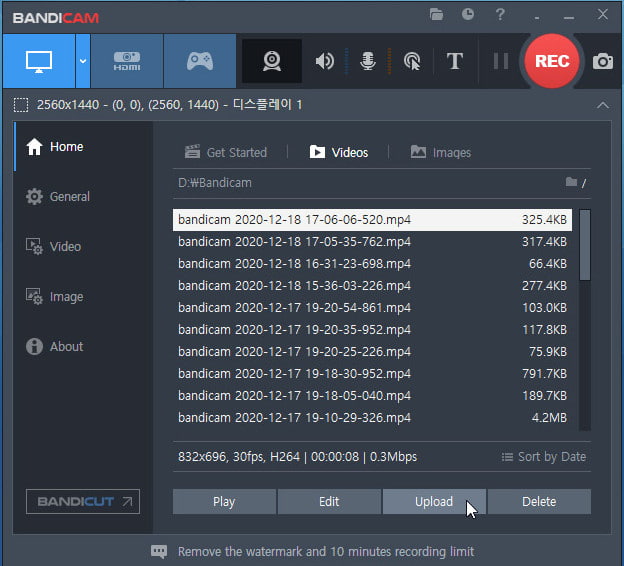
我們大多已經在用 Bandicam,因為它是 Windows 上最佳遊戲錄影軟體之一。透過這款錄影工具,你可以在遊玩時進行完整的螢幕錄影體驗。而且,它最高支援 480 FPS,確保能將你遊戲中的每一個動作逐一捕捉。不過它的能力與功能毋庸置疑,但在免費版中卻無法享受 480 FPS 的錄製體驗。
在使用此屏幕錄像機時,即使我們沒有開始錄製,我們也經常會遇到崩潰。錄製開始時令人不快,因為它讓我們在錄製和遊戲時感到困擾。此外,沒有任何跡象表明錄製將像計時器一樣開始。即使我們將它的 FPS 設置為 30,但在使用刻錄機時遇到這個問題仍然很麻煩。因此,使用此工具您不能錄製超過 10 分鐘,並且會有水印,主要是如果您使用免費版本。但好的一面是,10分鐘遊戲錄製的文件大小只有1.10GB;它是本文中最小的文件大小。
行動!
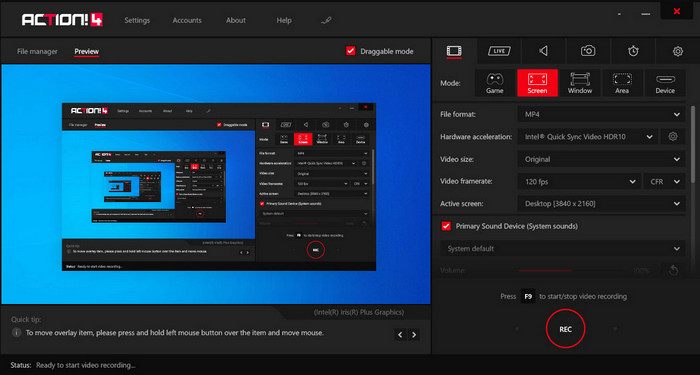
Action! 是另一款可靠的 Windows 10 遊戲錄影軟體,你可以下載並在桌面上使用它來錄製遊戲。這款工具最高可以錄到 120 FPS,比市面上許多螢幕錄製工具都更出色。與本清單中的其他錄影軟體不同的是,下載後你會看到它的介面相當專業,且螢幕上提供了多種可調整的選項。儘管整體看起來偏向專業級,但在匯出遊戲錄影時,你只能在 MP4 或 AVI 這兩種格式之間做選擇。
在我們測試軟件時,我們發現很難使用該工具,因為它不會立即開始錄製,即使在您啟動遊戲時也是如此。因此,如果要錄製,則需要打開視頻遊戲,然後按 F9 開始錄製。當 10 分鐘標記到達錄音時,我們將其停止。設置 60 FPS 後,錄屏文件大小為 2.19 GB,是本文最大文件大小的第二位。此外,導出的屏幕錄像帶有水印。但總體體驗,該工具非常適合屏幕錄製,並且我們嘗試使用它時沒有崩潰或錯誤。
洛伊洛
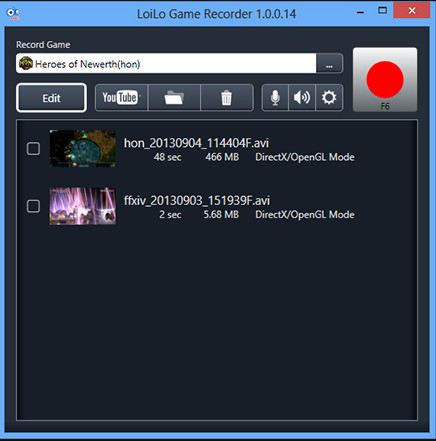
Loilo 是 Windows 上其中一款最佳免費遊戲錄影軟體。這款工具介面簡單,卻能以高解析度與 30 FPS 進行螢幕錄影,雖然幀率比前面三款遊戲錄影程式略低。實際使用時你會發現,它的介面設計並不花俏,但仍能提供不錯的遊戲螢幕錄影效果,適合想免費使用的使用者。除了螢幕錄製能力外,這款工具也提供了一些編輯功能可供使用,雖然都屬於基礎層級,但仍足以幫助你完成簡單剪輯。
當我們嘗試使用屏幕錄像機時,在系統上運行時並沒有發生太多事情。但在錄製之前,您需要設置錄製的目標。在我們以 30 FPS 完成 10 分鐘的錄製後,我們看到保存錄製的文件大小為 4.6 GB。這是屏幕錄像機在本文中的最大文件大小。儘管 FPS 是倒數第二低,但我們仍然認為屏幕錄像機對存儲不友好。所以,如果你想用這個軟件錄製一個小時,那麼文件甚至會變得巨大。
FVC 屏幕錄像機在線
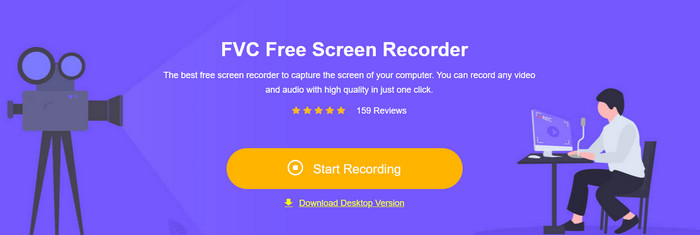
FVC 線上螢幕錄影 是一款最佳的線上遊戲錄影工具,你可以直接在網頁上使用,無需下載其他檔案就能啟動。與前面提到的錄影軟體不同,這個工具可以錄製螢幕上發生的任何內容,例如遊戲畫面。即使這款線上錄影工具能幫你錄製遊戲,它所支援的 24 FPS 幀率並不算高,如果你希望逐格捕捉畫面中的每個動作,可能會稍嫌不足。
當我們使用此網絡記錄器時,我們注意到它有時可能會出現故障,因為它取決於您的互聯網連接。雖然它不是高畫質遊戲的最佳屏幕錄像機,但它仍然可用;您可以免費訪問它。我們錄製了 10 分鐘的遊戲並導出後,錄製的文件大小只有 1.2 GB,比其他文件小第二。因此,如果您想以更小的尺寸免費錄製,那麼這就是您可能想要使用的網絡工具。
第 3 部分。關於最佳遊戲記錄器的常見問題解答
錄製 Minecraft 的最佳屏幕錄像機是什麼?
市面上其實還有很多螢幕錄影工具,除了本文中介紹的幾款之外也不例外。不過,透過我們在這篇文章中提供的教學和工具,你現在已經可以立刻開始錄製 Minecraft 了;點擊這個連結了解更多資訊。
Camtasia 和 Snagit 哪個屏幕錄像機更好?
如果你點擊此連結,就能更深入了解 Camtasia 與 Snagit 的比較。請完整閱讀這篇文章,以充分掌握這兩款螢幕錄影軟體的所有重要資訊。
為什麼我的屏幕錄像機無法捕捉流暢的視頻遊戲?
要使用高圖形遊戲玩遊戲,您需要將每秒幀數擴展到 60 或更高,以使錄製更流暢。錄製的 FPS 越高,視頻越流暢,但其文件大小會更加顯著。
結論
現在我們已經認識了五款最佳遊戲錄影軟體,是時候做選擇了。玩家們,這正是你透過錄製精彩片段並上傳,展現自身實力的好機會。如果你的網路連線穩定,也可以選擇直播,但並不是每個人都有強而有力的網路環境。不過,只要透過錄影軟體進行遊戲錄製,你仍然可以分享自己的內容。若想隨手擁有最好的遊戲螢幕錄影工具,就必須下載 Aiseeesoft Screen Recorder,因為它是最值得你信賴的遊戲錄影軟體。還是不太確定這是不是適合你的工具嗎?那就點擊下載按鈕親自試用看看,你一定會發現它完全能滿足你的遊戲錄影需求。
-
 如何在 Minecraft 上錄製史詩級特技、技巧或教學 [2025]
 你想知道如何在 Minecraft 上錄製你的特技嗎?然後閱讀我們提供的這篇文章。
-
 如何在 iPhone 上錄製音頻的 3 種最佳技術
 由於無法在 iPhone 上正常錄音而遇到困難?然後閱讀本文以了解如何在 iPhone 上錄製音頻以及可用的工具有哪些。
-
 7 個可在所有平台上訪問的 Magnificent Voice Recorder
 您想學習如何進行錄音嗎?然後轉到這篇文章,因為我們談論可以滿足您需求的最佳錄音機。
