


 視頻轉換大師
 屏幕錄影大師
 影片修復
影片修復
 安全下載
安全下載可在所有已知平台上訪問的最佳 MPEG 數字視頻錄像機
MPEG 是一種被各種多媒體平台使用的檔案格式。MPEG-2 格式通常用於檔案較大的 DVD。而 MPEG-4 則多用於線上用途。因此,多數編解碼器都支援這種格式,因為它提供了最新的設定。不過,兩者都能維持高品質的影片及極為精準的音訊,並可傳輸到各種裝置。有些使用者會用這類格式來錄製、壓縮與傳輸檔案,使操作更為便利。如果你也是在為選擇哪一款支援此格式的螢幕錄影程式而感到困擾的使用者之一,那你一定要繼續往下看,好好了解有哪些可用的「MPEG 錄影程式」工具可以幫你完成工作。

第 1 部分。 適用於 Windows 和 Mac 的最佳 MPEG 錄製器
以下是可用於捕獲 MPEG 視頻並提供 MPEG 輸出文件格式的可用工具。
FVC免費屏幕錄像
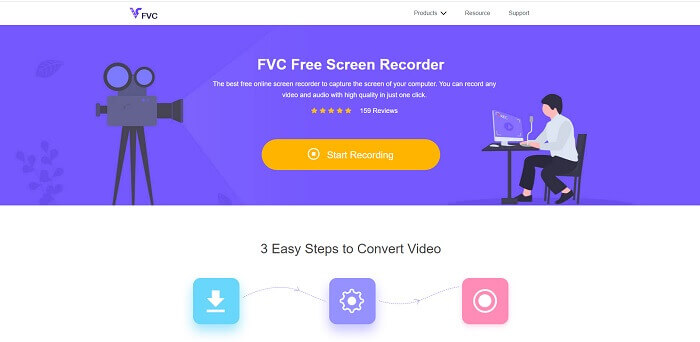
此工具能產出 MPEG-4 數位錄影檔。FVC Free Screen Recorder 是一款免費且開源的工具,允許使用者錄製視訊通話、語音通話、串流、商務會議、討論等等。世界各地有許多使用者將它作為個人線上錄影工具的首選。它也能輸出 MPEG-4 與 WMV 等影片格式,並具備清晰的畫面與音訊效果。與網路上其他免費線上工具不同的是,只要網路連線不中斷,它就能持續不停錄影。與其佔用你的本機儲存空間來錄製,不如使用這個工具。若要學會怎麼使用本工具,請仔細依照以下步驟操作並深入理解。
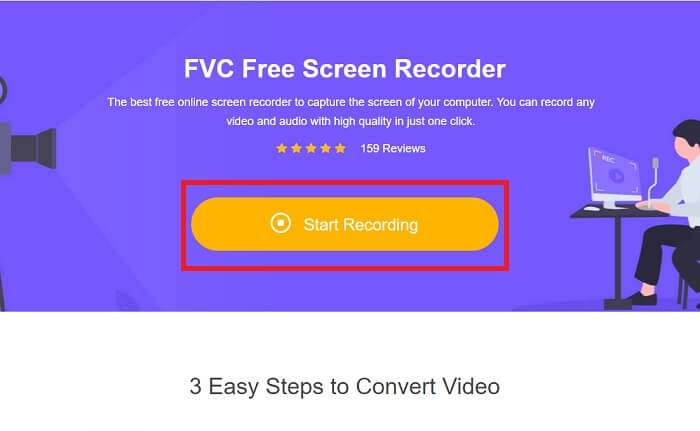
步驟 1:點擊連結前往官方網站,然後按下「Start Recording」以啟動工具。
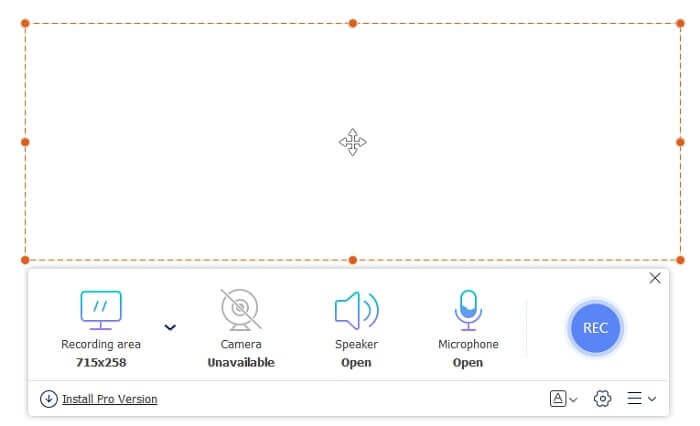
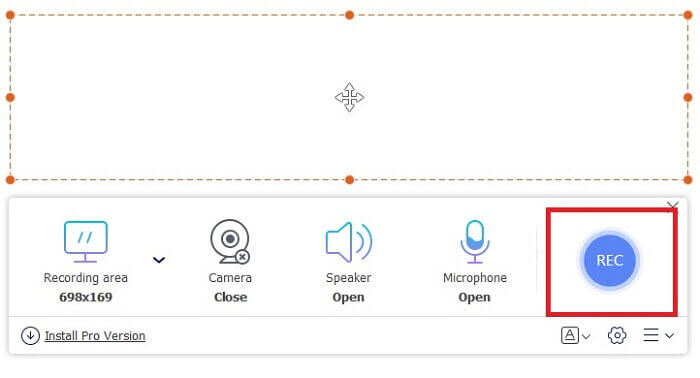
步驟 2:啟動工具後,螢幕上會出現一個類似這樣的小工具列。
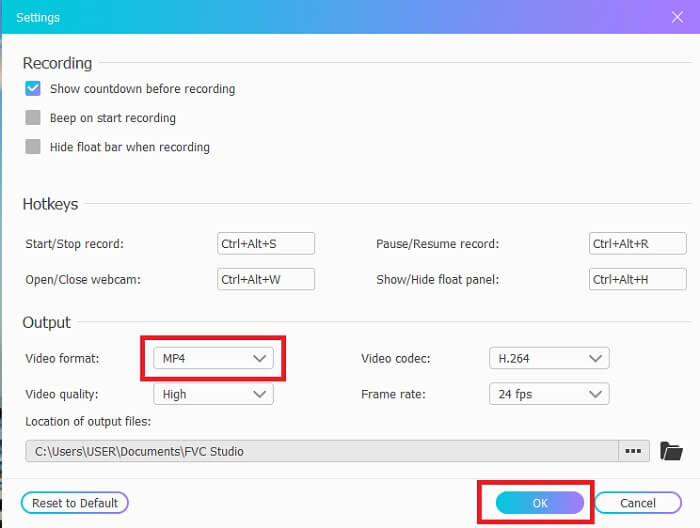
步驟 3:按下「Widget」圖示進行設定。當設定介面開啟後,找到輸出面板並點選「Video Format」以變更格式,然後按「OK」儲存。
步驟 4:調整畫面比例,或在需要時選擇「Full screen」全螢幕。其他選項包括「Webcam」可在錄影時顯示你的臉;「Speaker」用來錄製系統音效;「Microphone」用來加入你的聲音。全部設定完成後,按下「REC」按鈕開始錄影。
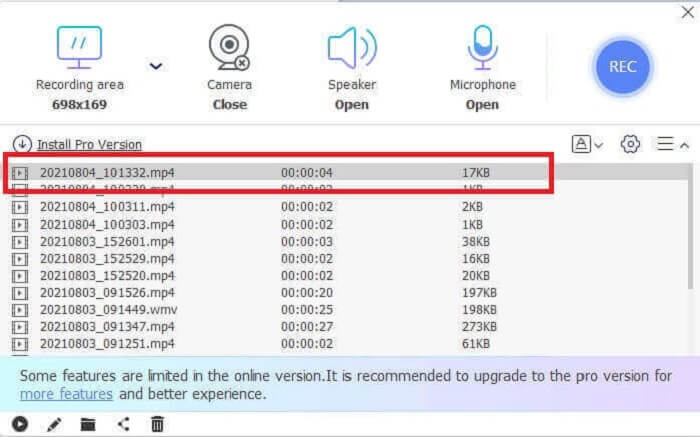
步驟 5:當你按下「Square」方形按鈕停止錄影後,點擊平行按鈕查看影片輸出結果。
優點
- 免費、易於使用且易於訪問的最佳在線工具。
- 無需下載。
- 您正在尋找的最佳功能是此處的在線錄音工具。
缺點
- 它需要互聯網連接才能運行。
- 並非您在高級版本中尋找的所有功能都在這裡。只是最基本的東西。
第 2 部分。適用於 Windows 和 Mac 的其他有用的 MPEG 記錄器
FVC 屏幕錄像機
在線工具的高級版本可助您一臂之力。如果您喜歡使用上面的免費在線工具,那麼如果您使用這個工具,這就是您的快樂高峰。它提供了比免費版本更多的功能。只需使用此工具,就無需使用神經元 MPEG 4 記錄器進行輸出。不是使用 FVC 屏幕錄像機,而是一種付費使用的工具,它在其他工具中非常靈活和獨特。
這個工具和其他溢價之間的區別有很多值得一提的地方。擁有這個多合一工具可以讓您比其他屏幕錄像機用戶更具優勢。更不用說,其他屏幕錄像機沒有的獨特功能是鎖定屏幕功能,不會打擾用戶,如果您截屏,則不會捕獲浮動工具欄。在進一步討論之前,讓我們探索一下這個出色的工具。下面提供了一些步驟。
步驟 1:選擇你的作業系統,並點擊下方的下載按鈕進行下載。接著安裝程式,並依照你的需求調整偏好設定(Preferences)。
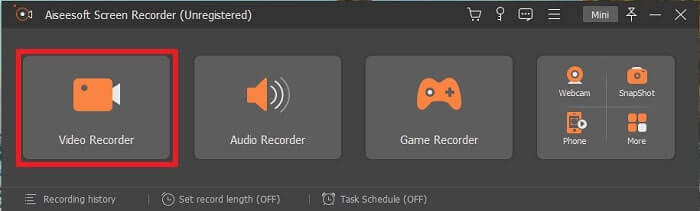
步驟 2:點擊「Video Recorder」圖示開始錄製,新的工具列設定介面會隨即顯示。
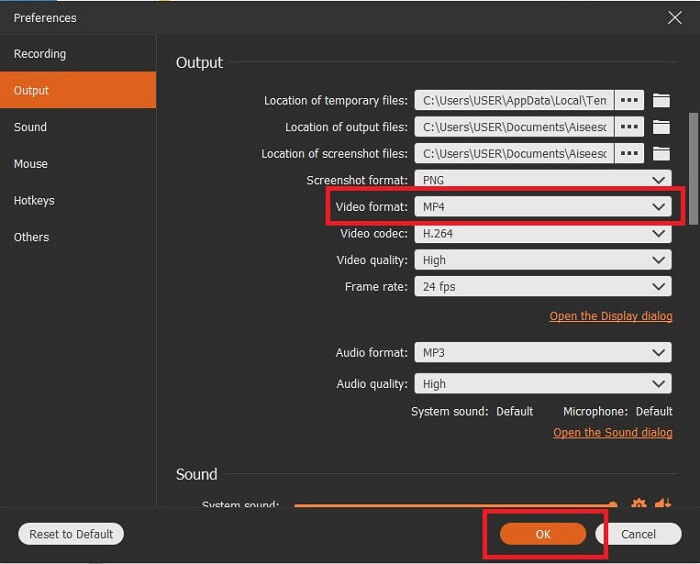
步驟 3:進入設定頁面,將影片輸出格式改為 MPEG,然後按「OK」儲存。
步驟 4:將螢幕比例設定為「Fixed region」或「Full screen」。你也可以加入「Webcam」在錄製時顯示你的臉,或按下「Speaker」按鈕加入系統音效並調整音量。同時,你也能開啟「Mic」加入你的聲音,並啟用噪音抑制功能,以獲得更清晰的語音輸出。準備好之後,點擊「Round」圓形按鈕開始錄影。
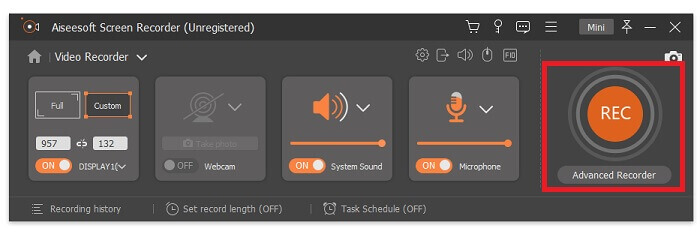
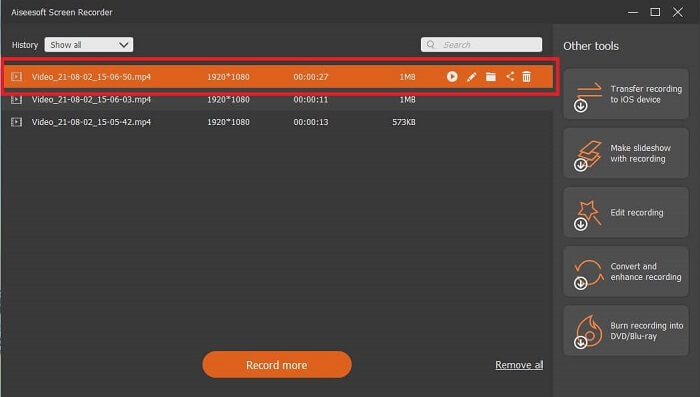
步驟 5:錄影完成後,點擊小小的「Square button」方形按鈕停止錄製。全部錄影結束後,點擊「Save」儲存並按「Next」,再按平行按鈕查看歷史紀錄並享受你的錄影成果。
優點
- 無論是在線還是離線都可以訪問。並產生無水印的高質量視頻和音頻輸出。
- 沒有什麼可尋找的,因為它是一個包羅萬象的工具。具有獨特的鎖屏功能。
- 支持幾乎所有已知的不同格式和平台。
缺點
- 要激活該工具,您需要付費,但您的每一分錢都值得。
- 該工具需要下載。因此,它將佔用 2.4MB 的存儲空間。
班迪康
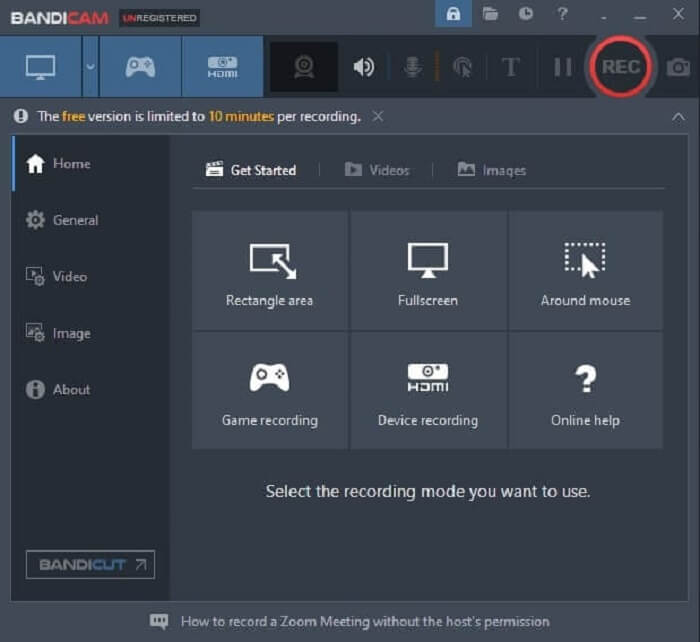
一百萬用戶使用的已知屏幕錄像機是 Bandicam。它作為您可以下載的網絡上最好的屏幕錄像機之一而享有盛譽。這個工具的 fps 是驚人的;它可以達到 480。然而你的電腦應該包含比普通錄音機應該有的更高的規格。即使普通的屏幕錄像機不能產生每秒 480 幀的視頻和音頻,也可以產生高質量的視頻和音頻。
優點
- 它以知名的屏幕錄像機的身份建立了自己的帝國。
- 它具有來自 Intel、NVIDIA 和 AMD 的 H. 264 視頻編碼器,用於硬件加速。
- 它有一個on-point接口。
缺點
- 如果您的計算機規格較低,則無法使用 480 fps。
- 它不支持 Windows 操作系統以外的其他平台。
OBS工作室
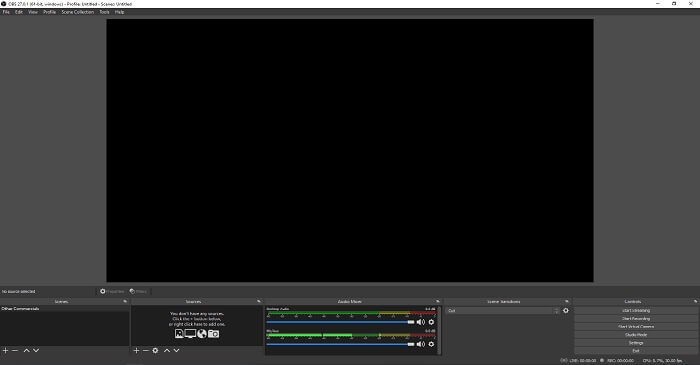
一種工具,允許用戶在其輸出中添加更多功能並管理在界面中立即執行其他任務。 OBS Studio 受到整個網絡中眾所周知的不同平台的支持。它是一個可免費下載的離線工具,可以記錄用戶可能想要的任何請求。此外,它以其複雜性和屏幕錄像機的最大文件大小之一而聞名。與其他相同,它可以產生高達 MPEG4 文件格式的 MPEG 2 記錄。
優點
- 在談論最好的屏幕錄像機時,它最終沒有出現。
- 您可以學習其他屏幕錄像機無法提供的不同功能。
- 您可以顯示多個監視器。
缺點
- 由於其複雜性,不是新手錄製的首選。
- 並非適用於所有平台,如 Windows XP。
第 3 部分。 比較圖表
| 特點 | FVC免費屏幕錄像 | FVC 屏幕錄像機 | 班迪康 | OBC工作室 |
| 視頻/音頻屏幕錄製 |  | | | |
| 註釋 | | | |  |
| 鎖定屏幕 | | | | |
| 可用錄製視頻的長度 | 無限制 | 無限制 | 10 分鐘免費/高級無限制 | 無限制 |
| 可用的操作系統 | 所有操作系統 | 所有操作系統 | 僅限 Windows | 僅適用於 Windows、Mac 和 Linux |
| 價格範圍 | 網上免費 | 1個月:$25.00 一年:$31.20 終身許可證:$55.20 | 它有免費版和高級版。 對於 1 台電腦:$39.95 2 台電腦:$59.96 帶 Bandicut 的 Bandicam:$60.95 | 免費下載 |
第 4 部分。 有關 MPEG Recorder 的常見問題解答
有多少 MPEG 可用?他們的目的是什麼?
以下是其他 6 種 MPEG。 MPEG-1 設計用於數字存儲音頻/視頻媒體、MPEG-2 數字電視和 DVD 視頻、MPEG-4 網絡多媒體標準、MPEG-7 多媒體內容搜索和描述、增強和混合現實的 MPEG-MAR 參考模型,最後是用於流媒體解決方案多媒體數據的 MPEG-DASH。
你能把 MPEG 轉換成 MP4 嗎?
是的,你可以使用轉檔工具(例如 FVC Free Online Video Converter)來轉換它們。點擊這裡了解更多詳細的操作說明。
屏幕錄像機最常見的視頻輸出是什麼?
標準的影片格式是 MP4,因為它幾乎與所有使用者所使用的平台相容。若想知道如何播放 MP4 影片,可參考《Best MP4 Player》來了解相關說明。
結論
正如我們得出的結論,MPEG 4 記錄器是可以在所有媒體平台上播放的最佳格式之一。每個工具都有自己的獨特之處,可以提供給您。儘管所有工具都可以錄製,但並非所有平台都可以使用。因此,請選擇最適合您的工具,因為您是該工具的用戶。
與任何其他工具不同,FVC 屏幕錄像機非常靈活。它可以在不同的平台上使用,而且對於它可以生產的高端輸出來說也很便宜。為了幫助您決定選擇什麼,您必須首先查看它是否對用戶友好,是否適用於所有操作系統,如果需要付費,是否值得使用?記住您是客戶,無需調整您應該使用的工具。該工具必須靈活,以便您進行管理和現場控制。做出正確的決定,例如選擇 FVC 屏幕錄像機作為您的錄像機。
-
 首次亮相屏幕錄像機–終極評測和最佳替代品
 NCH首次亮相視頻捕獲和屏幕錄像機是捕獲任何發送到計算機屏幕(包括鼠標移動)的視頻的絕佳工具。
-
 4個最佳的免費網絡啟動記錄器,以捕獲屏幕視頻
 是否在尋找無需花一分錢就能在桌面上錄製屏幕上活動的最佳方法?這是4種最常用的免費網絡啟動記錄器。
-
 公正的Cinch評論錄音機和最佳選擇
 Cinch Audio Recorder是從流媒體網站下載音樂的最佳方法。只需從本文中了解更多有關無偏見評論和最佳替代方法的信息即可。
