


 視頻轉換大師
 屏幕錄影大師
 影片修復
影片修復
 安全下載
安全下載Monosnap 軟體:產品資訊與替代品評測
擷取螢幕畫面是一種透過快速截圖來保存螢幕內容,或將整個畫面完整捕捉下來的方式。在 Windows、Mac 等桌面裝置上,有各式各樣的螢幕截圖方法,因此使用哪一種方式,主要取決於使用者的個人偏好。若使用者覺得內建方法有點麻煩,或根本無法正常運作,最好的解決方案就是改用第三方的桌面螢幕擷取工具,例如 Monosnap。本文將介紹桌面裝置上的 Monosnap 螢幕截圖工具,說明其產品資訊、效能表現,以及如何利用此工具進行螢幕擷取任務的詳細步驟。此外,我們也整理了一些其他可供選擇的螢幕截圖工具,方便你體驗更順暢、即時的螢幕擷取。

第 1 部分。什麼是 Monosnap
Monosnap 是一款適用於 Mac 和 Windows 等桌面裝置的免費截圖工具。它允許用戶定期截取桌面螢幕截圖。它被認為是網路上最好的免費截圖工具之一,提供截圖檔案的即時重命名功能,同時具有一定的自訂功能,允許用戶在截圖中進行快速編輯。此外,Monosnap 不僅僅是一個截圖工具;而且還可以輕鬆用作視訊螢幕錄影工具。
Monosnap是一款雲端儲存系統的軟體工具,採用LGPlv2.1下的FFmpeg程式碼,程式碼是開源的。這使得軟體更加通用、用戶友好,並能產生高品質的輸出。以下是 Monosnap 為 Windows 和 Mac 裝置提供的一些功能。
1.它可以捕獲整個螢幕、螢幕的特定區域以及選定的視窗標籤。
2. 它使用並允許用戶訪問其基於雲端的儲存來儲存螢幕截圖,使其成為您設備的節省空間的工具。
3.它還可以用作視訊螢幕錄製工具,具有將其轉換為 GIF 檔案的額外功能。
4. 按一下功能可快速將螢幕截圖儲存到裝置儲存或雲端。
5. 它提供螢幕截圖的調整大小、旋轉、模糊和裁剪功能。
第 2 部分。 Monosnap 評測
使用 Monosnap 的步驟
步驟 1:先從 Monosnap 官方網站下載軟體,完成下載與安裝後,在你的裝置(Mac 或 Windows)上開啟該軟體。
步驟 2:開啟 Monosnap 工具後,你會在螢幕右下角看到工具的彈出式圖示。
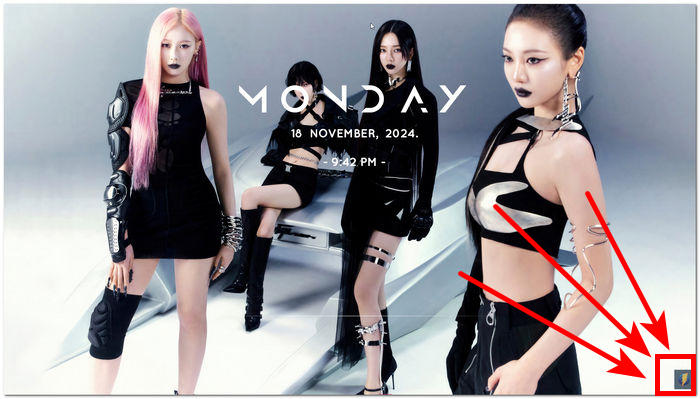
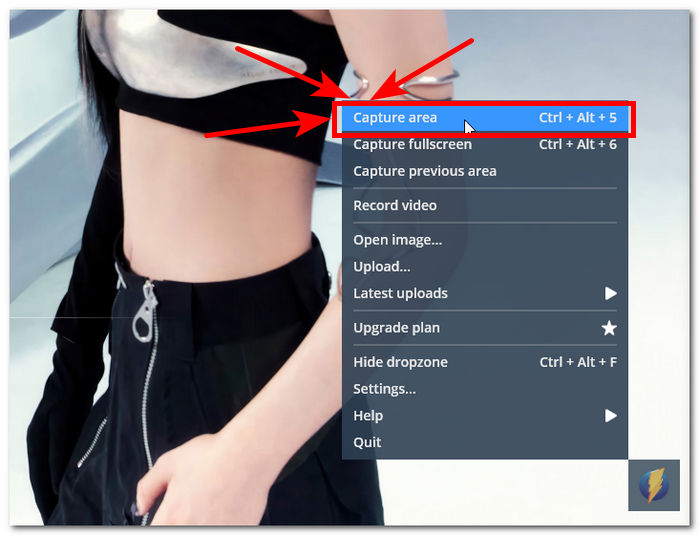
步驟 3:只要點擊該圖示即可進入畫面擷取的設定。接著,若要快速擷取目前螢幕畫面,可點選 Capture area,或在鍵盤上按下 Ctrl + Alt + 5 的組合鍵。
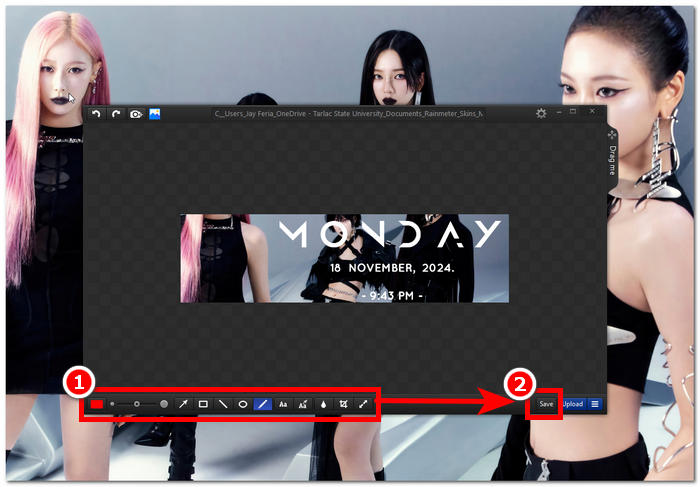
步驟 4:螢幕上會彈出一個視窗,顯示你剛才截取的畫面或選取區域。接著,你可以在其中自訂你的截圖,例如加入文字、標註重點、裁切,以及加入圖形與箭頭來強調內容。完成編輯後,按一下 Save 按鈕,即可將截圖儲存到雲端或是本機裝置中。
表現
在我們實際使用 Monosnap 截取網頁和整個 Windows 螢幕的截圖體驗中,該工具的效能出奇的簡單,但功能卻非常豐富,是一款出色的截圖工具。因此,為了進一步討論其作為截圖工具的性能,我們在下面列出了它們。
• 一鍵即時截圖,無需載入螢幕或開啟軟體延遲。
• 它有一個有組織的系統,將編輯功能與儲存按鈕分開,以便於使用該工具。
• 螢幕截圖位置儲存系統非常豐富,使用者可以選擇並決定使用哪個資料夾或儲存平台。
兼容性
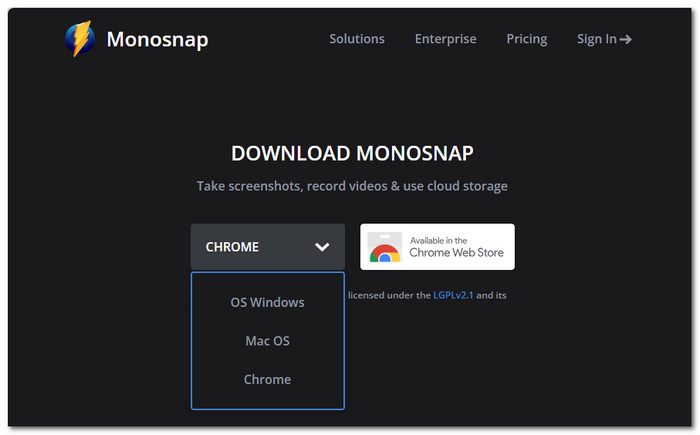
Monosnap 的兼容性也值得注意。該工具相容於所有桌面設備,並可用作網頁瀏覽器擴充功能。這是跨裝置和平台的廣泛用戶必須使用的軟體工具的一個重要方面。 Monosnap 截圖工具的可用性使其更受所有用戶的喜愛,因為它支援從以下裝置/平台下載。
軟體版本
Windows 和 Mac
網頁瀏覽器擴充功能
Chrome 線上應用程式商店和 Edge 附加元件
儲存
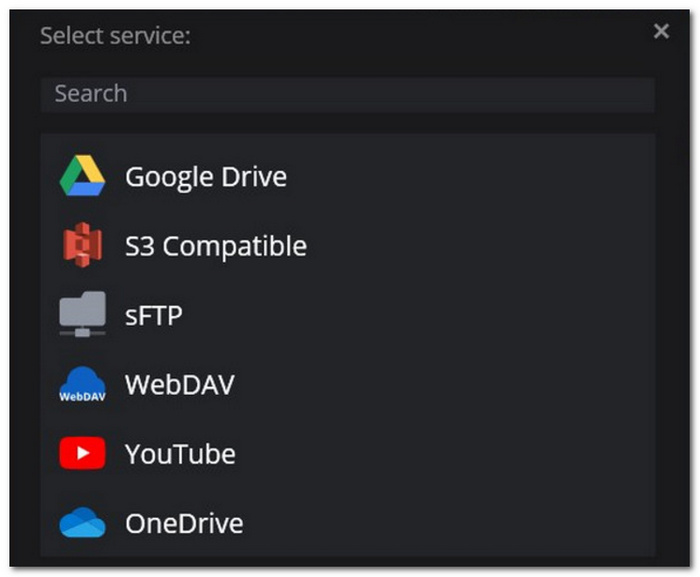
Monosnap 軟體截圖工具的另一個令人印象深刻的方面是它慷慨地為用戶保存 Monosnap 拍攝的截圖。同時,許多截圖軟體工具並不注重給用戶提供雲端儲存和設備儲存的選擇。另一方面,Monosnap 努力提供額外的功能,例如允許用戶將他們的截圖保存在裝置儲存和雲端儲存系統(如 Drive、OneDrive 等)上。
編輯中
對於編輯功能,Monosnap 具有許多有用的編輯功能,可幫助使用者輕鬆自訂螢幕截圖,而無需使用其他工具。以下是 Monosnap 提供的每個編輯功能的詳細討論。
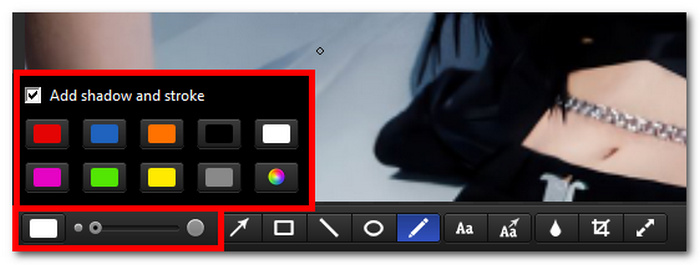
• 陰影與外框顏色及粗細調整盤: 這個區塊可讓使用者輕鬆選擇外框顏色並加入陰影效果。此外,旁邊的旋鈕可用來調整筆畫或文字大小的粗細。
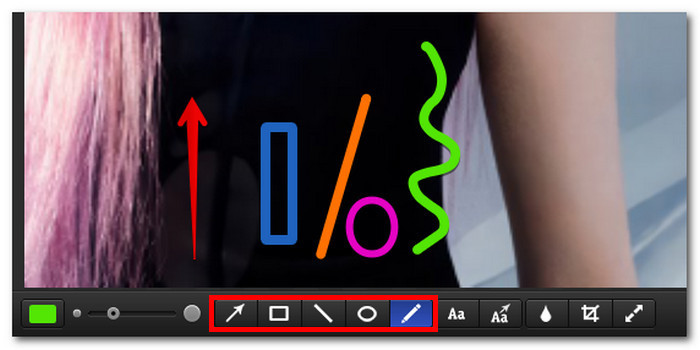
• 箭頭、矩形、線條、橢圓與筆刷工具: 這些工具可讓使用者在截圖上註記或標示特定區域,方便畫線、加箭頭、圈選範圍等。
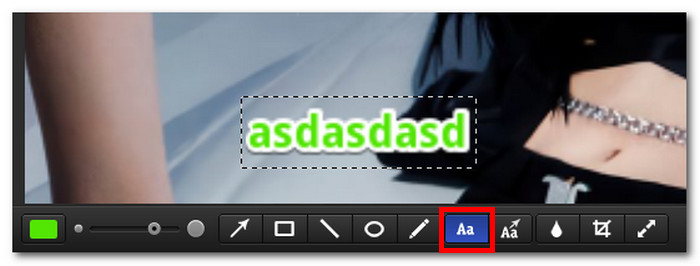
• 加入文字: 此功能可讓使用者在儲存前,直接在截圖上加入文字,免去另開其他圖片編輯器只為了輸入文字的麻煩。
• 文字箭頭: 此工具將文字與箭頭結合為一體,讓你可以在截圖中同時加入箭頭與說明文字。
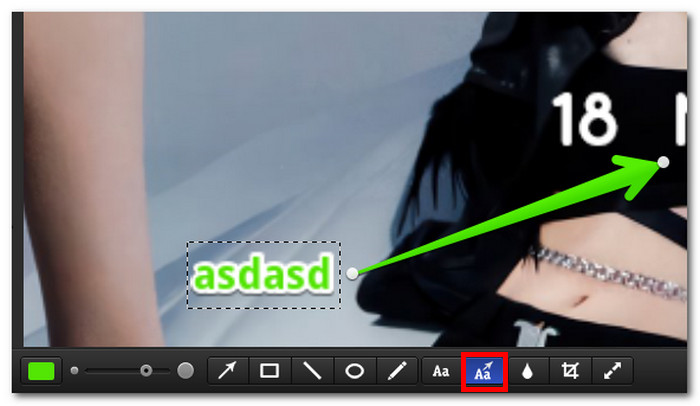
• 模糊工具: 模糊工具可將你想隱藏的截圖區域進行模糊處理。
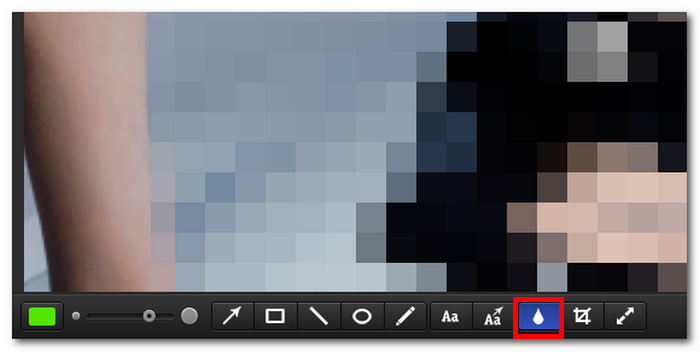
• 裁切與調整大小工具: 這項截圖編輯功能可讓使用者輕鬆裁切與縮放在工具中截取或上傳的圖片。
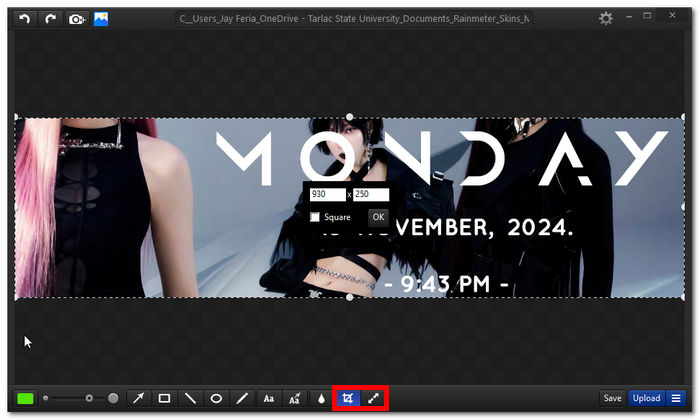
整體評價
我們對 Monosnap 免費截圖工具的整體評價是令人印象深刻的 8/10 分。這是因為該工具滿足用戶可能需要的所有基本螢幕截圖需求。此外,作為一款免費且用戶友好的截圖工具,它內建了井然有序的設置,用戶無需具備使用此類工具的背景即可輕鬆使用。雖然我們發現用戶沒有必要登入或強制他們建立帳戶才能使用雲端儲存系統,但它仍然是一個很棒的截圖軟體工具。
第 3 部分。最佳 Monosnap 替代品
FVC-精選螢幕錄影機
若 Monosnap 軟體工具因某些原因無法使用,你可以改試試這款替代的螢幕截圖工具,也就是這款FVC 精選的螢幕錄製軟體。在功能面上,它比 Monosnap 更加豐富,不僅支援截圖,還能錄製螢幕等。這款替代軟體的優點在於,它提供了 Monosnap 所欠缺的多種截圖編輯功能,例如可在截圖上疊加圖片、噴槍工具、可加入編號標記的標註工具等。
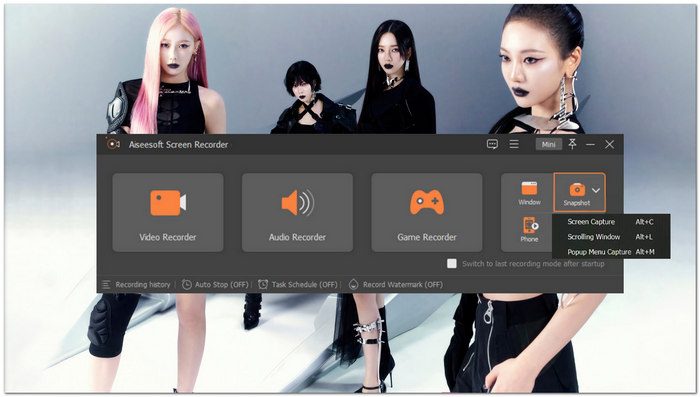
主要功能特色
它也可以作為Android 的螢幕截圖工具,同時支援 iOS 裝置。
易於導航的介面。
它可透過捲動截圖的方式擷取整頁內容,並且讓你編輯截圖。
高品質的圖像效果。
多功能螢幕錄影機、錄音機、遊戲錄影機和截圖工具。
線上螢幕錄影機
如果你覺得下載與安裝軟體很麻煩,也可以改用這款線上螢幕錄影工具。它是百分之百網頁版的工具,可直接在瀏覽器中輕鬆用於桌面螢幕截圖。
主要功能特色
網路為基礎的螢幕錄影工具。
免費且易於導航的截圖工具。
它具有視訊、音訊和螢幕錄製功能。
完全捕捉您的裝置螢幕。
高品質截圖工具。
斯納吉特
該軟體工具是一款付費使用的截圖工具,適用於所有裝置。作為 Monosnap 的替代品,它也是一款易於使用的軟體工具,無論是在使用者介面還是在截圖品質上,它都是一款非常有條理且高級專業的截圖工具。
主要功能特色
適用於桌面裝置的多功能多用途截圖工具。
它有一個內建的圖像編輯工具。
支援基於雲端的儲存系統。
它為媒體組織者提供了一個圖書館。
專業級的截圖工具。
第 4 部分。關於 Monosnap 的常見問題解答
Monosnap 有什麼用途?
當裝置的預設工具不具備即時截圖和螢幕錄製功能時,Monosnap 軟體工具通常用於即時截圖和螢幕錄製。快速存取一些圖像編輯工具(例如突出顯示、圖像裁剪和調整大小)是用戶的主要用途之一。
Monosnap 可以免費使用嗎?
是的,雖然它為用戶提供了免費版本供用戶試用,但用戶可以透過其付費方案解鎖高級功能,無論價格如何。它是價格非常便宜的軟體工具之一。
Monosnap 可以將螢幕截圖儲存為哪些檔案格式?
一般來說,Monosnap 只支援 PNG 和 JPEG 影像格式,這就足夠了,因為大多數工具、平台和其他程式都支援它的使用。但是,如果您正在尋找支援多種檔案格式的軟體工具,您應該嘗試 FVC 挑選的螢幕錄影機工具,因為它比 Monosnap 支援更多的格式。
結論
在評測 Monosnap 這款螢幕截圖軟體後,我們認為 Monosnap 的表現相當不錯,也超出了我們對一般截圖工具的預期。儘管它的介面簡單、功能不算多,但能夠進行基本的截圖編輯,總比完全沒有這些功能來得好,不是嗎?然而,即使看完這篇深入的使用教學,你仍可能覺得 Monosnap 在操作上不夠直覺、對你來說稍嫌複雜。在這種情況下,你可以考慮改用文中列出的其他替代工具,例如 FVC 精選的螢幕錄製器,因為它在螢幕截圖任務方面提供了更多實用功能。
-
 如何在 FaceTime 通話過程中截圖(2025 年指南)
 您是否想在 FaceTime 視訊通話期間截取螢幕截圖,但不知道如何操作?閱讀本文並了解 3 種取得 FaceTime 螢幕截圖的方法。
-
 如何輕鬆在 iPhone 上截圖(2025 年指南)
 在 iPhone 上擷取螢幕截圖從未如此簡單。按照我們的指南學習如何輕鬆在 iPhone 上截取螢幕截圖。點擊了解更多!
-
 學習如何調整 PNG 大小並實現無損質量
 使用我們全面的指南快速輕鬆地調整 PNG 檔案的大小。通讀我們的文章並按照逐步指南實現無縫圖像升級。
