


 視頻轉換大師
 屏幕錄影大師
 影片修復
影片修復
 安全下載
安全下載M4A 與 MP3 兩種音頻格式的深入回顧和比較
由於數字音樂的激增,選擇合適的音頻格式現在比以往任何時候都更加重要。雖然 M4A 和 MP3 被廣泛使用,但兩者之間存在重要區別。雖然 MP3 是音樂文件的事實標準,但 M4A 經常用於提供卓越的音頻質量。
在M4A vs. MP3的比較中,我們將仔細探討 M4A 與 MP3 這兩種檔案格式之間的細節差異,讓你能做出明智的選擇。我們也會從音質、相容性、檔案大小等多方面,為你全面分析這兩種音訊檔案類型的異同之處。無論你是音樂愛好者還是職業音樂人,都值得繼續閱讀,找出最適合你的音訊格式。

第 1 部分 M4A 與 MP3
這是一個簡單的表格,在不同的重要方面比較了這些格式,以便做出明智的決定。查看下表。
| M4A | MP3 | |
| 音質 | 高的 | 好 |
| 文件大小 | 大 | 小 |
| 兼容性 | 有限的 | 廣泛兼容 |
| 元數據 | 支持的 | 有限的 |
| 數字版權保護 | 是 | 沒有 |
| 流行用途 | 音樂、有聲讀物、播客 | 音樂、播客、鈴聲 |
第 2 部分。 M4A 和 MP3 介紹
MP3 與 M4A 的戰鬥已經足夠了。讓我們稍作停頓,通過對每種格式的簡要介紹來了解更多有關這些格式的信息。
M4A 介紹
Apple 專有的數字音頻格式是 MPEG-4 音頻(或簡稱 M4A)。它是適用於音樂、有聲讀物和播客的絕佳音頻格式,因為它可以適應多種比特率和採樣率。 M4A 文件可以在 iTunes、QuickTime 和其他媒體播放器中打開,使其成為 Apple 設備的理想選擇。
MP3 介紹
MP3 代表“MPEG-1 Audio Layer 3”,是一種數字音頻格式,由於其廣泛採用和低比特率壓縮,已成為壓縮音頻的標準。 MP3 文件非常適合音樂、播客和鈴聲,因為與其他音頻格式相比,它們的體積更小。它們可以在許多不同的設備上播放,也可以從 Internet 上快速輕鬆地下載。另一方面,MP3 文件的音質通常比 M4A 等替代格式差。
第 3 部分。 M4A 比 MP3 好嗎?
M4A 和 MP3 各有優缺點。 M4A以卓越的音質著稱,深受音樂愛好者和專業人士的青睞。另一方面,MP3 的文件較小,並且廣泛兼容各種設備和媒體播放器。
在 M4A 和 MP3 之間做出選擇取決於對您來說更重要的是:高音質或更小的文件大小和兼容性。
第 4 部分。 MP3 和 M4A 之間的區別
流行的數字音樂格式 MP3 和 M4A 具有鮮明的特點。下面詳細解釋一下MP3和M4A的區別:
音質:M4A 的音質普遍被認為優於 MP3。M4A 採用較佳的壓縮演算法,並支援更廣泛的位元率與取樣率。M4A 也支援無損壓縮,能保留原始音訊的完整品質;而 MP3 採用有損壓縮,雖能減小檔案大小,卻會同時犧牲部分音質。
檔案大小:MP3 檔案相較於 M4A 檔案通常更小。這是因為 MP3 採用較高效率的壓縮演算法,在不大幅影響音質的前提下縮小檔案體積。相對而言,M4A 使用的壓縮方式效率較低,檔案體積較大,但能提供更好的音質。
相容性:MP3 被廣泛視為數位音訊的業界標準,與多種裝置與媒體播放器相容,包括智慧型手機、平板與電腦。相較之下,M4A 的相容性較低,主要應用在 Apple 裝置與軟體上,例如 iTunes 和 QuickTime。
中繼資料(Metadata):M4A 相較於 MP3 支援更廣泛的中繼資料。這意味著 M4A 檔案可以儲存更多與音訊相關的資訊,例如專輯封面、歌詞與曲目資訊。
DRM 保護:M4A 支援數位版權管理(DRM)保護,讓版權持有人能夠控制其音訊檔案的使用與散佈。而 MP3 則不支援 DRM 保護。
第 5 部分。 如何將 M4A 轉換為 MP3 或將 MP3 轉換為 M4A
除了比較和審查這兩種音頻格式之外,學習如何將 M4A 轉換為 MP3 或反之亦然也很重要。以下是您可以使用的一些程序:
無論你處於線上或離線狀態,Video Converter Ultimate 都是能將 M4A 與 MP3 互轉的優秀工具。此工具具備眾多可供運用的功能,可批次轉換多個檔案,也就是說,你可以一次轉換整個音樂檔案收藏。更吸引人的是,它讓你能存取並調整音訊檔案的輸出設定。請參考下列步驟,了解這個工具的運作方式。
步驟 1。按一下其中一個免費下載按鈕開始下載,並依照螢幕上的指示安裝。接著啟動程式並熟悉其簡潔的介面。
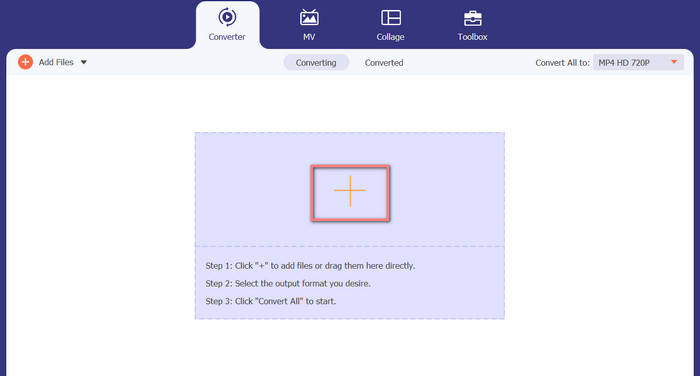
步驟 2。在主畫面上按一下新增按鈕,然後找到你想轉換的音訊檔案。上傳完成後,已上傳檔案的預覽很快就會顯示在介面上。你也可以一次上傳整個資料夾,將多個 M4A 檔案同時轉成 MP3。
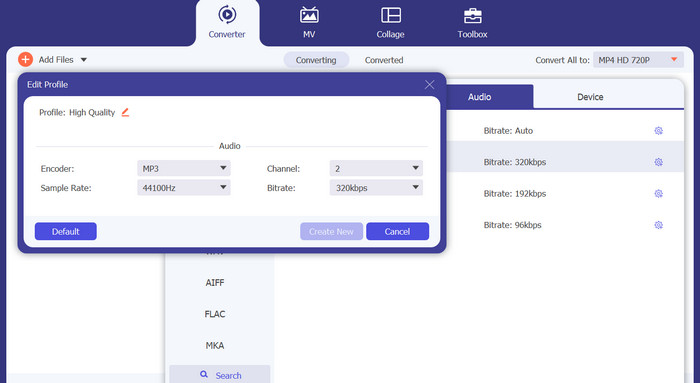
步驟 3。若要變更工具的輸出格式,請前往設定檔(Profile)選單中的音訊(Audio)分頁(位於工具右上方)。你可以將 M4A 檔案轉為 MP3,或反向將 MP3 轉為 M4A。
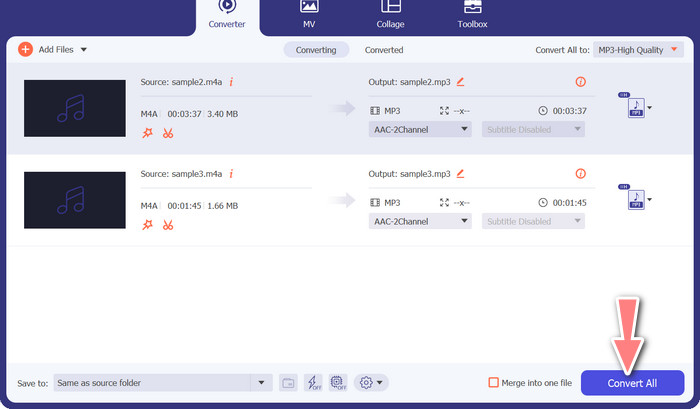
步驟 4。在畫面最下方選擇想要儲存輸出檔案的位置。然後點選全部轉換(Convert All),即可開始轉檔流程。
免費在線視頻轉換器(在線)
沒有空間再安裝另一套軟體?好消息是,你可以利用線上轉檔工具,完全免除下載程式的需求。Free Video Converter Online 網頁工具可直接在瀏覽器中進行轉檔,同時支援多種音樂與影片檔案格式。此外,此線上工具也支援批次轉檔,用戶還能調整最終音訊檔案的輸出設定。以下說明如何在線上將 MP3 轉成 M4A。
步驟 1。先開啟你慣用的網頁瀏覽器,前往 Free Video Converter Online 官方網站。
步驟 2。按一下新增檔案以轉換(Add Files to Convert)選項,接著找到並選取你想要轉換的 M4A 檔案。
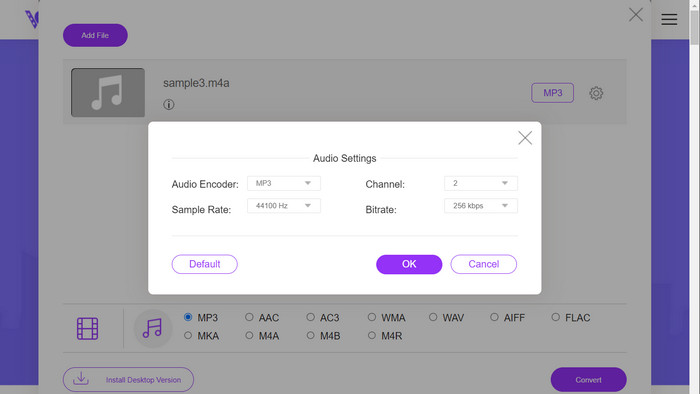
步驟 3。在音訊(Audio)格式選單中選擇MP3作為輸出檔案格式。你也可以調整 MP3 檔案的位元率或輸出音質。
步驟 4。按一下轉換(Convert)按鈕即可開始轉檔流程。以上就是在網頁上將 M4A 轉換為 MP3 的步驟。
延伸閱讀:
在 PC 與 Mac 上將 M4A 轉換為 WAV 的操作指南
第 6 部分。 M4A 和 MP3 常見問題解答
就元數據而言,MP3 與 M4A 是什麼?
M4A 支持比 MP3 更廣泛的元數據,這意味著 M4A 文件可以存儲更多有關音頻的信息。
我可以編輯 MP3 或 M4A 文件嗎?
您可以使用各種音頻編輯軟件編輯 MP3 和 M4A 文件。
哪個更適合播客、MP3 或 M4A?
MP3 更適合播客,因為它的文件更小,兼容性更廣。
結論
了解MP3 vs. M4A的比較,有助於你選擇最合適的數位音訊格式。無論你是在串流聽音樂,或是從事音樂製作,選對格式都是確保音質與相容性達到最佳表現的關鍵。
-
 MP3 VS MP4:MP3和MP4之間沒有什麼區別
 MP3或MP4,哪個更好? MP3和MP4有什麼區別?本文將比較您可以成像的MP3和MP4的各個方面。
-
 M4A播放器–適用於Android和計算機的前5名M4A播放器
 如何在Android手機上播放M4A文件?哪些玩家可以玩M4A?此帖分享了5個針對Android,Mac和PC的最佳免費M4A播放器。
-
 在 Windows 和 Mac 上修復和編輯 MP3 元數據的 4 種最佳方法
 想知道輕鬆編輯 MP3 元數據的秘密嗎?該博客將使用您輕鬆訪問的不同工具教您不同的技術。
