


 視頻轉換大師
 屏幕錄影大師
 影片修復
影片修復
 安全下載
安全下載什麼是 JPG/JPEG 以及如何將圖像轉換為 JPG
JPG、PNG 和 GIF 檔案格式是現今最受歡迎的格式。當你在網站或社群媒體貼文中使用圖片時,最常遇到的就是這幾種檔案。務必要記住,每一種格式都有不同的功能與特性,也就是說它們各自具有獨特的特點。不過,在這篇文章中,我們將專注於 JPG/JPEG 檔案格式。你將會了解它的定義、功能,以及如何開啟 JPG/JPEG 檔案。同時,你也會學到如何透過線上工具,把圖片轉換成 JPG/JPEG 格式的最佳方法。

第 1 部分。有關 JPG 或 JPEG 的信息
什麼是JPG/JPEG格式
JPG 圖像文件格式是壓縮圖像時的最佳文件。 JPG 是一種受用戶歡迎的文件。他們將其用於照片和互聯網圖形。此外,它也稱為 JPEG 或 JPG 文件。 JPEG的全稱是Joint Experts Group。這個小組創建了這個流行的圖像文件。此外,大多數位圖圖像的文件擴展名為 .jpg。主要原因是為了減小文件的大小。 JPG 是一種有損格式,壓縮太多會影響圖像質量。所有程序都可以訪問此格式。這樣,您就無需考慮如何在不同的程序或設備上打開此文件。它的壓縮算法減小了文件的大小。這也是它近來流行的原因之一。這樣,在網站上創作故事、分享和發布照片就更從容了。有關其他信息,您可能會遇到網站無法識別 JPEG 文件的情況。例如,一些照片查看器和編輯器只會打開帶有 .JPG 文件的圖像。您可以做的最好的解決方案是重命名文件擴展名。您可以將 JPEG 文件更改為 JPG 文件。這樣,網站就可以識別圖像。
此外,JPG 文件具有您需要知道的優點。 JPG 是高分辨率圖像。它的高清晰度是該圖像文件的一大優勢。它支持多達 1600 萬種顏色的 24 位顏色。即使在使用某些工具進行高級編輯之後,分辨率仍然非常好。此外,JPG 的尺寸較小。與其他圖像文件格式相比,它具有理想的文件大小。即使尺寸較小,也不會影響圖像的質量和分辨率。知道了優點之後,還要知道它的缺點,才能有更多的認識。在 JPG 上拍攝時,您必須限制相機的處理器和顏色變化。此文件也不支持分層圖像。如果您打算編輯圖像並需要一個額外的圖層,JPG 不是完美的格式。
第 2 部分。如何打開 JPG/JPEG 文件
如果您在設備上打開 JPG 文件時遇到問題,這部分將為您提供幫助。您想知道如何在 Windows 11、Android 和 iPhone 上打開 JPG 文件嗎?您可以按照下面給出的說明進行操作。
對於 Windows 用戶
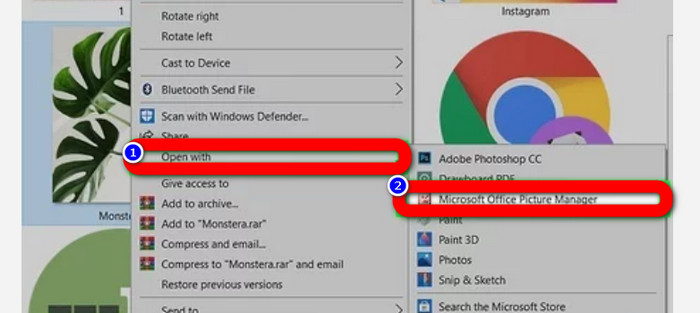
步驟 1: 在鍵盤上按下 Ctrl + E 開啟檔案總管。它的圖示看起來像一個夾著藍色圖釘的資料夾。
步驟 2: 前往左側的 快速存取 面板。接著進入 下載 資料夾,找到你儲存的 JPG 照片。
步驟 3: 找到 JPG/JPEG 檔案後,使用「相片」以外的程式開啟它們。要開啟時,在照片上按滑鼠右鍵,點選 以此方式開啟,然後選擇你想使用的程式。
安卓用戶
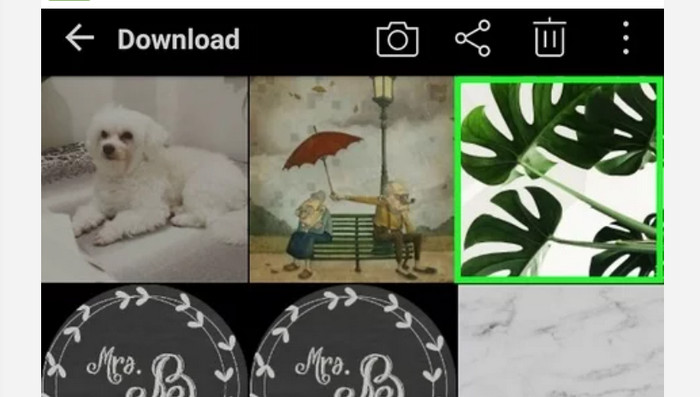
步驟 1: 在你的 Android 裝置上開啟「相簿」(Gallery)應用程式。
步驟 2: 開啟「相機」相簿來檢視你用手機相機拍攝的照片。你的手機中也會有各式各樣的其他相簿。
步驟 3: 如果看到很多照片,請點選其中一張照片,將其在全螢幕模式下開啟。透過這種方式,你就能查看你的 JPG/JPEG 影像。
對於 iPhone 用戶
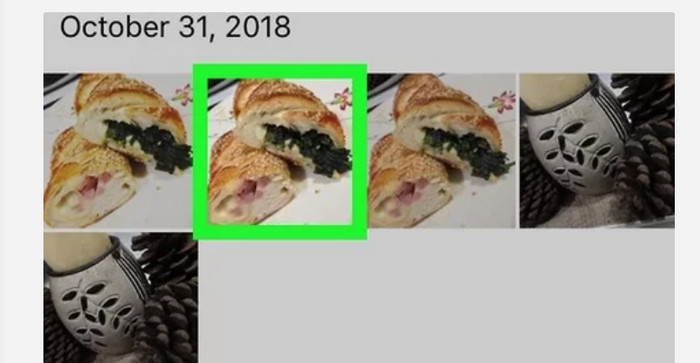
步驟 1: 在 iPhone 上點選 照片。這個 App 會收集你從相機與網路取得的所有圖片。這個 App 的圖示看起來像一朵彩色的花。
步驟 2: 啟動「照片」App 後,你可以看到裡面所有的照片。而且,就像在 Android 手機上一樣,你會在應用程式中看到各種不同的相簿。
步驟 3: 點選圖片即可全螢幕開啟。如此一來,你可以更清楚地檢視圖片。除了開啟圖片之外,你也可以在「照片」App 中編輯照片。裡面有多種圖示工具可以幫助你讓圖片效果更好。
第 3 部分。將圖像轉換為 JPG 的絕佳方法
FVC 免費圖片轉檔工具 是一款可在線上使用、將圖片轉成 JPG 的工具。它能協助你只需幾個點擊就完成圖片轉換。此外,它支援多種輸入格式,例如 JPG、PNG、GIF、TIFF 等等。因此,即使某些工具或裝置無法再開啟你的圖片,你也不必擔心。使用這個線上圖片轉換器即可將它們轉檔。它還能保留原始照片的高品質。轉換完成後,你幾乎看不出原檔與轉檔後檔案的差異。此外,這個圖片轉檔工具操作起來非常簡單,提供清楚易懂的轉換流程,非常適合初學者使用。它也支援批次轉檔,讓你能一次轉換多個檔案。你還可以在多種瀏覽器上使用這個應用程式,例如 Google、Safari、Mozilla、Explorer 等。最後,這個工具也保障每位使用者的隱私。在你完成下載與轉檔之後,系統會自動刪除你的圖片。
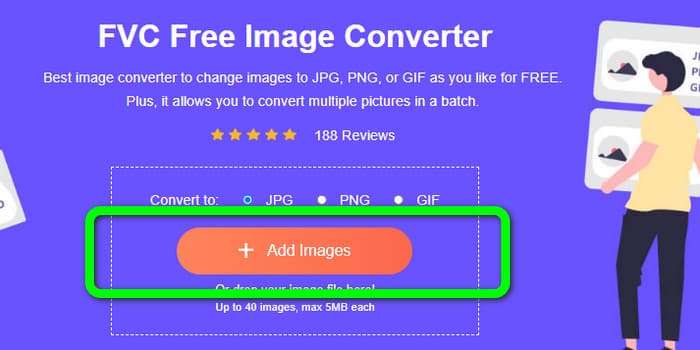
步驟 1: 首先,造訪 FVC 免費圖片轉檔工具 的網站。前往格式選單並選擇 JPG 檔案格式。
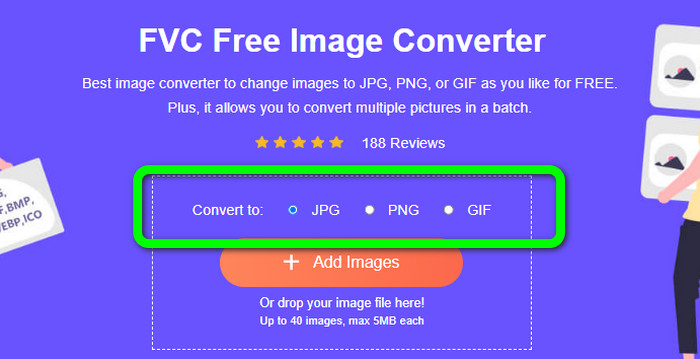
步驟 2: 若要上傳你想轉換的照片,請點選 新增圖片 按鈕。若你想進行批次轉檔,再次點選「新增圖片」即可。
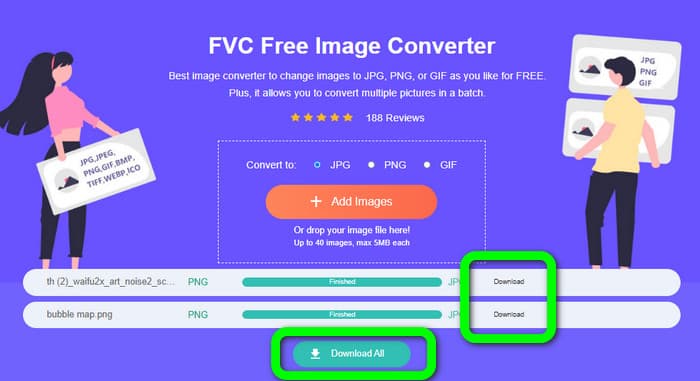
步驟 3: 轉檔程序完成後,點選 下載 按鈕即可逐一儲存檔案。若你想一次全部下載,請點選 全部下載 按鈕。
相關:
第 4 部分。關於 JPG/JPEG 文件的常見問題解答
1. 我怎麼知道我的照片是不是JPG文件?
您可以右鍵單擊文件夾中的照片。然後,轉到“屬性”選項。導航到“常規”菜單並查看圖像的文件類型。
2. JPEG 壓縮圖像的效果如何?
很好。全彩照片的未壓縮數據為 24 位/像素。最流行的無損壓縮方法可以平均壓縮此類數據約 2:1。 JPEG 可以實現 10:1 到 20:1 的壓縮,而沒有明顯的損失。它將必要的存儲量減少到每個像素 1-2 位。對於小數據,30:1 到 50:1 的壓縮率可以減少缺陷。而像存檔索引這樣的低質量用途可以相對輕鬆地進行 100:1 壓縮。壓縮圖像 JPEG 的 100:1 比率使用與全色、十分之一比例圖像相同的空間量。儘管比縮略圖有更多的細節,但它確實如此。
3. 如何在 Photoshop 中打開 JPG 文件?
在您的計算機上啟動 Photoshop。轉到文件 > 打開選項。文件夾文件將在您的屏幕上彈出。選擇 JPG 文件並單擊確定。之後,您將在 Photoshop 中看到 JPG 圖像文件。
結論
本文為你說明 JPG/JPEG 的全名、定義與特性。除此之外,我們還額外介紹了使用 FVC 免費圖片轉檔工具 將圖片轉成 JPG 格式的最簡單方法。所以,還在等什麼?快來使用這個工具,輕鬆將你的圖片轉換成 JPG 格式吧。
-
 如何在線和離線將圖像轉換為 JPG 的方法
 您是否出於某種原因要將文件轉換為 JPG 格式?那麼這篇文章適合你。我們將教您將圖像轉換為 JPG 的最佳方法
-
 輕鬆將圖像轉換為 PNG 格式的有用方法
 您是否正在尋找將圖像保存為 PNG 的最佳方式?該指南為您在線和離線將圖像轉換為 PNG 提供了出色的解決方案
-
 使用 6 種有效的離線和在線方式將 HEIC 轉換為 JPG
 您想知道如何將 HEIC 轉換為 JPG 嗎?在這種情況下,我們添加了 6 種在線和離線方式,您可以使用它們來完全完成和處理此任務。
