


 視頻轉換大師
 屏幕錄影大師
 影片修復
影片修復
 安全下載
安全下載您可以了解什麼是 PNG 文件
現今,PNG 檔案格式是標準影像格式之一。你可以在網路上、電腦上、手機上等各處看到它。不過,仍有一些使用者對這種格式並不了解。幸運的是,這篇文章會提供你所需的充足資訊。你將會了解什麼是 PNG 檔案格式。此外,本文也會提供將圖片轉換為 PNG 檔案格式的優良方法。

第 1 部分。 有關 PNG 文件的詳細信息
柵格系列的便攜式網絡圖形 (PNG) 擴展執行無損圖片壓縮。它沒有專利,是作為 GIF(圖形交換格式)的替代品而創建的。除了提供透明度的標準灰度圖像之外,它們還可以基於調色板。 PNG 不支持其他顏色類型,如 CMYK。這是因為它的主要目的之一是通過 Internet 發送圖像。此外,它沒有考慮任何專業印刷工作。文件中的圖像被分成帶有信息的塊。它包括編碼的像素或文本註釋,並且完整性驗證是在 RFC 2083 下完成的。許多用戶遇到過 PNG 格式。這是因為它是當今流行的格式之一。它可能是電子郵件附件或您從網站獲得的圖片。有時,屏幕截圖也具有此分辨率。對會用的專業人士更有幫助。
從歷史上看,PNG 圖像格式始於 1995 年。IT 專家 Oliver Fromme 提出了 PING 格式。但後來,它變成了 PNG。這種文件格式是 GIF 格式的下一步發展。 GIF 格式比 PNG 早八年。 GIF 有很多缺點。它需要專利許可和 256 種顏色的有限範圍。在計算機屏幕上打開圖像時,此限制可能會影響圖像。因此,製作 PNG 文件是最佳選擇。它是無專利的,並且具有更大的調色板。
第 2 部分。 如何打開 PNG 文件
由於您已經知道什麼是 .png 文件,這部分將告訴您如何在您的設備和不同的瀏覽器上打開這種格式。您可以在任何流行的網絡瀏覽器中打開 PNG 照片。它包括 Firefox、Chrome、Explorer 等。該方法沒有問題。
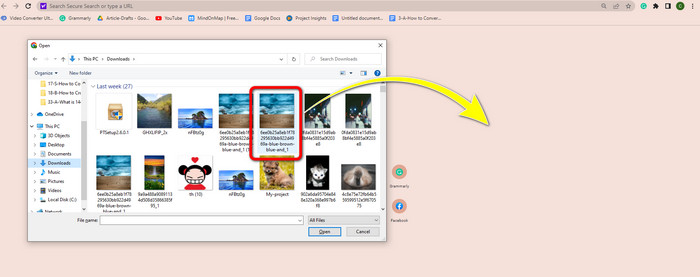
如果你使用的是瀏覽器,可以按鍵盤上的 Ctrl + O 來開啟 PNG 圖片。選擇你想開啟的 PNG 圖片,然後在資料夾中按一下開啟按鈕。
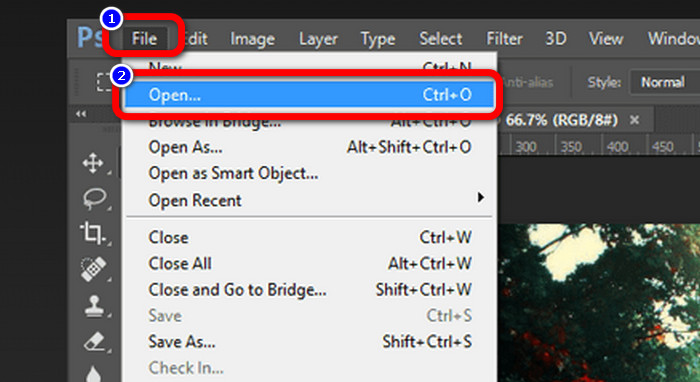
在 Photoshop、雲端硬碟或其他應用程式中也有開啟 PNG 圖片的方法。你可以前往檔案 > 開啟 >並選取照片。之後按下Enter鍵。透過這種方式,你就能在該應用程式中檢視你的 PNG 圖片。
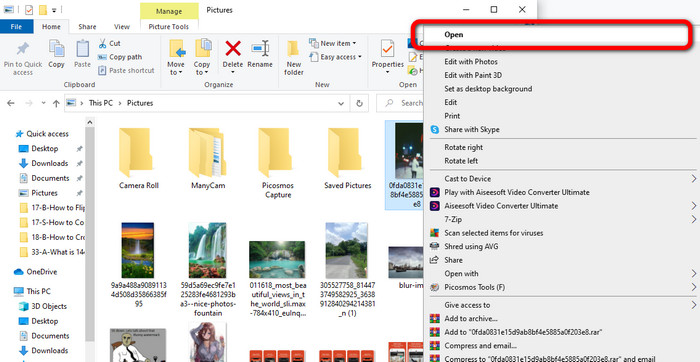
在 Windows 電腦上開啟 PNG 檔案相當容易。點選工作列上的檔案總管來將其打開。前往快速存取分頁來查看 PNG 圖片。看到圖檔後,按一下滑鼠右鍵並選擇開啟選項。這樣一來,你就可以以全螢幕模式檢視該圖片。
第 3 部分。將圖像轉換為 PNG 格式的有效方法
使用 FVC Free Image Converter 將圖像轉換為 PNG
你可以使用各種線上轉檔工具將圖片轉換為 PNG 格式。不過,其中有些並不安全,還有一些轉檔工具價格高昂。如果你想要安全且免費的圖片轉檔工具,可以使用 FVC 免費圖片轉檔器。此工具是線上圖片轉檔中數一數二的應用程式之一。你可以免費使用,使其對所有使用者都相當容易取得。而且你可以上傳多種不同格式的圖片,例如 TIFF、JPG、PNG、GIF 等。此外,轉換圖片的操作也很簡單,只需要三個步驟就能將圖片轉換成 PNG 格式。你也可以同時轉換多張圖片。這個轉檔器提供批次轉檔流程,因此可以幫你節省更多時間。而且,它會在轉檔完成後刪除你的資料,以確保隱私安全。再者,你無需在這個應用程式中註冊或建立帳號,只要打開網站就能使用。
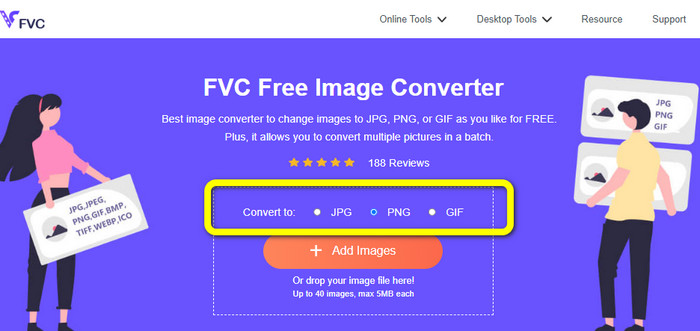
步驟 1:首先,造訪 FVC 免費圖片轉檔器網站。進入主頁面後,前往格式選項並選擇PNG檔案作為欲輸出的格式。
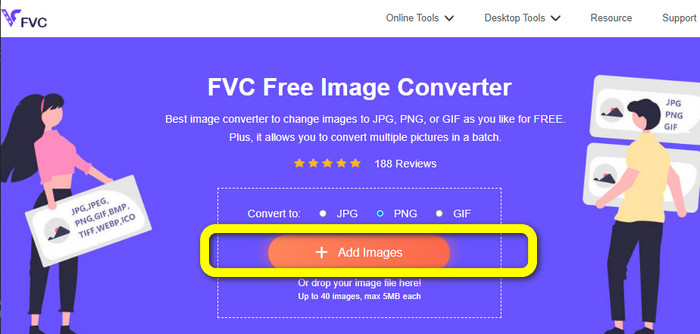
步驟 2:按一下中央介面上的新增圖片按鈕以上傳照片。從資料夾中開啟你想要轉換的照片。
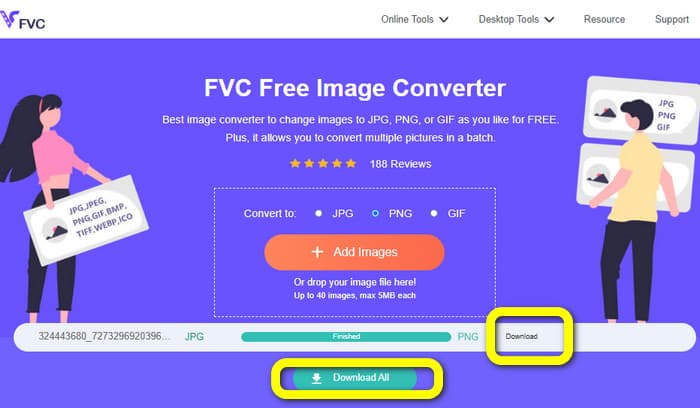
步驟 3:轉檔完成後,按一下下載按鈕來儲存最終圖片。之後,你就可以在電腦上開啟你的 PNG 圖片。
使用 Coolutils 將圖像轉換為 PNG
你可以在線上使用圖片檔案轉檔工具 Coolutils,無需下載任何程式。也不必等待電子郵件連結,因為這個線上轉檔器會立即替你執行轉換。這個線上工具讓你可以快速將圖片轉換為 PNG格式。我們喜歡這項服務的一個特點,是它能在轉檔前旋轉及調整圖片大小。不過,它不會顯示旋轉後圖片於轉檔完成時的預覽畫面。由於它是透過網頁瀏覽器運作,你可以在任何作業系統上使用此方法,包括 Windows、Linux 和 Mac。這個程式支援多種輸入格式,包括 JPEG、PNG、GIF、BMP 和 TIFF。
步驟 1:開啟瀏覽器並搜尋 Coolutils。接著,按一下Upload File to Convert(上傳檔案以轉換)按鈕,新增你想轉換的圖片。
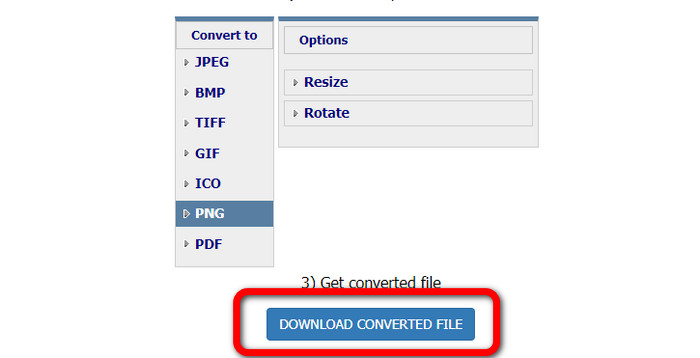
步驟 2:在格式選項中選擇PNG格式。
步驟 3:按一下Download converted file(下載已轉換檔案)按鈕,將圖片儲存到桌面。你也可以利用此工具將圖片轉換為 JPG。
第 4 部分。 有關 PNG 文件的常見問題解答
1、PNG和JPG有什麼區別?
PNG 和 JPG 文件格式之間的主要區別在於它們的壓縮算法。 PNG 文件格式使用無損算法。這意味著它可以保留圖像中的所有信息。 JPG 格式使用有損壓縮算法。它會丟棄一些圖像信息以減小文件大小。
2. PNG 格式顯示書面文本的效率如何?
這是有效的。此文件的無損壓縮可以顯示文字較多的照片。它包括頁面佈局和屏幕截圖。包括手寫文檔和報紙頁面等印刷文本的掃描件。
3. 哪個更好,JPG 還是 PNG?
這取決於你的目的。 JPG 文件會降低圖像質量。它還可以更好地減小圖像的文件大小。 PNG 壓縮文件,同時保持圖像質量。它非常適合存儲文本、標誌性圖形和線條圖等項目。
結論
以上所有資訊向你介紹了 PNG 檔案格式,並提供了關於PNG 檔案的用途是什麼的充分說明。此外,本文也示範了如何使用 FVC 免費圖片轉檔器,將圖片實際轉換為 PNG 格式。因此,如果你想轉換圖片檔案,可以使用這款值得信賴的線上圖片轉檔工具。
-
 8 個驚人的圖像轉換器 [完整信息]
 這篇評論將告訴您可用於轉換圖像文件的最佳圖像文件轉換器。閱讀這篇文章以了解最適合您的圖像轉換器
-
 關於 JPEG 與 JPG 與 PNG 差異的完整詳細信息
 這篇文章將為您提供有關 JPEG、JPG 和 PNG 的區別的足夠信息。此外,您還將學習如何將圖像轉換為這些文件
-
 什麼是 JPEG/JPG:輕鬆將圖像轉換為 JPG
 您是否對 JPEG 的含義感到好奇?我們有一個答案給你。此外,您還將學習如何將不同的圖像格式轉換為 JPG 文件。現在閱讀帖子。
