


 視頻轉換大師
 屏幕錄影大師
 影片修復
影片修復如何通過步驟將 AMV 轉換為 WMV 的綜合指南 [已解決]
Want to enjoy watching AMV video files on your Windows or use it for online streaming? If so, you must read this article to know how to convert AMV to WMV, improve the quality, and make it compatible. In this list, you will learn the software you can use to convert your AMV files. So without further ado, you must now fasten your seatbelt and learn a lot more about AMV and WMV format.

第 1 部分。使用 FVC Video Converter Ultimate 將 AMV 轉換為 WMV
FVC Video Converter Ultimate is our first choice for converting AMV to WMV because it allows you to transcode media and device-specific formats. And more, it is capable of converting not only one, two, or three files simultaneously but more. Furthermore, this converter is dedicated to its users to provide nothing but greatness on their conversion. Want to know why? Then read the key features below.

FVC Video Converter Ultimate
4,355,888+ 次下載- 它可以幫助您解決 AMV 到 WMV、AVI、FLV、SWF、MP4、AVI 的轉換問題。
- 它支持超快速轉換以更快地轉換格式。
- 使用此工具提供的獨特編輯功能編輯您的 AMV 視頻。
- 只需單擊幾下,即可幫助您成為專家。
- 它支持所有平台,如 Windows 和 macOS。
您是否對該工具的功能感到驚訝?如果是這樣,讓我們閱讀轉換 AMV 文件的過程並複制步驟以成功轉換。
Step 1. Download the FVC Video Converter Ultimate on your computer drive by clicking the download button presented below. Proceed on clicking the installer to install and press Start Now to launch the tool.
Step 2. After launching the software, you can add one or more files by clicking the Add Files option. The computer folder will show on your screen, select the AMV file, and press Open to upload it.
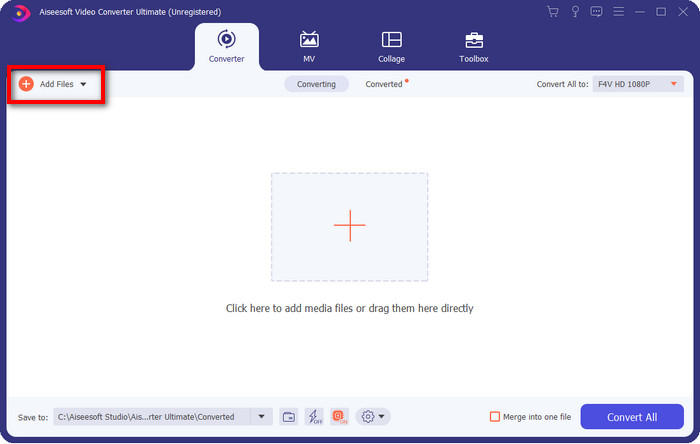
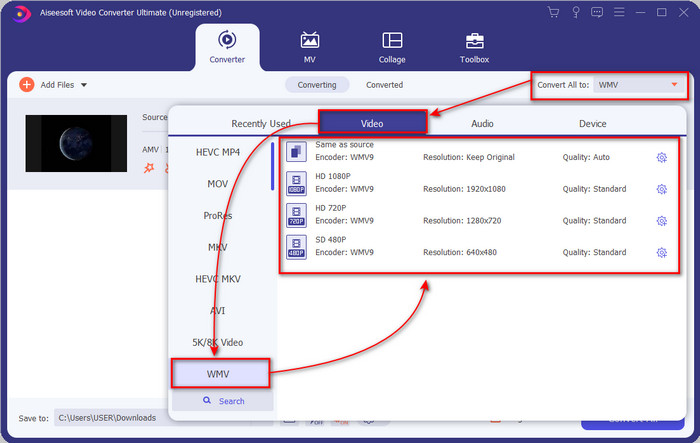
Step 3. By clicking the Convert All to option, a format list will show. Find the WMV format and choose the resolution, encoder, and quality you want to have.
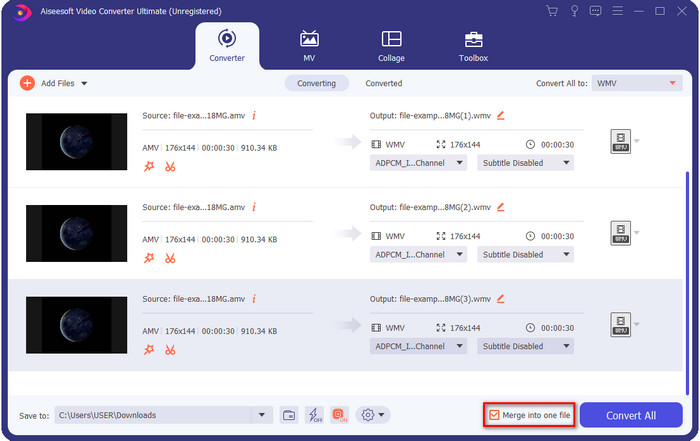
Optional. Want to make your AMV files into one WMV format? Then it would help if you ticked the box saying merge into one file.
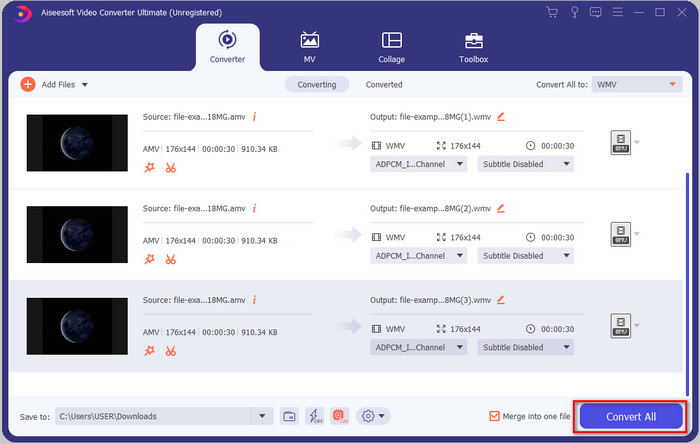
Step 4. Press the Convert All for the process of converting to start. After the process, a folder will display on your screen with the converted WMV file.
第 2 部分。 在線將 AMV 轉換為 WMV
Don't you want to download an offline converter because you don't have enough storage to download one? Then use the FVC Free Online Video Converter. Because you will not need to download the full converter; instead, you will need the launcher, but it is tiny and won't affect your computer storage. Moreover, this web converter converts AMV to WMV, adjusting the resolution. However, converting the file will depend on the speed of your internet. Do you have an internet connection? Then you must try to use this and experience online conversion.
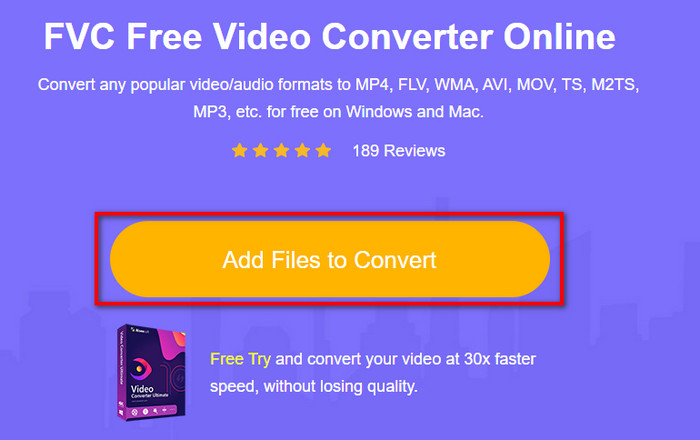
Step 1. Hit this link to open the main website of the converter.
Step 2. By clicking the Add Files to Convert, a folder will show where you can find the AMV file and press Open.
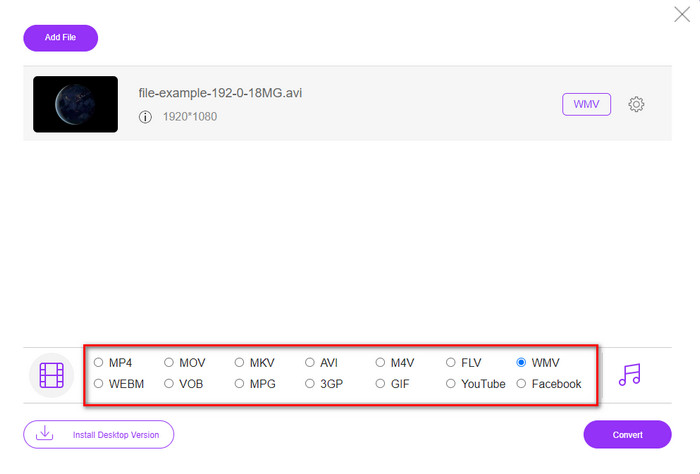
Step 3. Choose the WMV format that will display on the screen.
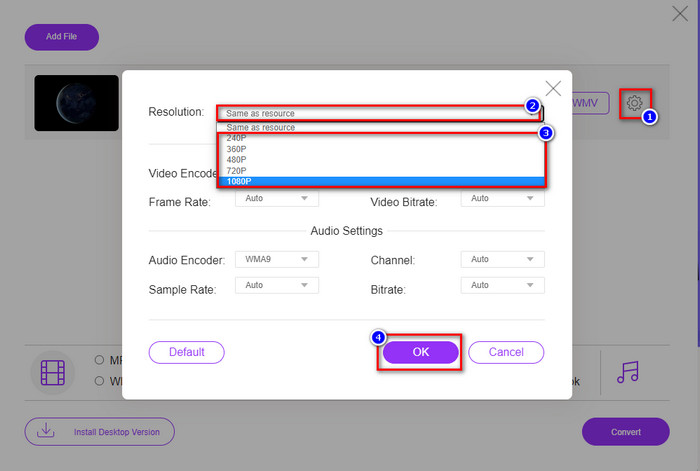
Optional. As we said earlier, you can adjust the resolution here. So now, let's modify the resolution by clicking the gear button. At the upper part, click the drop-down button, and a list of resolutions will show; choose one and press OK to proceed.
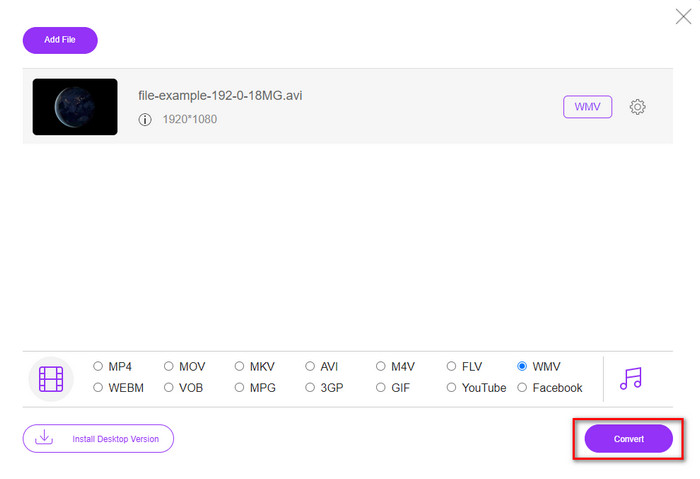
Step 4. So now, if you want to start the conversion, you can click the Convert button, and the process will begin.
第 3 部分。 AMV 和 WMV 有什麼區別
首先,這兩種媒體容器因其作為一種格式的獨特功能而變得流行。但是今天,我們將研究格式本身的優點和缺點。此外,我們將通過將更多地了解AMV和WMV作為一個問題來指定三個方面。
哪種格式具有更好的媒體分辨率?
在這兩種格式之間,毫無疑問,WMV 具有更好的質量。 WMV 文件可以存儲和流式傳輸分辨率高達 300,000 像素的視頻,以獲得更詳細的視覺輸出。但是您可以將速率設置為 528x576 屏幕分辨率。而對於 AMV,它可以包含的質量是 96x96 到 320x240,與 WMV 的低分辨率相比,這是相當低的。 AMV 分辨率較小的原因之一是它需要適合中文媒體播放器的屏幕。
哪種格式的文件更小?
這場胜利將伴隨 AMV,因為這種格式是超級壓縮的。雖然 WMV 有一個壓縮器,但 AMV 的大小比 WMV 更經濟友好,尤其是在您的計算機驅動器上。
哪種格式更兼容?
We can say that they have different strengths if we talk about compatibility because WMV is for Windows programs only. If you are a Mac user, you can't just use this format and play it on Quicktime or edit it on iMovie. Instead, you will need to convert WMV to MOV to make it compatible. In the case of AMV, this format uses a portable Chinese media player to play this format. But today, you can use a portable media player instead of buying an AMV media player. However, looking for an AMV media player is a pain in the ass because they are numbered players supporting this kind of format and the encoder. We can say that WMV has gained more compatibility than AMV, especially if we transfer the file to Windows.
現在我們知道了原因,在這種情況下需要將文件轉換為新格式。因此,您必須學習如何將 AMV 轉換為 WMV,以使媒體文件與 Windows 軟件兼容。
第 4 部分。 有關 AMV 和 WMV 轉換的常見問題解答
如何將我的 AMV 轉換為 MOV?
There are a lot of techniques and methods we can search and try on that are available if we query it on the web. But it is hard to choose which tool is better to use to convert AMV to MOV. So, to make it short, click this link and understand how to convert AMV to MOV and make it compatible with macOS.
我可以使用 VLC 媒體播放器觀看和播放 AMV 嗎?
Absolutely, you can download the VLC media player on your desktop to play your AMV files without needing to download an additional codec. But if you want to know more about the VLC and its alternative, try to read this article by clicking this link.
為什麼我需要壓縮 AMV?
We compress our media file and AMV because we need to free some space up on our hardware drive. So want to learn how to compress AMV files? Then click this link.
結論
這兩個解決方案提供卓越的性能,使您從 AMV 到 WMV 的轉換變得輕鬆和成功。此外,這些是我們可以在網絡上找到的最佳解決方案。所以現在,您可以選擇使用哪個轉換器將 AMV 文件轉換為 WMV。要取得成功,您必須使用上面提供的 FVC 工具。
-
 將 AMV 轉換為 AVI 的最佳方法 [已批准]
 您是否很難將 AMV 格式的視頻文件轉換為 AVI?這裡有一些提示,但您只能在本文中找到。
-
 [已證明] 2 種將 AMV 離線和在線轉換為 FLV 的方法
 您是否考慮過嘗試使用轉換器將 AMV 文件轉換為 FLV 文件格式。要解決您在觀看 AMV 視頻時遇到的問題,請閱讀本文以了解您應該使用的合適轉換器。
-
 免費|將MP4轉換為WMV而不損失質量的3種最佳方法
 這篇文章分享瞭如何在Mac或Windows上將MP4視頻轉換為WMV格式。我們還將為您提供多種選擇,包括桌面軟件和基於Web的在線轉換器。準備知道最好的MP4到WMV轉換工具了嗎?
