


 視頻轉換大師
 屏幕錄影大師
 影片修復
影片修復在 Mac/Windows/Linux 上將 M4V 轉換為 MKV 且不損失質量的 3 種有效方法
我需要打開我在 iTunes 上下載的 M4V 視頻。知道如何在 Mac 上將 M4V 轉換為 MKV,然後在我的電視上使用它嗎?
這個問題相當普遍,特別是透過 iTunes 下載的 M4V 影片,因為此格式受 Apple 的 Fair Play 政策所規範並受到保護。因此,在未先轉檔的情況下,你無法立即在其他裝置上播放 .m4v 影片。本文將提供關於可使用的轉檔工具的實際資訊,並協助你成功轉換 M4V 格式。事不宜遲,現在就來學習在 Mac 或 Windows 上高效將 M4V 轉成 MKV 的方法。

第 1 部分。在 Mac 和 Windows 上將 iTunes M4V 轉換為 MKV [最受歡迎]
市面上有許多可以下載的免費 M4V 轉 MKV 轉檔器,其中之一就是 FVC Video Converter Ultimate。但這款終極工具比其他轉檔器提供更有效率的轉檔功能,因為它具備極高速轉檔、無限制檔案上傳轉換,以及直覺式介面。對這款終極轉檔器感到驚艷嗎?或是想更了解這個轉檔器?如果是這樣,以下是你在擁有此轉檔器後會看到的關鍵功能。

FVC Video Converter Ultimate
2,999,368+ 次下載- 它可以將多個 iTunes M4V 轉換為 MKV 或 200 多種媒體格式,如 MOV、AVI、MP4 等。
- 通過超快速轉換,您的 M4V 轉換過程瞬間完成
- 高級編輯功能可讓您的視頻更加出色。
- 在工具箱下設置壓縮、調整大小、GIF 製作器等驚人的功能。
所有這些功能都可以在一個工具上使用,這不是很神奇嗎?讓我們不要再浪費時間,按照以下步驟確定此工具如何有效地將您的 iTunes M4V 轉換為 MKV。
步驟 1. 首先,點擊下方下載按鈕,將這款終極轉檔器下載到你的硬碟。選擇你目前使用的平台,依照安裝流程操作,然後按下「Start Now」以繼續。記住,你需要先熟悉此工具的介面,以避免操作上的困難。
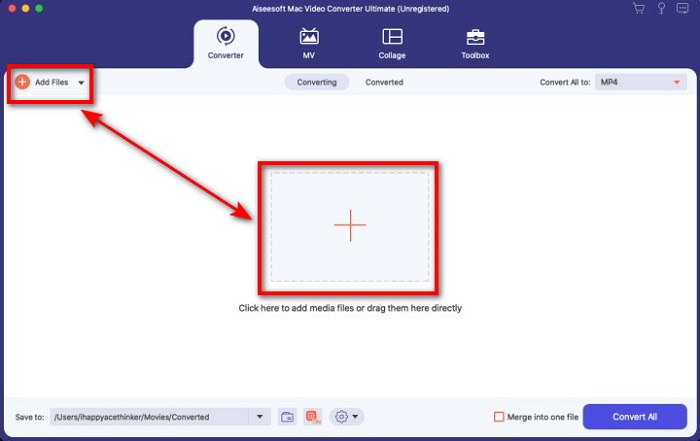
步驟 2. 在介面上按一下 Add Files 或 + 按鈕上傳 M4V 檔案。之後電腦資料夾會在螢幕上開啟,瀏覽並選取 .m4v 檔案,然後按下 Open。
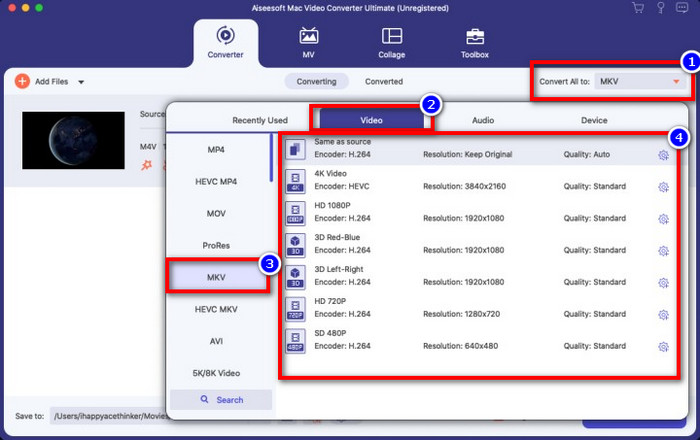
步驟 3. 在 Convert All to 底下選擇 MKV 格式並點擊它。
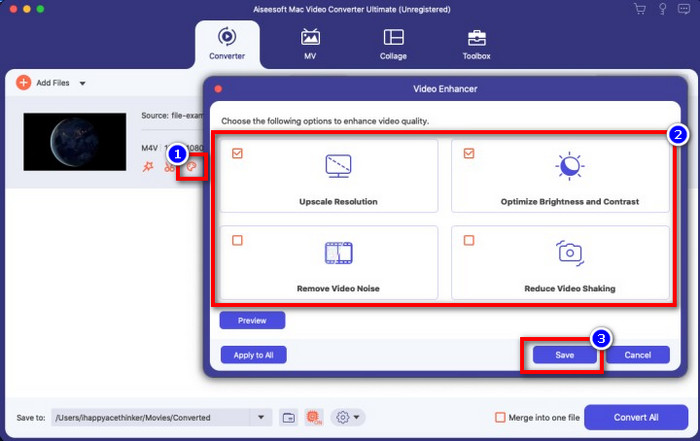
選用功能。 此工具的轉換效果毋庸置疑地相當出色。但你是否知道,它同時也提供影片增強功能?若你點擊 enhance video 選項,會跳出一個對話框;勾選你想在影片中改善的項目,然後點擊 Save 套用。
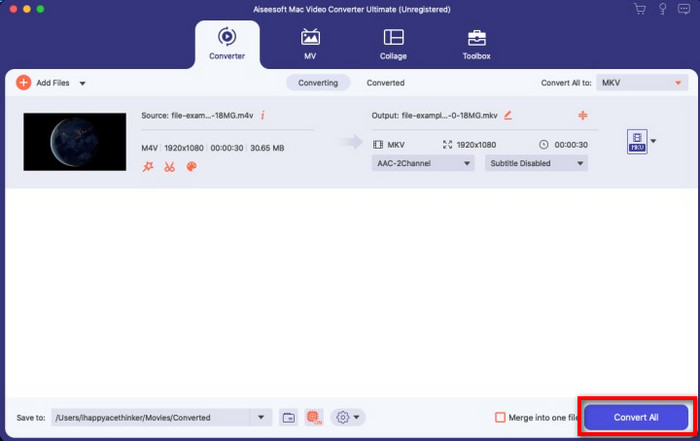
步驟 4. 點擊 Convert All 按鈕後,轉檔會在短時間內開始並完成。完成後,你的影片檔案副檔名就變成 .mkv 了。
第 2 部分。 在線將 M4V 轉換為 MKV
不想付費轉檔 M4V 檔案,而是想要在線上將 M4V 轉成 MKV 嗎?如果是這樣,FVC Free Video Converter Online 是一款線上轉檔器,即便是在網頁上也能確保你的轉檔過程高效。該轉檔器可以在無需購買軟體或下載安裝的情況下完成任務。此外,使用它不會有廣告,也不需要註冊帳號。即使這是一款免費轉檔器,其功能主要專注在轉檔作業上;不像終極工具那樣,能提供大範圍且強大的進階功能。此外,如果你需要在線上轉換 M4V 檔案,就使用這款轉檔器並依照下列步驟操作。
步驟 1. 請點擊此連結開啟 FVC Free Video Converter Online。
步驟 2. 按下 Add Files to Convert 選項,啟動並上傳你需要轉換的 M4V 檔案。
下載桌面版以批次轉換檔案。
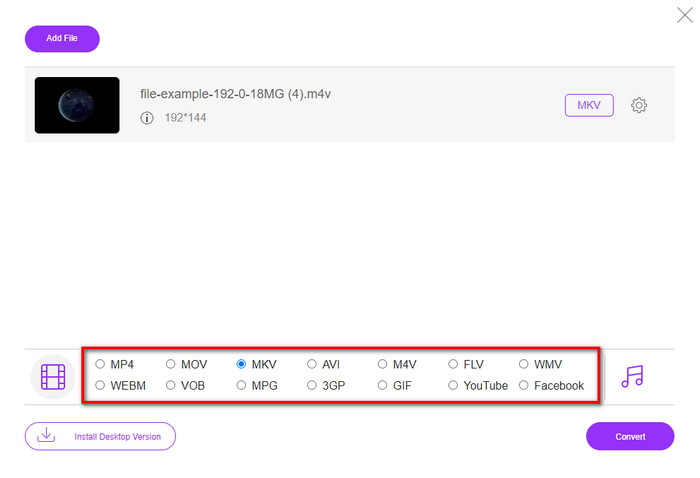
步驟 3. 在下方選取 MKV 格式,或選擇你想輸出的其他格式。
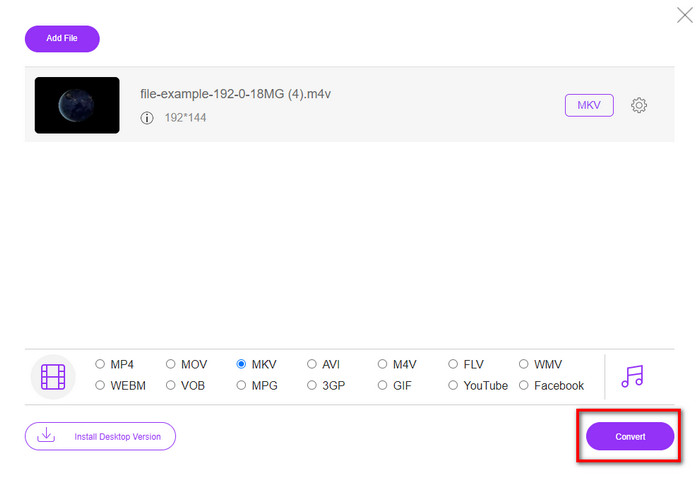
步驟 4. 點擊 Convert 以開始轉檔流程。
第 3 部分。免費將 M4V 轉換為 MKV
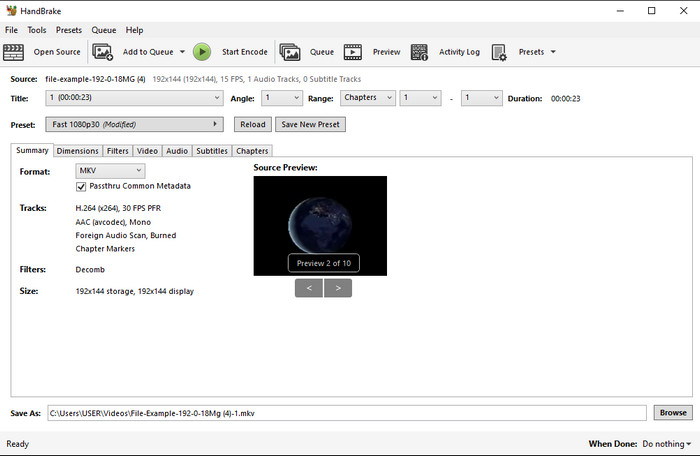
Handbrake 和前文介紹的其他轉檔器一樣,也能提供快速又有效率的轉檔過程。然而,此工具支援的格式有限,代表你在選擇輸出格式時可選擇的空間較小。不過,如果你仍想在 Handbrake 中將 M4V 轉成 MKV,請依照以下步驟操作。
步驟 1. 在桌面下載並安裝 Handbrake。將 .m4v 檔案拖曳到介面中即可上傳。你也可以點擊 File,在電腦資料夾中找到檔案,然後按下 Open。
步驟 2. 點擊 Format,並選擇 MKV。
步驟 3. 點擊 Start Encode 以開始轉檔流程。
第 4 部分。 M4V 和 MKV 之間有什麼異同
在我們比較 M4V 和 MKV 之前,讓我們弄清楚這兩種格式之間的相似之處。 M4V 和 MKV 都是媒體內容和元素的容器。此外,眾所周知,這兩種格式可以存儲最佳視頻質量之一,例如高清視頻或 4k。而且它們對於包含元數據等元素也很大。此外,下面的後續細節是兩種格式之間的區別。
M4V 與 MP4 格式非常相似;但是,這種格式受 DRM 複製保護,這意味著您不能隨意使用它。但並非所有 M4V 文件都有 Apple 保護,因為一些可下載的 M4V 具有未經授權的許可證,因此請確保您在 iTunes 上下載 .m4v 文件以避免感染您系統的惡意病毒。雖然格式有限制,但您仍然可以在多個媒體播放器上使用此格式來觀看您在 iTunes 上下載的視頻。此外,如果您在 Mac 上需要受保護的設計,這種格式是最佳選擇。
相反,MKV 特定於在一個文件中包含多個媒體內容和元素。此功能僅在 MKV 上可用,因為此格式可以免費使用,並且比 M4V 更靈活。此外,在 Mac 或 Windows 上將 M4V 更改為 MKV 的原因有很多,其中之一就是使視頻文件不受限制。
M4V 與 MKV
第 5 部分。關於 M4V 到 MKV 轉換的常見問題解答
哪個更適合編輯,M4V 還是 MOV?
上述這兩種格式都是 Apple 的格式,因此你會發現 M4V 與 MOV 之間並沒有顯著差異。不過,MOV 在剪輯方面表現更佳,因為此格式通常包含一系列的影片播放資料,是專業剪輯的最佳選擇。你也許會想,是否應該將 M4V 轉成 MOV 來做剪輯用途?如果有這個想法,請點擊此連結,以更全面地了解如何將 M4V 轉成 MOV。
M4V 和 MP4 一樣嗎?
M4V 和 MP4 在結構感和視頻質量上非常一致。但由於 Apple Plays 保護,M4V 的支持範圍很小,您不能只播放視頻或在 .m4v 擴展名中進行編輯。
支持 M4V 的媒體播放器有哪些?
由於受到 DRM 保護,並不是很多媒體播放器都支援這種格式。因此,如果你正在尋找支援 MKV 的播放器,可能得花費相當多時間來尋找與測試,十分耗時。但若你閱讀這篇文章,你就可以下載或使用適用於各大平台的 5 大 MKV 媒體播放器。
結論
本文介紹的三款工具,只要依照步驟操作,肯定能提供你理想又高效的轉檔體驗。雖然這些轉檔器之間有許多相似之處,但也各自具備不少差異。如果你仔細閱讀上述說明,就能對這三款工具有相當多的了解。假設你想在一次操作中就完成優質轉檔,並同時兼顧轉檔效率,我們會推薦使用 FVC Video Converter Ultimate。聽起來不可思議?的確如此,不妨下載到桌面親自體驗看看。
-
 M4V到MP3轉換器–從M4V文件提取MP3的4種最佳方法
 如果您想輕鬆地從M4V視頻中提取MP3音頻,則可以了解有關4種最佳M4V到MP3轉換器的更多信息,以從文章中獲取所需的音頻文件。
-
 [指南] 如何在 Windows/Mac 上將 M4V 視頻轉換為動畫 GIF
 如果您想從您最喜歡的 M4V 視頻製作動畫 GIF 文件,您可以了解 2 種簡單有效的方法,通過自定義設置將 M4V 視頻轉換為 GIF。
-
 3 視頻轉換器程序用於在 Mac 上將 iTunes M4V 轉換為 AVI
 不知道如何將 MKV 轉換為 AVI 格式?隨著我們繼續閱讀本文,我們將了解可以幫助您轉換此文件格式的 3 種工具。

