


 視頻轉換大師
 屏幕錄影大師
 影片修復
影片修復使用最佳轉換器將 MPG 轉換為 MKV 的最簡單方法 [免費]
Sadly, MPG files do not contain subtitle tracks; however, you can convert your file to a file format that stores numerous subtitle tracks in different languages. And if you are looking for a way to convert your MPG file to MKV easily, we provide the simple steps to convert MPG to MKV online and offline; read this article until the end.

第 1 部分。 為什麼將 MPG 轉換為 MKV
MPG 文件格式是網絡上最常用的文件格式之一。此文件格式由 MPEG 或運動圖像專家組開發。此外,這種類型的文件可以存儲視頻、音頻和元數據。此外,幾乎所有媒體播放器都廣泛支持這些類型的文件。相比之下,MKV 或 Matroska 文件是一種媒體文件容器,可將視頻、音頻和字幕軌道存儲到一個文件中。這種文件類型也因電影愛好者而聞名,因為它可以處理不同語言的音軌。
第 2 部分。 將 MPG 轉換為 MKV 離線的最快方法
There are a lot of converters in the market that can convert MPG to MKV. However, if you want a converter that can do an ultra-fast conversion, FVC Video Converter Ultimate is the best tool. And if you want to remove watermark from your videos, this converter has the feature to do so. Moreover, it can also do a batch conversion to merge multiple file-formats into one. Want to know the advantages of using this MPG to MKV Converter? Then read the details below.

FVC Video Converter Ultimate
5,689,200+ 次下載- 明確地編輯和增強您的視頻。
- 此轉換器提供超快速轉換過程。
- 它可以將 MPG 文件轉換為 MKV、WMV、AVI、MP4 和其他 1000 多種文件格式。
- 適用於所有操作系統,例如 Windows 和 macOS。
請按照以下步驟將您的 MPG 文件轉換為 MKV。
Step 1. Download FVC Converter Ultimate by clicking the Download button below for Windows or macOS. Then follow the installation process, and run the app.
Step 2. For the next step, click the Add Files or the + sign button to upload your MPG file on the software's main interface.
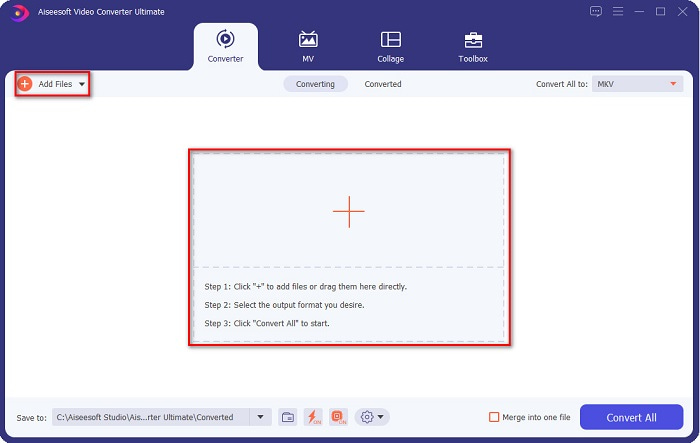
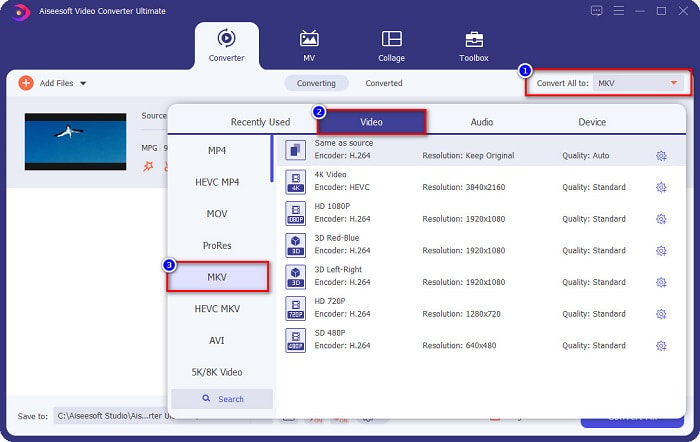
Step 3. After uploading your MPG file, select the output format by clicking the Convert All to button. In your case, choose the MKV file format.
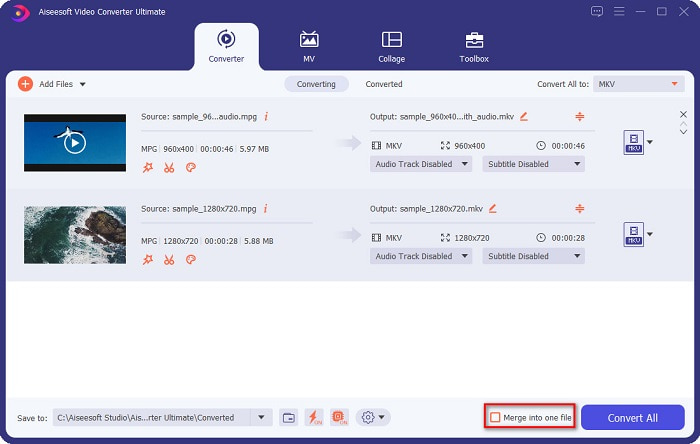
Optional. If you want to convert multiple MPG files into one, tick the Merge into one file box. If not, proceed to the next step.
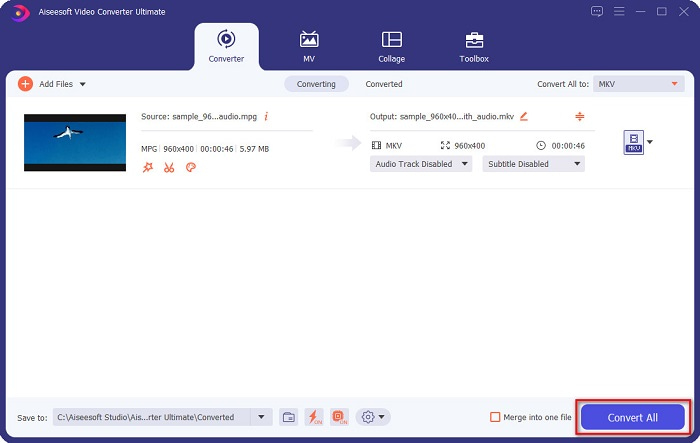
Step 4. To finish, click the Convert All button to convert your MPG file to an MKV file. Wait for a few seconds, and that’s it! As easy as that, you can easily convert MPG to MKV.
第 3 部分。使用免費軟件工具將 MPG 轉換為 MKV
Ever wonder what the best freeware tool to convert MPG to MKV is? We observed that many users use HandBrake as the first line of choice. This freeware can convert MPG to MKV, WebM, and MP4 files. In addition, it has an easy-to-use interface, which is a good thing if you are a beginner. However, it can only convert limited file formats. Nonetheless, it is still an effective tool for converting MPG to MKV.
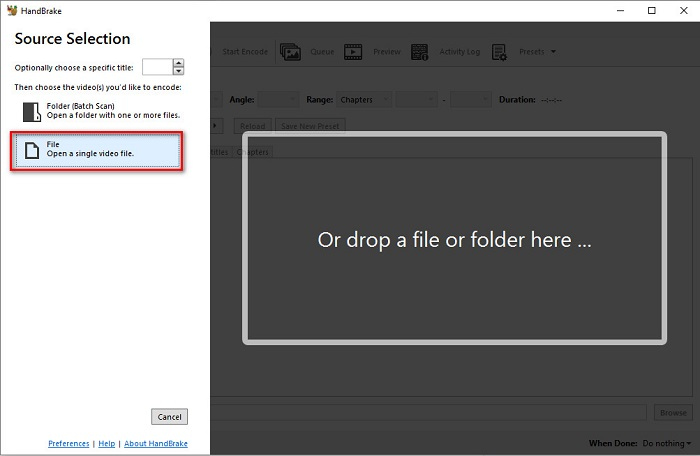
Step 1. Download HandBrake on your device, then run the application. After opening the app, click the File option on the right side of the software’s interface. When your computer files appear, select your MPG file.
Step 2. Then select the output file format that you want on the drop-down button beside Format. And then, by clicking the Browse button, choose where your file destination will be.
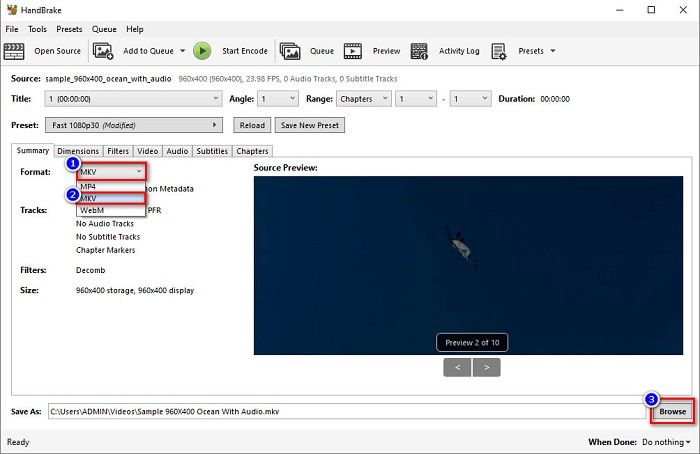
Step 3. Finally, click the Start Encode button to convert your MPG file to MKV file format.
您可以按照上述簡單步驟使用免費軟件轉換器將 MPG 轉換為 MKV。
第 4 部分。2 在線將 MPG 轉換為 MKV 的方法
通過在線轉換器進行轉換可能是最方便的選擇。此外,使用在線轉換器時,您無需下載任何內容。但是,您可以直接在線轉換。但是,您的轉換速度將取決於您的互聯網連接速度。儘管如此,我們在下面列出了將 MPG 文件轉換為 MKV 的兩種最佳方法。
方法 1. 使用 FVC 免費在線視頻轉換器
FVC Free Online Video Converter is a free online converter that conveniently converts various file formats. It supports file formats like MPG to MKV, AVI, MP4, MOV, MP3, and more. It also has a beginner-friendly converter because it has an easy-to-use GUI. Moreover, it has a feature that allows you to change your file's video and audio bitrate. So, if you are interested in this MPG to MKV converter online, follow the steps below.
Step 1. In your browser, search FVC Free Online Video Converter, or go directly to the webpage by clicking this link. And then launch the software application.
Step 2. After launching the app, click the Add Files to Convert button. Your computer files will appear, then select your MPG file.
下載桌面版以批次轉換檔案。
Step 3. And then choose MKV as your output format.
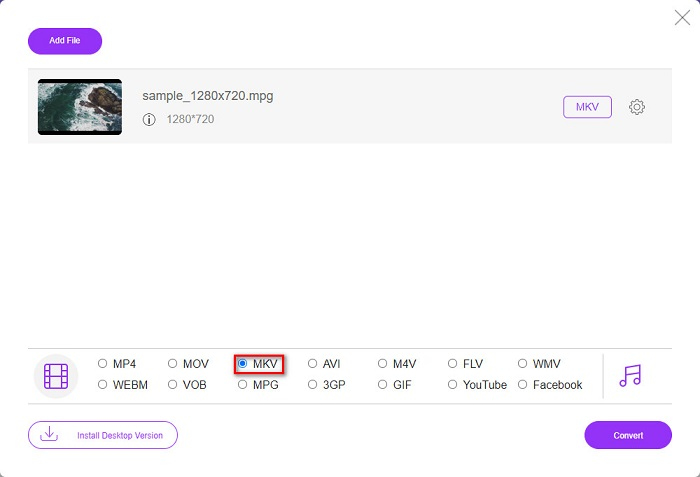
Step 4. For the last step, click the Convert button. Then your MPG to MKV conversion will begin.
方法 2. 使用 CloudConvert
Another online converter that you can use is CloudConvert. This converter is very efficient to use because of its simple interface. Moreover, you can also compress your files when using it. However, it only supports limited file formats. Despite that, many still use this converter for convenience purposes.
Step 1. In your browser, search CloudConvert. When you are already on the webpage, click the Select Files button. Then select your MPG file when your computer files appear.
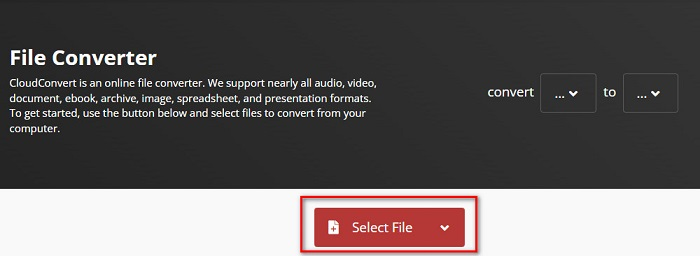
Step 2. Then, choose the MKV file as your output format on the drop-down button.
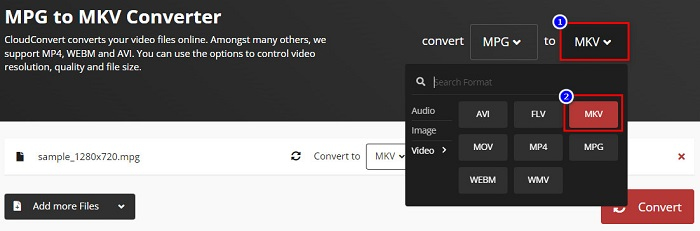
Step 3. Lastly, click the Convert button. Then wait for your file to be converted, and voila! With those three easy steps, you can change MPG to MKV.
MPG 與 MKV
第 5 部分。關於將 MPG 轉換為 MKV 的常見問題解答
將 MPG 轉換為 MKV 會影響文件大小嗎?
是的,雖然將 MPG 轉換為 MKV 文件時影響不大,但文件大小會增加。
哪個文件更大?
與 MPG 文件相比,MKV 文件具有更大的文件大小,因為 MKV 文件在一個文件中包含視頻、音頻和多個字幕軌道。
你能壓縮 MKV 文件嗎?
You can compress MKV files by using a file compressing tool. FVC Video Converter Ultimate has a feature that allows you to compress your large video files.
結論
如果您正在尋找將 MPG 轉換為 MKV 文件的最佳方法,本文將為您提供支持。上面介紹的所有轉換器在轉換文件時都顯示出良好的性能。但是,如果您正在尋找具有許多出色功能的轉換器,您可能想嘗試使用 FVC Video Converter Ultimate 作為您的第一選擇。如果您還不相信,請下載它以嘗試您可以使用的最佳轉換器。
-
 如何在 Mac/Windows/在線上將 MPG 轉換為 MOV 的 3 種簡單方法
 想要轉換您的 MPG 文件,然後在您的 iOS、iPod、iPad 或 Mac 上傳輸它們?本文將幫助弄清楚如何通過步驟將 MPG 轉換為 MOV。
-
 如何在不損失質量的情況下將 MPG 轉換為 FLV [已證明]
 您必須在此媒體播放器上觀看您喜愛的電影,但它不支持 MPG。嘗試使用本文介紹的這些轉換器將 MPG 文件轉換為 FLV。
-
 2 個終極 MPG 轉換器,可免費將 MPG 轉換為 WMV
 您想免費將 MPG 轉換為 WMV 嗎?在這種情況下,您很幸運,因為我們發現您可以使用兩種工具來轉換 MPG 文件。

