免費 MPG 到 WMV 轉換器

快速將您的文件轉換為其他高質量的格式。
添加文件進行轉換

Download Desktop VersionDesktop Version to convert files in batch.

資源資源 > 視頻音頻轉換 > MPG 轉 WMV

了解如何使用 2 個最佳轉換器將 MPG 轉換為 WMV

If we compare MPG files with the other formats, they are outdated. Furthermore, many users ask how to convert MPG to WMV for free without losing the quality of the video. So now, let's not wait anymore longer, and let's discuss the tools you can use to convert your .mpg files and more details about the two formats. Keep the ball rolling and the pace as we proceed to the converters you can use.

MPG 轉 WMV

第 1 部分。免費在線將 MPG 轉換為 WMV

If you wish to convert MPG to WMV online, you must consider boundaries, especially the file size. Since MPG files are big depending on the bitrate, so you will need an online converter that doesn't limit the file size. FVC Free Video Converter Online doesn't limit the size you can upload and the times you convert. Although the tool has no limitations, it still lacks supported formats you can choose from. However, suppose you don't want to spend a penny on your conversion. In that case, you must select this converter because this is the only online converter that provides excellence in your conversion needs. Want to know how to use this online MPG converter? If so, continue reading the succeeding details below and learn how to use this online converter.

Step 1. First, you can click this link, and a new tab will automatically open.

Step 2. Tick the Add Files to Convert button to allow the tool to run into your system. After that, you can choose the .mpg file you want to convert on the computer folder that will pop up on your screen. Once you've already selected the file, click Open to upload it.

添加文件進行轉換

Download the Desktop Version to convert files in batch.

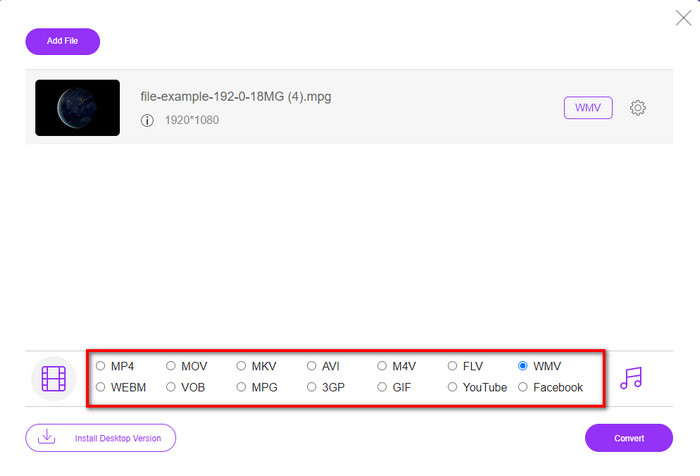
Step 3. Under there is a setlist of the format you can choose on; click MKV to proceed to the last step.

選擇 WMV 格式

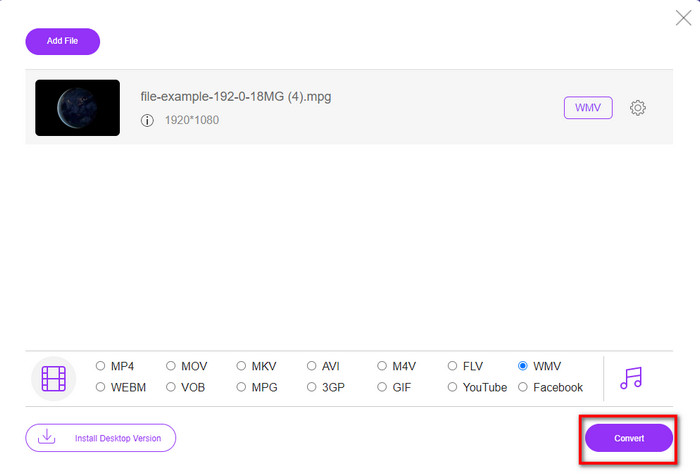
Step 4. Start converting your file by clicking the Convert button below.

開始轉換 MPG

第 2 部分。 在 Windows 11/10 上將 MPG 轉換為 WMV 而不會丟失質量 [推薦]

Still not satisfied with the converter online? What if we tell you that you can use an MPG to WMV converter free download instead of much faster with other functions. FVC Video Converter Ultimate will help you with many problems regarding your videos, especially converting the format. Although the tool can convert, there are many areas we need to explore in this tool. Want to know more about these? Then read the key features available below.

FVC Video Converter Ultimate

FVC Video Converter Ultimate

4,255,366+ 次下載
  • 它支持將您的 MPG、WMV、AVI、MP4、MOV、MKV、FLV、M4V 等轉換為 200 多種格式。
  • 它使用起來並不復雜,而且它具有許多用戶喜歡的非常直觀的界面。
  • 非常適合編輯視頻,例如剪切、合併、裁剪、創建 GIF 等等。
  • 超快速轉換和硬件加速可用於閃電般的轉換過程。
  • 可在 Windows 和 macOS 等所有平台上訪問。
  • 支持批量轉換,一次轉換多個 MPG 或 WMV 文件。

如果你有這個終極工具,你就可以擁有所有這些功能。但在此之前,讓我們閱讀完整的詳細範圍和使用它將 MPG 轉換為 WMV 的步驟。

Step 1. You can click the download button below and select which platform you are using. After downloading, install the converter next, and run the tool.

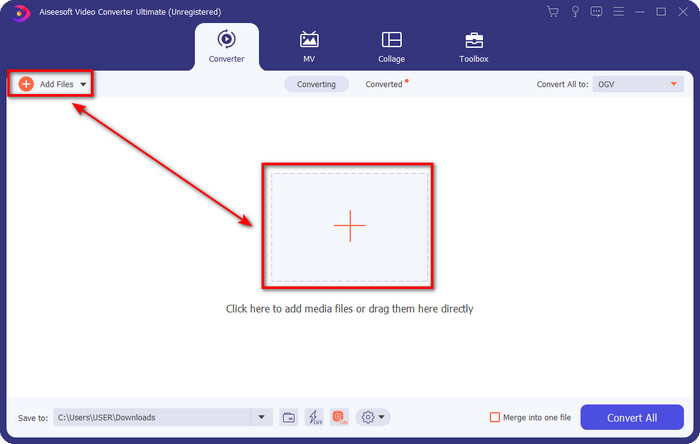
Step 2. To upload the MPG file, you can click the Add Files or the + button in the middle. Instantly a folder will show, select the file, and press Open to proceed.

上傳 MPG 文件

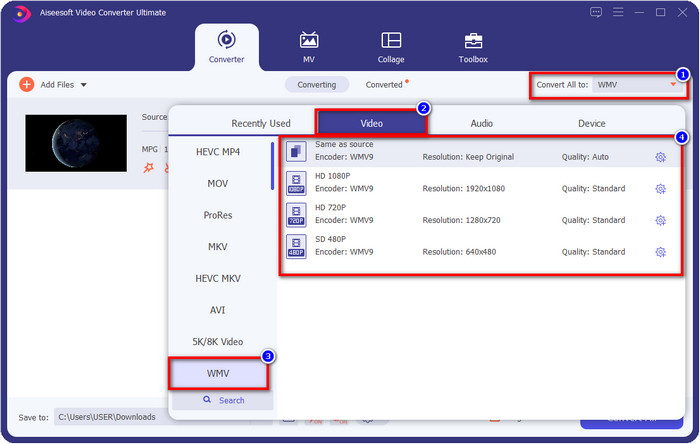
Step 3. Before you convert the file, you will need to select the format in the setlist by clicking the Convert All to button. Select WMV format, then choose the encoder you want to have.

選擇 WMV

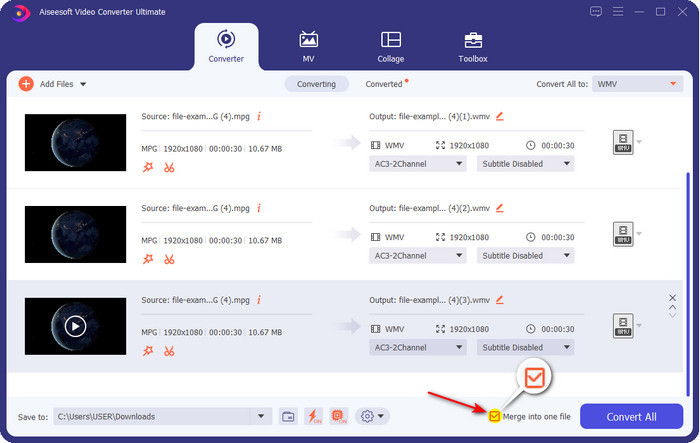
Optional. Need to merge different sets of MPG files? In that case, you can tick the box to join the final output.

合併文件

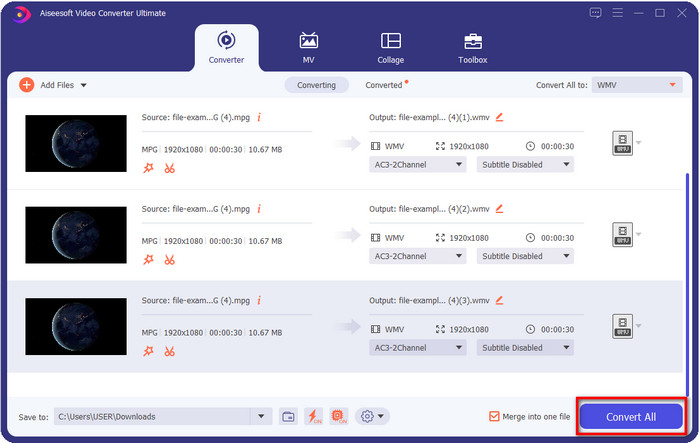
Step 4. Hit Convert All to start the converting process. After converting MPG to WMV, a computer folder will show on your screen.

將 MPG 轉換為 WMV

第 3 部分。 MPG 和 WMV 有什麼區別

MPG and WMV are both media containers for audio and video. Even though these formats mentioned can store still there are many differences between the two formats. Do you want to know more? The following details will discuss the MPG and WMV more and what you need to reconsider before choosing a free online or offline MPG to WMV converter.

MPG is known for being one of the first formats developed in the early years. This format uses two types of encoder that is under MPEG, and that is the MPEG-1 and the MPEG-2. It uses two compressors to suffice the needs that MPEG-1 can't do, which means the MPEG-2 is a backup for the MPG. Furthermore, it is said to be one of the high-quality videos before, but many formats have become better; a great example is the WMV. To play your MPG files, you can read on the best MPG/MPEG players.

WMV 還可以使用兩個 Windows 壓縮器並將多個壓縮器合併到一個文件中。它為所有 Windows 用戶所熟知,因為它是 Windows 上可用的一流格式。儘管它使用了兩個或多個壓縮器,但在使用編解碼器後仍然不會破壞質量。此外,這種格式更兼容所有 Windows 桌面,非常適合視頻流。

MPG 與 WMV

手脈

MPG 由運動圖像專家組 (MPEG) 製作,是一種常見的數字視頻格式,用於存儲視頻、音頻和元數據信息。在創建用於在 Internet 上共享的電影時,它非常有用。 MPG 中的這些文件通常包含 MPEG-1 或 MPEG-2 視頻/音頻壓縮。

WMV 由 Microsoft 製作,是 2000 年代最常見的視頻格式之一。它可以在網絡上看到,並由 Windows 上的各種媒體播放器播放。它也是 Windows Media Player 的默認視頻文件格式。但它最近已被其他格式接管。

第 4 部分。關於 MPG 到 WMV 轉換的常見問題解答

如何使用 Windows Media Player 將 MPG 轉換為 WMV?

First, you can't convert format on Windows Media Player, but you can rip the CD and change the format if you want to save it into your desktop. To begin with, open the Windows Media Player on your PC, click Organize, then Options. Under it, click Rip Music, choose the format by clicking the dropdown button, and press OK. Now you can insert the CD, and it will automatically rip the file from the CD.

我在哪裡可以觀看我的 MPG 視頻文件?

You can use the native media player on Windows to play the .mpg file, which is the Windows Media Player. But if you want a much better option, click and read this article to know more about the possible MPG/MPEG player available on all platforms.

如何在 Windows Movie Maker 中將 MPG 轉換為 WMV?

Although the Windows Movie Maker is for editing, you can change the format here. Still, it is not the typical converting process you will expect like the other converters online and offline. Moreover, this editor is only available on Windows 10 and less, so if you have the latest version of Windows, you can't download this editor. To convert your MPG video to WMV format, follow the succeeding steps. Open the editor and drag the file to the blank interface. Click File, then Save Movie, choose the device settings you want, and wait for the process to end. Thus, all of the files you render will save as .wmv.

結論

All of the tools presented above are assured to help you change MPG to WMV as we try them ourselves to make sure that all of the details in this article will only state facts. Suppose you don't want to download a converter on your device to save some space, then we recommend using the FVC Free Video Converter Online. However, suppose you want to add a professional touch that the online converter can't provide. In that case, FVC Video Converter Ultimate is the perfect tool for the job. Still, were you not convinced with the ultimate tool? In that case, you need to download the software on your desktop to use and have the ultimate experience in converting.

優秀的

Rating: 4.1 / 5 (based on 108 votes)

免費在線視頻轉換

Free Convert MPG to WMV Online!

添加文件進行轉換